Would be nice to get an official Linux package for the Player sometime, anyhow.
I really would want a dark theme. It would have been great. Could you please do it?
Hi @Knapsu,
First of all, thanks a million for creating these AppImages; they are a godsend! I’m running the 2.18 version on Linux Mint 19 and it is almost perfect (at least for me).
And that’s also the reason I’m posting. The energy setting do not seem to detect the Player. I noticed it when watching a video for longer than 5 minutes, after which the screen goes black. This is what is supposed to happen when I am on a battery and 5 minutes of inactivity, but you can imagine that in the ideal situation the Energy settings detect that I’m playing a video, and do not go to a black screen.
Any ideas what is causing this?
I’m experimenting with deploying an older laptop with a fully-updated Ubuntu 18.10 64-bit and your wonderful AppImage of the latest 64-bit Plex Media Player. The laptop is older and has only 4 gigs of RAM. When I double-click the AppImage, nothing happens at all… I see a Plex Media Player icon in my app drawer, but clicking it does nothing.
Any ideas how to get this working, or to see what the issue might be?
did you make the AppImage executable ??
@maartenpelgrim not sure what might be causing this or is it a problem with AppImage or Plex itself.
If you could install Plex Media Player Flatpak package and see if this works for you better than AppImage. I am testing this myself for some time now and find it more stable than AppImage. Worth a try.
Do the following in a terminal or grap .flatpakref file through your web browser.
flatpak install https://knapsu.eu/data/plex/tv.plex.PlexMediaPlayer.flatpakref
@FoUStep when playing video inside Plex Media Player press Ctrl+Shift+D and check what is written under Hardware Decoding.
@DJViking Snaps are only for PMS (server). There are no snaps for PMP (client).
Plex Media Player 2.22.1.917-2a5a2e01 is available for download.
I’ve been having an issue with trying to get the latest stable release and nightly running. Here is the message I’m getting (Also on Ubuntu 18.10)
$ ./Plex_Media_Player_20181106_4839cbf2_x64.AppImage
/tmp/.mount_Plex_MlNG4KX/usr/bin/plexmediaplayer: symbol lookup error: /usr/lib/x86_64-linux-gnu/libGLX_mesa.so.0: undefined symbol: xcb_dri3_get_supported_modifiers
$
@Knapsu Hardware Decoding: No (-)
In the app itself it’s set to Enabled. Can’t see any reason why it is not working. It works in VLC. Do you have any idea?
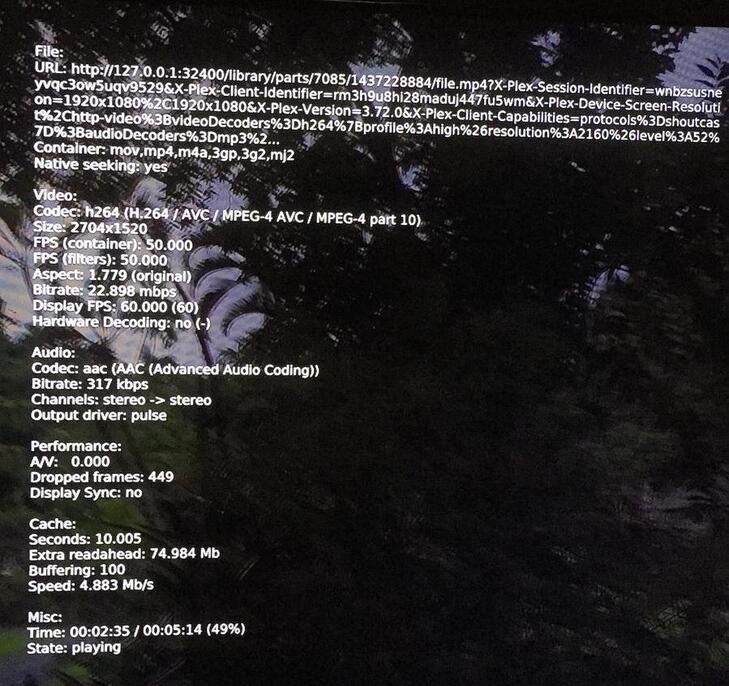
Interesting, with the appimage I only ever get -no. But with the flatpak I get - no (VAAPI). Same result but different.
Everything depends on the video card and video card driver you are using. When reporting hardware acceleration problems please write down the card and driver names.
@LowVibe75 this means the hardware acceleration is there (using VA-API interface), but the coded does not use it with the played content.
@FoUStep Download and run the latest daily build Plex_Media_Player_20181116_4839cbf2_x64.AppImage. I’ve enabled old VDPAU hardware acceleration interface to also be used if detected.
Using a NUC with on board Intel GPU (HD5000). Standard Intel drivers via kernel (i915).
Yes, the AppImage is executable.
Both the latest daily build and 2.22 do not give me HW acceleration.
Starting the app:
NUC7CJYH:~/Downloads$ ./Plex_Media_Player_20181116_4839cbf2_x64.AppImage
libva info: VA-API version 0.39.0
libva info: va_getDriverName() returns 0
libva info: Trying to open /usr/lib/x86_64-linux-gnu/dri/i965_drv_video.so
libva error: /usr/lib/x86_64-linux-gnu/dri/i965_drv_video.so has no function __vaDriverInit_0_32
libva info: va_openDriver() returns -1
vainfo:
NUC7CJYH:~/Downloads$ vainfo
libva info: VA-API version 1.1.0
libva info: va_getDriverName() returns 0
libva info: Trying to open /usr/lib/x86_64-linux-gnu/dri/i965_drv_video.so
libva info: Found init function __vaDriverInit_1_1
libva info: va_openDriver() returns 0
vainfo: VA-API version: 1.1 (libva 2.1.0)
vainfo: Driver version: Intel i965 driver for Intel(R) Gemini Lake - 2.1.0
vainfo: Supported profile and entrypoints
VAProfileMPEG2Simple : VAEntrypointVLD
VAProfileMPEG2Main : VAEntrypointVLD
VAProfileH264ConstrainedBaseline: VAEntrypointVLD
VAProfileH264ConstrainedBaseline: VAEntrypointEncSlice
VAProfileH264ConstrainedBaseline: VAEntrypointEncSliceLP
VAProfileH264Main : VAEntrypointVLD
VAProfileH264Main : VAEntrypointEncSlice
VAProfileH264Main : VAEntrypointEncSliceLP
VAProfileH264High : VAEntrypointVLD
VAProfileH264High : VAEntrypointEncSlice
VAProfileH264High : VAEntrypointEncSliceLP
VAProfileH264MultiviewHigh : VAEntrypointVLD
VAProfileH264MultiviewHigh : VAEntrypointEncSlice
VAProfileH264StereoHigh : VAEntrypointVLD
VAProfileH264StereoHigh : VAEntrypointEncSlice
VAProfileVC1Simple : VAEntrypointVLD
VAProfileVC1Main : VAEntrypointVLD
VAProfileVC1Advanced : VAEntrypointVLD
VAProfileNone : VAEntrypointVideoProc
VAProfileJPEGBaseline : VAEntrypointVLD
VAProfileJPEGBaseline : VAEntrypointEncPicture
VAProfileVP8Version0_3 : VAEntrypointVLD
VAProfileVP8Version0_3 : VAEntrypointEncSlice
VAProfileHEVCMain : VAEntrypointVLD
VAProfileHEVCMain : VAEntrypointEncSlice
VAProfileHEVCMain10 : VAEntrypointVLD
VAProfileHEVCMain10 : VAEntrypointEncSlice
VAProfileVP9Profile0 : VAEntrypointVLD
VAProfileVP9Profile0 : VAEntrypointEncSlice
VAProfileVP9Profile2 : VAEntrypointVLD
Itś a NUC7JCYH with a Intel® UHD Graphics 600 (Geminilake 2x6). The firmware looks correctly installed (hence the VLC running well).
Looking at VAAPI, PMP uses 0.39 which does not work. However 1.1 works with vainfo. Any further ideas? Kinda looking for PMP to use VAAPI 11. instead of 0.39?
I’m having the same issue. I tried the stable as well as the latest daily builds and am having the same graphical issues. I haven’t even tried to play a movie yet because the interface is almost unusable. I don’t mean that disparagingly of the dev either. The app looks like just PMP on other platforms. The menus and everything function as intended. It’s just the lack of usability for me because of said graphical bug. I’m running Mint 19 on a UHD TV. through a GTX960 via HDMI.
new plex user here, and this works like a charm on my gentoo linux.
I get this on my shell when I launch it:
./Plex_Media_Player_2.22.1.917-2a5a2e01_x64.AppImage
zenity, kdialog, Xdialog missing. Skipping /tmp/.mount_Plex_MXP9SHD/usr/bin//plexmediaplayer.wrapper.
Logging to /home/krog/.local/share/plexmediaplayer/logs/plexmediaplayer.log
Logging to /home/krog/.local/share/plexmediaplayer/logs/pmphelper.log
Fontconfig error: Cannot scan config file "infinality/conf.d"
kde-open5: /tmp/.mount_Plex_MXP9SHD/usr/lib/libQt5Core.so.5: version `Qt_5.11' not found (required by kde-open5)
kde-open5: /tmp/.mount_Plex_MXP9SHD/usr/lib/libQt5Core.so.5: version `Qt_5.11' not found (required by /usr/lib64/
libQt5Svg.so.5)
kde-open5: /tmp/.mount_Plex_MXP9SHD/usr/lib/libQt5Core.so.5: version `Qt_5.11' not found (required by kde-open5)
kde-open5: /tmp/.mount_Plex_MXP9SHD/usr/lib/libQt5Core.so.5: version `Qt_5.11' not found (required by /usr/lib64/
libQt5Svg.so.5)
kde-open5: /tmp/.mount_Plex_MXP9SHD/usr/lib/libQt5Core.so.5: version `Qt_5.11' not found (required by kde-open5)
kde-open5: /tmp/.mount_Plex_MXP9SHD/usr/lib/libQt5Core.so.5: version `Qt_5.11' not found (required by /usr/lib64/
libQt5Svg.so.5)
but then… everything fine!
@LowVibe75 @FoUStep @Borg-101
Please give Flatpak a try and tell me if it works better. AppImage is very fragile with library versions…
flatpak install https://knapsu.eu/data/plex/tv.plex.PlexMediaPlayer.flatpakref
Unfortunately, I tried the Flatpak version and on my new Mint installation, it fails with
xxx systemd[1255]: flatpak-tv.plex.PlexMediaPlayer-32417.scope: Failed to add PIDs to scope’s control group: Permission denied
xxx systemd[1255]: flatpak-tv.plex.PlexMediaPlayer-32417.scope: Failed with result ‘resources’.
xxx systemd[1255]: Failed to start flatpak-tv.plex.PlexMediaPlayer-32417.scope.
I don’t know if it’s a truly a permission issue or not.
It’s caused by a systemd issue, systemd/systemd#3388, which has already been fixed by systemd/systemd#8125, which is in release v238.
Flatpak package should still be able to run. Are there any messages in terminal output?
Update your system and see if that solves it.
Flatpak seems to load fine for me, but crashes to desktop when I try and play anything.
