Server Version#: 4.125.1
Plex Media Server does not respect ManualPortMappingMode and ManualPortMappingPort when set as environment variables as described in https://support.plex.tv/articles/201105343-advanced-hidden-server-settings/
My Plex server is accessible over the internet on the port set in ManualPortMappingPort but the admin interface claims it is not. This is despite that I am accessing the admin interface over the ip:port it claims is not accessible. Plex native clients cannot access it over the internet as, I assume, Plex does not pass the ip:port to them.
If ManualPortMappingMode and ManualPortMappingPort are set to the same settings in Preferences.xml everything works as expected.
fyi - I modified the startup script to dump the env with “printenv” immediately before startup so I am 100% sure they are set correctly.
This is clearly a Plex bug. Please fix.
They are not environment variables.
They are entries in Preferences.xml.
Ex: ManualPortMappingMode="1" ManualPortMappingPort="42450"
If I stop PMS, edit Preferences.xml and change the port number, then start PMS, the new port number is displayed in Settings → Remote Access.
If I change the port number in Settings → Remote Access, it is updated in Preferences.xml.
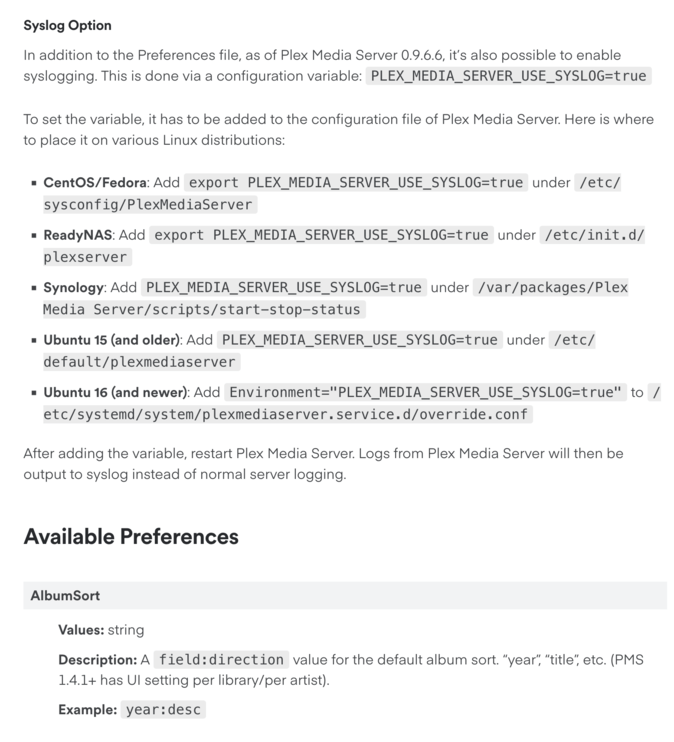
If that’s true that means the page I referenced is just randomly switching back and forth talking about Preferences.xml and env variables(see pic).
Having to write some xml(yuck) python code or an ugly sed to edit a file for something as basic as a TCP port is horrible.
The only environmental variable mentioned is for syslogging.
The document states to use Preferences.xml for the other options.
On Linux, the options are available in a XML file called Preferences.xml, which is located in your Plex Media Server data directory.
Not sure why you think python or sed is needed.
Specific to remote access, you can configure the port in Settings → Remote Access.
For the other settings, you can use a text editor.
@plexhex07
To add to FordGuy,
If you are using a machine with systemd (cat /proc/1/comm returns systemd) you’ll need to put the Environment variables in an override.conf file.
See here:
Customizing your Plex configuration on systemd based systems
This information is intended for those systems where cat /proc/1/comm returns systemd.
On systems which use Systemd (Ubuntu 16+, Fedora, Centos 7, Debian 8,) you create this customization file which SystemD reads prior to launching PMS. This file is independent of the default configuration and service control mechanisms in /lib/systemd/system/plexmediaserver.service. Your customization override is preserved across updates, uninstal…
Additionally, Manually mapped port is stored in the Preferences.xml file after successful connect.
So the two points here seem to be
1/ I don’t know why you would need a programing language when you can just do things manually.
2/ The linux environment only works from our magic override.conf file.
The Linux environment changed 7 years ago from ‘init’ to ‘systemd’.
Init uses bash (a command interpreter with its own programming language).
Systemd uses a simple declarative syntax Environment="Variable=Value"