Yes, we have that one. I’m putting final on that plus a couple more now.
This change was already staged but didn’t make the cutoff to be included.
I ask you to confirm if this will work for you,
  # Independently,  evaluate if in a LXC.  This is used later in installation to avoid UDEV trigger bug
  if [ "$(grep -i 'container=lxc' /proc/1/environ )" != "" ]; then
    LinuxContainer=1
  fi
That’s what’s already in the preinst file on my system. But /proc/1/environ contains container=systemd-nspawn, not lxc, so that doesn’t set LinuxContainer.
That sort of depends on what LinuxContainer is for. If it should match any container, I would presume that grep -zi "^container=" /proc/1/environ would be sufficient for any case. If instead this is a workaround for specific container types, then an else if [ "$(grep -i 'container=systemd-nspawn' /proc/1/environ )"... would solve the nspawn issue without impacting other runtimes.
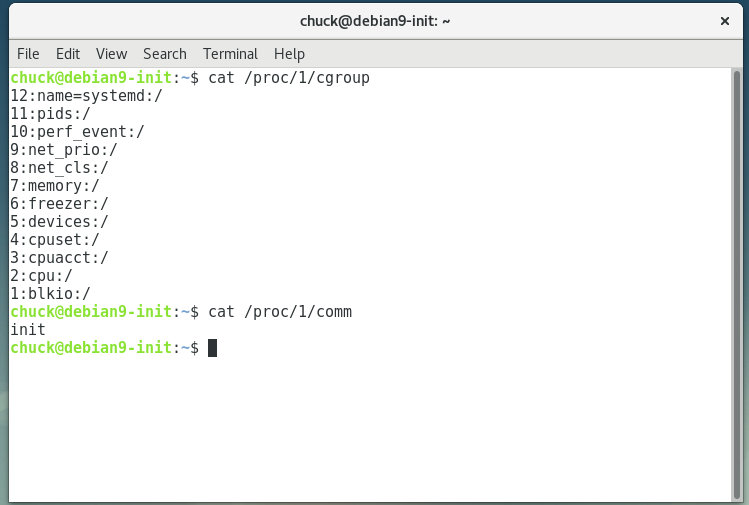
I migrated to using /proc/1/cgroup so I don’t have to name-chase everyone’s docker executive.
It’s equally impossible to name-chase everyone’s LXC executive.
To your question about what LinuxContainer is for; The sole purpose of the variable is to detect and avoid getting failures from the udevadm bug. I was trying to be nice there. If grepping for container in environ is sufficiently guaranteed to identify a LXC, I’ll take it. If it’s not going to work as intended, I’ll suppress the error from trickling back up into the installation and causing issues.
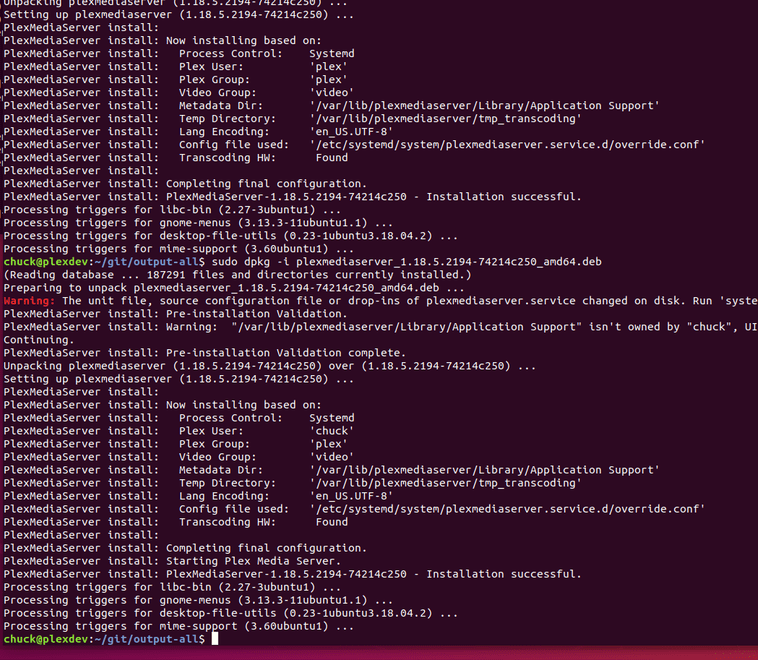
I’m trying to install 1.18.5.2309 and getting the following errors.
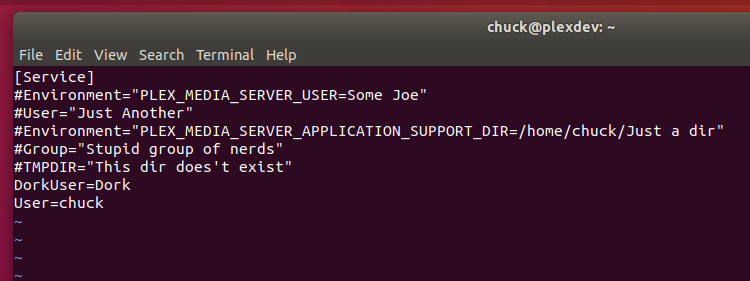
I have a systemd override conf file where I set a bunch of custom settings, and the preinst script seems to be getting confused by some of them. Here’s my override file in its entirety:
When the preinst script is looking for User, it’s getting matched with PrivateUsers, gets the value of true, sees that there’s no such user, and complains.
When the preinst script is looking for Group, it’s getting matched with PrivateControlGroups, gets the value of true, sees that there’s no such group, and complains.
The preinst script sees that I have a LD_LIBRARY_PATH setting there, but that’s because I like to keep the ExecStart field clean, and have environment variable settings go as separate entries in their own fields. I get the reasoning for the error, but any chance there can be an override setting to say “Don’t check my settings, I know what I’m doing”?
Also, systemd shouldn’t have the “d” at the end capitalized. See this page.
Also, rather than manually parsing these files, I think systemctl can be used to get the values (presumably, if .service files are being installed, systemctl will exist). Something like systemctl show -p User plexmediaserver should work (hopefully in containers as well).
Which environment is this being used on ? (I see the ubuntu)
As for the SystemD , thanks for catching those typos. (there were 2)
I’m doing a lot of bullet-proofing now.
I think I see where the grep can be tightened as part of the regex to improve.
As FYI, hard setting the variable PMS picks up dynamically is against their purpose.
You also have LD_LIBRARY_PATH – It’s now illegal given RPATH is defined.
Is it init or is it upstart or was the system upgraded from Ubuntu 15 ?
Please go look at where pid 1’s executable is pointing. and what it’s value is.
I don’t support upstart anymore because Ubuntu dropped it in 2016.
it was a “one release wonder”
Here is the actual code to the test I perform:
  # If this looks like init,  be careful of redirectioon
  elif [ "$(cat /proc/1/comm)" = "init" ]; then

    # Verify not a redirected init -> systemd
    if [ "$(readlink /sbin/init)" = "" ]; then
      Init=1
    elif [ $(readlink /sbin/init | grep systemd | wc -l) -gt 0 ]; then
      Systemd=1
    else
      Output both "Unsupported init/systemd hybrid control configuration."
      exit 1
    fi
Interesting; the .service file at /usr/lib/plexmediaserver/lib/plexmediaserver.service (I’m guessing this is the one that would get installed in a normal systemd installation case?) still has LD_LIBRARY_PATH being set. I did verify, though, that the binary itself has RPATH set, and so can start without that.
Upgraded to latest PMS version and not able to remotely access the server.
Server is hosted in a VPS.
Running Native package
Upgrade installation worked but cannot find my server on Plex web.
Attempted to stop/start service & rebooted server several times but still nothing.
I actually have a standalone Microserver set up with just OMV and the OS coders of the software have a Plex Media server built into the software. You just have to enable it. but before you do that i suggest that you first install all off the needed file system plug-ins as well as set up your server certificates for the server. OMV is a very powerful OS and it is actually my first introduction into using and learning Linux. I have my server set up as a network file server for my entire home network and I was using another Media server software that I ended up hating and when i found OMV and saw that Plex was built into it I tried it and now 3 years later that server is still going strong and works well with the Plex Pass as well as Tidal on all of my streaming devices in the home as well as outside of my home network I am still able to access my media files for viewing. and way the OMV forum suggests that you don’t try to install updates that have not been released by the OMV team as the Plex software coding even though OMV is based on Debian the coding is different and you run the chance of crashing your system. OMV so far have been pretty good about keeping Plex current and up-to-date. Hope this info helped a little.
sudo dpkg -i plex_.deb
(Reading database ... 437561 files and directories currently installed.)
Preparing to unpack plex_.deb ...
Removed /etc/systemd/system/multi-user.target.wants/plexmediaserver.service.
PlexMediaServer install: Pre-installation Validation.
dpkg: error processing archive plex_.deb (--install):
 new plexmediaserver:i386 package pre-installation script subprocess returned error exit status 2
Created symlink /etc/systemd/system/multi-user.target.wants/plexmediaserver.service → /lib/systemd/system/plexmediaserver.service.
Errors were encountered while processing:
 plex_.deb
No /tmp/plexmediaserver.log is created, only an empty folder named pms-0c1093b3-d36a-473a-b667-7190a202c704, with the UID on the end there changing on each installation.