@wgstarks – refreshing again probably won’t do anything unless something went wrong with the first attempt. If the new files are in the same library as the old files, the upgrade should be exactly that, an upgrade, and not considered a new addition.
Does the automation for Radarr delete the original file first, initiate a scan of some sort, and empty trash, and then after that, the new file is added?. If the file has been removed, and trash emptied, adding an upgraded file will be considered as “Recently Added”
Radarr just notifies Plex when a new movie is added (not on upgrades) through the API. This will only happen with new movies though. I have disabled the notifications for upgrades, file deletions, etc. I even removed the Plex integration in Radarr but that didn’t help. I was hoping the logs would show something.
I notice that “Local Media Assets” was enabled for my scanner. I’m a little vague on exactly what that is but google shows that it loads embedded metadata from the video files. I would assume that a 2160p video would have different metadata from a 1080p video right? Would this cause Plex to add it as a new movie?
If your library is configured to use the legacy scanner, then I’m pretty sure Plex should simply add the upgraded version and not consider it as a new addition. That’s been my experience, Plex continues to use the agent originally used in this case.
If the library has been “Upgraded” to use the new agent, and then “refreshed” to complete the conversion, all of the existing items in the library will use the newer agent. They won’t be considered as new additions in this case. It’s the only time that Plex actually changes the guid of the item, as far as I know.
If you are using the legacy agent for the library, and have manually matched it (we had several ways of matching with the old agent - the moviedb, plex legacy, etc) an upgraded file would match to the “default” agent configured in the “Agents” settings. This could result in an upgraded version showing as recently added, because it will be tied to a different agent than the original file.
A 2160p and 1080p video should match and merge automatically as one item with multiple versions. I have versions in different resolutions with different audio and video formats, but they are still considered as one item. Adding or replacing a version does not place it into the “Recently Added” list, no matter how long ago the original version was added.
Plex only reads embedded metadata from MP4’s.(I don’t have many, and have only audio language set in the file) I have my libraries configured to use local assets, so they can use local items like posters, trailers, etc. That was with the old agents and with the new agent.
I suppose if your old MP4’s had a lot of embedded metadata, it could affect the guid’s Plex is using. Someone with more knowledge than me would have to answer that.
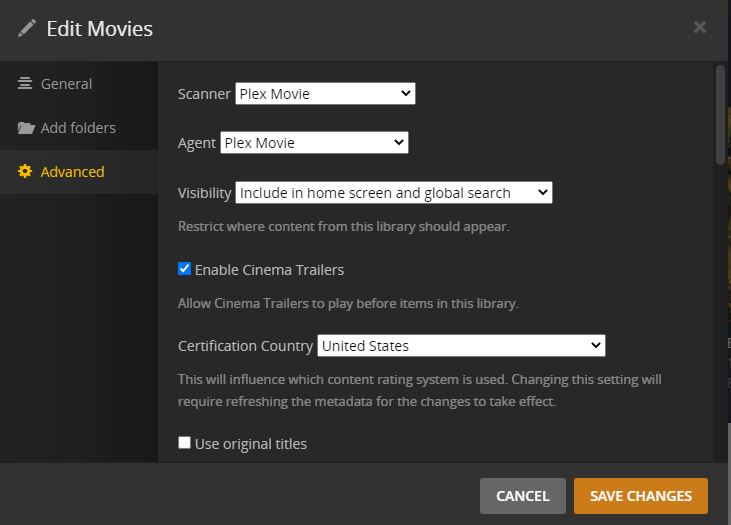
The agents configuration you showed in your image is not used by the new agent. To configure your library to use the new agent, if you want to (and I haven’t found a reason not to) you need to use the “...” and edit the Library. So Manage → Edit -->Advanced. Change the agent and scanner to “Plex Movie” Save changes, and then refresh the metadata so all of the items use the new agent.
Not sure how to do that? The “before” movie gets replaced by the “after” and not all of the movies that get upgraded show up in Recently Added. In fact it’s way less than half I think.
I get a notification when the download starts for the upgrades. I’ll try and grab an xml for the movies before the upgrade just in case this happens. Worth a shot anyway.
I may have found the problem but not sure how to fix it. My Radarr db has about 300 more movies than Plex does. When I sort for unmatched movies in Plex the list is empty though. How do I Get Plex to add the missing movies?
I would filter for “Duplicates.” Movies that have been mismatched may show up there. You can use “Get info” to find which files have been mismatched if that’s the case.
300 movies is a lot of mis-matches, in any event. Maybe your file names are not quite up to Plex standards. Not sure that would cause the movies to show up as recently added, though.
Actually it looks like I owe everyone an apology. There are about 350 movies missing from Radarr (not sure how this happened). The upgrades that I thought were occurring were actually replacements for missing movies. Plex was correctly adding the to Recently Added because they didn’t exist at the time they were added. Again, I’m sorry I wasted everyone’s time on a non-issue. Thank you all for your help.