Server Version 1.18.5.2309:
Player Version 1.18.5.2309:
My setup:
Server running on Rpi4, 4GB RAM
Storage NAS
Clients: Web, Android, Chromecast, Windows
The issue appears to be that when I try to play a specific video file from the browser (Chrome) if spins for over like 20secs for a while and start buffering like 25% and the video doesnt start.
If I do the same thing from the windows applications, this doesn’t happen, the video will load in seconds.
I have notice that the issue might be with the quality…
Plex web is setup:
Video quality (2Mbps, 720p)
[Ticked] Play smaller videos at original quality
[Ticked] Use recommended settings
The XML data of the video file in question 11055.txt (11.1 KB)
The video tries to play in:
1.4Mbps, 688p, HD
Is there any more information that could help? I dont understand why this is happening… Ive tried readding the file a few times
Sounds like the video is being transcoded to play in the given quality.
“Downscaling” a video to the given 2 Mbps @ 720p happens on your server. Depending on your server’s capabilities it’ll use the RPi CPU or graphics chip (with HW accelerated streaming enabled and supported). If the RPi’s chips don’t support HW transcoding, the CPU might be too weak to do the transcoding (causing at least the delayed start-up).
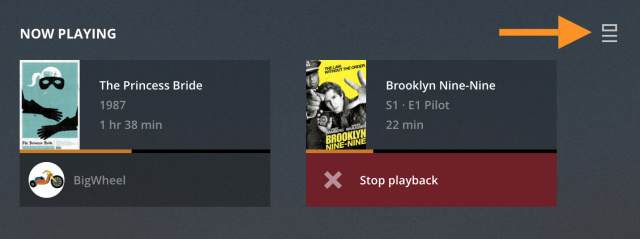
You can check this out by opening a separate Plex Web session in a different browser window and navigate to the Now Playing section of the dashboard.
If the video is being transcoded, this will be displayed next to the detailed streaming information (where the screenshots below show “Direct Play”):
That being said… the given video on its own should play ok without transcoding as h264 video and AAC audio are supported by most browsers. The troublemaker could be the subtitles – did you enable those when playing the video in your browser?
Just a check…
Will that happen as well if you start a video while the RPi is up/awake/running and the NAS disks are already spinning? (e.g. if you start playback of that video, stop it and start playback of a similar video right away)
I know this can occasionally take a moment – I even experienced this causing an infrequent timeout
That’s your main issue. ^^^
Use adequate hardware. Plex is made to automatically convert media formats to the requirements of the clients, so you don’t need to care about that.
If you are crippling Plex server by running it on an entry-class phone CPU, it cannot do that anymore.
Not at all. The web app is running in a web browser.
A web browser is one of the least capable media players at all.
Which means that it will much more likely require your server to transcode the video, if it isn’t 100% compatible.
Fair point on the Rpi4. That would be one of my first suspicions. I am starting with a Rpi4 because I wanted to setup everything, start enjoying my movies and TV and organizing my library before I could invest the around $1000 I have to invest to get the NAS where everything can run.
But the fact is, it has been running from the Rpi4 successfully since I started on it about a couple of months now.
CPU usage is barely high, except when as you said it needs to transcode, but it barely does.
I don’t think this was the issue here as it wasnt transcoding and the CPU usage was low (10%).
I think I know what the issue is, don’t exactly know why.
So basically I got friend accessing the media from Spain, they have reported it works fine.
This issue occurred when my Dad tried to access the server from Vietnam, Internet speed look appropriate 40/40 Mbps low ping/latency.
I tried installing the plex media client over there and still would get that issue of the video taking over 1 minute to load.
I am now thinking it might be that they ISP over there is capping the network.
I don’t know I have given up.
Regarding the XML of the media I have attached it on my first message.
Was one of the subtitles activated?
Because otherwise the file could have been played unchanged. Which means for a long-distance connection, the packet roundtrip time isn’t that important because the file is transferred in one piece (‘Direct Play’).
However, if an (external) subtitle is activated, the file is chopped up into small chunks. (‘Direct Stream’ + ‘Transcoding’)
Now the packet roundtrip delay applies to each of these chunks individually. Which can cause the bandwidth to drop rapidly.
There is a reason why video streaming services always set up mirror servers geographically close to their customers.