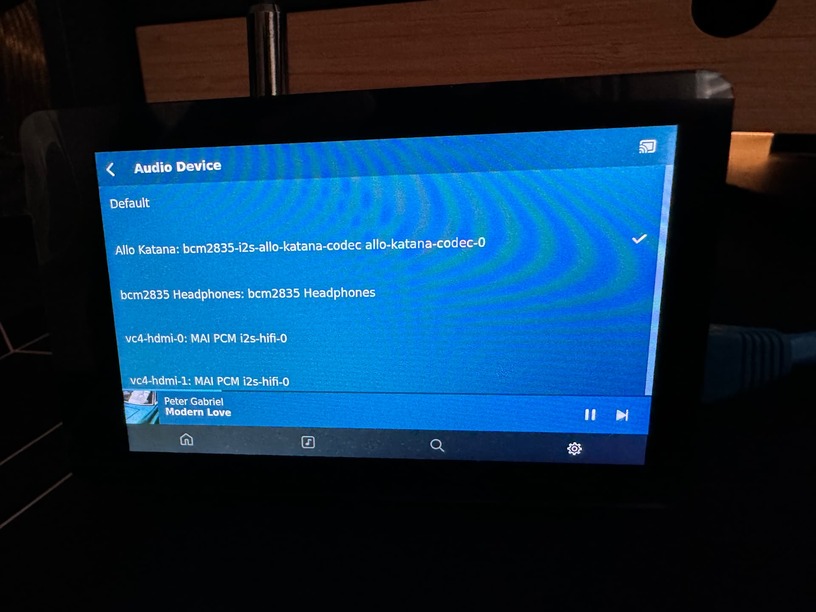
I’ve noticed that when I reboot or shutdown/start the Pi the audio out reverts to another output instead of my DAC HAT.
Here is what I have it normally set to:
Did you add the DAC HAT config to “/boot/config.txt”? If not, that is most likely your issue.
If you perform a clean install, you can use the script to set it, and then also upgrade with it.
Heh. I’m the one that opened #24 on your repo. Yes, the correct dtoverlay is set. I realized this happens on after shutdown and not reboot. After a shutdown for some reason it falls back to HDMI 2… not even HDMI 1. Also I noticed when using aplay -l the card order is sometimes different.
The audio devices change after shutdown. Before shutdown card 1 was the DAC HAT, now it’s HDMI.
card 1: vc4hdmi0 [vc4-hdmi-0], device 0: MAI PCM i2s-hifi-0 [MAI PCM i2s-hifi-0]
  Subdevices: 1/1
  Subdevice #0: subdevice #0
card 2: Katana [Allo Katana], device 0: bcm2835-i2s-allo-katana-codec allo-katana-codec-0 [bcm2835-i2s-allo-katana-codec allo-katana-codec-0]
You are running the 64 bit lite version of the OS? Did you use the script only, or did you manually manipulate “/boot/config.txt”? HDMI should not be enabled unless you choose it in the script, or add it yourself.
Have this running on 3 RPi 4B, and I can remove power without loosing the HAT settings. Try installing from scratch, and only use script to set HAT?
See also: Q: What is the right way to configure audio interface on a PlexAmp headless RPi? - #5 by pjv
…which you would have to modify for your HAT instead of the USB DAC that answer was addressing. I think the same approach might also work with a HAT with whatever are the appropriate modifications.
I just installed a Waveshare 4in screen and it looks like the software may have tried to re-enable some things. I had to disable the headphone and hdmi audio. Now it seems to keep the chosen device.
I actually just did that after noticing changes the Waveshare software had made in the config.txt file. Seems to be working ok so far. Going to shut it down a couple times today to see. Thanks
Thanks for reaching out with help.
Sure, NP! My feeling about “/boot/config.txt” being the issue seems to have been correct! You manipulated it via the waveshare app install!
Good thing it is fixed now!