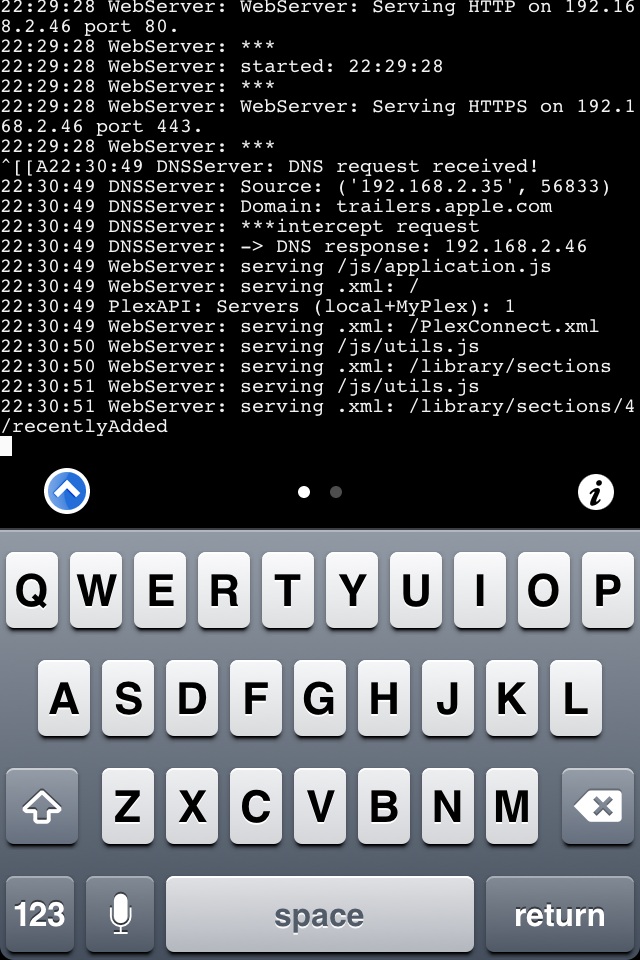
I have my jailbroken iphone 4s on iOS 8.3 running plexconnect! (Also a mini2 on 8.3, ipad 3 on 8.3.)
Updated instructions for iOS devices here (tested on iPhone 4S iOS 8.3):
SSH into your JB iOS device (install OpenSSH from the BB repo if needed) then paste this easy one liner or fire up mobile terminal on your iOS device and paste it using that instead. “APT 0.7 Strict” or higher required (a simple search in cydia will allow you to install it, required for apt-get function). INSTALL “APT 0.7 strict” PRIOR TO RUNNING THIS COMMAND BELOW!
iBaa or Wahlman.j with prompts for desired theme & optional autoupdating plist:
Please note PIL (Fanart) does not work using this method…yet (not sure if it ever will).
This method is best suited for traveling, you can connect multiple devices to one jailbroken PlexConnect host or repurposing an old or new iOS device to be a PlexConnect host. Not everyone brings a laptop when traveling or uses airplay from the Plex for iOS app or other airplay enabled devices. Personally I prefer a remote to control my aTV and find airplaying to cause an immense amount of congestion on any network that I have ever used. If you do use this method I suggest to turn on airplay mode then turn your wifi back on to keep your network connection on your iOS device alive even if your iOS device has its screen locked.
The launchctl error was because of a ios 5.0.1 error, OF COURSE the ios which was running. Simply installing corona from cydia fixed the issue. I dont always install plexconnect on ios 5.0.1 but when I do I must run corona prior to the installation
Well, if there's anyone in the world that's have ATV and want to use PlexConnect and have no computer at all but have a jailbroken iphone, this is nice :)
Well, if there's anyone in the world that's have ATV and want to use PlexConnect and have no computer at all but have a jailbroken iphone, this is nice :)
LOL :)
Again it's for "on the go" purposes pretty sure i'm not going to bring my desktop to a hotel just to host plexconnect for ATV.
To make this as simple as possible this is what your would do after following the above instructions. Using ANY jailbroken ios (plexconnect host) device you may upload a similar settings.cfg e.g. below. Open up your pms port on your home router pointed at your home pms local ip. If you want to just use myplex via plexconnect to view most of your home and shared pms content you DO NOT require these settings.cfg edits. Once your jailbroken ios device has booted up it will launch plexconnect automatically (you obviously need matching trailers.pem’s on your atv3 and ios device prior to launching plexconnect).
If you want plexconnect to look identical as it does at home as in filling in the tabs then edit pms by using the allow without auth in pms. It requires by minimum if you were doing one remote location, three ip address’s:
192.168.1.101 local pms ip address
11.22.33.44 wan ip address
44.33.22.11 remote location wan ip address (hotel?)
Use this at each location (local and remote) to figure out your wan ip addresses http://www.whatsmyip.org/ if you can’t figure out your local device pms ip address on your own use google to figure out how
All I need to do is update pms if needed if I travel from place to place to add or change remote location wan ip addresses by typing a similar url in a browser and changing that simple setting in pms:
It doesn’t get any easier than this unless myplex implements this into the plexconnect code rendering the editing of pms allow without auth unnecessary. Also launchctl needs some work as well but this just came out so please be patient until it can be worked out, otherwise enjoy plexconnect on your atv3 anywhere as a new option (bringing a jailbroken ios device & your atv3 of course)
You can use this on a unjailbroken atv2 as well if you updated it past the current ios jailbreakable revisions.
Maybe this just isn’t for you or you don’t get what doors this has just opened. This is exactly why myplex was invented so you can view other pms servers anywhere. Go ahead and bring along your device with all your pms content with you as well as your atv3 when you are away from home e.g. vacation, hotel etc. Personally I will be leaving my mac at home (which is always on) with my esata raid array hosting 4tb of pms content when I go out of town, but hey thats just me I could also send a WOL packet from anywhere to wake up my pms server if need be if I ever need a energy efficient solution.
On a atv3 not possible that I know of at this time, you can hijack other apps instead as well such as imovie theater or wsj. On a Jailbroken Atv2 we create a plexconnect app and use trailers as originally intended by apple. Its mentioned here and other prior topics:
I remember you saying that in a different topic as well. Any ideas on why launchctl is not working using the bash or other plists on jailbroken ios devices besides the atv2 where it works perfectly?
So everyone understands now the whole point of this is to be able to use your unjailbroken atv2/3 anywhere by simply hosting plexconnect on your jailbroken ios device then logging into myplex to see your content on the big screen. You can fill in all the tabs exactly as it is at home to have your configured channels as well if desired and is completely optional. Just using your ios device with the plex app defeats the purpose unless you just want to watch your content on your ios device or constantly airplay to your unjailbroken atv2/3. As f00b4r said you can host plexconnect on unjailbroken ios devices as well but all my ios devices are jailbroken so I personally will be using this method to host plexconnect for a on the go solution, for now.