PMS 4K streaming issues

@ChuckPa

I think Im wrapping my head around this.

So if the media player supports direct play based on the file/file type/etc then I wont have any transcoding buffering issues…

BUT…

If I do need to transcode (sounds like only the nVidia Shield that can do direct play with everything) then I need to get a CPU fast enough to transcode?

xbox PLEX app does not support atmos passthrough. While all output is in atmos format, only the xbox system and games use the atmos.

PMS will transcode anything HD audio. Transcoding audio isn’t quite as bad as transcoding 4k video, however for 4k content it is still alot of work (4k files are huge and high bitrate, that takes a lot of IO).

You can see this on the plex web status page, it will say transcoding the audio and/or video. That means that player doesn’t support that content type.

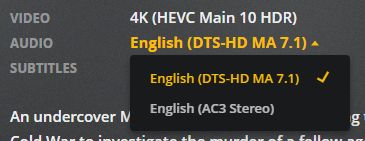
If you do not have an atmos/dtxhd receiver, one thing you can do, is select a different AUDIO stream when you play back.

For example, instead of using a default atmos audio stream, choose the dolby digital stream (or whatever audio is compatible with your playback device), this can help avoid audio transcoding.

You may not care about the audio, but you should care about what making sure your media direct plays.

As I said above, the nvidia shield is the only consistently good 4k hdr plex streamer.

They are on sale now, so I would suggest you invest in one if you wish to continue going forward with 4k.

as mentioned in the 2nd post, EVEN IF you get a cpu or gpu that can transcode 4k hdr, HDR will get washed out when converted to SDR.

you are treading down the path that many have already covered and there are tons of threads about 4k on this forum.

my setup
tcl/roku tv with 4k/hdr - can DIRECT PLAY 4k/hdr VIDEO but not HD audio (5.1 dd or dts only)
xbox one x - same as above
nvidia shield - can direct play pretty much every type of video and pass-through any type of audio

my xbox and shield are connected to yamaha receiver with atmos/dts-hd.

then receiver out to tv

Thanks for the clarification! I don’t have any 7.x audio, is there a way to have plex default to 5.1?

You’d think the Xbox one X could handle all the transcoding of files but apparently not.

unfortunately the xbox is limited by what microsoft allows (from what I understand anyway)

you can remux the mkv files and put the 5.1 audio first

or remove the 7.1 audio streams entirely

Justin,
Yes, you’re getting it.

  • If the player can take the file AS IS, then even a tiny ARM cpu can handle the job.

  • If the server has to do any manipulation of the file then it gets messy and depends entirely on how much manipulating has to be done.

Including “Direct Stream” scenarios?

(Learning a lot in this conversation too)

Direct stream it is manipulating the file though much less intense than transcoding, it may be putting it in another container the device can handle for example from MKV to MP4 or possible transcoding audio but not video as stated previously much less cpu intensive but not free.

with direct play its literally just sending the file with almost no CPU hit at all…

See:
https://support.plex.tv/articles/200250387-streaming-media-direct-play-and-direct-stream/

And it sounds like the nVidia Shield can literally play everything via direct play and not have to utilize any CPU on the server side. I’m OK with buying the nVidia Shield, but I currently have 4 different streaming devices and I only want one haha. If thats the Shield, then Im all for it.

The Shield is second only to a PC connected direct to the TV for file compatibility.

Was curious about Direct Stream, since there’s no actual video conversion happening beyond the container swap.

my shield will transcode Dolby Digital Plus

also it has issues with subtitles so if you use them a lot of the time it will transcode the video

DirectStream comes in a couple forms:

  1. If the DirectStream is nothing than splitting out the audio and remuxing contents of the file, this will be ok.

  2. If only the audio needs converting, leaving the video untouched, this is ok.

  3. If the video must be remuxed (into fragmented-MP4 for Apple devices as example) the answer is 100% dependent on the source material.

Alright… so opinions are needed here.

I could buy a NUC PC, reinstall Fedora and all the apps to make that my new PMS. My guess is its about $450 for an i7 7xxx CPU version. But I’d still run into issues with HDR content being washed out and not really 4K.

Or I can buy the Shield TV and it would literally do everything I need now, and going forward. And its $140 right now.

I could totally save money and just DL 1080p, but whats the fun in that? :slight_smile:

The Shield TV can direct play almost anything but you are still constrained to your setup. For mine if I play dts:x audio I am good but if I do Dolby true HD my receiver doesn’t support it and the server will start transcoding the audio to Dolby 5.1 … in that case I use Kodi with the Plex add on … in that case I still get direct play but the audio is pass as multichannel PCM and I am ok with it and rather don’t have the server changing the audio. The shield can run kodi so it is out of the same device.

@ justin, pretty much yes exactly that

I recommend the shield tv.

My pms is a readynas 528x, which is hefy enough for transcoding a couple 1080p, but not transcoding any 4k.

But with shield, all my 4k content streams directly with no transcoding.

If your files have other audio streams, you can avoid transcoding by manually switching to a supported audio stream (ie switch audio from atmos/truehd to dolby digital 5.1 stream),

If you are ripping the files yourself, you have direct control over which audio streams saved, and in which order they are (ie you can put DD5.1 first instead of atmos).

You can choose an alternate audio stream directly from the pre-play screen.

fdsfdfsdf

@TeknoJunky

So I go buy the shield tv, play some 4K content that has 7.1 audio it will start to transcode and buffer? And if I just change the audio type from 7.1 to 5.1 then it will stop transcoding just fine?

Also, when transcoding, Is this assuming that the CPU on my PMS cant handle just an audio transcode, or is a transcode a transcode? Doesnt matter what its transcoding, it all crushes the CPU?

If you do not have a 7.1 receiver (there are no tvs that currently supports 7.1 that I am aware of), and you try to play 7.1 audio, then YES plex will try to transcode that audio to 5.1 (or stereo if you don’t have 5.1).

Yes, you can manually choose a 5.1 (or stereo) audio stream that your client supports and plex will direct play it (according to whatever the client capabilities are).

normally transcoding audio is fairly light on the cpu, however because 4k files are such huge monsters of a file, it does take more to process, transcode the audio and put it back in the 4k stream, than it would with a regular bluray or less rip.

So, given sufficient disk and network IO available, I would expect any cpu from the last couple years be enough to handle the audio transcoding, but if your cpu is a pocket calculator then all bets are off.

I don’t know if there are any charts or tables or guidelines where the line is for transcoding audio only in 4k files, but the whole point is to avoid transcoding 4k in the first place.

If you get a shield, and a cheap 7.1 atmos receiver, then you shouldn’t have any 4k transcoding problems at all.

You can test the audio using the clients you already have, simply change the audio stream to DD5.1 or stereo and see if your 4k plays without buffering.

Thanks for everyone for the quick replies and insight.

I went ahead and got the Shield TV so Ill spend the night rooting it and playing with that for sure.

I also have a vizio 5.1 sound bar and really have no need for 7.1 in the living room. So I’ll probably need to change the audio to most of my content but thats not a big deal.

I have not had any need to root my shield, so while it may be an option, its not necessary for anything plex related.

edit

1 other thing I don’t think has been mentioned.

subtitles can cause transcoding. the shield supports most subtitles without any transcoding, but certain types or situations can cause transcoding to happen. (no I don’t have a list of those types or situations)

If in doubt and having problems, turn off subtitles to see if that fixes whatever issue.

Rooting the shield, AFAIK, will kill your hopes of running PMS

I was just looking to clean up the interface for the Shield. I dont need the games and clutter all over the place. Im used to the AFTV that has a ton of unnecessary stuff on the screen and I want to not have that.