PMS on a fresh 2018 Mac Mini (10.14.6) seeming to crash randomly. [Solution: Update Energy Saver Settings]

Server Version#: 1.16.6.1592

Chasing down some odd performance issues on my new MacMini running PMS. I migrated from a 2012 Mini that ran flawlessly but for some resource taxing when pushing multiple streams.

With the recent hardware update, I now have a plethora of juice to throw at it, but it appears to be crashing (potentially due to some network configuration?)

I first thought that the crashing was symptomatic of the server losing remote connection, but that was resolved via a refresh of the token per the great advice in this thread from @russrtw & @sa2000.

While away on vacation I noticed this behavior happening approx. every 48 hours and just returned home to find that PMS was down again. I wasn’t able to parse out anything conclusive but found that the last of the log lines noted an attempt to submit the crash report, however the crash logs saying that task failed due to receiving a 429 response from the target host.

Things I’ve verified so far:

  • I have the same networking configuration from the previous Mac mini
  • port forwarding rules are still the same
  • IP of the device is manually defined in the Network settings pane on the Mac as well as tied to the device MAC address in my router’s configuration
  • I have the local firewall on the mini disabled to rule that out as a variable

… actually… as I’m taking a closer look I’m seeing lines that potentially indicate a self-assigned IP issue prior to crashing.

Sep 22, 2019 02:07:37.715 [0x700004efb000] DEBUG - NetworkService: Browsing on interface 169.254.165.62 on broadcast address 239.255.255.250 (index: 0)
Sep 22, 2019 02:07:37.715 [0x700004efb000] DEBUG - NetworkService: Replacing an old server at index 0 and address 192.168.1.119 (we just got packet from 169.254.165.62, index 1)
Sep 22, 2019 02:07:37.715 [0x700004efb000] DEBUG - NetworkServiceBrowser: SERVER updated: 169.254.165.62 (WongBuki)

Throughout the logs, I do see some flip-flopping, but I’m not sure why it’d be doing so when I manually configured the IP for this device. I found this article that’s potentially related, but I might be sending myself off down another rabbit hole.

Seeking assistance with the following:

  1. Parsing the logs leading up to the crash to determine possible root cause (networking or otherwise)

  2. Confirmation as to whether or not it’s currently expected that the crash log upload task would be receiving a 429 response

Thanks so much!

Plex Media Server Logs_2019-09-24_01-09-54.zip (2.8 MB)

1 Like

Hey I’ll take a look at your logs. The HTTP 429 response is too many requests, meaning Plex tried to upload too many crash reports in a certain period of time. You can be reasonably sure they got at least one.

I’ve seen a lot of networking issues constantly repeated throughout your logs. I would reboot everything.

Sep 24, 2019 01:09:38.045 [0x70000b4bf000] DEBUG - Network interfaces:
Sep 24, 2019 01:09:38.045 [0x70000b4bf000] DEBUG -  * 1 lo0 (127.0.0.1) (loopback: 1)
Sep 24, 2019 01:09:38.045 [0x70000b4bf000] DEBUG -  * 8 en0 (192.168.1.119) (loopback: 0)
Sep 24, 2019 01:09:38.045 [0x70000b4bf000] DEBUG -  * 11 en1 (169.254.165.62) (loopback: 0)
...
Sep 21, 2019 11:18:12.731 [0x700004024000] DEBUG - MyPlex: We appear to have lost Internet connectivity, resetting device URL cache.
Sep 21, 2019 11:18:28.352 [0x7000040a7000] DEBUG - MyPlex: We appear to have regained Internet connectivity.

Are you using any plugins, DLNA, IPV6, or CGNAT
Describe your network layout. Describe how the mini is configured.
Screenshot your Settings - Show Advanced - Network please.

The last log before crash was written at 22:22 on Sept. 23, and refers to autoupdate:

com.plexapp.system.log.1
2019-09-23 22:21:54,567 (700002a39000) :  DEBUG (runtime:1156) - Starting timed thread named 'auto_update_thread'
2019-09-23 22:21:54,621 (700002a39000) :  INFO (storeservice:356) - Starting automatic update check
2019-09-23 22:21:54,676 (700002a39000) :  DEBUG (runtime:1117) - Created a thread named 'remove_unavailable_agents'
2019-09-23 22:21:54,771 (700002a39000) :  DEBUG (networking:166) - Requesting 'https://plugins.plex.tv/apps/all.json?frameworkVersion=2.6.3&machineIdentifier=241c293dcb094235d72f9586a0e24ed64bdcdee2&os=MacOSX&osVersion=10.14.6&cpu=i386&serverVersion=1.16.6.1592-b9d49bdb7&systemRevision=b9d49bd'
2019-09-23 22:21:59,855 (70000323f000) :  INFO (datakit:131) - Saved the dictionary file
2019-09-23 22:22:08,549 (700002a39000) :  INFO (storeservice:509) - Failed to fetch Plex Online data - the store probably won't work
2019-09-23 22:22:08,559 (700002a39000) :  CRITICAL (storeservice:510) - Error info (most recent call last):
  File "/Applications/Plex Media Server.app/Contents/Resources/Plug-ins-b9d49bdb7/System.bundle/Contents/Code/storeservice.py", line 495, in update
    log_msg = "Updated information for plug-in '%s' (class: %s) to a stable version"
  File "/Applications/Plex Media Server.app/Contents/Resources/Plug-ins-b9d49bdb7/Framework.bundle/Contents/Resources/Versions/2/Python/Framework/api/parsekit.py", line 145, in ObjectFromURL
    method=method,
  File "/Applications/Plex Media Server.app/Contents/Resources/Plug-ins-b9d49bdb7/Framework.bundle/Contents/Resources/Versions/2/Python/Framework/api/networkkit.py", line 67, in _http_request
    req = self._core.networking.http_request(url, *args, **kwargs)
  File "/Applications/Plex Media Server.app/Contents/Resources/Plug-ins-b9d49bdb7/Framework.bundle/Contents/Resources/Versions/2/Python/Framework/components/networking.py", line 370, in http_request
    return HTTPRequest(self._core, url, data, h, url_cache, encoding, errors, timeout, immediate, sleep, opener, follow_redirects, method)
  File "/Applications/Plex Media Server.app/Contents/Resources/Plug-ins-b9d49bdb7/Framework.bundle/Contents/Resources/Versions/2/Python/Framework/components/networking.py", line 141, in __init__
    self.load()
  File "/Applications/Plex Media Server.app/Contents/Resources/Plug-ins-b9d49bdb7/Framework.bundle/Contents/Resources/Versions/2/Python/Framework/components/networking.py", line 181, in load
    f = self._opener.open(req, timeout=self._timeout)
  File "/Applications/Plex Media Server.app/Contents/Resources/Plug-ins-b9d49bdb7/Framework.bundle/Contents/Resources/Platforms/Shared/Libraries/urllib2_new.py", line 438, in open
    response = self._open(req, data)
  File "/Applications/Plex Media Server.app/Contents/Resources/Plug-ins-b9d49bdb7/Framework.bundle/Contents/Resources/Platforms/Shared/Libraries/urllib2_new.py", line 456, in _open
    '_open', req)
  File "/Applications/Plex Media Server.app/Contents/Resources/Plug-ins-b9d49bdb7/Framework.bundle/Contents/Resources/Platforms/Shared/Libraries/urllib2_new.py", line 416, in _call_chain
    result = func(*args)
  File "/Applications/Plex Media Server.app/Contents/Resources/Plug-ins-b9d49bdb7/Framework.bundle/Contents/Resources/Platforms/Shared/Libraries/urllib2_new.py", line 1225, in https_open
    return self.do_open(httplib.HTTPSConnection, req)
  File "/Applications/Plex Media Server.app/Contents/Resources/Plug-ins-b9d49bdb7/Framework.bundle/Contents/Resources/Platforms/Shared/Libraries/urllib2_new.py", line 1192, in do_open
    raise URLError(err)
URLError: <urlopen error [Errno 8] nodename nor servname provided, or not known>

2019-09-23 22:22:08,560 (700002a39000) :  INFO (storeservice:531) - 'WebManager' plug-in [com.plexapp.plugins.webmanager] is up to date (33b1fcd)
2019-09-23 22:22:08,560 (700002a39000) :  INFO (storeservice:531) - 'NPR' plug-in [com.plexapp.plugins.npr] is up to date (557b09c)
2019-09-23 22:22:08,562 (700002a39000) :  INFO (storeservice:531) - 'Revision3' plug-in [com.plexapp.plugins.revision3] is up to date (b53eeee)
2019-09-23 22:22:08,562 (700002a39000) :  INFO (storeservice:531) - 'iTunes Movie Trailers' plug-in [com.plexapp.plugins.amt] is up to date (704f26a)
2019-09-23 22:22:08,562 (700002a39000) :  INFO (storeservice:531) - 'Twitch' plug-in [com.plexapp.plugins.twitchtv] is up to date (530174b)
2019-09-23 22:22:08,562 (700002a39000) :  INFO (storeservice:531) - 'TWiT.TV' plug-in [com.plexapp.plugins.twitlive] is up to date (18c6d1b)
2019-09-23 22:22:08,563 (700002a39000) :  INFO (storeservice:531) - 'CNET' plug-in [com.plexapp.plugins.cnettv] is up to date (30a6a6c)
2019-09-23 22:22:08,563 (700002a39000) :  INFO (storeservice:531) - 'Services' plug-in [com.plexapp.system.services] is up to date (62fcf1f)
2019-09-23 22:22:08,563 (700002a39000) :  INFO (storeservice:531) - 'Pandora' plug-in [com.plexapp.plugins.pandora] is up to date (3964fa3)
2019-09-23 22:22:08,563 (700002a39000) :  INFO (storeservice:531) - 'Vimeo' plug-in [com.plexapp.plugins.vimeo] is up to date (6e5f893)
2019-09-23 22:22:08,563 (700002a39000) :  INFO (storeservice:362) - All plug-ins are up to date
2019-09-23 22:22:08,565 (700002a39000) :  DEBUG (runtime:1150) - Scheduled a timed thread named 'auto_update_thread'

Prior to that, the system was flickering back and forth between your real private IP,
192.168.1.119 and your IANA rfc3927 link local IP 169.254.xxx.yyy

It repeatedly says internet connection is lost, then we appear to have regained.

Let's have a look at dueling IPs
Sep 21, 2019 14:53:00.991 [0x700004efb000] DEBUG - NetworkService: Replacing an old server at index 0 and address 169.254.165.62 (we just got packet from 192.168.1.119, index 0)
Sep 21, 2019 14:53:46.909 [0x700004efb000] DEBUG - NetworkService: Replacing an old server at index 0 and address 192.168.1.119 (we just got packet from 169.254.165.62, index 1)
Sep 21, 2019 14:54:11.925 [0x700004efb000] DEBUG - NetworkService: Replacing an old server at index 1 and address 169.254.165.62 (we just got packet from 192.168.1.119, index 0)
Sep 21, 2019 14:55:22.281 [0x700004efb000] DEBUG - NetworkService: Replacing an old server at index 0 and address 192.168.1.119 (we just got packet from 169.254.165.62, index 1)
Sep 21, 2019 14:55:44.737 [0x700004efb000] DEBUG - NetworkService: Replacing an old server at index 1 and address 169.254.165.62 (we just got packet from 192.168.1.119, index 0)
Sep 21, 2019 14:56:57.619 [0x700004efb000] DEBUG - NetworkService: Replacing an old server at index 0 and address 192.168.1.119 (we just got packet from 169.254.165.62, index 1)
Sep 21, 2019 14:57:21.645 [0x700004efb000] DEBUG - NetworkService: Replacing an old server at index 1 and address 169.254.165.62 (we just got packet from 192.168.1.119, index 0)
Sep 21, 2019 14:58:33.023 [0x700004efb000] DEBUG - NetworkService: Replacing an old server at index 0 and address 192.168.1.119 (we just got packet from 169.254.165.62, index 1)
Sep 21, 2019 14:58:55.304 [0x700004efb000] DEBUG - NetworkService: Replacing an old server at index 1 and address 169.254.165.62 (we just got packet from 192.168.1.119, index 0)
Sep 21, 2019 15:00:10.378 [0x700004efb000] DEBUG - NetworkService: Replacing an old server at index 0 and address 192.168.1.119 (we just got packet from 169.254.165.62, index 1)
Sep 21, 2019 15:00:42.434 [0x700004efb000] DEBUG - NetworkService: Replacing an old server at index 1 and address 169.254.165.62 (we just got packet from 192.168.1.119, index 0)
Sep 21, 2019 15:00:55.042 [0x700004efb000] DEBUG - NetworkService: Replacing an old server at index 0 and address 192.168.1.119 (we just got packet from 169.254.165.62, index 1)
Sep 21, 2019 15:00:55.107 [0x700004efb000] DEBUG - NetworkService: Replacing an old server at index 1 and address 169.254.165.62 (we just got packet from 192.168.1.119, index 0)
Sep 21, 2019 15:01:07.058 [0x700004efb000] DEBUG - NetworkService: Replacing an old server at index 0 and address 192.168.1.119 (we just got packet from 169.254.165.62, index 1)
Sep 21, 2019 15:01:07.124 [0x700004efb000] DEBUG - NetworkService: Replacing an old server at index 1 and address 169.254.165.62 (we just got packet from 192.168.1.119, index 0)
Sep 21, 2019 15:01:47.653 [0x700004efb000] DEBUG - NetworkService: Replacing an old server at index 0 and address 192.168.1.119 (we just got packet from 169.254.165.62, index 1)
Sep 21, 2019 15:02:01.641 [0x700004efb000] DEBUG - NetworkService: Replacing an old server at index 1 and address 169.254.165.62 (we just got packet from 192.168.1.119, index 0)
Sep 21, 2019 15:02:36.825 [0x700004efb000] DEBUG - NetworkService: Replacing an old server at index 0 and address 192.168.1.119 (we just got packet from 169.254.165.62, index 1)

Causing a lot of
Sep 21, 2019 11:16:03.247 [0x700004024000] DEBUG - MyPlex: We appear to have regained Internet connectivity.
Sep 21, 2019 11:16:12.927 [0x700004542000] DEBUG - MyPlex: Updating device connections (from timer: 0)
Sep 21, 2019 11:16:47.106 [0x700004024000] DEBUG - MyPlex: We appear to have lost Internet connectivity, resetting device URL cache.
Sep 21, 2019 11:17:02.105 [0x7000047d1000] ERROR - PublicAddressManager: Unable to get public IP adddress from myPlex (httpCode=-6): 
Sep 21, 2019 11:17:02.107 [0x7000047d1000] DEBUG - MyPlex: Updating device connections (from timer: 0)
Sep 21, 2019 11:17:02.114 [0x7000047d1000] WARN - MyPlex: Updating device connections failed, retrying in 10 seconds.
Sep 21, 2019 11:17:07.104 [0x700003fa1000] ERROR - PublicAddressManager: Unable to get public IP adddress from myPlex (httpCode=-6): 
Sep 21, 2019 11:17:07.107 [0x700003fa1000] DEBUG - MyPlex: Updating device connections (from timer: 0)
Sep 21, 2019 11:17:07.114 [0x700003fa1000] WARN - MyPlex: Updating device connections failed, retrying in 10 seconds.
Sep 21, 2019 11:17:17.118 [0x700004336000] DEBUG - MyPlex: Updating device connections (from timer: 1)
Sep 21, 2019 11:17:32.730 [0x7000040a7000] DEBUG - MyPlex: We appear to have regained Internet connectivity.
Sep 21, 2019 11:17:42.404 [0x700003d12000] DEBUG - MyPlex: Updating device connections (from timer: 0)
Sep 21, 2019 11:18:12.731 [0x700004024000] DEBUG - MyPlex: We appear to have lost Internet connectivity, resetting device URL cache.
Sep 21, 2019 11:18:18.207 [0x7000043b9000] ERROR - PublicAddressManager: Unable to get public IP adddress from myPlex (httpCode=-6): 
Sep 21, 2019 11:18:18.209 [0x7000043b9000] DEBUG - MyPlex: Updating device connections (from timer: 0)
Sep 21, 2019 11:18:18.216 [0x7000043b9000] WARN - MyPlex: Updating device connections failed, retrying in 10 seconds.
Sep 21, 2019 11:18:24.561 [0x7000049dd000] ERROR - PublicAddressManager: Unable to get public IP adddress from myPlex (httpCode=-6): 
Sep 21, 2019 11:18:24.564 [0x7000049dd000] DEBUG - MyPlex: Updating device connections (from timer: 0)
Sep 21, 2019 11:18:24.569 [0x7000049dd000] WARN - MyPlex: Updating device connections failed, retrying in 10 seconds.
Sep 21, 2019 11:18:28.352 [0x7000040a7000] DEBUG - MyPlex: We appear to have regained Internet connectivity.

and UPnP errors
ep 21, 2019 11:14:37.845 [0x700004648000] DEBUG - PublicAddressManager: Obtaining public IP.
Sep 21, 2019 11:14:38.186 [0x700004648000] DEBUG - PublicAddressManager: Got public IP from http://plex.tv: 73.158.71.215
Sep 21, 2019 11:14:47.208 [0x700004648000] DEBUG - NAT: UPnP, getPublicIP didn't find usable IGD.
Sep 21, 2019 11:15:30.251 [0x700004336000] DEBUG - PublicAddressManager: Obtaining public address and mapping port.
Sep 21, 2019 11:15:30.251 [0x700004542000] DEBUG - PublicAddressManager: Obtaining public IP.
Sep 21, 2019 11:15:30.256 [0x700004542000] ERROR - PublicAddressManager: Unable to get public IP adddress from myPlex (httpCode=-6): 
Sep 21, 2019 11:15:36.068 [0x700004e78000] DEBUG - PublicAddressManager: Obtaining public address and mapping port.
Sep 21, 2019 11:15:36.068 [0x700004ae3000] DEBUG - PublicAddressManager: Obtaining public IP.
Sep 21, 2019 11:15:36.075 [0x700004ae3000] ERROR - PublicAddressManager: Unable to get public IP adddress from myPlex (httpCode=-6): 
Sep 21, 2019 11:16:03.262 [0x700004024000] DEBUG - PublicAddressManager: Obtaining public address and mapping port.
Sep 21, 2019 11:16:03.262 [0x700004542000] DEBUG - PublicAddressManager: Obtaining public IP.
Sep 21, 2019 11:16:03.600 [0x700004542000] DEBUG - PublicAddressManager: Got public IP from http://plex.tv: 73.158.71.215
Sep 21, 2019 11:16:12.626 [0x700004542000] DEBUG - NAT: UPnP, getPublicIP didn't find usable IGD.
Sep 21, 2019 11:17:01.262 [0x7000041ad000] DEBUG - PublicAddressManager: Obtaining public address and mapping port.
Sep 21, 2019 11:17:02.098 [0x7000047d1000] DEBUG - PublicAddressManager: Obtaining public IP.
Sep 21, 2019 11:17:02.105 [0x7000047d1000] ERROR - PublicAddressManager: Unable to get public IP adddress from myPlex (httpCode=-6): 
Sep 21, 2019 11:17:06.667 [0x70000474e000] DEBUG - PublicAddressManager: Obtaining public address and mapping port.
Sep 21, 2019 11:17:07.097 [0x700003fa1000] DEBUG - PublicAddressManager: Obtaining public IP.
Sep 21, 2019 11:17:07.104 [0x700003fa1000] ERROR - PublicAddressManager: Unable to get public IP adddress from myPlex (httpCode=-6): 
Sep 21, 2019 11:17:32.745 [0x7000040a7000] DEBUG - PublicAddressManager: Obtaining public address and mapping port.
Sep 21, 2019 11:17:32.758 [0x700003d12000] DEBUG - PublicAddressManager: Obtaining public IP.
Sep 21, 2019 11:17:33.102 [0x700003d12000] DEBUG - PublicAddressManager: Got public IP from http://plex.tv: 73.158.71.215
Sep 21, 2019 11:17:42.108 [0x700003d12000] DEBUG - NAT: UPnP, getPublicIP didn't find usable IGD.
Sep 21, 2019 11:18:18.148 [0x700004ae3000] DEBUG - PublicAddressManager: Obtaining public address and mapping port.
Sep 21, 2019 11:18:18.201 [0x7000043b9000] DEBUG - PublicAddressManager: Obtaining public IP.
Sep 21, 2019 11:18:18.207 [0x7000043b9000] ERROR - PublicAddressManager: Unable to get public IP adddress from myPlex (httpCode=-6): 
Sep 21, 2019 11:18:23.991 [0x700003d12000] DEBUG - PublicAddressManager: Obtaining public address and mapping port.
Sep 21, 2019 11:18:24.556 [0x7000049dd000] DEBUG - PublicAddressManager: Obtaining public IP.
Sep 21, 2019 11:18:24.561 [0x7000049dd000] ERROR - PublicAddressManager: Unable to get public IP adddress from myPlex (httpCode=-6): 
Sep 21, 2019 11:18:28.369 [0x7000040a7000] DEBUG - PublicAddressManager: Obtaining public address and mapping port.
Sep 21, 2019 11:18:30.362 [0x700004542000] DEBUG - PublicAddressManager: Obtaining public IP.
Sep 21, 2019 11:18:30.719 [0x700004542000] DEBUG - PublicAddressManager: Got public IP from http://plex.tv: 73.158.71.215
Sep 21, 2019 11:18:39.745 [0x700004542000] DEBUG - NAT: UPnP, getPublicIP didn't find usable IGD.
1 Like

Thanks so much for the assist!

Not using IPV6 or CGNAT.

I have the Mini connected to a switch that’s then connecting to my Nighthawk router.

In PMS DLNA settings, I did have the Enable the DLNA server disabled, but saw that DLNA server timeline reporting was enabled for some reason? I would think that the top-level DLNA enable config would make anything below moot, but perhaps not. I just disabled the timeline reporting option as well.

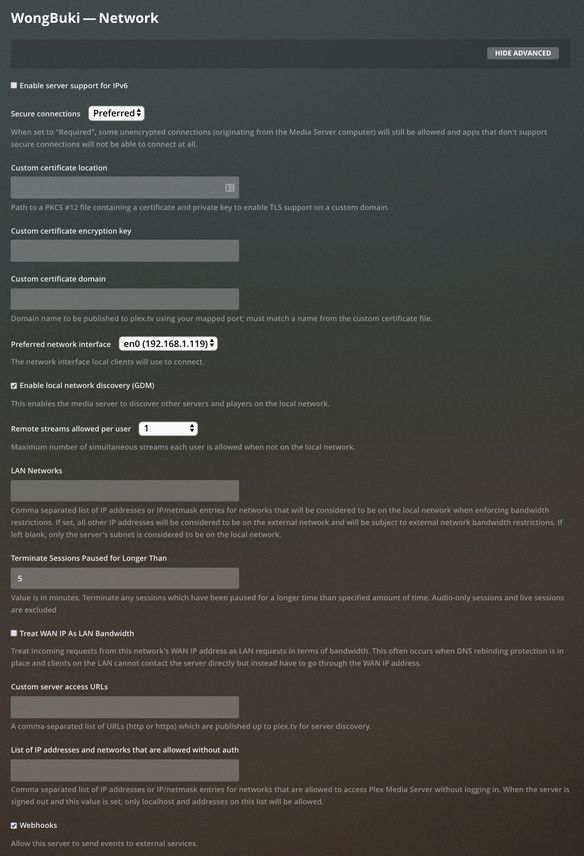
Here’s that screenshot of Settings - Show Advanced - Network:

I don’t recollect adjusting any configurations here but for the Remote streams allowed per user, but based on the findings that you noted, I’ve a hunch that the following options might be in party with what’s going wonky?

  • Preferred network interface > Any
  • Treat WAN IP As LAN Bandwidth

Under the dropdown, I only have the options Any (presumably the default) and the physical interface. Is it possible that Any could be related to the IP-Ping-Pong? Perhaps it’s just a red herring.

After I posted last night, I did reboot the mini but have yet to restart every component in the network chain. I’ll give that a whirl later this evening.

Taking a peek at the most current logs I am still seeing messages like Sep 24, 2019 21:58:42.593 [0x70000d5db000] DEBUG - NetworkService: Replacing an old server at index 1 and address 169.254.184.103 (we just got packet from 192.168.1.119, index 0) but they’re now much less frequent.

In your opinion should I hold off on upgrading to the most recent public release (Version 1.17.0.1709) until addressing possible network config concerns?

upgrading is good. Let’s see what Bigwheel has to say :smiley:

1 Like

there is no need to enable this unless you know you are having issues with local clients the finding local sever.

I’m not really clear on when the crashing is happening. is it predicable at all? If the crashing is happening about the same time every night when it does I would check scheduled tasks maybe disable one at a time and wait to see if a crash happens.

I do see what looks like database locks. but i don’t have access to the crash logs myself but I can check tomorrow.

I definitely would update. since you are on Mac it is pretty easy to go back if the update makes it worse.

quit server and move `Plex Media Server.app" from your applications folder to the desktop or anywhere else.
download the update to 1.17 from the downloads page, open up the dmg and put in it applications and launch.

if it makes it worse just quit the server and put the 1.16 version you moved to desktop back in applications folder and launch it.

2 Likes

Thanks, @BigWheel!

I’ve disabled the Treat WAN IP As LAN Bandwidth setting and will upgrade tonight.

In terms of crashing, I wasn’t able to correlate it to a cron event or anything else specific and it seemed fairly random (maybe tied to remote client activity?) but perhaps the crash logs will hold the key there. I greatly appreciate the help!

As a Mac user I found I needed to reserve / static my devices LAN IP addresses in my router. Diagnostics reports showed a lot of RX and TX errors. So I also added my Subnet Mask to PMS network settings and entered my Server address and port to my Plex TV app settings. My LAN now performs without errors. You are advised to Manually configure your Mac network settings using DHCP use a unique Server IP and try in the Advanced / DNS adding a Public DNS instead of your ISP DNS.

I have found on a busy network this has resolved all my issues as I use switches post router to protect my IOT’s.

https://www.grc.com/nat/nat.htm

2 Likes

I guess I asked but he didn’t give those details.

Please tell us if your Mini was configured to use DHCP and whether setting a static IP fixes this, because I’m going to guess a DHCP server assigns the same IP address to his server and that the assigned address is available long before PMS starts up.

Do you have 2 DHCP servers running accidentally, maybe on a Time Machine?

We should understand the issue of why the users has two interfaces.
You would think if his primary (only) real interface failed to get a lease, 192.168.1.119, then the primary en0 would get a the link-local address assigned to it.

But we are seeing two interfaces, and it’s en1 that has the link-local IP. Why?
And why if Plex doesn’t list two interfaces is it listening on two?
Did you ever force Plex to only listen on en0 in Settings > Network > Preferred Network Interface?

What does your mini report for

ifconfig | grep -C 5 169.254

And what about

defaults read /Library/Preferences/SystemConfiguration/NetworkInterfaces.plist

I’m going to guess the en1 is the WiFi on the mini, and you have it accidentally enabled, or it’s just annoying. :crazy_face:

The Mini has been DHCP with Manual Address since I first stood it up.

Did you ever force Plex to only listen on en0 in Settings > Network > Preferred Network Interface?

Not yet. Doing so now.


$ ifconfig | grep -C 5 169.254
	media: autoselect (100baseTX <full-duplex>)
	status: active
en1: flags=8863<UP,BROADCAST,SMART,RUNNING,SIMPLEX,MULTICAST> mtu 1500
	ether a4:83:e7:16:01:18 
	inet6 fe80::4c3:d8aa:bd36:aae7%en1 prefixlen 64 secured scopeid 0xb 
	inet 169.254.184.103 netmask 0xffff0000 broadcast 169.254.255.255
	nd6 options=201<PERFORMNUD,DAD>
	media: autoselect (<unknown type>)
en2: flags=8963<UP,BROADCAST,SMART,RUNNING,PROMISC,SIMPLEX,MULTICAST> mtu 1500
	options=60<TSO4,TSO6>
	ether da:00:20:60:30:01 

en1 is for sure the Wi-Fi, but it’s always been disabled. I’ll try removing it fully from the Network interface list.


output
{
    Interfaces =     (
                {
            Active = 1;
            "BSD Name" = en0;
            IOBuiltin = 1;
            IOInterfaceNamePrefix = en;
            IOInterfaceType = 6;
            IOInterfaceUnit = 0;
            IOMACAddress = <f01898e8 eb88>;
            IOPathMatch = "IOService:/AppleACPIPlatformExpert/PCI0@0/AppleACPIPCI/RP02@1C,1/IOPP/GIGE@0/BCM5701Enet/en0";
            SCNetworkInterfaceInfo =             {
                UserDefinedName = Ethernet;
            };
            SCNetworkInterfaceType = Ethernet;
        },
                {
            Active = 1;
            "BSD Name" = en1;
            IOBuiltin = 1;
            IOInterfaceNamePrefix = en;
            IOInterfaceType = 6;
            IOInterfaceUnit = 1;
            IOMACAddress = <a483e716 0118>;
            IOPathMatch = "IOService:/AppleACPIPlatformExpert/PCI0@0/AppleACPIPCI/RP01@1C/IOPP/ARPT@0/AppleBCMWLANBusInterfacePCIe/AppleBCMWLANCore/en1";
            SCNetworkInterfaceInfo =             {
                UserDefinedName = "Wi-Fi";
            };
            SCNetworkInterfaceType = IEEE80211;
        },
                {
            Active = 1;
            "BSD Name" = en2;
            IOBuiltin = 1;
            IOInterfaceNamePrefix = en;
            IOInterfaceType = 6;
            IOInterfaceUnit = 2;
            IOMACAddress = <da002060 3001>;
            IOPathMatch = "IOService:/AppleACPIPlatformExpert/PCI0@0/AppleACPIPCI/PEG1@1,1/IOPP/UPSB@0/IOPP/DSB0@0/IOPP/NHI0@0/AppleThunderboltHAL/AppleThunderboltNHIType3/IOThunderboltController/IOThunderboltLocalNode/AppleThunderboltIPService/AppleThunderboltIPPort/en2";
            SCNetworkInterfaceInfo =             {
                UserDefinedName = "Thunderbolt 1";
            };
            SCNetworkInterfaceType = Ethernet;
        },
                {
            Active = 1;
            "BSD Name" = en3;
            IOBuiltin = 1;
            IOInterfaceNamePrefix = en;
            IOInterfaceType = 6;
            IOInterfaceUnit = 3;
            IOMACAddress = <da002060 3000>;
            IOPathMatch = "IOService:/AppleACPIPlatformExpert/PCI0@0/AppleACPIPCI/PEG1@1,1/IOPP/UPSB@0/IOPP/DSB0@0/IOPP/NHI0@0/AppleThunderboltHAL/AppleThunderboltNHIType3/IOThunderboltController/IOThunderboltLocalNode/AppleThunderboltIPService/AppleThunderboltIPPort/en3";
            SCNetworkInterfaceInfo =             {
                UserDefinedName = "Thunderbolt 2";
            };
            SCNetworkInterfaceType = Ethernet;
        },
                {
            Active = 1;
            "BSD Name" = en4;
            IOBuiltin = 1;
            IOInterfaceNamePrefix = en;
            IOInterfaceType = 6;
            IOInterfaceUnit = 4;
            IOMACAddress = <da002060 3005>;
            IOPathMatch = "IOService:/AppleACPIPlatformExpert/PCI0@0/AppleACPIPCI/PEG2@1,2/IOPP/UPSB@0/IOPP/DSB0@0/IOPP/NHI0@0/AppleThunderboltHAL/AppleThunderboltNHIType3/IOThunderboltController/IOThunderboltLocalNode/AppleThunderboltIPService/AppleThunderboltIPPort/en4";
            SCNetworkInterfaceInfo =             {
                UserDefinedName = "Thunderbolt 3";
            };
            SCNetworkInterfaceType = Ethernet;
        },
                {
            Active = 1;
            "BSD Name" = en5;
            IOBuiltin = 1;
            IOInterfaceNamePrefix = en;
            IOInterfaceType = 6;
            IOInterfaceUnit = 5;
            IOMACAddress = <da002060 3004>;
            IOPathMatch = "IOService:/AppleACPIPlatformExpert/PCI0@0/AppleACPIPCI/PEG2@1,2/IOPP/UPSB@0/IOPP/DSB0@0/IOPP/NHI0@0/AppleThunderboltHAL/AppleThunderboltNHIType3/IOThunderboltController/IOThunderboltLocalNode/AppleThunderboltIPService/AppleThunderboltIPPort/en5";
            SCNetworkInterfaceInfo =             {
                UserDefinedName = "Thunderbolt 4";
            };
            SCNetworkInterfaceType = Ethernet;
        },
                {
            Active = 1;
            "BSD Name" = en6;
            IOBuiltin = 0;
            IOInterfaceNamePrefix = en;
            IOInterfaceType = 6;
            IOInterfaceUnit = 6;
            IOMACAddress = <acde4800 1122>;
            IOPathMatch = "IOService:/AppleACPIPlatformExpert/PCI0@0/AppleACPIPCI/RP17@1B/IOPP/IOBC@0,1/IOBufferCopyController/AppleUSBVHCIBCE@80000000/AppleUSBVHCIPort@80100000/iBridge@80100000/NCM Data@1/AppleUSBNCMData/en6";
            SCNetworkInterfaceInfo =             {
                "USB Product Name" = iBridge;
                UserDefinedName = iBridge;
                idProduct = 33331;
                idVendor = 1452;
            };
            SCNetworkInterfaceType = Ethernet;
        }
    );
    Model = "Macmini8,1";
}

I’m leaning towards something “annoying”. :grimacing:

I’ve since upgraded to the latest public release so PMS had a restart and I’ve not yet seen a crash since the last occurrence that lead me to open this thread. I’ll keep an eye on the logs to see if that flip-flop keeps happening even though the Wi-Fi interface should have been ignored.

1 Like

Thanks, @SE56! I’ll look into this as well.

At least it’s not trying to talk out the thunderbolt port :crazy_face:
Looking forward to it working. Good eye on the DHCP @SE56

1 Like

Things appeared to be running well for several days, after making the additional adjustments to PMS and networking settings:

  • upgraded to PMS v1.17.0.1709
  • forcing en0 listening
  • removing WiFi as an option within the system settings networking config
  • ensuring DLNA was disabled in PLEX across the board
  • for the heck of it, updating the router and the mini from using Google Public DNS to OpenDNS

However, I awoke this morning to discover there was another crash last night.

I just restarted the service on the mini and grabbed fresh logs:

Plex Media Server Logs_2019-10-01_10-06-27.zip (4.1 MB)

@BigWheel When you’ve an opportunity, may I trouble you for feedback from the crash log?
Successfully reported 7D744143-C444-4B0F-9CE9-FDF9041624FC

Thanks, all!

Update:

I’m back on the beta channel releases, and while no longer a full crash after about 48 hours of run time I’ll see the following symptoms:

  • settings menus in the web client (either <LAN_IP>:32400 or plex.tv) will time out on load attempt or report as being unavailable, but PMS appears to still be running in some capacity
  • video playback locally, and via remote clients (w/ transcode) will sporadically spin wheel for an instant as though attempting to buffer and then the play head will jump back 2s-5s and continue until it happens again. The timing between incidents appears random and unpredictable and will persist until I manually restart PMS

Here’s the latest set of logs, and the time window of bullet #2 above occurring most noticeably today from ~20:18 until I restarted PMS ~20:25 (Plex Media Server.1.log):

Plex Media Server Logs_2019-10-30_21-11-46.zip (4.5 MB)

Something funky is going on with the network service as I see a bunch of things like:

whyyyyyeeeeeee #1
Oct 30, 2019 19:48:08.734 [0x70000a79a000] WARN - MyPlex: Updating device connections failed, retrying in 10 seconds.
Oct 30, 2019 19:48:09.544 [0x70000b2dc000] WARN - NetworkServiceBrowser: Error sending out discover packet from 192.168.1.119 to 192.168.1.255: Can't assign requested address
Oct 30, 2019 19:48:09.544 [0x70000aa29000] WARN - NetworkServiceBrowser: Error sending out discover packet from 192.168.1.119 to 192.168.1.255: Can't assign requested address
Oct 30, 2019 19:48:09.658 [0x70000a50b000] DEBUG - EventSource: Resolving 184.105.148.115 port 443
Oct 30, 2019 19:48:09.658 [0x70000a50b000] DEBUG - EventSource: Resolved 184.105.148.115 to 184.105.148.115
Oct 30, 2019 19:48:09.659 [0x70000a50b000] DEBUG - EventSource: Failure in Connect (51 - Network is unreachable).
Oct 30, 2019 19:48:09.659 [0x70000a50b000] ERROR - EventSource: Retrying in 30 seconds.
Oct 30, 2019 19:48:10.710 [0x70000b3e2000] DEBUG - Network change for advertiser.
Oct 30, 2019 19:48:10.711 [0x70000b3e2000] ERROR - Error broadcasting message: send_to: Network is unreachable
Oct 30, 2019 19:48:10.711 [0x70000b3e2000] DEBUG - Network change for advertiser.
Oct 30, 2019 19:48:10.711 [0x70000b3e2000] ERROR - Error broadcasting message: send_to: Network is unreachable
Oct 30, 2019 19:48:10.711 [0x70000b3e2000] DEBUG - Network change for advertiser.
Oct 30, 2019 19:48:10.711 [0x70000b3e2000] DEBUG - NetworkService: Network change for browser (polled=0), closing 2 browse sockets.
Oct 30, 2019 19:48:10.711 [0x70000b3e2000] DEBUG - NetworkService: Setting up multicast listener on 0.0.0.0:32413
Oct 30, 2019 19:48:10.711 [0x70000b3e2000] ERROR - NetworkService: Couldn't join multicast group: set_option: Can't assign requested address
Oct 30, 2019 19:48:10.711 [0x70000b3e2000] DEBUG - NetworkService: Browsing on interface 127.0.0.1 on broadcast address 127.255.255.255 (index: 0)
Oct 30, 2019 19:48:10.711 [0x70000b3e2000] DEBUG - NetworkService: Network change for browser (polled=1), closing 2 browse sockets.
Oct 30, 2019 19:48:10.711 [0x70000b3e2000] DEBUG - NetworkService: Browsing on interface 127.0.0.1 on broadcast address 127.255.255.255 (index: 0)
Oct 30, 2019 19:48:10.712 [0x70000b3e2000] DEBUG - NetworkService: Network change for browser (polled=0), closing 1 browse sockets.
Oct 30, 2019 19:48:10.712 [0x70000b3e2000] DEBUG - NetworkService: Setting up multicast listener on 0.0.0.0:1901
Oct 30, 2019 19:48:10.712 [0x70000b3e2000] ERROR - NetworkService: Couldn't join multicast group: set_option: Can't assign requested address
Oct 30, 2019 19:48:10.712 [0x70000b3e2000] ERROR - Network Service: Error in browser handle read: 89 (Operation canceled) socket=-1
Oct 30, 2019 19:48:10.822 [0x70000b3e2000] INFO - Network Service: Abandoning browse socket, it was closed.
Oct 30, 2019 19:48:10.822 [0x70000b3e2000] ERROR - Network Service: Error in browser handle read: 89 (Operation canceled) socket=-1
Oct 30, 2019 19:48:10.932 [0x70000b3e2000] INFO - Network Service: Abandoning browse socket, it was closed.
Oct 30, 2019 19:48:10.932 [0x70000b3e2000] ERROR - Network Service: Error in browser handle read: 89 (Operation canceled) socket=-1
Oct 30, 2019 19:48:11.035 [0x70000b3e2000] INFO - Network Service: Abandoning browse socket, it was closed.
Oct 30, 2019 19:48:11.035 [0x70000b3e2000] ERROR - Network Service: Error in browser handle read: 89 (Operation canceled) socket=-1
Oct 30, 2019 19:48:11.144 [0x70000b3e2000] INFO - Network Service: Abandoning browse socket, it was closed.
Oct 30, 2019 19:48:11.144 [0x70000b3e2000] ERROR - Network Service: Error in browser handle read: 89 (Operation canceled) socket=-1
Oct 30, 2019 19:48:11.252 [0x70000b3e2000] INFO - Network Service: Abandoning browse socket, it was closed.
Oct 30, 2019 19:48:11.252 [0x70000b3e2000] ERROR - Network Service: Error in browser handle read: 89 (Operation canceled) socket=-1
Oct 30, 2019 19:48:11.359 [0x70000b3e2000] INFO - Network Service: Abandoning browse socket, it was closed.
Oct 30, 2019 19:48:11.360 [0x70000b3e2000] ERROR - Network Service: Error in browser handle read: 89 (Operation canceled) socket=-1
Oct 30, 2019 19:48:11.467 [0x70000b3e2000] INFO - Network Service: Abandoning browse socket, it was closed.
Oct 30, 2019 19:48:12.455 [0x70000b777000] DEBUG - NetworkInterface: Notified of network changed (force=0)
Oct 30, 2019 19:48:12.457 [0x70000b777000] DEBUG - Network change notification but nothing changed.
Oct 30, 2019 19:48:12.459 [0x70000abb2000] DEBUG - NetworkInterface: Notified of network changed (force=0)
Oct 30, 2019 19:48:12.461 [0x70000abb2000] DEBUG - Network change notification but nothing changed.
Oct 30, 2019 19:48:13.461 [0x70000aec4000] DEBUG - NetworkInterface: Notified of network changed (force=0)
Oct 30, 2019 19:48:13.463 [0x70000aec4000] DEBUG - Network change notification but nothing changed.
Oct 30, 2019 19:48:14.089 [0x70000bb8f000] DEBUG - NetworkInterface: Notified of network changed (force=0)
Oct 30, 2019 19:48:14.091 [0x70000bb8f000] DEBUG - Detected primary interface: 0.0.0.0
Oct 30, 2019 19:48:14.091 [0x70000bb8f000] DEBUG - Network interfaces:
Oct 30, 2019 19:48:14.091 [0x70000bb8f000] DEBUG -  * 1 lo0 (127.0.0.1) (loopback: 1)
Oct 30, 2019 19:48:14.092 [0x70000bb8f000] DEBUG -  * 8 en0 (192.168.1.119) (loopback: 0)
Oct 30, 2019 19:48:14.092 [0x70000bb8f000] DEBUG - NetworkService: Got notification of changed network (first change: 0)
Oct 30, 2019 19:48:14.092 [0x70000bb8f000] DEBUG - NetworkService: Dispatch network change after two second delay.
Oct 30, 2019 19:48:14.092 [0x70000bb8f000] DEBUG - NetworkService: Got notification of changed network (first change: 0)
Oct 30, 2019 19:48:14.092 [0x70000bb8f000] DEBUG - NetworkService: Dispatch network change after two second delay.
Oct 30, 2019 19:48:14.092 [0x70000bb8f000] DEBUG - NetworkService: Got notification of changed network (first change: 0)
Oct 30, 2019 19:48:14.092 [0x70000bb8f000] DEBUG - NetworkService: Dispatch network change after two second delay.
Oct 30, 2019 19:48:14.092 [0x70000bb8f000] DEBUG - NetworkService: Got notification of changed network (first change: 0)
Oct 30, 2019 19:48:14.092 [0x70000bb8f000] DEBUG - NetworkService: Dispatch network change after two second delay.
Oct 30, 2019 19:48:14.092 [0x70000bb8f000] DEBUG - NetworkService: Got notification of changed network (first change: 0)
Oct 30, 2019 19:48:14.092 [0x70000bb8f000] DEBUG - NetworkService: Dispatch network change after two second delay.
Oct 30, 2019 19:48:14.092 [0x70000bb8f000] DEBUG - NetworkService: Got notification of changed network (first change: 0)
Oct 30, 2019 19:48:14.092 [0x70000bb8f000] DEBUG - NetworkService: Dispatch network change after two second delay.
whyyyyyeeeeeee #2
Oct 30, 2019 20:19:03.796 [0x70000a488000] DEBUG - Play progress on 924517 '404 Not Found' - got played 2592423 ms by account 1!
Oct 30, 2019 20:19:03.802 [0x70000a488000] DEBUG - [Now] User is mikeisonthenets (ID: 1)
Oct 30, 2019 20:19:03.802 [0x70000a488000] DEBUG - [Now] Device is tvOS (Entertainment Room).
Oct 30, 2019 20:19:03.803 [0x70000a488000] DEBUG - [Now] Profile is tvOS
Oct 30, 2019 20:19:03.803 [0x70000a488000] DEBUG - [Now] Updated play state for /library/metadata/924517.
Oct 30, 2019 20:19:03.803 [0x70000a488000] DEBUG - Statistics: (2ED9B3A1-1C27-45C0-A7C0-F9C72C6C4380) Reporting active playback in state 0 of type 4 (scrobble: 0) for account 1
Oct 30, 2019 20:19:03.810 [0x70000a50b000] DEBUG - Completed: [192.168.1.4:63608] 200 GET /:/timeline?bufferedTime=293&duration=2958942&key=%2Flibrary%2Fmetadata%2F924517&location=lan&playQueueItemID=307857&playbackTime=2594912&ratingKey=924517&state=playing&time=2592423 (25 live) TLS GZIP 20ms 495 bytes (pipelined: 9)
Oct 30, 2019 20:19:04.664 [0x70000afca000] DEBUG - NetworkInterface: Notified of network changed (force=0)
Oct 30, 2019 20:19:04.666 [0x70000a923000] DEBUG - NetworkInterface: Notified of network changed (force=0)
Oct 30, 2019 20:19:04.667 [0x70000afca000] DEBUG - Network change notification but nothing changed.
Oct 30, 2019 20:19:04.669 [0x70000a923000] DEBUG - Network change notification but nothing changed.
Oct 30, 2019 20:19:04.780 [0x70000b671000] WARN - Held transaction for too long (../Statistics/StatisticsManager.cpp:248): 0.270000 seconds
Oct 30, 2019 20:19:04.792 [0x70000b3e2000] ERROR - Error issuing curl_easy_perform(handle): 28
Oct 30, 2019 20:19:04.792 [0x70000b3e2000] DEBUG - HTTP simulating 408 after curl timeout
Oct 30, 2019 20:19:04.792 [0x70000b3e2000] ERROR - SSDP: Error parsing device schema for http://192.168.1.43:60000/upnp/dev/9d2ab0fb-40c4-da5c-0000-0000325494b1/desc
Oct 30, 2019 20:19:04.792 [0x70000a694000] DEBUG - NetworkServiceBrowser: SSDP departed after not being seen for 32.896673 seconds: 192.168.1.1 (WPS Access Point)
Oct 30, 2019 20:19:04.792 [0x70000a694000] DEBUG - NetworkServiceBrowser: SSDP departed after not being seen for 34.320035 seconds: 192.168.1.2 ([TV] Samsung 8 Series (65))
Oct 30, 2019 20:19:04.793 [0x70000a694000] DEBUG - NetworkServiceBrowser: SSDP departed after not being seen for 32.399277 seconds: 192.168.1.14 (TX-NR646)
Oct 30, 2019 20:19:04.793 [0x70000a694000] DEBUG - NetworkServiceBrowser: SSDP departed after not being seen for 34.894717 seconds: 192.168.1.108 (TITAN (DS1812+))
Oct 30, 2019 20:19:04.793 [0x70000b3e2000] DEBUG - NetworkServiceBrowser: Parsing SSDP schema for http://192.168.1.6:60000/upnp/dev/8c1747b7-801e-b220-ffff-ffff81c08adf/desc
Oct 30, 2019 20:19:04.793 [0x70000b3e2000] DEBUG - HTTP requesting GET http://192.168.1.6:60000/upnp/dev/8c1747b7-801e-b220-ffff-ffff81c08adf/desc
Oct 30, 2019 20:19:04.967 [0x70000b3e2000] DEBUG - HTTP 200 response from GET http://192.168.1.6:60000/upnp/dev/8c1747b7-801e-b220-ffff-ffff81c08adf/desc
Oct 30, 2019 20:19:04.967 [0x70000b3e2000] DEBUG - NetworkServiceBrowser: found 1 SSDP devices via http://192.168.1.6:60000/upnp/dev/8c1747b7-801e-b220-ffff-ffff81c08adf/desc
Oct 30, 2019 20:19:04.967 [0x70000b3e2000] DEBUG - NetworkServiceBrowser: SSDP arrived: 192.168.1.6 (Michael's Fire TV)
Oct 30, 2019 20:19:04.968 [0x70000b3e2000] DEBUG - NetworkServiceBrowser: Parsing SSDP schema for http://192.168.1.108:5000/ssdp/desc-DSM-eth0.xml
Oct 30, 2019 20:19:04.968 [0x70000b3e2000] DEBUG - HTTP requesting GET http://192.168.1.108:5000/ssdp/desc-DSM-eth0.xml
Oct 30, 2019 20:19:04.976 [0x70000b3e2000] DEBUG - HTTP 200 response from GET http://192.168.1.108:5000/ssdp/desc-DSM-eth0.xml
Oct 30, 2019 20:19:04.977 [0x70000b3e2000] DEBUG - NetworkServiceBrowser: found 1 SSDP devices via http://192.168.1.108:5000/ssdp/desc-DSM-eth0.xml
Oct 30, 2019 20:19:04.977 [0x70000b3e2000] DEBUG - NetworkServiceBrowser: SSDP arrived: 192.168.1.108 (TITAN (DS1812+))
Oct 30, 2019 20:19:04.977 [0x70000b3e2000] DEBUG - NetworkServiceBrowser: Parsing SSDP schema for http://192.168.1.2:7676/rcr/
Oct 30, 2019 20:19:04.978 [0x70000b3e2000] DEBUG - HTTP requesting GET http://192.168.1.2:7676/rcr/
Oct 30, 2019 20:19:04.989 [0x70000b3e2000] DEBUG - HTTP 200 response from GET http://192.168.1.2:7676/rcr/
Oct 30, 2019 20:19:04.990 [0x70000b3e2000] DEBUG - NetworkServiceBrowser: found 1 SSDP devices via http://192.168.1.2:7676/rcr/
Oct 30, 2019 20:19:04.990 [0x70000b3e2000] DEBUG - NetworkServiceBrowser: SSDP arrived: 192.168.1.2 ([TV] Samsung 8 Series (65))
Oct 30, 2019 20:19:04.991 [0x70000b3e2000] DEBUG - NetworkServiceBrowser: Parsing SSDP schema for http://192.168.1.1:49153/wps_device.xml
Oct 30, 2019 20:19:04.991 [0x70000b3e2000] DEBUG - HTTP requesting GET http://192.168.1.1:49153/wps_device.xml
Oct 30, 2019 20:19:05.000 [0x70000b3e2000] DEBUG - HTTP 200 response from GET http://192.168.1.1:49153/wps_device.xml
Oct 30, 2019 20:19:05.000 [0x70000b3e2000] DEBUG - NetworkServiceBrowser: found 1 SSDP devices via http://192.168.1.1:49153/wps_device.xml
Oct 30, 2019 20:19:05.000 [0x70000b3e2000] DEBUG - NetworkServiceBrowser: SSDP arrived: 192.168.1.1 (WPS Access Point)
Oct 30, 2019 20:19:05.001 [0x70000b3e2000] DEBUG - NetworkServiceBrowser: Parsing SSDP schema for http://192.168.1.14:8888/upnp_descriptor_0
Oct 30, 2019 20:19:05.002 [0x70000b3e2000] DEBUG - HTTP requesting GET http://192.168.1.14:8888/upnp_descriptor_0
Oct 30, 2019 20:19:05.022 [0x70000b3e2000] DEBUG - HTTP 200 response from GET http://192.168.1.14:8888/upnp_descriptor_0
Oct 30, 2019 20:19:05.023 [0x70000b3e2000] DEBUG - NetworkServiceBrowser: found 1 SSDP devices via http://192.168.1.14:8888/upnp_descriptor_0
Oct 30, 2019 20:19:05.023 [0x70000b3e2000] DEBUG - NetworkServiceBrowser: SSDP arrived: 192.168.1.14 (TX-NR646)
Oct 30, 2019 20:19:30.130 [0x70000b5ee000] DEBUG - NetworkServiceBrowser: SSDP departed after not being seen for 25.106835 seconds: 192.168.1.1 (WPS Access Point)
Oct 30, 2019 20:19:30.131 [0x70000a611000] WARN - NetworkServiceBrowser: Error sending out discover packet from 192.168.1.119 to 192.168.1.255: Network is down
Oct 30, 2019 20:19:30.131 [0x70000a8a0000] WARN - NetworkServiceBrowser: Error sending out discover packet from 192.168.1.119 to 192.168.1.255: Network is down
Oct 30, 2019 20:19:30.131 [0x70000b5ee000] DEBUG - NetworkServiceBrowser: SSDP departed after not being seen for 25.107221 seconds: 192.168.1.2 ([TV] Samsung 8 Series (65))
Oct 30, 2019 20:19:30.131 [0x70000abb2000] WARN - NetworkServiceBrowser: Error sending out discover packet from 192.168.1.119 to 239.255.255.250: Network is down
Oct 30, 2019 20:19:30.130 [0x70000b465000] ERROR - Error issuing curl_easy_perform(handle): 28
Oct 30, 2019 20:19:30.134 [0x70000b465000] DEBUG - HTTP simulating 408 after curl timeout
Oct 30, 2019 20:19:30.134 [0x70000b5ee000] DEBUG - NetworkServiceBrowser: SSDP departed after not being seen for 25.110626 seconds: 192.168.1.6 (Michael's Fire TV)
Oct 30, 2019 20:19:30.134 [0x70000b465000] WARN - MyPlex: Updating device connections failed, retrying in 10 seconds.
Oct 30, 2019 20:19:30.134 [0x70000b5ee000] DEBUG - NetworkServiceBrowser: SSDP departed after not being seen for 24.878386 seconds: 192.168.1.14 (TX-NR646)
Oct 30, 2019 20:19:30.134 [0x70000b5ee000] DEBUG - NetworkServiceBrowser: SSDP departed after not being seen for 25.110791 seconds: 192.168.1.108 (TITAN (DS1812+))
Oct 30, 2019 20:19:30.134 [0x70000aa29000] DEBUG - MyPlex: Updating device connections (from timer: 1)
Oct 30, 2019 20:19:30.135 [0x70000aa29000] DEBUG - HTTP requesting PUT https://plex.tv/devices/241c293dcb094235d72f9586a0e24ed64bdcdee2?Connection[][uri]=http://192.168.1.119:32400&httpsEnabled=1&httpsRequired=0&dnsRebindingProtection=0&natLoopbackSupported=1&X-Plex-Token=xxxxxxxxxxxxxxxxxxxx
Oct 30, 2019 20:19:30.140 [0x70000aa29000] ERROR - Error issuing curl_easy_perform(handle): 7

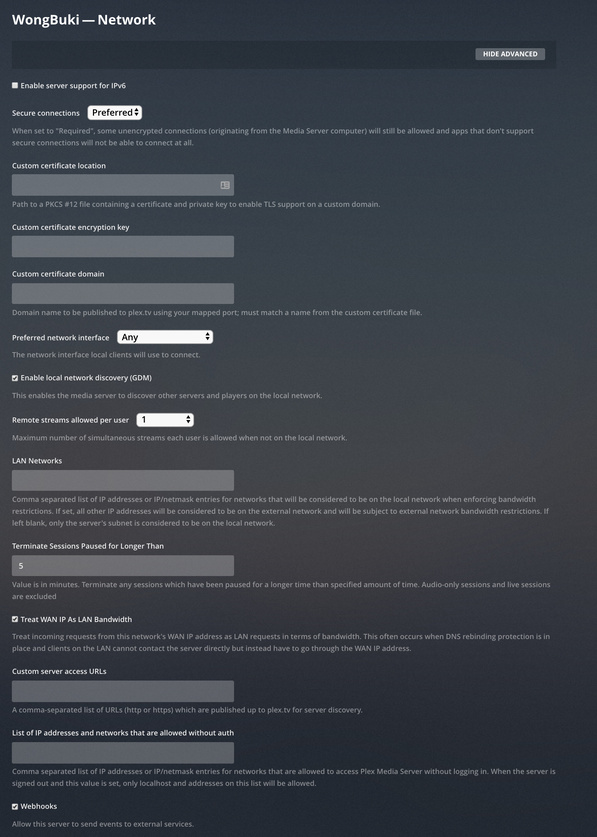
Current state of Network settings:

There’s nothing significantly different in the config, or router settings from before when PMS was solid as a rock, it all appears (perhaps anecdotally) that it went to heck after upgrading to the new beefier MacMini. Clean install be damned.

This vexes me to the point of new grey hairs sprouting. :grimacing:

I know the feeling. Let’s avert more grey hairs and have you reboot the Mac, then give PMS 6 min. to start up and run before you connect to it and download logs. I’d like to see it booting up cleanly, and you’re logs you attached don’t go back that far.

We only need the logs that are timestamped at the restart or later.
Thanks.

1 Like

Much appreciated! Here’s the log kit after a restart of the Mini:

Plex Media Server Logs_2019-10-31_11-07-44.zip (3.8 MB)

Looks like there’s something wrong with your Remote Access. Could be hardware or software as it’s not clear to me yet. Are you running this at home? :smiley:

Evidence: UPNP errors in the logs during RA setup, and then key exchange protocol errors, then PlexRelay dies.

Oct 31, 2019 10:36:49.020 [0x700004a64000] DEBUG - NAT: UPnP, found device <http://192.168.1.108:5000/ssdp/desc-DSM-eth0.xml> with private address <192.168.1.119>
Oct 31, 2019 10:36:49.020 [0x700004a64000] DEBUG - NAT: UPnP, not an IGD: <http://192.168.1.108:5000/ssdp/desc-DSM-eth0.xml>.
Oct 31, 2019 10:36:49.020 [0x700004a64000] DEBUG - NAT: UPnP, getPublicIP didn't find usable IGD.
Oct 31, 2019 10:36:49.168 [0x70000541d000] DEBUG - HTTP 200 response from GET https://plex.tv/api/v2/release_channels?X-Plex-Token=xxxxxxxxxxxxxxxxxxxx
Oct 31, 2019 10:36:49.169 [0x70000541d000] DEBUG - HTTP requesting GET https://plex.tv/api/v2/features?X-Plex-Token=xxxxxxxxxxxxxxxxxxxx
Oct 31, 2019 10:36:49.276 [0x700004a64000] WARN - NAT: PMP, got an error: Not Supported by gateway.
...
Oct 31, 2019 10:36:55.473 [0x700004440000] DEBUG - HTTP requesting GET https://downloads.plex.tv/relay/relay_v1.pub
Oct 31, 2019 10:36:55.585 [0x700004440000] DEBUG - HTTP 200 response from GET https://downloads.plex.tv/relay/relay_v1.pub
Oct 31, 2019 10:36:55.585 [0x700004440000] DEBUG - Relay: refreshed host key from https://downloads.plex.tv/relay/relay_v1.pub
Oct 31, 2019 10:36:55.585 [0x700004440000] DEBUG - Relay: starting relay.
Oct 31, 2019 10:36:55.586 [0x700004440000] DEBUG - Job running: PLEXTOKEN='xxxxxxxxxxxxxxxxxxxx' '/Applications/Plex Media Server.app/Contents/MacOS/Plex Relay' '-p' '443' '-N' '-R' '0:127.0.0.1:32401' '-o' 'StrictHostKeyChecking=yes' '-o' 'UserKnownHostsFile=/Users/videodrome/Library/Caches/PlexMediaServer/relayHostKey.txt' '-o' 'NoneSwitch=yes' '-o' 'NoneEnabled=yes' '-o' 'LogLevel=VERBOSE' '-o' 'PreferredAuthentications=password' '-o' 'PubkeyAuthentication=no' '-l' 'mikeisonthenets' '-F' '/dev/null' '1xx.xxx.xxx.89'
Oct 31, 2019 10:36:56.374 [0x700005629000] DEBUG - [PlexRelay] Authenticated to 1xx.xxx.xxx.89 ([1xx.xxx.xxx.89]:443).
Oct 31, 2019 10:36:56.422 [0x700005211000] ERROR - [PlexRelay] kex protocol error: type 7 seq 11
Oct 31, 2019 10:36:57.072 [0x700005523000] INFO - [PlexRelay] Allocated port 21559 for remote forward to 127.0.0.1:32401
Oct 31, 2019 10:42:21.765 [0x7000048db000] DEBUG - [PlexRelay] Transferred: sent 35520, received 6368 bytes, in 325.4 seconds
Oct 31, 2019 10:42:21.772 [0x700004546000] DEBUG - [PlexRelay] Bytes per second: sent 109.2, received 19.6
Oct 31, 2019 10:42:21.773 [0x70000433a000] DEBUG - Jobs: '/Applications/Plex Media Server.app/Contents/MacOS/Plex Relay' exit code for process 498 is 255 (failure)
Oct 31, 2019 10:47:00.482 [0x7000046cf000] DEBUG - Relay: cleaning up inactive relay connection to 1xx.xxx.xxx.89

After those issues, every time I see your username appear in the logs, it’s coming from a WAN connection like these:

Oct 31, 2019 10:47:54.029 [0x700004440000] DEBUG - Auth: authenticated user 1 as mikeisonthenets
Oct 31, 2019 10:47:54.029 [0x7000048db000] DEBUG - Request: [38.88.216.186:56359 (WAN)] GET /media/providers (4 live) TLS GZIP Signed-in Token (mikeisonthenets)
Oct 31, 2019 10:47:54.088 [0x700004440000] DEBUG - Auth: authenticated user 1 as mikeisonthenets
Oct 31, 2019 10:47:54.089 [0x7000048db000] DEBUG - Request: [38.88.216.186:56359 (WAN)] GET /status/sessions (4 live) TLS GZIP Signed-in Token (mikeisonthenets)
Oct 31, 2019 10:47:54.108 [0x7000044c3000] DEBUG - Auth: authenticated user 1 as mikeisonthenets
Oct 31, 2019 10:47:54.108 [0x7000048db000] DEBUG - Request: [38.88.216.186:56359 (WAN)] GET /:/prefs (4 live) TLS GZIP Signed-in Token (mikeisonthenets)

I admit I’m pretty confused here. If the Remote Access didn’t start up well, how are all your connections coming from a WAN address? Is that one you recognize? Sorry I’m not a lot of help yet.

1 Like

Thanks for the analysis, and yeah! WAN connections are me from the office pulling down the logs via the plex.tv web portal.

Is it common for UPnP anything to fire up even if manual port forwarding is configured in Plex and correspondingly in my router (with UPnP disabled)?

Hold the front door… that’s my Synology NAS, which I for sure am not running nor have I ever configured Plex for. Checking now to see if an automatic software update somewhere along the way automagically enabled a setting in the device that wasn’t active previously.

I lol’d :slight_smile:
let us know what you find.

1 Like

So… damndest thing. I confirmed that there are no DLNA or Media Server packages installed, nor is any media contained on the NAS configured to be indexed.

Contents of that XML file PMS is fetching:

<?xml version="1.0"?>
<root xmlns="urn:schemas-upnp-org:device-1-0">
	<specVersion>
		<major>1</major>
		<minor>0</minor>
	</specVersion>
	<device>
		<deviceType>urn:schemas-upnp-org:device:Basic:1</deviceType>
		<friendlyName>TITAN (DS1812+)</friendlyName>
		<manufacturer>Synology</manufacturer>
		<manufacturerURL>http://www.synology.com</manufacturerURL>
		<modelDescription>Synology NAS</modelDescription>
		<modelName>DS1812+</modelName>
		<modelNumber>DS1812+ 6.2-24922</modelNumber>
		<modelURL>http://www.synology.com</modelURL>
		<modelType>NAS</modelType>
		<serialNumber>0011321631ed</serialNumber>
		<UDN>uuid:73796E6F-6473-6D00-0000-0011321631ed</UDN>
		<serviceList>
			<service>
				<URLBase>http://192.168.1.108:5000</URLBase>
				<serviceType>urn:schemas-dummy-com:service:Dummy:1</serviceType>
				<serviceId>urn:dummy-com:serviceId:dummy1</serviceId>
				<controlURL>/dummy</controlURL>
				<eventSubURL>/dummy</eventSubURL>
				<SCPDURL>/ssdp/dummy.xml</SCPDURL>
			</service>
		</serviceList>
		<presentationURL>http://192.168.1.108:5000/</presentationURL>
	</device>
</root>

Any ideas what shenanigans the Plex relay service might be up to?