@mikec_pt i did copy paste you code, but i’m not sure if it did anything
i did try both
“root@plexmediaserver:~ #chown -R plex:plex /Plex\ Media\ Server”
and
“root@plexmediaserver:/ #chown -R plex:plex /Plex\ Media\ Server”
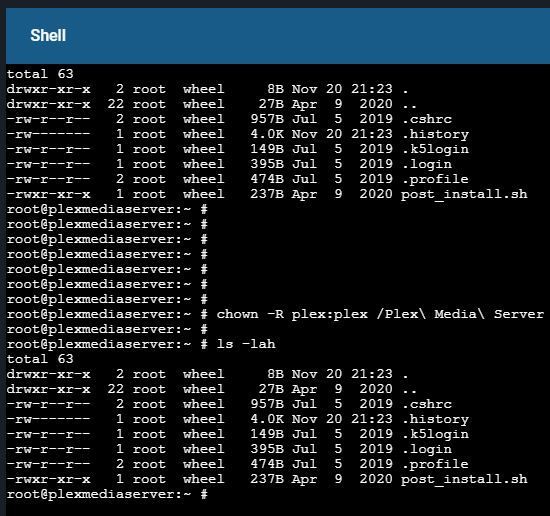

by the way i’m pretty sure the reason root own Codecs is because you told me to delete it, so when i went to put back Codecs. i was log in as root, so root wrote those files
You’re not in the right path, or in other case using " in the wrong place, but this is most certainly due to permissions, after wiping the dir PMS should re-create it again, if you move over somehting then its gonna get the ownership of whomeever moved it.
If PMS does not recreate the dir, therre’s likely permission issue in the parent dir.
The fact that it all works in a new jail, means something is setup wrong with this one, however this are system issues that require some knownlage of using a shell to fix, and it doesn’t seem like you to familiar with that.
I’m not sure if you can try to fix it fix the FreeNAS UI, but that might (might) be an option too.
An alternative here is just using the new jail, having the media access there is easy, but if you want to migrate PMS db/metadata then you’ll likely face the same struggles.
For anyone else bumping into dir it was indeed related to ACLs, being set, possibily by some other service like samba, I was able to solve this over DM and Codecs are now downloading.
You might need to use setfacl -b on dir that have the “+” flag when you run ls, running chmod will likely give permissions issues even with root, if ACLs are the problem.
Sadly freebsd doesn’t have -R (recursive option) for setfacl, so you’ll need find DIR -exec setfacl -b {} \; and I suggest you do this Dir by Dir (i.e for Codecs, Cache, Logs etc… mostly because when you run it for the Metadata dir, this can take a looooong time, but ofc if you have time running this on the main PMS folder will work 
EDIT:
I said this in DM but forgot to post here, to speed up find exec use:
find DIR -exec setfacl -b {} \+ (+ instead of 
This is the next best thing to -R and might make it a lot faster, in the case of this OP we didn’t have much free memory at the time so things were getting slow as zfs wanted more ram, so the user had to reduce ram usage for one of the process.
I guess tl;dr is be sure you have some free memory, otherwise zfs will always be slow, and using that + plus trick won’t make much difference in such cases.
BTW thanks to @Volts for the reminder of + instead of ; and also the fact that in FreeBSD 12 (not sure if 12.0 but 12.1 and 12.2 you do have -R, so I.E. In truenas that should work and simplify things.
2 Likes
