Problem With Corrupt databases

Hi,

I’m having a problem with a corrupt database. I would be having problems opening the home site or recommended folders in the library. I was able to open the library folder to play my media. After opening the database in DB Browser for SQLite and running the Integrity check I get many problems. Here are all the issues:

*** in database main ***
On tree page 135105 cell 65: Rowid 99138 out of order
On tree page 119659 cell 15: Rowid 95524 out of order
On tree page 38 cell 7: Rowid 120 out of order
On tree page 38 cell 6: Rowid 106 out of order
On tree page 38 cell 5: Rowid 91 out of order
On tree page 38 cell 4: Rowid 76 out of order
On tree page 216095 cell 14: Rowid 106 out of order
On tree page 226181 cell 13: Rowid 120 out of order
On tree page 273272 cell 9: Rowid 130 out of order
On tree page 38 cell 0: 2nd reference to page 5672
Page 247958 is never used
Page 320911 is never used

I tried extracting the database to a sql file and back but I always got some errors importing to the database fx: “Error in statement #3 constraint failed”. I tried to find the errors manually but I barely understand databases so that worked very little.

After this I tried to check my backup but the backups seem to have stopped for the db file around 18 months ago. It seems like the database got so corrupt that the backups would not run after that. That is far too long ago to be a good alternative to fixing the db file.

So here come my questions and asks for help. Is there anyway to fix the database manually? If so is there some tutorial that can help me find the errors to fix them since I don’t understand what “On tree page 135105” means.

Secondly, why is there no notification or an error to report a problem with the database before it got so broken and too late to restore from a backup?

You can start in the support site with: https://support.plex.tv/articles/201100678-repair-a-corrupt-database/

Not my forte, but this has helped me in the past

Also some new info in the forum: Corrupt Plex Database - repair steps produce 0-byte database? Backups only BLOBs? Another recovery step to try if your database is FUBAR

1 Like

Constraint failures mean that the traditional database recovery isn’t going to work as there’s some table definition that is failing. Your best bet right now is to try the alternate method that recently helped me.

In the “Repair a Corrupt Database” article, take “Run a Repair” all the way through Step 3. Instead of doing Step 4 there, try this - I’m assuming you’re using a POSIX-compliant shell here and not Windows:

4.) sqlite3 com.plexapp.plugins.library.db ".recover" | sqlite3 out.db

5.) mv out.db com.plexapp.plugins.library.db

Then run back through the “Check for Corruption” steps and see if it throws any errors. If not, you might be better off than you were before! Start up Plex with this new DB and tail the Plex Media Server.log to see if you get the “Analyzing/Vacuuming database” entries.

Hi,

This repair function worked! Thank you so much. But do you have any clue about why there are no notifications or errors for problems with the backup operation?

1 Like

Sorry, no. I’m not a Plex dev, just a database guy. I am also plagued by the backup issues, but I’ve solved it with a manual “stop Plex, copy DB file, start Plex” cron job that I have running every Sunday night now.

Hello,

I got the same issue, but post #2 resolved it :smiley:

Thanks, I hope you get an exstra present for Chrismans :wink:

Best regards
JBCn1

I run Plex on a MacMini with Big Sur

Version 1.21.1.3842

I recently successfully moved the metadata folder to an external HDD

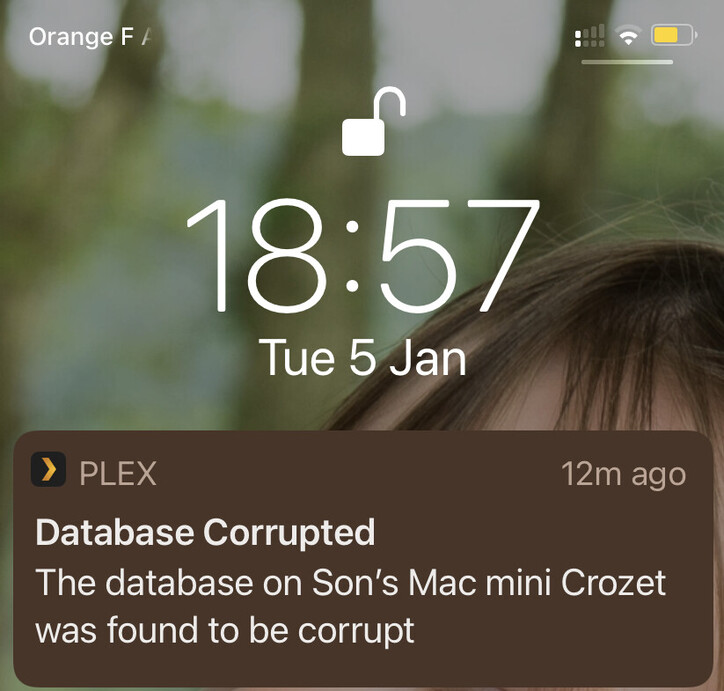
I also regularly (even prior to that metadata folder move) get a message on my ipad/iphone that my database is corrupt, but I did not notice any issue running the server and watching content.

However, my Plex server seems lately to crash without announcing, I notice it only when I want to access a media and I see it is no longer running.
Then I restart it manually without any issue.
So I am trying to assert whether the database corruption is the source of that “silent” crash

I tried to apply the steps indicated in

Not sure if it was successful:
sondophan@Sons-Mac-mini-Crozet Databases % cd /Volumes/Music_Maxtor_USB_4TB/Plex\ Media\ Server/Plug-in\ Support/Databases

sondophan@Sons-Mac-mini-Crozet Databases % cp com.plexapp.plugins.library.db com.plexapp.plugins.library.db.original

sondophan@Sons-Mac-mini-Crozet Databases % sqlite3 com.plexapp.plugins.library.db “DROP index ‘index_title_sort_naturalsort’”

sondophan@Sons-Mac-mini-Crozet Databases % sqlite3 com.plexapp.plugins.library.db “DELETE from schema_migrations where version=‘20180501000000’”

sondophan@Sons-Mac-mini-Crozet Databases % sqlite3 com.plexapp.plugins.library.db “PRAGMA integrity_check”

wrong # of entries in index index_metadata_items_on_changed_at

wrong # of entries in index index_metadata_items_on_originally_available_at

sondophan@Sons-Mac-mini-Crozet Databases % cp com.plexapp.plugins.library.db com.plexapp.plugins.library.db.original

sondophan@Sons-Mac-mini-Crozet Databases % sqlite3 com.plexapp.plugins.library.db “DROP index ‘index_title_sort_naturalsort’”

Error: no such index: index_title_sort_naturalsort

sondophan@Sons-Mac-mini-Crozet Databases % sqlite3 com.plexapp.plugins.library.db “DROP index ‘index_title_sort_naturalsort’”

Error: no such index: index_title_sort_naturalsort

sondophan@Sons-Mac-mini-Crozet Databases % sqlite3 com.plexapp.plugins.library.db “DELETE from schema_migrations where version=‘20180501000000’”

sondophan@Sons-Mac-mini-Crozet Databases % sqlite3 com.plexapp.plugins.library.db .dump > dump.sql

sondophan@Sons-Mac-mini-Crozet Databases %

Can someone please tell me if the problem is fixed and what next steps to take to solve the silent crash/db corruption messages?

I downloaded the server log in case someone can detect the crash cause
(File removed)

Downloading the database yields a strange result (empty file), is it because the symlink?
If you tell me which folder to zip I can do it manually
(File removed)

Thank you

This topic was automatically closed 90 days after the last reply. New replies are no longer allowed.