I’m brand new to PLEX. I’ve read all the articles about how PLEX will transcode video files on the fly based on the target viewing device’s requirements. In my situation, that device might be a Dolby Atmos theater with 7.2.4 speakers, a smart TV with 5.1 speakers, a computer with 2.1 speakers, a computer with headphones, a smart phone with a sterero head jack or an iPad. My PLEX server will be powerful enough to handle the transcoding on the fly. My questions are regarding which audio tracks I should keep when I rip my Blu-ray movies using MakeMKV. I’m more concerned about audio quality than total file size, but I do not want to make my files any bigger than really necessary.
- Can I just rip the highest quality audio track such as Dolby Atmos or DTS-HD Master Audio?
- Can I trust PLEX to transcode this audio file to whatever the destination device needs?
- Since the PLEX client might be installed on a smart TV, how would the PLEX server know if the smart TV was connected to a receiver and 5.1 sound system or if the TV was just using built in stereo speakers?
- Are the audio transcodes essentially identical to the different original audio formats available on the disc?
- Or would it be better to just always rip all the English language audio tracks (perhaps skipping the commentary type tracks if I can guess which they are)?
Thanks!
@“dad@ourhumbleabode.com” said:
- Can I just rip the highest quality audio track such as Dolby Atmos or DTS-HD Master Audio?
Yes.
- Can I trust PLEX to transcode this audio file to whatever the destination device needs?
Yes.
- Since the PLEX client might be installed on a smart TV, how would the PLEX server know if the smart TV was connected to a receiver and 5.1 sound system or if the TV was just using built in stereo speakers?
This largely depends on the particular Plex client used. They all have different abilities.
- Are the audio transcodes essentially identical to the different original audio formats available on the disc?
No, (almost) every transcode comes with losses in quality. Video and audio equally.
If you value quality most, my general advice is: get a Plex client which plays all the important video and audio formats directly, so your server doesn’t transcode.
‘Plex Media Player’ (for PC hardware)
or the Plex client on the nVidia Shield console are such beasts.
Plex clients in Smart TVs are much more restricted.
They are OK, IMHO for “bedroom Tvs” and such 
Keep Plex’s ability to transcode for other use cases, like playback on wireless, or remote or weaker clients (where constraints in network bandwidth or codec support exist).
- Or would it be better to just always rip all the English language audio tracks (perhaps skipping the commentary type tracks if I can guess which they are)?
This has not directly to do with the above questions. You can have your files with several audio tracks.
I do this with most of my video files. I alwas keep the english and german audio tracks and several subtitle tracks in both languages.
Every Plex client supports selecting audio tracks and subtitle tracks. Only the issue of distinguishing commentary tracks from regular tracks is still a bit difficult, since Plex doesn’t show the track ‘titles’.
The only way currently is to ‘order’ the tracks after always the same schema:
https://forums.plex.tv/discussion/comment/832981/#Comment_832981
- Or would it be better to just always rip all the English language audio tracks (perhaps skipping the commentary type tracks if I can guess which they are)?
This has not directly to do with the above questions. You can have your files with several audio tracks.
I do this with most of my video files. I alwas keep the english and german audio tracks and several subtitle tracks in both languages.
Every Plex client supports selecting audio tracks and subtitle tracks. Only the issue of distinguishing commentary tracks from regular tracks is still a bit difficult, since Plex doesn’t show the track ‘titles’.
The only way currently is to ‘order’ the tracks after always the same schema:
https://forums.plex.tv/discussion/comment/832981/#Comment_832981
Let me explain what I meant by question #5. I always plan to rip the very highest quality audio track on the disc, such as Dolby Atmos, to be enjoyed in a home theater. If I do that, do I gain any audio quality by also ripping the DD 5.1 track for when I stream the movie to a 5.1 speaker setup in a different location? Or is the PLEX transcoding of the Dolby Atmos track so good that it is basically creating a duplicate DD 5.1 stream?
@“dad@ourhumbleabode.com” said:
Let me explain what I meant by question #5. I always plan to rip the very highest quality audio track on the disc, such as Dolby Atmos, to be enjoyed in a home theater. If I do that, do I gain any audio quality by also ripping the DD 5.1 track for when I stream the movie to a 5.1 speaker setup in a different location? Or is the PLEX transcoding of the Dolby Atmos track so good that it is basically creating a duplicate DD 5.1 stream?
Probably not.
It again, depends heavily on the client which does the playback. Some will get a AC3 transcode from the server, some only a AAC 5.1 transcode.
I usually keep only the highest quality audio track.
You probably won’t notice the quality difference on clients which don’t “understand” its format.
But in the end your ears are which make the decision. So set up a few test rips and do some comparisons.
Or be on the safe side and keep those AC3 and DTS5.1 tracks in. You can later decide you won’t need them and remove them. Remuxing the files and leaving out tracks is much, much faster than re-ripping them from disc.
Dear OttoKerner
I have a question about how plex transcodes audio
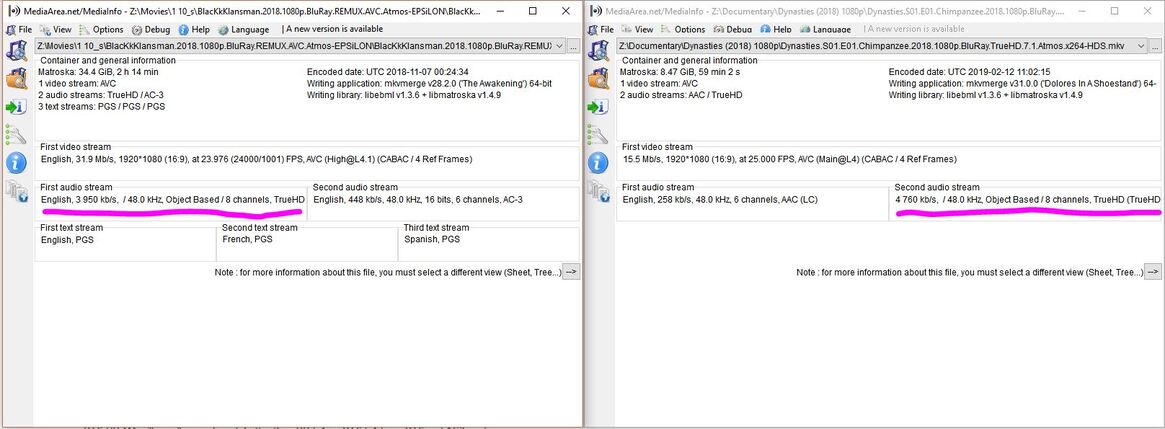
im play two MKV files both have exactly the same Audio TRUHD atmos
the movie blackklansman Plex client on my LG TV C8 does not transcodes direct play
the dynasties documentary exactly the same audio plex transcodes audio on the same TV !
I don’t know the smart tv app that well, but I seem to remember that even the order of the audio tracks can play a role.
The first movie has the TrueHD track first,
the second movie has TrueHD only as second audio track.
what otto said;
typically most plex clients will use the first audio stream unless you have selected a different stream from the pre-play or pause menu.
in other words, to avoid transcoding, select the 2nd audio stream for the blackklansman movie.
OTTOKERNER
so if I change the order with mkvtool nix I would get the same direct play in both
will try that
Teknojunky
NO actually the blackklansman does not transcode it direct plays the first audio stream (atmos TRUEHD)
The dynasties when I choose audio stream 2 (which is DOLBY atmos TRUEHD) it transcodes
I find that difficult to believe. If that tv does support truehd+atmos for 1 movie, it should support them for the other.
the only difference is the dynasties has a higher bitrate.
screenshots of the status page @ https://app.plex.tv/desktop > status for both videos
this should tell what streams exactly is being played or transcoded
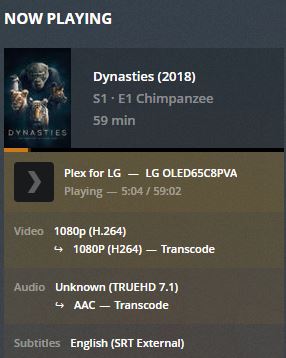
this is plex app on LG is transcoding audio TRUEDHD for dynasties
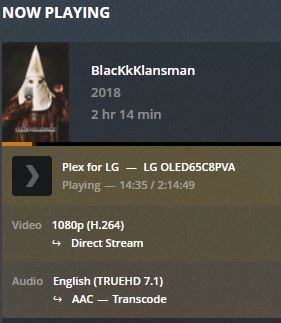
this is plex app on LG is transcoding audio TRUEHD for blakklansman

this is xplay app on LG not transcoding audio for TRUEHD
as for xplay for dynsites it did not play any sound for TRUEHD of dynasties before I added the ac3 audio track then now it does not play the truehd track when I select it
ok, so plex transcodes audio both movies, this is as expected, since unless this tv has the new HDMI 2.1 and E-ARC and an atmos receiver to pass through to, it doesn’t support truehd+atmos.
dynasties has subtitles enabled which can cause video transcoding as indicated.
as for xplay, I have no idea what its deal is, but it obviously uses some kind of enhanced player that can direct play truehd.
thanks teknojunky
however the bizzar thing is that xplay direct plays one mkv atmos and does not the other
subtitles are srt so on xplay it never transcodes video when srt is selected however on plex app on lg video is transcoded with srt
I think plex client for LG is very primitive
I usually use Xplay since it rarely transcodes anything
yes, likely the plex lg client is a ‘web app’ and it sounds like the xplay is more of native app with more comprehensive abilities.
All LG apps are “web apps”. But Plex, like most Plex clients, use the devices native audio/video players. XPlay is a dedicated audio/video player so it does not rely on hardware codec support.