Easy work around that I haven’t seen anyone post. You can change the date on your computer to like a year or 2 in the past. Then move the movies you want over. Once you have moved the movies over scan the plex library. It will add the movies but wont match them correctly (You can do this after). Once Plex is done scanning you can change the time back to present and refresh Plex library. You can now have any movie added that wont show up on recently added list. You will need to go to the movies and match them. Easy way to find them is select the dropdown in moves and select unmatched. Match them and your all set. Really easy to do.
I do this all the time when I’m adding a bunch of old movies or replacing movies with better quality etc. This way they stay off the Recent Added list. Works every time.
I replace movie with better quality sometimes too, they do not come back to newly added upon Update Libraries.
I’m not after a work around like this. I going to wait for the feature to be fixed.
In the mean time I simply changed the file extension this way it’s still on the drive, but not showing and it’s inaccessible. It’s temporary fix an I hope they are working on this issue. I didn’t have this problem before, I was using PLEX for free just locally, so I didn’t care about that at all then.
How long can it take for an issue like this to be resolved?
Most people using Plex never come to the Forum just to vote on feature improvement. They don’t even know this idea is being suggested. If they don’t have major issues with their server, they never have to come here.
With years of being on this forum I’d be extremely skeptical that plex will ever implement this but maybe I’ll be proved wrong.
If you want something now then best solution is to manually update the added_at field directly in the metadata_items table for the movie you want to remove. This is similar to what was posted above early in this thread.
I’d be too afraid to mess thing up for everything else working the way I like. I opened the SQlite file in plex Install folder, I know nothing in coding, so that fix is not for me.
I would be so simple for them, the option delete is there. But that gets rid of it permanently, on you drive too.
Maybe there is another reason why PLEX can’t do this. If the feature was tested in a sandbox environment and have proven to generate several issues in the past. That could explain why they would not even want to touch this now.
It would be nice though if they took the time to explain why, in this post or give some good news like… “Give us a week were working on this :)”
Understood and I know how you feel. Maybe copy the db to some temp location and then play around with. Below is what I have been doing on those occasions I want to adjust this so will give an example …
Copy the DB to some temp location: cp /var/lib/plexmediaserver/Library/Application\ Support/Plex\ Media\ Server/Plug-in\ Support/Databases/com.plexapp.plugins.library.db /home/plex/Downloads/
Next open up a sql prompt opening the db you copied above: "/usr/lib/plexmediaserver/Plex Media Server" --sqlite /home/plex/Downloads/com.plexapp.plugins.library.db
At that prompt enable column mode (makes it easy to read things): .mode column
Next we need to find the id so we can update the right record in the db. Lets say the 1957 movie 12 Angry Men was just added to your server and is right at the top of your Recently Added in Movies list. Run the following to find that record: select id, title, added_at from metadata_items WHERE title = '12 Angry Men';
Results should look something like this …
So you can see the id for this record is 659 and the date it was added to my library is 2020-04-20 14:22:43. So lets update that record to change the added date to 1 year earlier … UPDATE metadata_items SET added_at = '2019-04-20 14:22:43' WHERE id =659;
Once done you can query the record again to see if the change worked.
Then copy the db back to your plex server and ensure permissions are all correct. Start plex and the movie’s added date will be updated and it will move to the new date in the recently added view.
You do not want to remove this date, only adjust it to the date you want. I typically move it back a few months so its not right at the top of the recently added list.
Anyhow, said I’d post this here in case its helpful to anyone as this comes up a bit and is more targeted that than example given earlier.
I got it, it’s working but that is not easy. I associated the the database file with PlexSQL app so it opens with the right program. I’m going to make a text file, with lines to copie, for next time. But still this is not easy, It’s not because I know now how to that this feature should be put on ice forever. I hope they are going to fix this. Thanks!
It worked the first time, this was a second attempt, I tried to changed the date to something further back, it didn’t do anything I think. I was not in my comfort zone, I really have no clue with coding.
Thanks for the clarification, first time I copied your text and it all went well. The second time “screenshot with typos” The Right click paste function and Ctrl V seemed to not work. So I manually type those line, I better not do this too often .
We can adjust the select statement for scenarios like this. So use something like this …
select id, title, added_at from metadata_items WHERE title GLOB 'Charlotte*';
which will return something like this …
sqlite> select id, title, added_at from metadata_items WHERE title GLOB 'Charlotte*';
id    title            added_at
----  ---------------  ----------
1102  Charlotte's Web  1607871367
sqlite>
The GLOB is used so we can use a * in the text title being searched. In this example on my system the id for the movie would be 1102 but will be different for you.
sqlite> select id, title, added_at from metadata_items WHERE title GLOB ‘Charlotte*’;
id title added_at
68976 Charlotte’s Web 2022-04-14 19:43:19
68977 Charlotte’s Web 2022-04-14 19:43:20
68978 Charlotte’s Web (Trailer 1) 2022-04-14 19:43:20
sqlite>
Thank you! That worked for me.
There’s was no way to tell which ID was related to recently added, so I updated both. The item is in the Library as it should and gone from Recently Added.
They already track when it’s added. The easiest thing they could do is add that “Date Added” field in the “Edit” properties, whether under General tab or Advanced tab. This can then allow you to manually edit to an older date, not unlike your ability to edit most other metadata, Sort Title, etc…


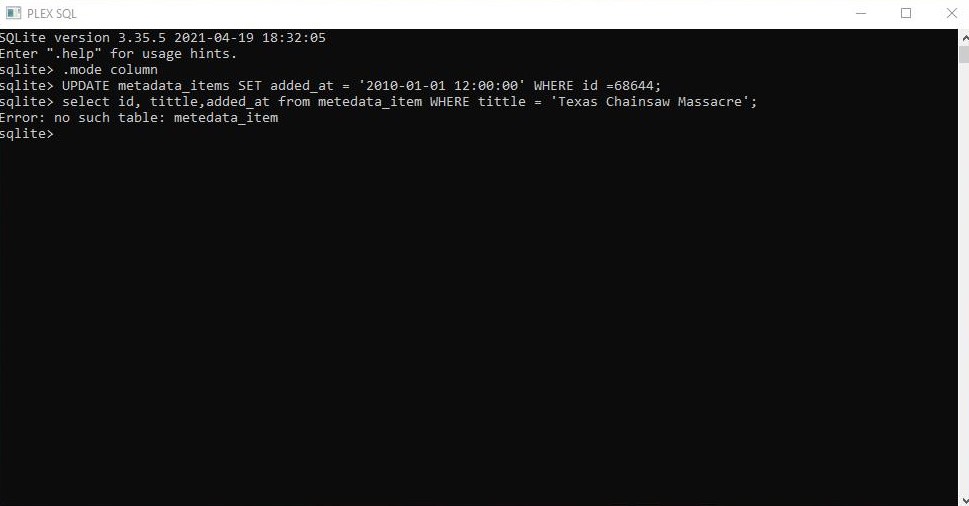
 and this is unforgiving if you aren’t careful.
 .
.