Repair Plex Database. I can't chown the repaired database to plex user

Hello,

I have a F2-421 Terramaster NAS with Plex and I’m trying to repair the database because it’s corrupted.

I did all the steps fine but when I’m trying to do the last one " ```
chown plex:plex com.plexapp.plugins.library.db

I have a operation notm permitted

![image|690x283](upload://xbvTwtutLRaaQyhkhyS9tpa54D.png) 

Any help please because I don't know what I'm doing bad.

Thanks a lot
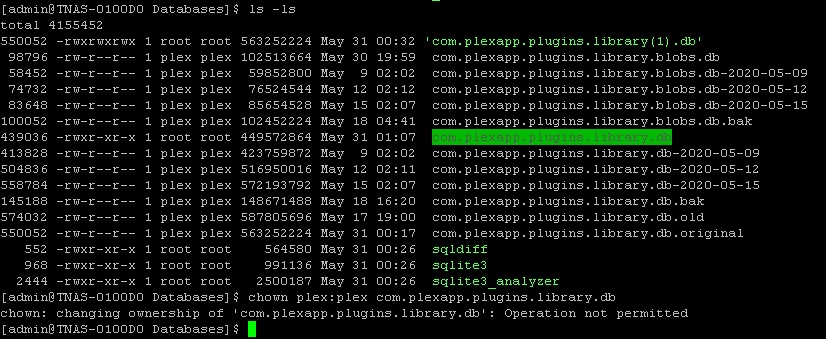
A capture of my problem

When changing ownership of a file/directory which doesn’t belong to your user, you must have root privileges. So, run the command with “sudo”:

sudo chown plex:plex com.plexapp.plugins.library.db

It will ask you for your root password; when it does, enter it and ownership will be assigned to plex.

Hi philipsw, firts thanks for the answer.

It’s true. I logged with admin user that I thought it’s a root user but it’s not true. I logged off and I logged with root user and it’s work.

Thanks a lot

1 Like

This topic was automatically closed 90 days after the last reply. New replies are no longer allowed.
