Server Version#: 1.21.1.3830
Player Version#: 8.11.0.22186
I am getting a lot of up front load time. Could Plex be, or is Plex, unnecessarily sending my request through the internet and back to my lan?
Right now I have a shieldtv (server and client) and synology server connected to a gigabit switch / media bridge linked with AC to the BT smart hub. I have tried an independent switch and I’ve tried the ASU’s 66u router as a switch. Same result.
Logically the file should pass from the server through the switch and get to the server / client and play, without ever touching wireless. Sample would be a file with a 8-10 mbps bit rate. Even if it was all wireless the throughout of my ac setup is about 300mbps with very little other overhead. It’s taking 30 seconds to start a stream. At least. Again, regardless of if I’m using the gigabit wired shield tv or an iPad wirelessly.
The lag I am getting preloading the file is specific to Plex. I can pull a file through a standard media player like VLC with share access instantly. Even on the iPad. The files are saying they are direct playing. I can also stream media files stored on the shield instantly. This would indicate to me that it’s not storage access or network speed but specifically Plex.
I had a very similar setup but with Plex serving off windows 10 / apple tv all wired via gigabit switch connected to a media bridge and had no issue.
I don’t understand why a file that is running direct play would take so much prep time. It doesn’t matter if the file is a 5 minute media file or 2 hour media file. Very low bit rate stuff starts instantly
Sounds a bit of a weird setup to me. Why not have just the Synology as the server, rather than having two servers? It also doesn’t make sense having the server as a client also and could be a reason why it’s going in a bit of a loop.
The shield tv is media player which is both a server and client. It has a hardware transcoder and quad core chip, capable of supporting 3-4 transcoded streams at a time without issue. It consumes very little energy and produces almost no heat in a near silent setup.
The synology is an arm based device without hardware transcoder and is unsuitable for anything beyond streaming files. It’s a file server.
I’m not sure what you mean by it makes no sense having the server and client on the same machine. There’s no real difference in my eyes between using a windows machine/nuc/htpc/odroid to serve and view, which many people do (except my setup has excellent hardware transcoding). Once the streams actually initiate there’s no issue. The problem is the preloading wait time.
On the one hand you are saying you have the perfect setup and then on the other you are complaining that it doesn’t work satisfactory.
You have said that the issue is that direct play doesn’t start quickly, yet you don’t use your Synology for direct play, even though you have admitted that the device would be suited for it.
In my experience of setting up media servers for people, I’ve not come across anyone that wants to use their media server as the client as it just makes no sense. If that was the case you could just use a plain media player for that rather than a media server.
Do you want a full break down of why I need the ability to transcode or is in unfathomable not all content is streamed on a lan?
Your answer is quite short sighted and if you’ve never set up a media server also as a client, your experience is probably quite limited as it’s extremely common.
My synology is absolutely NOT suited as a full time all being Plex media server. It has a super low powered arm chip that struggles with more than 2 audio transcodes, as mentioned.
The setup isn’t perfect nor did I say it is, I said the transcoder in the shield tv is excellent and having a media server and player on one box is common. Many people stream outside their homes or share libraries. If all one wants to accomplish is streaming ripped files there are a plethora of low overhead solutions.
Im not sure how extensive your experience with this stuff is but these kinds of answers aren’t helpful in the least. Perhaps as you’ve just joined you may wish to spend some time familiarising yourself with common setups and going to threads in areas where you may be of help, rather than random criticisms thrown form an apparent lack of experience or knowledge. The question at hand is why on a gigabit lan with almost no overhead there’s a preload time of 30 seconds.
I’m not sure if you’re trolling, having a bad day, or just want to seem “right” but the title of the thread wasn’t, come on in and critique my setup with limited understanding.
I have been installing media systems professionally for over 10 years. So not sure why you think I lack knowledge nor why you are intent on throwing insults just because you don’t like the answers that someone trying to help you is giving you.
I hope that you manage to get some satisfaction in the future
Simple answer as you didn’t understand my answers: Get a new server that is powerful enough to be able to stream directly and transcode if you want instant playing and not have two servers
Note: Also make sure you are using the updated server version
Simply reply to the suggestion a replace my new server with a new server as it and the synology as a file server aren’t capable of doing this.
That’s absurd.
This setup works on many devices, including lower powered raspberry pi and odroid devices. The only reason it wouldn’t work is if there’s an issue with pms on this platform.
Surely you can’t think everyone is using the same machine to stream and store files.
Ignoring the disaster of the previous conversation and back to the actual topic at hand.
The initiation of playback is for all intents, identically delayed across many files in this setup.
To me it seems like the Plex logic is preload a certain amount before initiating playback once a bit rate is higher than xyz
Is this something Plex does and is it adjustable in a configuration file? Given the gigabit connection it seems unnecessary to preload that much content (enough to have copied 20-40% of the file.
Edit -
So I found an old thread where moviefan explained the prebuffering. They stated that the prebuffer happens on direct stream. So I suppose this is expected behaviour in that sense. I just wonder why it has to pre buffer to so long and would suggest that length of time is unnecessary for many situations where one isn’t transcoding.
Indeed if I transcode the playback is instant, this is only direct play.
Perhaps this can be written in to the confit file or better yet a menu system , even if the option for preload is based on network speed, slow, medium, fast, ultra - or something to that effect.
You request to play a media file, it then get’s the file from your Synology and then sends it back to your server, then it sends it out again to your player, which happens to be your server. Hence the lag as your file is going round and round your network.
As for your comment on the Pi, it’s simple. Most people attach an USB drive to the Pi in order to serve the media.
So you believe that a file is called from a nas over gigabit, hits the server, makes a return trip to the nas, over gigabit, then comes back to the player on the same device as the sever.
I don’t believe that’s correct based on observing network traffic and drive activity from devices, but I’m happy to look at any documentation you may have regarding this. .
From what I see -
Plex server with library. Starts file steam from storage (attached or nas) and then forwards to client and converts to client. The only difference in the client being local is the forwarding happens instantly. However with even the largest files the amount of bandwidth necessary would make it largely irrelevant on modern networks with good throughout.
Even if what you proposed is true we are talking about a file transfer speed of max 2MB/sec on gigabit Ethernet. Should it make a return trip it would still be inconsequential when dealing with SSD, gigabit; and ample processing
It’s would seem clear from the posted link Plex has decided they will buffer a certain amount on direct play. The fact it doesn’t change between the client on the shield or an iPad over wifi indicates there’s no bottleneck on the network IMO.
A direct play through something like vlc doesn’t have a buffer and if the network was interrupted it would cease. I know if I pull the network plug I have quite a bit of time to get it back in before Plex stops the playback.
I would only submit after reading this is the design that should be editable by user.
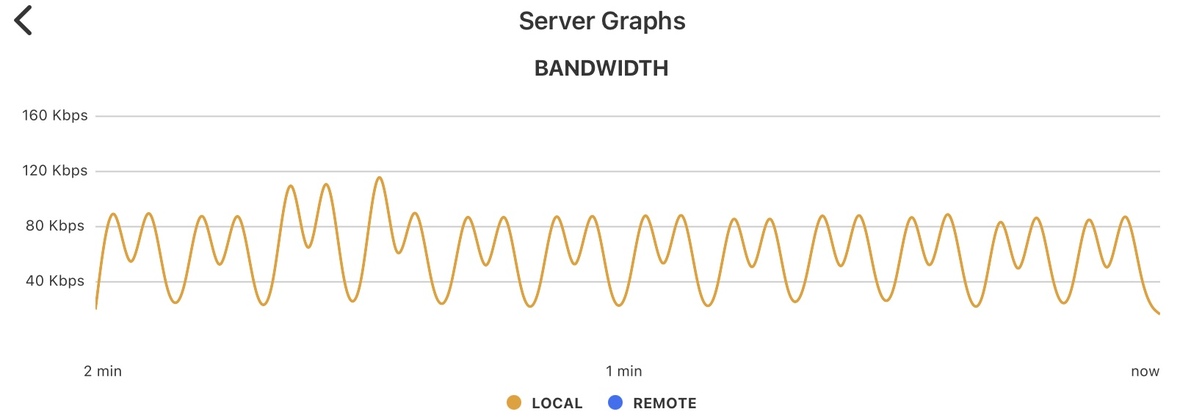
So the machine with the “problem” of the 80mb preload spike which plays exactly like the machine with local content.
So what are you saying is the shield server and client is fine but there’s a problem with nas to shield over Ethernet to wifi ipad
So there’s not the issue you said before but a different one?
The bottom line is running a server on a different machine than storage connected over gigabit isn’t an issue even remotely. Never has been. Maybe if I was trying to serve 50 streams and saturating the weak synology throughout.
The fact you picked on the iPad scenario as problematic reiterates the shield isn’t having issues.
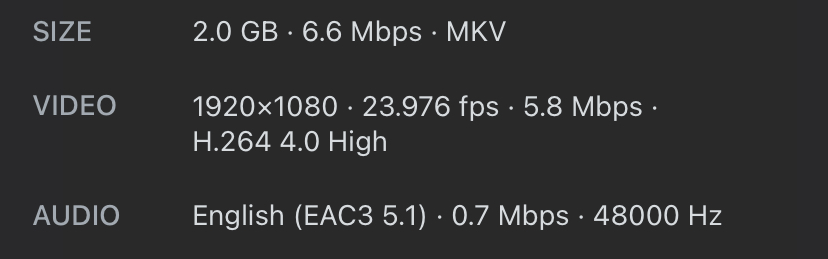
I’m not at all surprised to see it spike like that given the file information and direct play. It’s a near,y 7000 Mbps file.
The issue isn’t with the connection to the synology based on earlier testing. I will copy that exact file to the usb drive and add it to my library to see what the result is. I expect it to be pretty similar (within say 2-3 seconds)
Unfortunately a usb attached drive without redundancy holding 3-5tb of data isn’t a solution for me
This is something I’ve been doing (with Plex) for ten years. I have never stored my files on the machine which acts as a Plex server. The change I’ve made is removing a windows pc from the equation and shifting the server to the shield, given the hardware transcoder, gigabit Ethernet, quad core processor, and 3gb of ram this shouldn’t be an issue. The resources required to push through a file without transcoding are minimal- same for the copy process, and the transcoding is handled without any meaningful performance impact.
Even if the local bandwidth is doubling 85Mbps we are talking about a gigabit network capable of 900. Without anything else going over it. I will also pull my switch logs.
If there is a unique issue with this setup now then it isn’t present in the windows build of pms and its a specific pms android issue that should be opened.
If you’re interested in helping - can you find a file you have with similar specs on your synology server and ensure it’s direct playing- then show the bandwidth and time how long it takes to initiate the untranscoded stream?
It seems from the post I linked that this is something Plex has done deliberately and it will be relatively close across devices.
I found the answer after looking at resource usage on the disk station.
Synology’s implementation of opportunistic locking in smb.
I guess I enabled this when working with a few Linux boxes due to (Lightroom catalog syncing issues)around the same time as the shield swap. Disabling it solves the issue completely.
For anyone finding this later -
File services, under smb. Click and advanced.
The direct play files now work instantly through the shield client or over WiFi.
Now I have to move my Lightroom catalog to a cloud service. ¯_(ツ)_/¯