Techically yes, you can use hardware transcoding. Of course you’ll get slightly lower image quality when doing it with the GPU, but for on the fly transcoding this should be fine.
However, at the time only the newer processors support H.265 transcoding. So Skylake can transcode h.265 8-bit video, whereas Kabylake and Coffelake can transcode H.265 10-bit content.
The problem is, though, that plex, at the moment, seems to be unable to transcode H.265 with quicksync or any other GPU accelerated method. This is most likely a limitation of their transcoding solution they are using, and it may be possible in the future. Oh, and you need a plex pass to enable hardware transcoding anyways.
To answer your question, yes, in theory your skylake based J3455 should be able to transcode 8-bit H.265 content, even in 4k, but not in plex at the moment. However, as this is a rather slow GPU I do not know how good it would do this, depending on the bitrate. So I have no Idea if realtime would work, even if plex were to support it. However, it would still be worlds faster when transcoding than the CPU part of your 3455.
However, a strange thing is that Plex in it’s own FAQ states that a passmark 6000 CPU should be able to transcode 4k HEVC videos, which I don’t think is enough. I have 9500 passmark score and can not do this. But without the bitrate of the file plex tested, this is also not a very usefull statement (i mean, passmark 6000 is more than enough for 10mbits hevc 4k but not for something in the region of 80mbits or higher.)
What do you think would be better for 4K hardware transcoding using it’s own integrated graphics, the Intel® Celeron® 3865U dual-core 1.8 GHz processor or the Intel® Celeron® J3455 quad-core 1.5 GHz, up to 2.3 GHz. The second is older but quad core and the first one is brand new but dual core.
This is my first post on this forum but have been using PMS for a number of years now and has been fairly OK for my purposes - up until last year. But before I go any further, I’ll try to give a brief summary of the environment that that is running:
Server is home built. AMD Ryzen 7 2700X on Gigabyte X470 Gaming 7 mobo running 32GB RAM (2x16GB modules), 24TB of Raid 0 HDD storage with Gigabyte GTX 1080Ti Xtreme GPU, and Windows 10 Pro x64 running on SSD.
Main TV is a 4K/HDR Samsung QA65Q7FAM (2017 model QLED), with a secondary 1080p Samsung in another room.
Environment includes an XBox 1X and HDHomeRun.
Network is comprised 1 Netgear Nighthawk D7000 Router/Modem and 2 supporting Netgear X7000 range extenders. The server, Main TV, Xbox 1X and HDHomeRun are all ethernet connected to one X7000. The second TV is ethernet connected to the other x7000. The 5G spectrum is only available/used for traffic between the main router and range extenders. All other devices (mobiles, etc) connect via the 2.4GHz spectrum. The D7000 has a very stable and consistent ISP connection of 100Mbps down and about 48Mbps up.
Now to put it simply, my whole world of hurt began after purchasing the main TV. Here was I thinking my previous system (which was not too shabby) would have no problems running 4K HEVC HDR content - how could I be sooo wrong (and I can see anyone who is reading this nodding their heads knowingly). All I want to do is get my 4K HEVC HDR content that’s stored on my server to run smoothly (and in 4K HDR - preferred best quality) on my main TV. However, even after all of the recent upgrades I’ve done to my system - it still judders. Judders in the Plex app on the TV, it judders in the PMS app when played directly from the server, it judders in VLC Vetinari and Microsoft’s Films and TV. The only place it doesn’t judder is when copied to USB and played directly from there - and that’s only if the video and audio codecs are natively supported by the TV.
People with i9s benchmarking 20k are having trouble doing software 4k in plex so I’m not surprised you’re seeing stuttering if it’s transcoding… when it seems it shouldn’t be.
I would start with seeing if it’s doing direct play or transcode… my guess is it’s transcoding
From there I would check the logs to see why it wants to transcode when obviously your TV should be fine with direct play.
You could also try some non HDR 4k samples to see if it’s the HDR tripping things up
Some threads
Reported on LG app but maybe it’s a globally affecting bug
Hey Melrhombus, thanks for the response. I guess I need to see if I’m direct playing or transcoding (I believe it’s transcoding too). For the record, the following link tells you what audio and video codecs my main TV natively supports and at what resolutions - https://www.samsung.com/us/support/answer/ANS00062218/.
I guess if I’m stuck with transcoding (as there’s no way that I won’t to go through converting all my videos to ensure the system is always direct playing), I was wondering what else I could do (hardware/configuration wise) that might help me get my head above water (at least get the job done) without sacrificing too much quality in the process. I’m currently upgrading my system and have spare capacity (empty slots) where I could do a number of things that might possibly help with transcoding.
Today I will be ordering a Samsung 1TB 970 Pro NVMe where my OS will reside. I can also get another one of these and run it in Raid 0 which will further increase its speed.
Yesterday I was finally able to get my DRAM speed to go from 2,133MHz to 3,200MHz. I can possibly get that higher (up to 3,600MHz) - but could also add another 32GB of RAM taking the whole system to 64GB. Would a RAM drive of say 40GB assist in transcoding files?
I might also be able to get another GTX 1080 Ti GPU and run it in SLI - would that help?!? I’ve heard that the CPU can supposedly hand off processing to the GPU if need be?!? I have selected ‘Use hardware acceleration when available’ in the Plex Server Options - but I’m not sure how effective that is…
I can also Overclock my CPU from 3.7GHz up to about 4.2GHz, but will need to wait until I can get an appropriate water cooler into the system before attempting that - which also means that I have to wait for Phanteks’ Evolv X case (which got released 2 days ago!!! ) to become available.
I recently switched from years of Samsung Tv’s to LG. That also coincided with the launch of a brand new Plex app on the LG.
Week 1… pretty unusable.
Week 4… despite having some high end clients the LG is now my favourite client. It even direct plays 4K HDR files just fine. The exception being the very highest bit rate ones. But even that is acknowledged and due to be fixed in the next release.
So have you looked at the brand new Plex beta for Samsung TV’s? I would guess in these very early days its not gonna be issue free, but if it follows the trend of the LG app then expect good things. I think it was only launched 2 days ago. It’s probably worth checking out.
I’m on mobile at the moment so difficult to link to the thread.
Anyway just a suggestion.
EDIT… I haven’t scrolled through every post so apologies if you are already running the beta and I missed the fact.
Hey Hitsville, thanks for the heads up. Will keep an eye out for it now, but can let you know, there’s no beta Plex app available for the Samsung Q7F series unfortunately.
The thing that I find amazing though is that even the latest VLC 3.0.3 is unable to play some 4K files without juttering - it drives me mad trying to isolate what is causing the issue.
That thread is just talking about them using the webui to see if it’s transcoding vs direct play.
If you load up the webui while playing something on the tv and go to the activity tab you can see what it’s doing… very limited info though.
I think you just need to figure out if it is and why it’s transcoding then go from there
OK, noticed something very strange. When streaming a 4K HEVC HDR from my PMS (running on my PC) to the Plex client that is running on my TV, I noticed in Windows Task Manager under Performance tab that network appeared to be completely flooded. By this, the graph looked as though it was fully utilised, but the max amount available in the graph was 100Mbps - when it is on a 1Gbps network. It is as if Plex is somehow not allowed to use more than 10% of the available network bandwidth. Any thoughts on this?!?
That’s problematic… raw UHD HDR will thrash 100Mb/s in many cases.
eg: smurfs 2 is 78Mbps… and that’s not even HDR nor are we factoring in network overhead
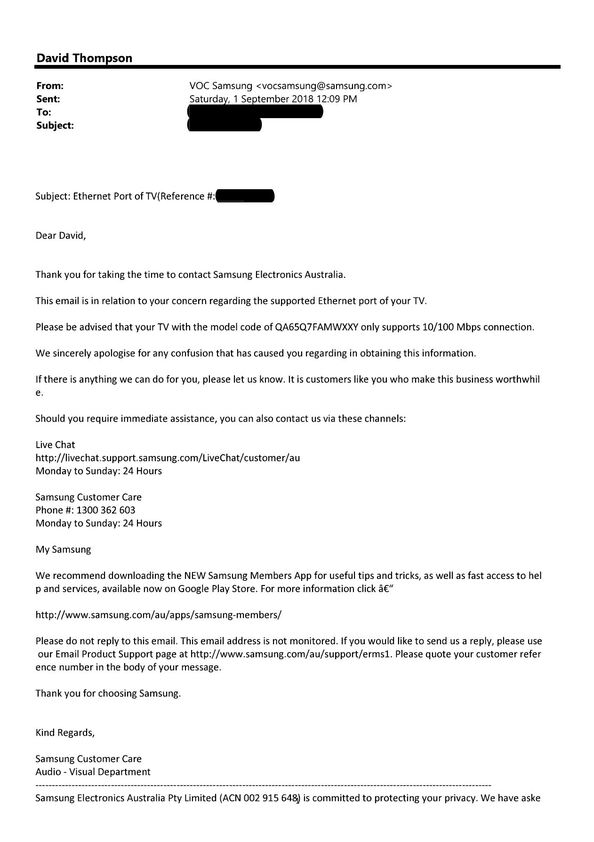
Well, Samsung support called me today after I made investigations into the actual maximum speed of the TV’s ethernet port, and they advised me that it supports 10/100 Mbps - not 1000Mbps or 1Gbps. If it only supports a maximum, then why mislead everybody by stating that a Cat 7 Ethernet cable is required when connecting via ethernet - as this a 10Gbps cable. You know, this very issue is the one that caused me to spend (so far) over $5K in upgrading my PC as I believed that it was the issue, not the 1 year old TV’s antiquated 10/100Mbps ethernet port…
I have asked Samsung support to send me this information in writing - once I have it, I will post it here…
It would be a mistake to make any recommendation without knowing what you are playing the content with, and how it gets from Plex to there. For example, are you using the computer itself? Are you streaming to a Roku 2 via 802.11G? The former would work but the latter wouldn’t matter how fast your computer is.
Yep that’s what I suspected.
I actually, just 10 minutes ago,started 3:10 to Yuma which pretty much gets close to that bandwidth limit.
Constant buffers… So I pulled the plug and connected to my AC wi-fi and playback is flawless on my LG.
That said it was tested with Emby not Plex.
It’s pretty hard to believe that on 2017/2018 TV sets costing ($/£)1000-3000 we still have 10/100Mbps as a mainstream thing.
Let us know but I would be surprised if it’s Gigabit.
And yeah the Netflix 4K is fairly bit rate starved in comparison, so you would be unlikely to hit a bottleneck on a 10/100 card.
 ) to become available.