Transcoding at low bitrates and incorrect bandwidth

NAS: Synology 1019+
PMS Version: 1.19.3.2843
Player Version: Plex for LG 4.29.5
Plex Media Server Logs_2020-05-23_23-55-41.zip (5.9 MB)

I’m having a weird issue that I hope someone can help me with. Please see the MediaInfo below on two video files as well as screenshots of the Plex dashboard as the files are being played remotely.

  • Limit remote stream bitrate is set to Original (No limit) on the PMS.
  • Automatically adjust quality is turned on.
  • The TV remote quality setting is at Maximum.
  • The TV is on a 100 Mbps/5 Mbps connection.
  • The NAS/PMS is on a 150 Mbps/150 Mbps connection.
Complete name                            : Z:\FTP\TV Shows\Cowboy Bebop\Season 01\Cowboy Bebop - S01E01 - Asteroid Blues.mkv
Format                                   : Matroska
Format version                           : Version 2
File size                                : 767 MiB
Duration                                 : 24 min 43 s
Overall bit rate                         : 4 337 kb/s
Writing application                      : mkvmerge v3.1.0 ('Happy up here') built on Jan 19 2010 12:09:24
Writing library                          : libebml v0.7.9 + libmatroska v0.8.1
Attachments                              : jesaya free.ttf
Complete name                            : Z:\FTP\Movies\Shoplifters (2018)\Shoplifters (2018).mkv
Format                                   : Matroska
Format version                           : Version 2
File size                                : 5.65 GiB
Duration                                 : 2 h 0 min
Overall bit rate                         : 6 697 kb/s
Writing application                      : mkvmerge v5.8.0 ('No Sleep / Pillow') built on Sep  2 2012 15:37:04
Writing library                          : libebml v1.2.3 + libmatroska v1.3.0


So, with that info, I have some questions:

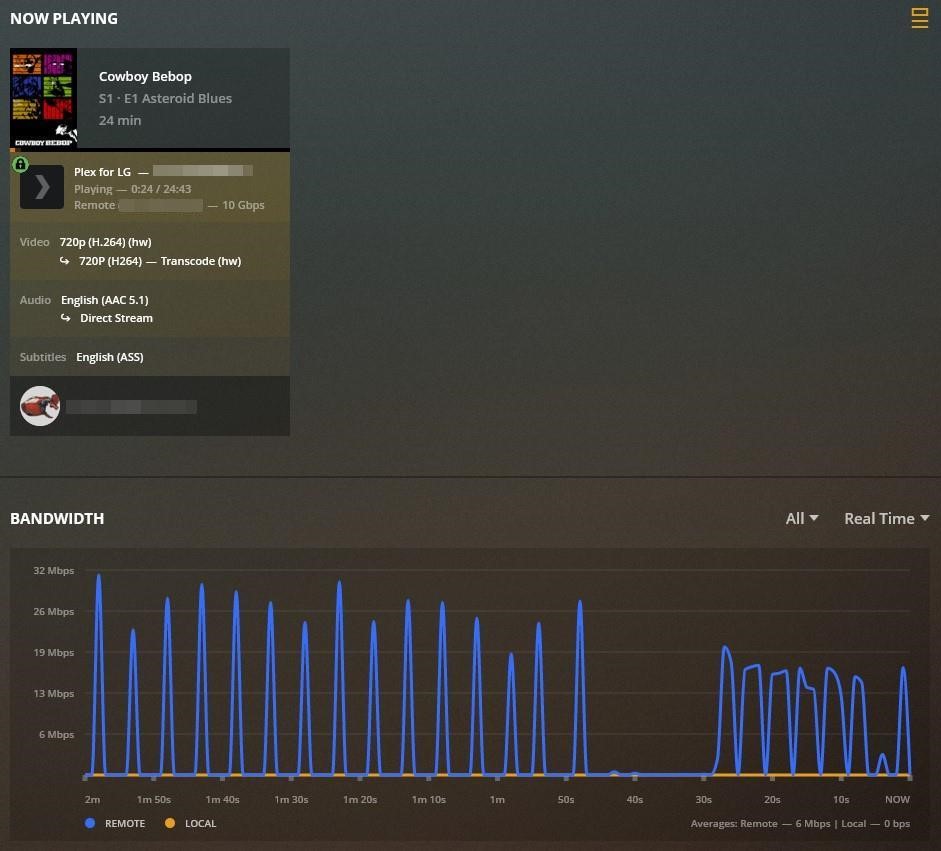
  1. Why does it show a 4337 kbps episode streaming at 10 Gbps?
  2. If it is streaming at 10 Gbps, which I think we all know it isn’t, why is it still transcoding?
  3. Why is a 6697 kbps movie remote streaming at 14 Mbps?
  4. Why is Plex transcoding a 4337 kbps episode, but Direct Playing a 6697 kbps movie?

When I set the remote quality to 1080p 8 Mbps on the TV, both files shows 4 Mbps transcode in the dashboard. I’m thoroughly confused. My goal is to have as little transcoding as possible so that I can watch most, if not all, of my media at full quality. I don’t have any extraordinarily large files and I’d venture to say that none of the files surpass an overall bit rate of 10,000 kbps.

Probably subtitles.

With the Plex for LG app, enabling PGS or VOBSUB subtitles forces a video transcode, so Plex can burn the subtitles into the video stream.

I believe the same happens with ASS subtitles. They can contain position, color, font, etc information. To honor that information, Plex treats them as image subtitles (same as PGS/VOBSUB), and burns them into the video (i.e. transcodes the video).

The Plex for LG app direct plays SRT subtitles, unless the audio is also transcoding, in which case the video will also transcode.

Possibly a display issue. There was a similar issue fixed a few PMS releases ago.

Plex Media Server 1.18.8.2461 is now available in the Beta update channel
(Dashboard) Transcodes to a lossless audio codec would display bitrate of 10Gbps (#10341)

Much appreciated. Would extracting the subtitles and converting them to SRT solve this issue? Is that a difficult thing to do?

Thanks for the info.

If anyone knows why I’m getting 4 Mbps transcode on a 7 Mbps video when the remote quality setting is set to 8 Mbps please let me know.

Yes, with the aforementioned caveat regarding transcoded audio.

Subtitle Edit is a nice tool for that purpose, https://www.nikse.dk/.

It depends on you. :slight_smile:

The default translation is pretty good and fast. However, it will get tripped up by such things as names, slang, and stylized text.

Easy: The quick brown fox jumped over the lazy dog.

Hard: Dvorachek slammed the rest of his Tsingtao, stumbled out of the Brown Fox, towards the Lentyay Hotel.

You can turn off the spell checker and just let it run. It will make a “best guess” when it finds words not in its database.

Alternately, you can tell it to stop whenever it needs help. You can then provide the correct error and continue the translation.

Personally, I generally do not have the patience to sit through & correct 1500 - 2000 subtitle entries.

I do use it to translate forced subtitles, as they are far fewer in number and generally important to understanding the flow of the movie. For example, in Avatar, when the humans speak Na’vi it is under 200 lines versus 2000+ for all the dialog.

There are several places to download subtitles. See the Fetching Internet Sourced & Using Your Own Subtitle Files support document. It lists several. I have not had good luck with opensubtitles.org. The few times I’ve used them I found the quality less than desirable. I have not tried the other locations.

You will probably have to adjust the timing of Internet sourced subtitles. Different versions of the same movie may have different lead-in times (ex: the US version may have different studio trailers than the EU version, so dialog starts at a different time in the overall movie). This is easily accomplished with Subtitle Edit.


Using Subtitles

Fetching Internet Sourced & Using Your Own Subtitle Files

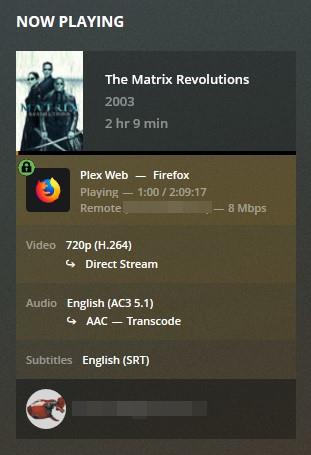
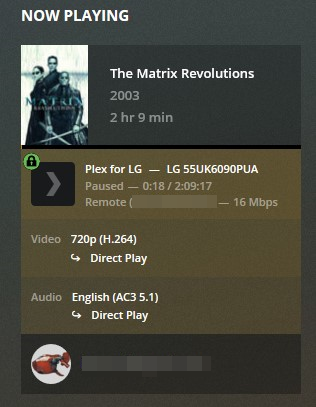
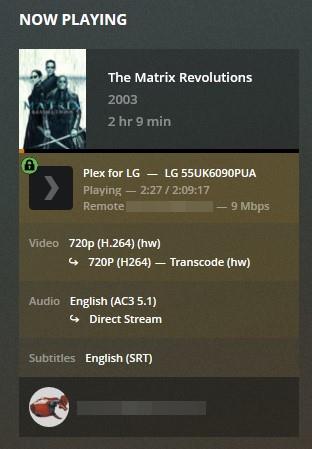
So, I was hoping this was an isolated incident, but check this out:

LG TV with remote quality set to Original:
original
LG TV with remote quality set to 20 Mbps, 1080p:
20mbps
Desktop computer on the same network as the TV using web player with remote quality set to Original:
web original
Below is the media info for the file in question:

Media
    Duration 2:09:17
    Bitrate 6048 kbps
    Width 1280
    Height 536
    Aspect Ratio 2.35
    Video Resolution 720p
    Container MKV
    Video Frame Rate 24p
    Video Profile high

Part
    Duration 2:09:17
    File The Matrix Revolutions (2003).mkv
    Size 5.46 GB
    Container MKV
    Video Profile high

    Codec H264
    Bitrate 5408 kbps
    Bit Depth 8
    Chroma Location left
    Chroma Subsampling 4:2:0
    Coded Height 544
    Coded Width 1280
    Frame Rate 23.976 fps
    Height 536
    Level 4.1
    Profile high
    Ref Frames 12
    Scan Type progressive
    Width 1280
    Display Title 720p (H.264)

    Codec AC3
    Channels 6
    Bitrate 640 kbps
    Language English
    Audio Channel Layout 5.1(side)
    Sampling Rate 48000 Hz
    Display Title English (AC3 5.1)

    Codec SRT
    Language English
    Display Title English (SRT)

    Codec SRT
    Language English
    Title SDH
    Display Title English (SRT)

My conclusion is the following:

  1. Plex is transcoding when it doesn’t need to.
  2. It’s showing inaccurate bit rates during streaming.
  3. The remote quality toggle isn’t working properly.

For testing purposes:

  • Leave all bandwidth settings on server and client at Maximum/Original.
  • In client audio settings, verify AC3/EAC3/DTS are selected.
  • In client video settings, verify Direct Play and Direct Stream are selected.
  • In client quality settings, turn off Automatically Adjust Quality (n/a on LG TVs).
  • Turn off subtitles.

Does The Matrix Revolutions still transcode?

If so, the problem is possibly the 12 reference frames. Many devices do not like a high number of reference frames.

Try something with 4 reference frames.

I followed your suggestions and it is now in Direct Play mode. The only change I had to make was to change the Limit remote stream bitrate from 15 Mbps to Original (no limit). It is now Direct Playing at 16 Mbps, so it seems it thought it couldn’t achieve full bit rate at 15 Mbps so it transcoded down. I’m still confused as to why it shows the movie as a 16 Mbps bit rate when it clearly isn’t, or why it showed 8 Mbps Direct Play on the desktop. At least that 1 less headache. Thank you @FordGuy61.
tiQtNlt96A

This topic was automatically closed 90 days after the last reply. New replies are no longer allowed.