just transcode it to a new format with handbrake and keep both versions. You wont be able to notice any difference specially for anime
For the moment I haven’t had any more problems, the 12 files for specifically that series had the green screen issue. Which I solved by turning of HW decoding for those, although the rPi ran at almost 100%.
I have watched a few other 10 bit anime files since then and none of them had this issue (as none did up until then). It seems to be something specifically in those files that the rPi couldn’t handle, I have no idea what though. Either way the issue is sorted of solved for now.
I might look into a more powerful device at some point, but I’d prefer native Hi10P HW decoding to be released first. I also don’t know what type of CPU would be required to SW decode Hi10P @ 1080p, but I assume it won’t be a $50 device.
Dude, transcode a version to h264 8 bit deph, average kbps 5000 (as top), 2 pass encoding, x264 tune animation and keep both versions next to each other.
I bet you wont be able to notice any difference between both versions (specially on animation)
Plex should choose automatically the transcoded version when you play from rasplex and you will experience a much better quality video experience. And you will still have your original 10bit version if you play it from another device.
Worst case scenario its always cheaper to buy extra storage than extra horse power
I have converted one file, and I see a slight difference but not very much. However I have a few questions.
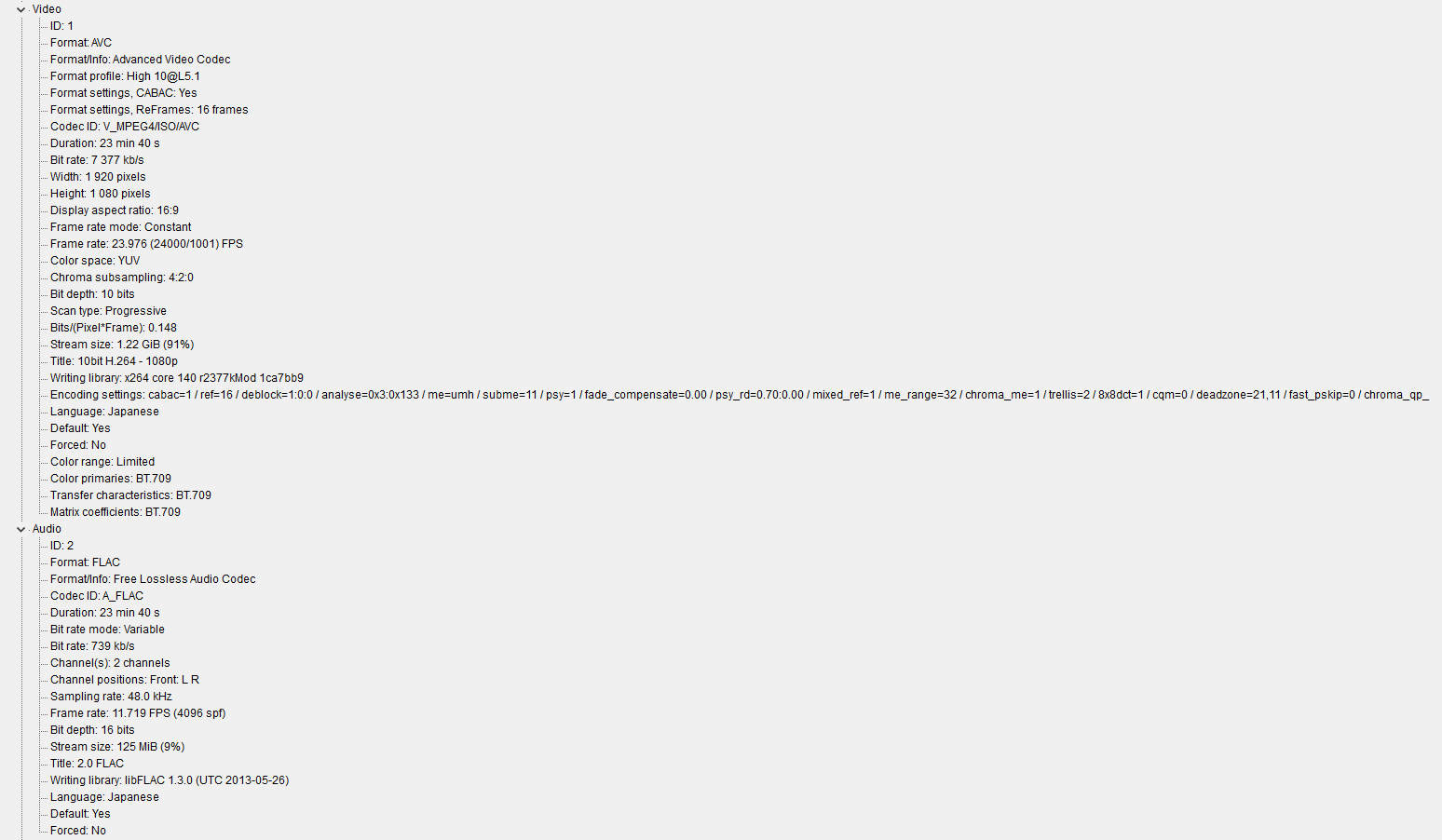
Below are the video and audio information for the original file and my newly transcoded file.
I have noticed that the original file has a higher video bitrate (and size ofc) and the audio seems to be of higher quality as well as FLAC is a lossless format.
File size is of no interest to me, so I would like to match the original bitrate (and quality). I think my AAC was set to 160 kb/s, compared to the 739 kb/s on the original FLAC.
Also should I use High over Main? What level should I be using? I see 4.1 a lot but what about the higher ones? My encoding preset i set to “Fast”, It took roughly 10-20 minutes for 1 file with 2 pass encoding. Is a slower one worth it?
I would also like to know if I can cap the CPU usage for Handbrake, my 6 (12) cores running on 100% made them rise to almost 90°C as I have an overclock from 3.20 to 4.40GHz. Under normal circumstances all 12 cores are never loaded that high so I have no issues, however this is a bit too hot for me.
fs5.directupload.net/images/161201/2miz9goe.png
fs5.directupload.net/images/161201/uw6jq98k.png
In options / advanced you can lower the priority if you need to. But because it´s a render it will try to use 100% if there isn´t anything else of importance. If you want to keep the audio on the original format just select Auto Passthru.
About the bitrate you can match it to whatever you want as long as you don´t go over what the raspberry can handle (30mbps total for audio+video). 5000kbps for video its not a blueray quality but it´s much higher than what you might find from netflix, something downloaded or broadcast HD.
I have never used anything over 4.0 for h.264, I haven´t tested the limit
Also, use the preview option. It will help you a lot for finding that sweet spot.
And finally, whats the point of overclocking if you cant handle a 100% load?
@videotecaCNSU said:
In options / advanced you can lower the priority if you need to. But because it´s a render it will try to use 100% if there isn´t anything else of importance. If you want to keep the audio on the original format just select Auto Passthru.About the bitrate you can match it to whatever you want as long as you don´t go over what the raspberry can handle (30mbps total for audio+video). 5000kbps for video its not a blueray quality but it´s much higher than what you might find from netflix, something downloaded or broadcast HD.
All my anime downloads are 1080p blu-ray, however anime has a much lower bitrate than a regular movie for example would. I haven’t seen any of them go above 10000 kb/s, whilst my movies are anywhere from 20 Mb/s to 50 Mb/s. By the way the rPi has no problems whatsoever playing those files, even the largest ones work fine. But if I transcode a source file with 7000 kb/s to for example 9000 kb/s what would happen? I doubt the quality will go up.
I have never used anything over 4.0 for h.264, I haven´t tested the limit
I have checked and all of my 10 bit files are High 10@L5 or 5.1 and the 8 bit ones are High@L4 or 4.1 so there seems to be some kind of relation between those bit depths and levels. Both 4 and 4.1 seem to work perfectly fine though on the rPi.
EDIT: An official response states that the rPi supports up to Level 4.1 and theoretically a maximum of 62.5 Mb/s.
Also, use the preview option. It will help you a lot for finding that sweet spot.
And finally, whats the point of overclocking if you cant handle a 100% load?
My CPU has 6 physical cores and 12 logical processors, however what I didn’t realise when I bought it is that almost no applications at the time would load more than 4 cores, and even those 4 won’t run at 100%. My main intent was gaming and for that I would have been better off with 4 physical cores and 8 logical processors at a higher base clock speed for less money as well.
Since my load for a single current day game for example is only 4-6 cores max I can however multitask because the other 6-8 cores are free to handle these tasks, this is still overkill though. A higher clock speed will obviously complete tasks faster, regardless of how many cores are being used which is why I have liquid cooling and an overclock from 3.20 to 4.40GHz. Since there is no every day application or game that would load all 12 of my cores (let alone to 100%) the overclock is perfectly safe for every day use and never gives me any trouble at all.
Handbrake is one of the few rare applications which will actually load your CPU to the absolute maximum, and when that happens all my cores run at 80 to 90°C. The “safe” limit for my CPU is at 91°C and even that temperature should not be maintained for extended periods of time. That being said my computer did not shut down while transcoding, meaning I was still within the limits.
This is an issue that has already been reported in the github bug tracker.
As it has been mentioned, the rpi cannot play 10bit directly. When transcoding using PMS you sometimes get that green screen, is really annoying.
The screen is usually triggered at very specific points and it will be gone in a few seconds. I usually wait around 10-15 seconds and just seek to a position after the problematic section.
@karurosu said:
This is an issue that has already been reported in the github bug tracker.
As it has been mentioned, the rpi cannot play 10bit directly. When transcoding using PMS you sometimes get that green screen, is really annoying.The screen is usually triggered at very specific points and it will be gone in a few seconds. I usually wait around 10-15 seconds and just seek to a position after the problematic section.
Sometimes if you wait roughly 16 seconds and then seek back 15 seconds, just after it turned green it will play perfectly fine the second time. Either way as you stated it’s very annoying and if it happens 3-4 times during an episode you might miss a lot of information.