All of my videos are processed through ffmpeg before being added to PMS with the following commands:
1st Pass:
ffmpeg -i $file -c:v libx264 -level:v 3.1 -b:v 1000k -minrate 800k -maxrate 1000k -bufsize 1835k -c:a aac -strict -2 $file2
2nd Pass:
ffmpeg -i $file2 -c:a copy -c:v copy -movflags faststart $file3
And while I hardly ever see transcoding (unless Auto Quality Adjustment kicks in) on every other device, every single video my brother tries to watch on his PS4 is transcoded (see attached image).
Is there a better set of ffmpeg commands to prevent this?
PS4 is hardwired to the modem (speed test results in pic #2)
PMS is hardwired to the modem (speed test results in pic #3)
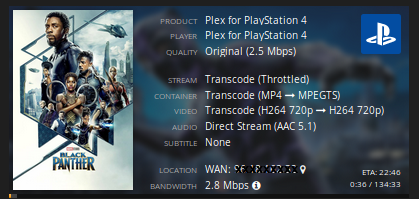


I’ve had a similar issue (transcoding H264 to H264 on the playstation 4). I solved it by increasing the H264 level inside the PS4 Plex settings from 4.1(?) to 5.0. Although this might cause some files not to play.
You could try processing your files to a lower H264 level so they will play on the default settings, i’ve never tried this myself though.
Also: anything with softsubs will always transcode for me.
@“walteriswhite9@gmail.com”
Is your post incomplete? I am well aware of the difference between Direct Play/Stream and Transcoding.
@laniax said:
I’ve had a similar issue (transcoding H264 to H264 on the playstation 4). I solved it by increasing the H264 level inside the PS4 Plex settings from 4.1(?) to 5.0. Although this might cause some files not to play.
You could try processing your files to a lower H264 level so they will play on the default settings, i’ve never tried this myself though.
Also: anything with softsubs will always transcode for me.
As you can see from my code, I am processing videos at level 3.1 and still seeing 99% of the videos get transcoded from mp4 to mpegts
