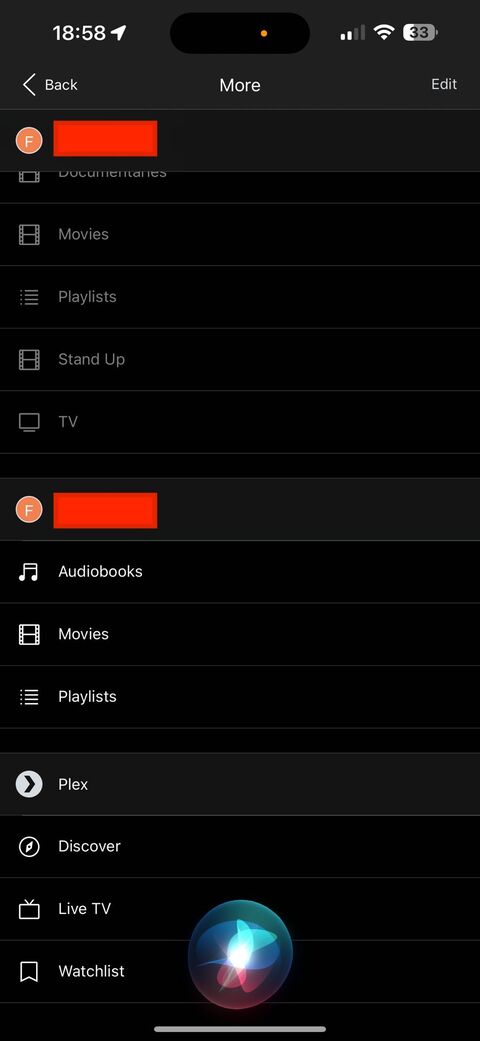
I set up a new server and am unable to remove the old one from the list upon delete/reinstall/login in iOS. The old server (under the same username) does not appear on https://app.plex.tv/desktop/#!/settings/devices/pms as I have removed it from there. I have tried advice found in other threads and logged out/in on devices, and while the old server no longer appears in most places, it still shows up as an available option after logging out and removing the iOS app and reinstalling. I did confirm that the old libraries are not showing up as shared with anyone under “manage library access”
I am having this issue too, but can find no resolution. The old, dead server appears above the new one in all apps, and it’s causing a lot of confusion. Is there no way to remove an old server entirely? My old server and new server have the same name, and were the same database (disk hosting the server died but I had a backup, so just moved everything from my PC to a Mac and it counted it as a “new” server). I removed it from devices. Deleting and reinstalling the app on my phone didn’t work, nor did logging out and in again (though I can’t really ask everyone to do that).
Is there truly no way to resolve this?
Attached is an image highlighting the problem from when my sister messaged me to ask why she didn’t have access to all the same libraries as before (the server migration killed all my shares and I forgot to add her back, so image is for illustrative purposes only).