Hmm... may give it a try... but thinking I may just stick to the extra long coiled HDMI cable I keep in my travel bag... Hotel rooms aren't that big.
I believe there are some devices that will do this without a hard-wired connection being required, but don't quote me on that...
I read this one will do it (D-Link DIR-505L)...
I just purchased the D-Link DIR-505 model (without an "L" at the end - I guess that the only difference is the region with specific plug type).
Can someone share their experience making Plex / Chromecast work with the DIR-505(L) in a hotel?
Hi guys,
Does any one of you ever tried casting from an ios device to a chromecast via a Hauwei mifi hotspot?
I just purchased the D-Link DIR-505 model (without an "L" at the end - I guess that the only difference is the region with specific plug type).
Can someone share their experience making Plex / Chromecast work with the DIR-505(L) in a hotel?
Here is my experience in a hotel room (Hilton).
My travel router DIR-505 makes a wireless private network and I get all my other endpoints to get an ip address, and connect to the internet.
My Chromecast connects to this private network, gets and IP address, but I keep getting a Chromecast can't access the internet error.
I called the ISP of the Hilton (BT) and they say they are not putting restrictions on the network. So it could be that the Chromecast + DIR-505 combination does not work.
Has any one tried the Chromecast behind a DIR-505 travel router from D-Link?
I am about to return the router and ask for a refund, so I need an answer in the next 2 days.
I can't comment on the model without the "L", but the link I provided on the 1st page (where I originally learned about using Chromecast in hotels) specifically talks about the DIR-505L used in Hilton Grand Vacation Clubs. Maybe this will help...
I can't comment on the model without the "L", but the link I provided on the 1st page (where I originally learned about using Chromecast in hotels) specifically talks about the DIR-505L used in Hilton Grand Vacation Clubs. Maybe this will help...
Hi, thanks for trying to help, but the thread you refer to does not address the DIR-505 + Chromecast combination, it is a general discussion about the DIR-505 at Hiltons.
I have no issue with the DIR-505, the only issue is that it will not give internet connectivity to Chromecast
Thats for the feedback. I just purchased the TP-LINK TL-WR710N.
Good to hear, and looking forward to your feedback on the TP Link TL-WR710N.
I will test the TP Link TL-WR702N in a hotel in 3 weeks and will post my findings here.
The reason for not going to the TL-WR710N was that the 702N looked more rounded from a firmware perspective, and also the fact that the 702N is extremely compact (but you need to carry around the USB cable for power).
http://www.androidcentral.com/chromecast-allow-casting-without-being-same-wifi-network
hopefully this update will help. I just wonder when i can stream sync content directly to chromecast, using my phone as a server, without any wifi at all!!!
You already can, I use it all the time, using the phone's wifi hotspot. I have a chromecast for hotel use that is associated with my phone's hotspot and stream video stored on my tablet and phone to it when in hotels. Unless you mean streaming without any wifi whatsoever which might be hard as the chromecast needs wifi!
I will test the TP Link TL-WR702N in a hotel in 3 weeks and will post my findings here.
Giving feedback on my experience.
I guess that when you have an Ethernet cable in the hotel room, then all these travel routers perform OK in router mode. However, most hotels that I travel to don't have an Ethernet wall jack, so hotspot mode is what was key for me.
Forget about the TL-WR702N. It does not seem to have WISP, not a good choice. Just provides bridge mode which is not enough.
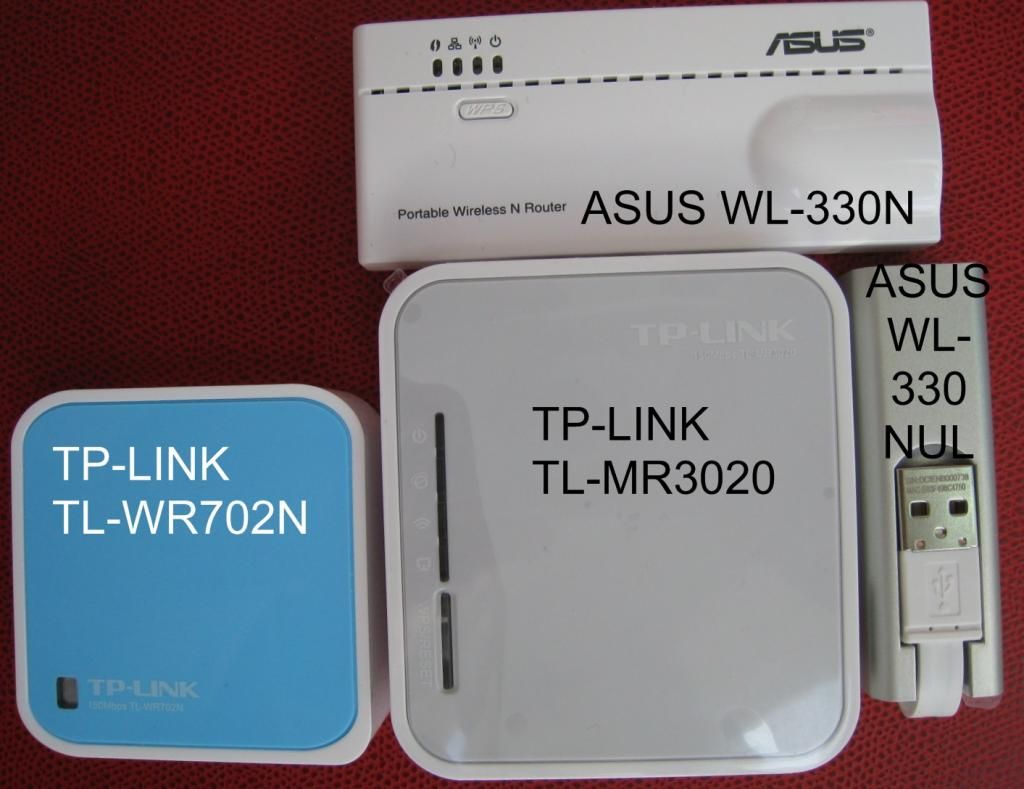
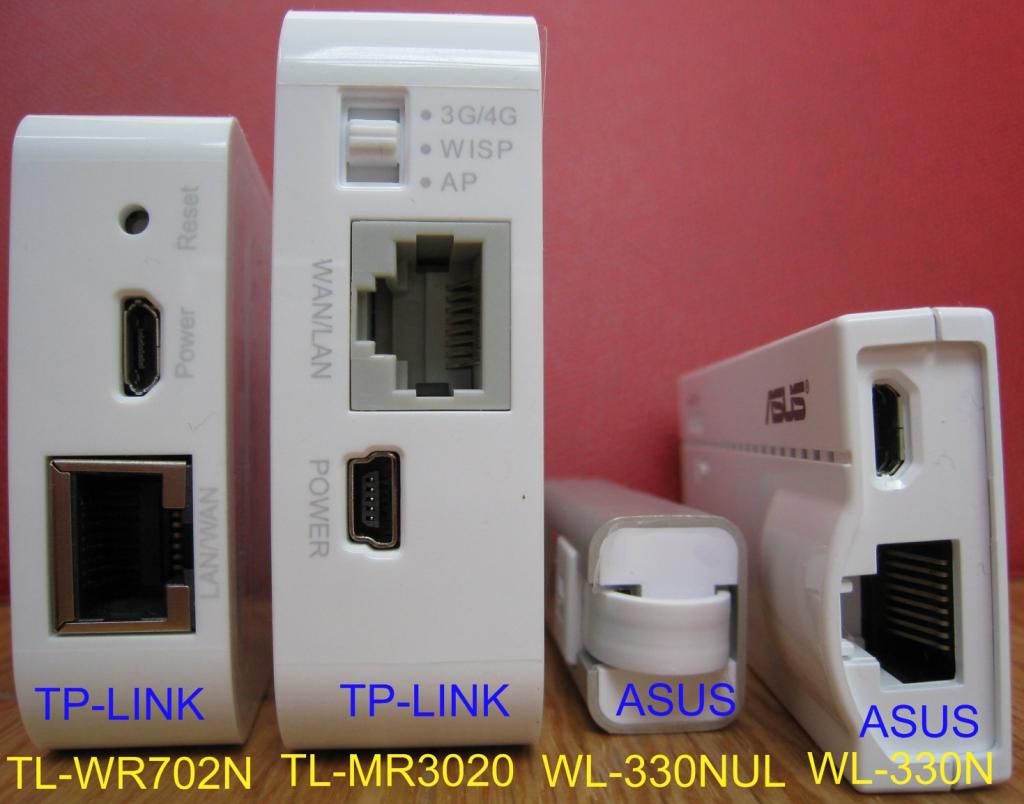
I tested other travel routers in hotspot mode and made up my mind on the TL-MR3020. The TL-MR3020 is not the smallest travel router, but setting is pretty straight forward, does *not* require a RJ45 cable to connect to the PC for setup, and gives the fastest speeds in all my tests. I also like the fact that you can switch modes with a hardware switch with 3 positions: 3G/4G, WISP, AP. The additional bonus, if you have a 3G/4G USB adapter, you can use 3G/4G and share that over Wi-Fi. The TL-MR3020 also can be used as a repeater. You will not use Repeater mode in hotels, but is useful at home, if you don't get a good Wi-Fi signal in all parts of your house. Last but not least, it is on the Google official list of Chromecast supported routers.
The ASUS WL-330NUL came at a close second. The ASUS WL-330NUL is extremely compact/lightweight, and is also on the official Google list of Chromecast supported routers. But unfortunately it does not offer a true Repeater functionality, so that was a big minus for me. And security is questionable, but the router is very easy to use, I must admit. It requires to install a driver on your PC and a utility from ASUS though.
I did not test the ASUS WL-330N (different from the previous one) in a hotel environment, but it is a nice little travel router as well. I don't like the fact that you need a RJ45 cable to connect to your PC to do the setup ... that's 1 more cable to carry. And the ASUS WL-330N is not on Google official list. It tended to disconnect easily when I tried it at home.
I did not test the TL-WR710N, it is also probably a good choice and directly plugs into the power plug, so you don't need to carry around USB adapters and USB cable. But it is therefore bigger than the other travel routers, and it is not on the Chromecast Router Compatibility list, as we speak.
So I would recommend the TL-MR3020 (the big square grey one in the photos).
I like most here simply create our own hot spot to do this. My personal choice is Connectify!
http://www.connectify.me
It’s reasonably price, easy to use, reliable and allows multiple connections. The big plus for me is I don’t have to carry another device around, it makes your laptop (or whatever) a hotspot. I have had three people at one time stream movies wirelessly from one laptop with a 1 TB external hard drive and no external internet connection.
As far as ChromeCast it to works great most of the time, if there’s a wired connection in a room, you can stream movies from your server at home and cast it to your ChromeCast or …, if you dont, just plug in your external HD.
For anyone whos traveling to Travelodge in the United Kingdom:
You are allowed to have 3 Mac Addresses on one account so like, Laptop, Chromecast, Mobile Phone etc and this goes national wide to any other Travelodge in the UK, Just make sure you have a Web Browser installed on the CC like Firefox/Chrome and log into the hotspot, it cost £3 for 24 hours access and one month cost £12.
Premier Inn i have no idea about but all i know is that you can have 30 minutes free WiFi access but im guess if you change the wireless mac address on the laptop then you might have longer :)
I guess that when you have an Ethernet cable in the hotel room, then all these travel routers perform OK in router mode. However, most hotels that I travel to don't have an Ethernet wall jack, so hotspot mode is what was key for me.
Not quite, the WL-330NUL (in AP mode) just transforms the wired signal into a wireless signal, but you still have to enter credentials in the hotel splash page (which is not the case when the WL-330NUL is connected in wireless in WISP mode).
So when you connect the WL-300NUL to the hotel's Ethernet cable, unfortunately it does not work for Chromecast (as Chromecast cannot enter credentials in the hotel splash page).
I think the fastest way to do this (and I’m doing it right now) is a mobile hotspot… Used my laptop to connect the chromecast to my mobile hotspot and now streaming synced content from my phone to chromecast but I can also use non synced content. Works like a charm, no need for any travel router or anything.
has anyone tried chromecast+hotel using the chromecast's new guest mode? I'm wondering if this is a path around the fact that hotel wifi often isolates each individual device. I realize MAC address spoofing will still be required.
Any Hotel that requires a Browser Auth to connect to Wireless Internet is probably going to need a Portable Router with WISP. Simple Repeater mode won't work.
If they have an Ethernet Connection but no Wireless you do have to set up the router in AP mode.
IN BOTH CASES you must set up and connect to Your router and browse to the Auth page using another device (Tablet or Phone). This will Auth the AP (Router) Mac Address which will then use Nat Translation for the Mobile device and the CCast.
As far as the Hotel is concerned only the router (AP) MAC is actually connected to their system but since it requires a Browser you have to use a mobile device to auth it before anything else gets internet access.
Unless of course your model router has a built in Browser to do that (I have never seen such a feature!)
Once the router has Authorization no other device will need to be authorized. The Router will get and send the traffic to the appropriate device.
After extensive research on the best travel routers offering WISP, as you can see from a previous post (where the winners are the ASUS WL-330NUL and the TP-Link TL-MR3020), I now came to the conclusion that ... at least for me, Chromecast is not the solution for hotels.
Let me explain my experience of the downsides of CC + travel router in hotel rooms:
- where a wired connection is available in the room, I found that the AP mode does not always work, plus some other bizarre things.
- travel routers are not always plug and play, and a setting used in one hotel does not necessarily work in an other hotel. I always end up going to the user interface of the router to try different settings, which has proved to be a big waste of my valuable time
- TVs do not always offer a USB port in addition to the HDMI-in port. So it is very often necessary to use the Chromecast power adapter. Typically the next available power wall socket is too far to reach with the CC power cord, so I ended up carrying a power extension cable, which takes some weight and space in the suitcase
- as the HDMI-in and USB ports are typically at the back of the TV, there is always the risk to forget the CC dongle in the room when checking out of the hotel
- connections in hotels, especially the free WiFi connections, are usually poor and slow (less than 250 kbps)
My preferred solution is to go wired: I purchased a 5m HDMI to mini HDMI cable with a HDMI (male)/miniHDMI (female) adapter, so that I can connect my laptop or tablet to the TV. The cable is long enough for me to access the controls from the bed in the room.
Besides, my company offers an iPass Open Mobile app on my work laptop, which gives a solid internet connection in hotels at no direct charge to me, and takes 10s to set up. So I just need to fire iPass, wire my laptop to the TV with the HDMI cable, open plex.tv and I am done. No more hassle with getting on the free hotel internet, wasting time setting the router up, etc.
I know that carrying a 5m HDMI cable takes some space and weight in the suitcase, but the simplicity of the solution easily makes up for that.
After extensive research on the best travel routers offering WISP, as you can see from a previous post (where the winners are the ASUS WL-330NUL and the TP-Link TL-MR3020), I now came to the conclusion that ... at least for me, Chromecast is not the solution for hotels.
Let me explain my experience of the downsides of CC + travel router in hotel rooms:
- where a wired connection is available in the room, I found that the AP mode does not always work, plus some other bizarre things.
- travel routers are not always plug and play, and a setting used in one hotel does not necessarily work in an other hotel. I always end up going to the user interface of the router to try different settings, which has proved to be a big waste of my valuable time
- TVs do not always offer a USB port in addition to the HDMI-in port. So it is very often necessary to use the Chromecast power adapter. Typically the next available power wall socket is too far to reach with the CC power cord, so I ended up carrying a power extension cable, which takes some weight and space in the suitcase
- as the HDMI-in and USB ports are typically at the back of the TV, there is always the risk to forget the CC dongle in the room when checking out of the hotel
- connections in hotels, especially the free WiFi connections, are usually poor and slow (less than 250 kbps)
My preferred solution is to go wired: I purchased a 5m HDMI to mini HDMI cable with a HDMI (male)/miniHDMI (female) adapter, so that I can connect my laptop or tablet to the TV. The cable is long enough for me to access the controls from the bed in the room.
Besides, my company offers an iPass Open Mobile app on my work laptop, which gives a solid internet connection in hotels at no direct charge to me, and takes 10s to set up. So I just need to fire iPass, wire my laptop to the TV with the HDMI cable, open plex.tv and I am done. No more hassle with getting on the free hotel internet, wasting time setting the router up, etc.
I know that carrying a 5m HDMI cable takes some space and weight in the suitcase, but the simplicity of the solution easily makes up for that.
LOL Well yes it does take a lot of effort to use the more complicated method..
But don't be surprised if you get pulled off the Security check line a little more often for having a big HDMI Cable in your Bag!
Won't happen a lot but it will happen especially at times where the alert is higher than norm. LOL
http://www.youtube.com/watch?v=uTK-x3ZbSZ4 is a video on the mac address process from Android.
