i don’t have an answer. I have an Onkyo receiver hooked up to the Shield and TV. I just don’t see the issue you have.
Those options do make a difference for me because my receiver supports all the codecs and handles internally.
i don’t have an answer. I have an Onkyo receiver hooked up to the Shield and TV. I just don’t see the issue you have.
Those options do make a difference for me because my receiver supports all the codecs and handles internally.
i’m not connecting to an amp in this example shown, just a TV.
So this is all boiling down to what the TV can natively support – which I now understand.
You’re comparing TrueHD to AC3 5.1 and asking why it’s transcoding the video, right?
What’s the file container? MKV ? Does the TV support MKV direct play ? Does it support support TrueHD ?
container is MKV
yes the TV can direct play other MKV files i have (which have stereo or 5.1 audio tracks).
the image i posted at the start of the thread shows what the shield detects as being supported - DTS-HD and TrueHD are not.
and yes the question is
i have this 4k remux file that plays fine with zero issues when my shield is connected to a 4k TV (via a soundbar that supports Atmos etc) - both Direct Play.
when i connect the same shield to a non-4k TV, then i get both video and audio transcoding, but if i change the audio track to the ac3 5.1 track, then it direct plays both the video and audio.
so why does a video transcode initiate just because the audio format isn’t supported by the TV?
i would have expected just the audio track to transcode rather than both video and audio?
I saw that and am trying to come through the logic again so I can run a sequence here and see what I can recreate by turning things off in the Shield player (debug mode)
My TV is the dumbest going. 2010 Vizio 1080p and I can let the Onkyo run full passthrough by turning it off.
this TV is also pretty dumb (albeit it is a “smart” TV).
no amp connected at any stage though, just shield direct to the TV via HDMI and sound via the TV speakers.
XML showing the file details here - 38550.xml - Google Drive

Is this what you’re seeing?
It needed to transcode the audio.
Notice: HEVC → H264?
Plex doesn’t have a HEVC encoding license. (nothing left of that PlexPass to pay for it AFAIK)
yes that’s what i get
that was my original question though, why does it need to transcode the video at all when it’s just the audio that’s not supported by the playback device?
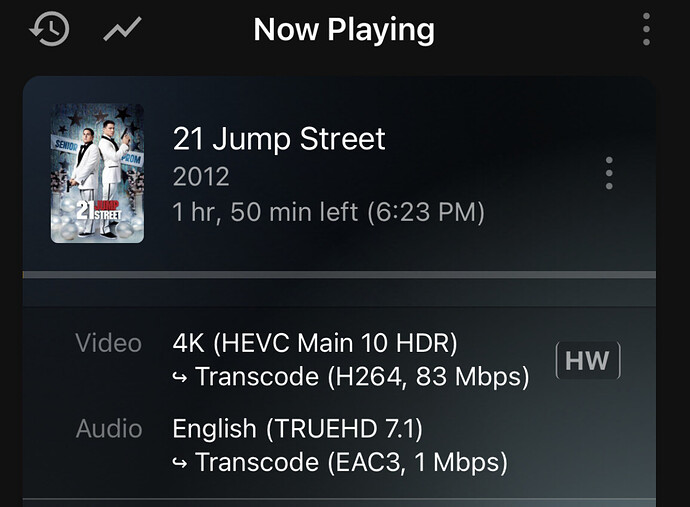

Because Plex doesn’t have the licence to transcode HEVC → HEVC (the remux part).
It does have licence to bitstream the whole thing but not to break it apart and recreate the composite stream with the HEVC video component ( It’s all about licensing and noney)
If you did this with H.264 , you would see “DirectStream”
ok, so there is no way around this then other than to manually select the 5.1 audio track before playback, which results in Direct Play.
Right --or-- don’t curate 7.1 HEVC unless your player (TV) can handle it natively.
well the main TV/soundbar handles it fine.
it’s just the secondary TV that doesn’t have a soundbar connected that’s the issue, which is when i noticed the issue.
maybe if plex or the shield could detect what audio streams are available in the file and auto switch to one that didn’t result in transcoding - that would be a cool feature.
Afterthought:
MKVToolnix will let you set the default track.
i’d rather keep the 7.1 audio track as the default, as the main viewing TV has no issues.
This topic was automatically closed 90 days after the last reply. New replies are no longer allowed.
