Server Version#:1.42.2.10156
Player Version#:
<If providing server logs please do NOT turn on verbose logging, only debug logging should be enabled>
I have Plex running on a win 11 computer and plan to back up format all system and then switch to Ubuntu Linux 24.04.3 LTS. This will be on the same hardware and not dual boot.
I want to be able to save the watch history for my shows and music playlist.
what files do I need to back up under windows and where would I restore those in the new Linux environment,
So when you say to enable Sync if I do that on my desktop in settings does that enable it for all managed users I have created in my home? Or is that just for other plex users I share with that have their own accounts I would have to also ask to do so?
When I copy my media files back to my extra internal drive which will be now ext4 I will then have to give the plex user permissions to those directories, correct?
Those articles seem like they will be very helpful. Thanks for that. I probably will migrate over to Linux over the holiday break.
You have to enable it for managed users in your Plex Home. They cannot enable it themselves. Using Plex Web, go to your Plex Home page, edit the user. The setting is on the Libraries tab.
Note you must edit the managed user to change the setting. You cannot set it when creating the managed user (I did not see it when creating a managed user). It is disabled by default.
An individual managed user cannot alter this setting themselves. However, the admin of the Plex Home can adjust it for a particular managed user from the Plex Home management page.
Users with regular Plex accounts (created w/ an e-mail & password at plex.tv), have to enable it themselves. You cannot enable it for them. It does not matter if they are in your Plex Home or not.
Correct.
The user plex needs at least read-only permission to the media files. If you are creating optimized versions, recording live tv (live tv & dvr), etc. then plex will also need write permission.
I got the Sync Watch setting enabled for myself and the two Managed users I have. It was on for me but not for them. I also do not recall seeing that setting when creating them but it is there after to enable.
I do have an HD Homerun tuner and use Live TV & DVR, so read and write will be given.
I hope to have this all completed soon. I’ll have to post back the results. Hopefully all goes well.
I got plex installed now but can’t play any media yet. I think the issue is permissions
I have my media on a separate drive mounted at /mnt/mymedia.
I have 3 folders there: TVshows, movies and music
I tried to make plex the owner and restarted but hat didn’t seem to help. I changed it back to my account as the owner. I don know how to grant plex access properly. Help!
Sorry if I’m asking dumb questions… I’m till learning a lot of this stuff. Have you claimed the new server? I think I recall reading a post where someone was having very similar issues and needed to claim the server.
Yep, I did get the prompt to claim it and completed that part. My media all shows up in Plex web but is unavailable to play. When I go to edit the location the path is still there from the former windows install but I can’t seem to access the correct new path to add it in correctly.
ike@TheBorg:/mnt/mymedia$ ls -la
total 152
drwx------ 7 mike mike 4096 Dec 26 18:16 .
drwxr-xr-x 4 root root 4096 Dec 26 09:31 ..
drwx------ 2 root root 16384 Dec 26 08:20 lost+found
drwxrwxr-x+ 257 mike plex 20480 Dec 12 21:35 movies
drwxr-xr-x+ 933 mike plex 94208 Dec 19 20:40 music
drwxr-xrwx+ 142 mike plex 12288 Dec 24 06:50 TVshows
drwxr-xr-x 2 mike mike 4096 Dec 27 2024 videos
If I unmount the drive this is what I have
mike@TheBorg:/mnt/mymedia$ ls -la
total 8
drwxr-xr-x 2 root root 4096 Dec 26 09:31 .
drwxr-xr-x 4 root root 4096 Dec 26 09:31 ..
mike@TheBorg:/mnt/mymedia$
Ok, let’s start by getting consistent ownership and permissions set. You haven’t mentioned anything about changing the way PMS is setup and running. I will conclude the it is running as the plex user with plex owner/group settings. I’d proceed like so:
cd /mnt
chown -R plex:plex mymedia
This will change the owner & group of all the files & directories to owner plex, group plex
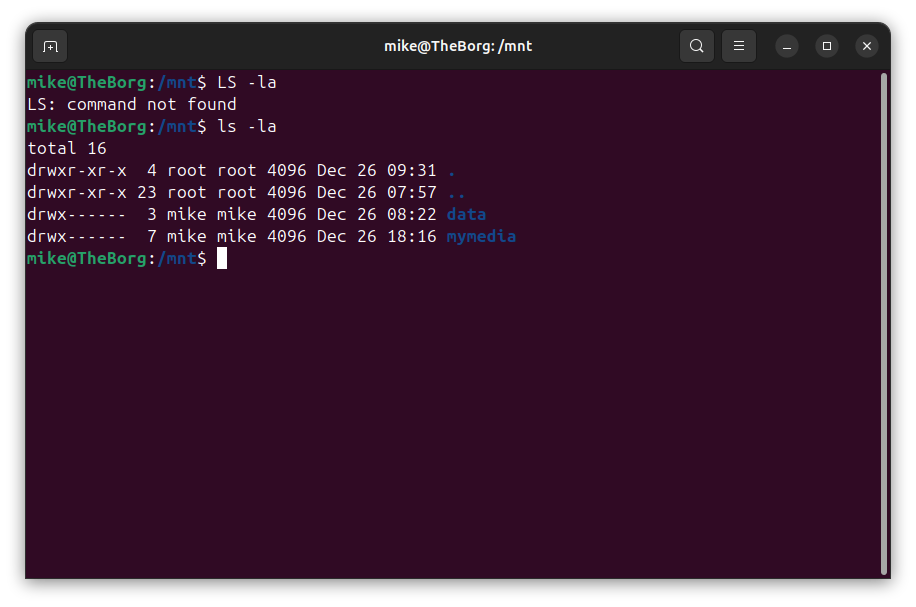
You didn’t list the permissions on /mnt specifically (ls -lad /mnt) but you will want to make sure the plex user has read and execute permissions. chmod 755 /mnt will accomplish that.
You may also want to consider making a separate mount point for your media. This is my personal preference. For my workflow, I tend to treat /mnt as a temporary mountpoint. One that I can fiddle with ownership & permissions as need be. For more permanent mounts, I like to have dedicated ones. In my case, my media disk is mounted under /plexmedia as /plexmedia/plex. If I add another disk in the future, I’ll mount it as /plexmedia/plex2. At least for me, it keeps thing tidier in my head.
Try those changes and see if that helps. You’ll probably need to make some changes for write permissions in the future but lets get PMS seeing your media first.
Thanks that actually got me to where I can get the files to be seen and matched to my old libraries in windows.
I had planned to have a chat with ChuckPA after 1pm. It seems we are practically neighbors. I think It’s in my best interest to still be that just to make sure I have the permissions set right and didn’t muck things up trying on my own.
Sounds good, you’ve made progress. ChuckPA is super helpful and a great resource. It is definitely in your best interest to feel comfortable with the changes being made, why they are being made, etc. That can only help you in the future as your system grows.
Only mike & users in the group dvr can write to your TVshows directory. Have you added user plex to the dvr group? If you did, did you restart PMS?
The other question I’ll ask is this, is Plex doing the dvr recording? Or is it another app and it is trying to put the recorded files in the media directory?