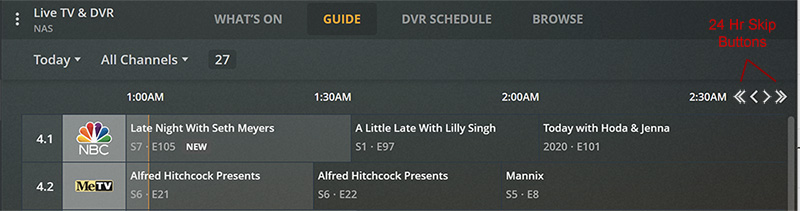
On the grid-guide (for web at least), can we get a 24 hour skip button that jumps 24 hours forward/back from whatever time we are currently viewing? So if I’m looking at 3:00 pm then I can jump to 3:00 pm tomorrow or the next day with just a couple clicks.
Visually I figured it might look something like this:
It is actually three clicks and every time you want to skip to the next day it is another three clicks. It also forces you to constantly shift your focus from the guide to the navigation and back over and over.
If I were completely reworking it, I’d probably move the controls up to the same level as the dropdowns and maybe add some button borders and a return to now button. Something like this:
I don’t know what kind of logic is required to maintain the relative daily time on the timeline, but Dish Network was doing a 24 hour skip in their DVR guide (via remote) back in 2005.
Also the dropdown method stops at 7 days, while the guide data continues for another week. Another good feature request might be to put a full two weeks in the dropdown menu.
The dropdown only works for the first 7 days of the EPG, even though there is 2 weeks of data. The guide is incredibly frustrating to use if you’re going to be away for 2 weeks and you’re trying to organize the recordings while you’ll be gone.
Currently, you have to click the right arrow 48 times to advance one day. This is why an “advance 24 hour” option is needed.
Also, with dropdown, you have to select a time range (Morning, Daytime, etc). If it is now 12noon and I advance to 2pm today, selecting the next day and then either Daytime 10am or Evening 5pm, I have more < or > clicks to get to 2pm. Not bad, but still changing focus.
In the Live TV channel program guide, it is tedious to click the left arrow to go forward several hours or days for a given channel. It would be beneficial to be able to jump ahead or back in the guide by 12 hour increments similar to DirecTV/Dish channel guides.