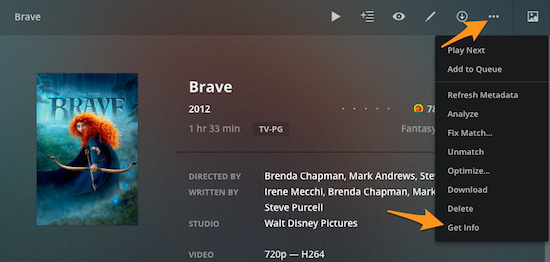
Having recently purchased a 4K TV, without knowing much about it, I think I might know the problem.
So I got a Samsung smart TV a couple of months ago; I can’t think of the model number off the top of my head. I started watching 4K content and was amazed at the picture quality and the vividness of the colors in videos I was watching on YouTube. Of course, I started adding 4K movies to my Plex library, again, without understanding the nuances of 4K content.
I learned that some 4K videos are SDR, while others are HDR. HDR content uses a particular color space that not all 4K TVs can display properly. My own particular issue was a combination of a misunderstanding of HDR versus SDR media, and the limitations of my own TV. My Samsung does not have a feature called “local dimming”, which very basically means that the entire screen will dim and brighten depending on the image being displayed, leading to a sometimes dim picture. Once I settled on SDR content, I am completely happy with color saturation on the TV.
I don’t know about your TV, but I can tell from your screenshot that the file you’re trying to play is 4K and HDR. As a test, I would suggest using a 4K SDR version of the same movie, and see if there’s a difference in the color as displayed on the TV.
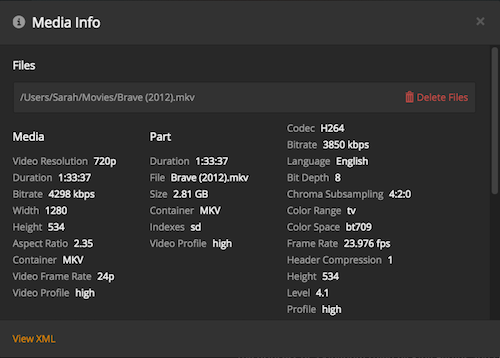
Here’s that same movie from my own collection, but SDR:
The Color Primaries information shows “bt709” - I have no idea what that means, but your file shows “bt2020” in that same field; these values correlate with the difference between SDR and HDR content in my own anecdotal experience. A simpler way to determine if your file is SDR versus HDR is right on the main page for the media. Here’s that same file again, this time the data comeing right from the main info page for the movie:

Notice the Video info: 4K HEVC Main 10
Now here’s a different movie, but this one is HDR:
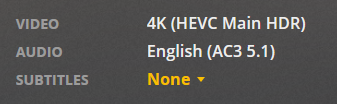
Both files are 10-bit, but one is distinctly labeled HDR. Like I said, try testing with a file you know for sure is SDR and see if there’s a difference in color saturation on your display. Seems like the quickest way to start troubleshooting.