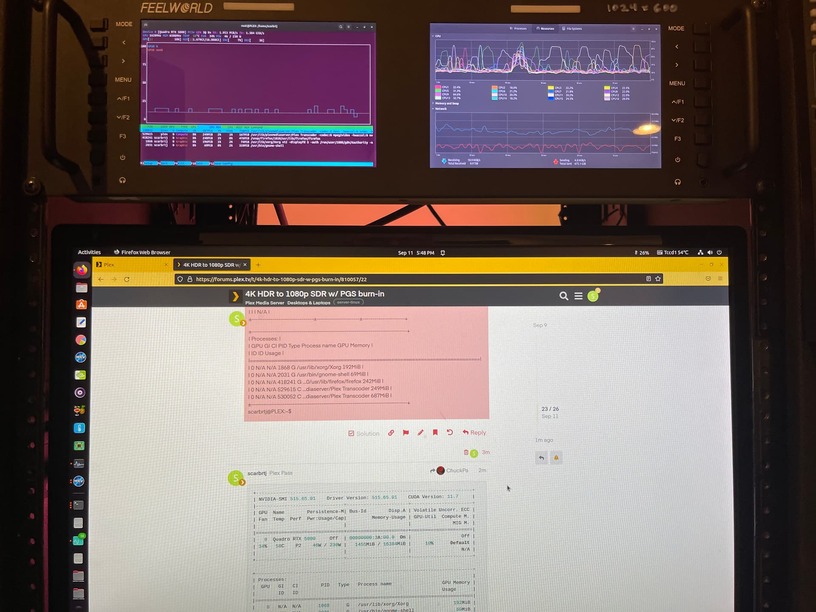
Nvidia-smi is an instantaneous snapshot of the activity.
I only need nvidia-smi to confirm the drivers & kernel are in sync and the card is seen.
May I see the DEBUG log files which capture a transcoded playback ?
Nvidia-smi is an instantaneous snapshot of the activity.
I only need nvidia-smi to confirm the drivers & kernel are in sync and the card is seen.
May I see the DEBUG log files which capture a transcoded playback ?
+-----------------------------------------------------------------------------+
| NVIDIA-SMI 515.65.01    Driver Version: 515.65.01    CUDA Version: 11.7     |
|-------------------------------+----------------------+----------------------+
| GPU  Name        Persistence-M| Bus-Id        Disp.A | Volatile Uncorr. ECC |
| Fan  Temp  Perf  Pwr:Usage/Cap|         Memory-Usage | GPU-Util  Compute M. |
|                               |                      |               MIG M. |
|===============================+======================+======================|
|   0  Quadro RTX 5000     Off  | 00000000:3A:00.0  On |                  Off |
| 34%   58C    P2    46W / 230W |   1455MiB / 16384MiB |     10%      Default |
|                               |                      |                  N/A |
+-------------------------------+----------------------+----------------------+

+-----------------------------------------------------------------------------+
| Processes:                                                                  |
|  GPU   GI   CI        PID   Type   Process name                  GPU Memory |
|        ID   ID                                                   Usage      |
|=============================================================================|
|    0   N/A  N/A      1868      G   /usr/lib/xorg/Xorg                192MiB |
|    0   N/A  N/A      2031      G   /usr/bin/gnome-shell               69MiB |
|    0   N/A  N/A    418241      G   ...0/usr/lib/firefox/firefox      242MiB |
|    0   N/A  N/A    529615      C   ...diaserver/Plex Transcoder      249MiB |
|    0   N/A  N/A    530052      C   ...diaserver/Plex Transcoder      687MiB |
+-----------------------------------------------------------------------------+
scarbrtj@PLEX:~$
So it’s your display driver too?
If you’re asking if my Plex server is hooked up to a display, yes
I run my machine completely headless and in “ubuntu server” so I don’t have all the screwy BS which is Gnome. (It is quite a load on the machine)
Please grab the logs when you can and attach here so I can look through them
I actually drive three screens with my RTX 5000. One 1920x1080, the other two 1280x720.
Plex Media Server Logs_2022-09-11_17-52-00.zip (5.5 MB)
Thank you for the logs:
Sep 11, 2022 17:35:56.571 [0x7f00dbec2b00] DEBUG - [Req#111edd1/Transcode/Req#111edd4] Audio Stream: 360045, Subtitle Stream: 360048
Sep 11, 2022 17:35:56.571 [0x7f00dbec2b00] DEBUG - [Req#111edd1/Transcode] Found session GUID of mgwr82ab1qmn63qo8q5fyqef in session start.
Sep 11, 2022 17:35:56.571 [0x7f00dbec2b00] DEBUG - [Req#111edd1/Transcode] Cleaning directory for session mgwr82ab1qmn63qo8q5fyqef ()
Sep 11, 2022 17:35:56.571 [0x7f00dbec2b00] DEBUG - [Req#111edd1/Transcode] Starting a transcode session mgwr82ab1qmn63qo8q5fyqef at offset -1.0 (state=3)
Sep 11, 2022 17:35:56.572 [0x7f00dbec2b00] DEBUG - [Req#111edd1/Transcode] TPU: hardware transcoding: using hardware decode accelerator nvdec
Sep 11, 2022 17:35:56.572 [0x7f00dbec2b00] DEBUG - [Req#111edd1/Transcode] TPU: hardware transcoding: zero-copy support present
Sep 11, 2022 17:35:56.572 [0x7f00dbec2b00] DEBUG - [Req#111edd1/Transcode] TPU: hardware transcoding: not using zero-copy because subtitle burning is required
Sep 11, 2022 17:35:56.572 [0x7f00dbec2b00] DEBUG - [Req#111edd1/Transcode] [Universal] Using local file path instead of URL: /home/scarbrtj/media/X/MEDIA12A/Movies/BLURAY/Crouching Tiger, Hidden Dragon (2002)/Crouching Tiger, Hidden Dragon (2002) (4K).mkv
Sep 11, 2022 17:35:56.572 [0x7f00dbec2b00] DEBUG - [Req#111edd1/Transcode] TPU: hardware transcoding: final decoder: nvdec, final encoder: nvenc
Sep 11, 2022 17:35:56.572 [0x7f00dbec2b00] DEBUG - [Req#111edd1/Transcode/JobRunner] Job running: EAE_ROOT=/tmp/pms-99da540b-6d5e-4eb7-9cd3-bd76b58b6fa3/EasyAudioEncoder FFMPEG_EXTERNAL_LIBS='/var/lib/plexmediaserver/Library/Application\ Support/Plex\ Media\ Server/Codecs/c4efa15-4365-linux-x86_64/' X_PLEX_TOKEN=xxxxxxxxxxxxxxxxxxxx "/usr/lib/plexmediaserver/Plex Transcoder" -codec:0 hevc -hwaccel:0 nvdec -hwaccel_fallback_threshold:0 10 -threads:0 1 -hwaccel_device:0 cuda -codec:1 truehd_eae -eae_prefix:1 mgwr82ab1qmn63qo8q5fyqef_ -analyzeduration 20000000 -probesize 20000000 -i "/home/scarbrtj/media/X/MEDIA12A/Movies/BLURAY/Crouching Tiger, Hidden Dragon (2002)/Crouching Tiger, Hidden Dragon (2002) (4K).mkv" -filter_complex "[0:4]scale=3840:2160[0];[0:0][0]overlay[1];[1]scale=w=2276:h=1280:force_divisible_by=4[2];[2]format=p010,tonemap=mobius[3];[3]format=pix_fmts=yuv420p|nv12[4]" -map "[4]" -metadata:s:0 language=eng -codec:0 h264_nvenc -b:0 20000k -preset:0 hq -forced-idr:0 1 -r:0 23.975999999999999 -force_key_frames:0 "expr:gte(t,n_forced*1)" -filter_complex "[0:1] aresample=async=1:ocl='stereo':rematrix_maxval=0.000000dB:osr=48000[5]" -map "[5]" -metadata:s:1 language=zho -codec:1 aac -b:1 256k -f dash -seg_duration 1 -dash_segment_type mp4 -init_seg_name 'init-stream$RepresentationID$.m4s' -media_seg_name 'chunk-stream$RepresentationID$-$Number%05d$.m4s' -window_size 5 -delete_removed false -skip_to_segment 1 -time_delta 0.0625 -manifest_name "http://127.0.0.1:32400/video/:/transcode/session/mgwr82ab1qmn63qo8q5fyqef/edf8684c-2b5a-4ddf-8f2f-c4ae60029be4/manifest?X-Plex-Http-Pipeline=infinite" -avoid_negative_ts disabled -map_metadata -1 -map_chapters -1 dash -start_at_zero -copyts -vsync cfr -init_hw_device cuda=cuda: -filter_hw_device cuda -y -nostats -loglevel quiet -loglevel_plex error -progressurl http://127.0.0.1:32400/video/:/transcode/session/mgwr82ab1qmn63qo8q5fyqef/edf8684c-2b5a-4ddf-8f2f-c4ae60029be4/progress
I see all the data getting pushed to be transcoded.
The client goes only a few blocks then gives up.
Sep 11, 2022 17:35:56.572 [0x7f00dbec2b00] DEBUG - [Req#111edd1/Transcode/JobRunner] Jobs: Starting child process with pid 528774
Sep 11, 2022 17:35:56.574 [0x7f00ddba2b00] DEBUG - Request: [127.0.0.1:52464 (Loopback)] PUT /video/:/transcode/session/mgwr82ab1qmn63qo8q5fyqef/edf8684c-2b5a-4ddf-8f2f-c4ae60029be4/progress?status=startup (32 live) #111edc2 Signed-in Token (scarbrtj) (MegaPLEX) (range: bytes=0-)
Sep 11, 2022 17:35:56.574 [0x7f012736cb00] DEBUG - Completed: [127.0.0.1:52464] 204 PUT /video/:/transcode/session/mgwr82ab1qmn63qo8q5fyqef/edf8684c-2b5a-4ddf-8f2f-c4ae60029be4/progress?status=startup (32 live) 0ms 203 bytes (pipelined: 1) (range: bytes=0-)
Sep 11, 2022 17:35:56.575 [0x7f00db4b3b00] DEBUG - Request: [192.168.7.35:54891 (Allowed Network (Subnet))] OPTIONS /photo/:/transcode?width=240&height=135&minSize=1&upscale=1&url=%2Flibrary%2Fparts%2F126276%2Findexes%2Fsd%2F6641050%3FX-Plex-Token%3Dxxxxxxxxxxxxxxxxxxxx (32 live) #111edce TLS GZIP Signed-in Token ()
Sep 11, 2022 17:35:56.575 [0x7f012756fb00] DEBUG - Completed: [192.168.7.35:54891] 200 OPTIONS /photo/:/transcode?width=240&height=135&minSize=1&upscale=1&url=%2Flibrary%2Fparts%2F126276%2Findexes%2Fsd%2F6641050%3FX-Plex-Token%3Dxxxxxxxxxxxxxxxxxxxx (32 live) TLS GZIP 0ms 376 bytes (pipelined: 32)
Sep 11, 2022 17:35:56.576 [0x7f00e6faab00] DEBUG - Request: [192.168.7.35:54891 (Allowed Network (Subnet))] GET /photo/:/transcode?width=240&height=135&minSize=1&upscale=1&url=%2Flibrary%2Fparts%2F126276%2Findexes%2Fsd%2F6641050%3FX-Plex-Token%3Dxxxxxxxxxxxxxxxxxxxx (32 live) #111edd9 TLS GZIP Signed-in Token (scarbrtj) (Chrome)
Sep 11, 2022 17:35:56.576 [0x7f00e6faab00] DEBUG - [Req#111edd9] Photo transcoder: Request for url [/library/parts/126276/indexes/sd/6641050?X-Plex-Token=xxxxxxxxxxxxxxxxxxxx] (is local: 1 upscaled: 1)
Sep 11, 2022 17:35:56.577 [0x7f00e6faab00] DEBUG - [Req#111edd9/Req#111edda] Closest frame to 6641050 ms was frame 3320 at 6640000 ms.
Sep 11, 2022 17:35:56.577 [0x7f00e6faab00] DEBUG - [Req#111edd9] Calling back into ourselves for photo to transcode, optimizing the process (status: -1)
Sep 11, 2022 17:35:56.577 [0x7f00e6faab00] DEBUG - [Req#111edd9] Photo cache obtained 2959 bytes from /library/parts/126276/indexes/sd/6641050?X-Plex-Token=xxxxxxxxxxxxxxxxxxxx
Sep 11, 2022 17:35:56.578 [0x7f00e6faab00] DEBUG - [Req#111edd9] Created thumbnail of size 240x135, has pixels: 1
Sep 11, 2022 17:35:56.579 [0x7f012736cb00] DEBUG - Completed: [192.168.7.35:54891] 200 GET /photo/:/transcode?width=240&height=135&minSize=1&upscale=1&url=%2Flibrary%2Fparts%2F126276%2Findexes%2Fsd%2F6641050%3FX-Plex-Token%3Dxxxxxxxxxxxxxxxxxxxx (32 live) TLS GZIP 3ms 2436 bytes (pipelined: 33)
Sep 11, 2022 17:35:56.591 [0x7f00e43c2b00] DEBUG - Request: [192.168.7.35:54903 (Allowed Network (Subnet))] OPTIONS /photo/:/transcode?width=240&height=135&minSize=1&upscale=1&url=%2Flibrary%2Fparts%2F126276%2Findexes%2Fsd%2F6618512%3FX-Plex-Token%3Dxxxxxxxxxxxxxxxxxxxx (32 live) #111edd5 TLS GZIP Signed-in Token ()
Sep 11, 2022 17:35:56.591 [0x7f012736cb00] DEBUG - Completed: [192.168.7.35:54903] 200 OPTIONS /photo/:/transcode?width=240&height=135&minSize=1&upscale=1&url=%2Flibrary%2Fparts%2F126276%2Findexes%2Fsd%2F6618512%3FX-Plex-Token%3Dxxxxxxxxxxxxxxxxxxxx (32 live) TLS GZIP 0ms 376 bytes (pipelined: 45)
Sep 11, 2022 17:35:56.591 [0x7f00da8a1b00] DEBUG - Request: [192.168.7.35:54903 (Allowed Network (Subnet))] GET /photo/:/transcode?width=240&height=135&minSize=1&upscale=1&url=%2Flibrary%2Fparts%2F126276%2Findexes%2Fsd%2F6618512%3FX-Plex-Token%3Dxxxxxxxxxxxxxxxxxxxx (32 live) #111eddd TLS GZIP Signed-in Token (scarbrtj) (Chrome)
Sep 11, 2022 17:35:56.591 [0x7f00da8a1b00] DEBUG - [Req#111eddd] Photo transcoder: Request for url [/library/parts/126276/indexes/sd/6618512?X-Plex-Token=xxxxxxxxxxxxxxxxxxxx] (is local: 1 upscaled: 1)
Sep 11, 2022 17:35:56.592 [0x7f00da8a1b00] DEBUG - [Req#111eddd/Req#111edde] Closest frame to 6618512 ms was frame 3309 at 6618000 ms.
Sep 11, 2022 17:35:56.592 [0x7f00da8a1b00] DEBUG - [Req#111eddd] Calling back into ourselves for photo to transcode, optimizing the process (status: -1)
Sep 11, 2022 17:35:56.592 [0x7f00da8a1b00] DEBUG - [Req#111eddd] Photo cache obtained 3022 bytes from /library/parts/126276/indexes/sd/6618512?X-Plex-Token=xxxxxxxxxxxxxxxxxxxx
Sep 11, 2022 17:35:56.593 [0x7f00da8a1b00] DEBUG - [Req#111eddd] Created thumbnail of size 240x135, has pixels: 1
Sep 11, 2022 17:35:56.595 [0x7f012736cb00] DEBUG - Completed: [192.168.7.35:54903] 200 GET /photo/:/transcode?width=240&height=135&minSize=1&upscale=1&url=%2Flibrary%2Fparts%2F126276%2Findexes%2Fsd%2F6618512%3FX-Plex-Token%3Dxxxxxxxxxxxxxxxxxxxx (32 live) TLS GZIP 3ms 2672 bytes (pipelined: 46)
Sep 11, 2022 17:35:56.607 [0x7f00da69eb00] DEBUG - Request: [192.168.7.35:54891 (Allowed Network (Subnet))] OPTIONS /photo/:/transcode?width=240&height=135&minSize=1&upscale=1&url=%2Flibrary%2Fparts%2F126276%2Findexes%2Fsd%2F6595975%3FX-Plex-Token%3Dxxxxxxxxxxxxxxxxxxxx (32 live) #111eddc TLS GZIP Signed-in Token ()
Sep 11, 2022 17:35:56.607 [0x7f012756fb00] DEBUG - Completed: [192.168.7.35:54891] 200 OPTIONS /photo/:/transcode?width=240&height=135&minSize=1&upscale=1&url=%2Flibrary%2Fparts%2F126276%2Findexes%2Fsd%2F6595975%3FX-Plex-Token%3Dxxxxxxxxxxxxxxxxxxxx (32 live) TLS GZIP 0ms 376 bytes (pipelined: 34)
Sep 11, 2022 17:35:56.608 [0x7f00e78e8b00] DEBUG - Request: [192.168.7.35:54891 (Allowed Network (Subnet))] GET /photo/:/transcode?width=240&height=135&minSize=1&upscale=1&url=%2Flibrary%2Fparts%2F126276%2Findexes%2Fsd%2F6595975%3FX-Plex-Token%3Dxxxxxxxxxxxxxxxxxxxx (32 live) #111ede1 TLS GZIP Signed-in Token (scarbrtj) (Chrome)
Sep 11, 2022 17:35:56.608 [0x7f00e78e8b00] DEBUG - [Req#111ede1] Photo transcoder: Request for url [/library/parts/126276/indexes/sd/6595975?X-Plex-Token=xxxxxxxxxxxxxxxxxxxx] (is local: 1 upscaled: 1)
Sep 11, 2022 17:35:56.608 [0x7f00e78e8b00] DEBUG - Content-Length of /var/lib/plexmediaserver/Library/Application Support/Plex Media Server/Cache/PhotoTranscoder/d2/d204ce221ac0922a571d9d08fc71022a406aed38.jpg is 2747 (of total: 2747).
Sep 11, 2022 17:35:56.609 [0x7f012736cb00] DEBUG - Completed: [192.168.7.35:54891] 200 GET /photo/:/transcode?width=240&height=135&minSize=1&upscale=1&url=%2Flibrary%2Fparts%2F126276%2Findexes%2Fsd%2F6595975%3FX-Plex-Token%3Dxxxxxxxxxxxxxxxxxxxx (32 live) TLS GZIP 0ms 2747 bytes (pipelined: 35)
Sep 11, 2022 17:35:56.647 [0x7f00dc3efb00] DEBUG - Request: [127.0.0.1:52464 (Loopback)] PUT /video/:/transcode/session/mgwr82ab1qmn63qo8q5fyqef/edf8684c-2b5a-4ddf-8f2f-c4ae60029be4/progress?status=startup (32 live) #111edd8 Signed-in Token (scarbrtj) (MegaPLEX) (range: bytes=0-)
Sep 11, 2022 17:35:56.647 [0x7f012756fb00] DEBUG - Completed: [127.0.0.1:52464] 204 PUT /video/:/transcode/session/mgwr82ab1qmn63qo8q5fyqef/edf8684c-2b5a-4ddf-8f2f-c4ae60029be4/progress?status=startup (32 live) 0ms 203 bytes (pipelined: 2) (range: bytes=0-)
Sep 11, 2022 17:35:56.647 [0x7f00dbcbfb00] DEBUG - Request: [127.0.0.1:52464 (Loopback)] PUT /video/:/transcode/session/mgwr82ab1qmn63qo8q5fyqef/edf8684c-2b5a-4ddf-8f2f-c4ae60029be4/progress?status=opening (32 live) #111ede3 Signed-in Token (scarbrtj) (MegaPLEX) (range: bytes=0-)
Sep 11, 2022 17:35:56.647 [0x7f012736cb00] DEBUG - Completed: [127.0.0.1:52464] 204 PUT /video/:/transcode/session/mgwr82ab1qmn63qo8q5fyqef/edf8684c-2b5a-4ddf-8f2f-c4ae60029be4/progress?status=opening (32 live) 0ms 203 bytes (pipelined: 3) (range: bytes=0-)
Sep 11, 2022 17:35:56.673 [0x7f00e82f2b00] DEBUG - Request: [127.0.0.1:52464 (Loopback)] PUT /video/:/transcode/session/mgwr82ab1qmn63qo8q5fyqef/edf8684c-2b5a-4ddf-8f2f-c4ae60029be4/progress?status=opened (32 live) #111ede4 Signed-in Token (scarbrtj) (MegaPLEX) (range: bytes=0-)
Sep 11, 2022 17:35:56.673 [0x7f012756fb00] DEBUG - Completed: [127.0.0.1:52464] 204 PUT /video/:/transcode/session/mgwr82ab1qmn63qo8q5fyqef/edf8684c-2b5a-4ddf-8f2f-c4ae60029be4/progress?status=opened (32 live) 0ms 203 bytes (pipelined: 4) (range: bytes=0-)
Sep 11, 2022 17:35:56.673 [0x7f00dc5f2b00] DEBUG - Request: [127.0.0.1:52464 (Loopback)] PUT /video/:/transcode/session/mgwr82ab1qmn63qo8q5fyqef/edf8684c-2b5a-4ddf-8f2f-c4ae60029be4/progress/stream?index=0&id=0&codec=hevc&type=video (32 live) #111ede5 Signed-in Token (scarbrtj) (MegaPLEX) (range: bytes=0-)
Sep 11, 2022 17:35:56.673 [0x7f012756fb00] DEBUG - Completed: [127.0.0.1:52464] 200 PUT /video/:/transcode/session/mgwr82ab1qmn63qo8q5fyqef/edf8684c-2b5a-4ddf-8f2f-c4ae60029be4/progress/stream?index=0&id=0&codec=hevc&type=video (32 live) 0ms 195 bytes (pipelined: 5) (range: bytes=0-)
Sep 11, 2022 17:35:56.674 [0x7f00ddba2b00] DEBUG - Request: [127.0.0.1:52464 (Loopback)] PUT /video/:/transcode/session/mgwr82ab1qmn63qo8q5fyqef/edf8684c-2b5a-4ddf-8f2f-c4ae60029be4/progress/stream?index=1&id=0&codec=truehd&type=audio (32 live) #111ede6 Signed-in Token (scarbrtj) (MegaPLEX) (range: bytes=0-)
Sep 11, 2022 17:35:56.674 [0x7f012756fb00] DEBUG - Completed: [127.0.0.1:52464] 200 PUT /video/:/transcode/session/mgwr82ab1qmn63qo8q5fyqef/edf8684c-2b5a-4ddf-8f2f-c4ae60029be4/progress/stream?index=1&id=0&codec=truehd&type=audio (32 live) 0ms 195 bytes (pipelined: 6) (range: bytes=0-)
Sep 11, 2022 17:35:56.674 [0x7f00db4b3b00] DEBUG - Request: [127.0.0.1:52464 (Loopback)] PUT /video/:/transcode/session/mgwr82ab1qmn63qo8q5fyqef/edf8684c-2b5a-4ddf-8f2f-c4ae60029be4/progress/stream?index=2&id=0&codec=dts&type=audio (32 live) #111ede7 Signed-in Token (scarbrtj) (MegaPLEX) (range: bytes=0-)
Sep 11, 2022 17:35:56.674 [0x7f012756fb00] DEBUG - Completed: [127.0.0.1:52464] 200 PUT /video/:/transcode/session/mgwr82ab1qmn63qo8q5fyqef/edf8684c-2b5a-4ddf-8f2f-c4ae60029be4/progress/stream?index=2&id=0&codec=dts&type=audio (32 live) 0ms 195 bytes (pipelined: 7) (range: bytes=0-)
Sep 11, 2022 17:35:56.674 [0x7f00e6faab00] DEBUG - Request: [127.0.0.1:52464 (Loopback)] PUT /video/:/transcode/session/mgwr82ab1qmn63qo8q5fyqef/edf8684c-2b5a-4ddf-8f2f-c4ae60029be4/progress/stream?index=3&id=0&codec=ac3&type=audio (32 live) #111ede8 Signed-in Token (scarbrtj) (MegaPLEX) (range: bytes=0-)
Sep 11, 2022 17:35:56.674 [0x7f012756fb00] DEBUG - Completed: [127.0.0.1:52464] 200 PUT /video/:/transcode/session/mgwr82ab1qmn63qo8q5fyqef/edf8684c-2b5a-4ddf-8f2f-c4ae60029be4/progress/stream?index=3&id=0&codec=ac3&type=audio (32 live) 0ms 195 bytes (pipelined: 8) (range: bytes=0-)
Sep 11, 2022 17:35:56.677 [0x7f012736cb00] DEBUG - Completed: [98.236.73.70:46567] 200 GET /video/:/transcode/universal/session/831952aa-de27-4bd5-b0af-584b9b4604d1-357/base/01387.ts?protocol=hls&mediaIndex=0&waitForSegments=1&videoQuality=75&session=831952aa-de27-4bd5-b0af-584b9b4604d1-357&maxVideoBitrate=10000&mediaBufferSize=50000&offset=0&partIndex=0&videoResolution=3840x2160&directPlay=0&path=%2Flibrary%2Fmetadata%2F57906&directStream=1&skipSubtitles=1 (32 live) TLS 535ms 888676 bytes (pipelined: 14)
Sep 11, 2022 17:35:56.677 [0x7f012736cb00] DEBUG - Removed transcode data consumer, active count 1 => 0
Sep 11, 2022 17:35:56.688 [0x7f00e43c2b00] DEBUG - Request: [127.0.0.1:52464 (Loopback)] PUT /video/:/transcode/session/mgwr82ab1qmn63qo8q5fyqef/edf8684c-2b5a-4ddf-8f2f-c4ae60029be4/progress/streamDetail?index=0&id=0&codec=hevc&type=video&profile=Main%2010&language=eng&width=3840&height=2160&interlaced=0&sar=1:1&level=153&frameRate=23.976 (32 live) #111ede9 Signed-in Token (scarbrtj) (MegaPLEX) (range: bytes=0-)
Sep 11, 2022 17:35:56.688 [0x7f012756fb00] DEBUG - Completed: [127.0.0.1:52464] 200 PUT /video/:/transcode/session/mgwr82ab1qmn63qo8q5fyqef/edf8684c-2b5a-4ddf-8f2f-c4ae60029be4/progress/streamDetail?index=0&id=0&codec=hevc&type=video&profile=Main%2010&language=eng&width=3840&height=2160&interlaced=0&sar=1:1&level=153&frameRate=23.976 (32 live) 0ms 195 bytes (pipelined: 9) (range: bytes=0-)
Sep 11, 2022 17:35:56.688 [0x7f00da8a1b00] DEBUG - Request: [127.0.0.1:52464 (Loopback)] PUT /video/:/transcode/session/mgwr82ab1qmn63qo8q5fyqef/edf8684c-2b5a-4ddf-8f2f-c4ae60029be4/progress/streamDetail?index=1&id=0&codec=truehd&type=audio&language=chi&channels=8&layout=7.1&sampleRate=48000&bitDepth=24&disp_default=1 (32 live) #111edeb Signed-in Token (scarbrtj) (MegaPLEX) (range: bytes=0-)
Sep 11, 2022 17:35:56.688 [0x7f012736cb00] DEBUG - Completed: [127.0.0.1:52464] 200 PUT /video/:/transcode/session/mgwr82ab1qmn63qo8q5fyqef/edf8684c-2b5a-4ddf-8f2f-c4ae60029be4/progress/streamDetail?index=1&id=0&codec=truehd&type=audio&language=chi&channels=8&layout=7.1&sampleRate=48000&bitDepth=24&disp_default=1 (32 live) 0ms 195 bytes (pipelined: 10) (range: bytes=0-)
Sep 11, 2022 17:35:56.688 [0x7f00da69eb00] DEBUG - Request: [127.0.0.1:52464 (Loopback)] PUT /video/:/transcode/session/mgwr82ab1qmn63qo8q5fyqef/edf8684c-2b5a-4ddf-8f2f-c4ae60029be4/progress/streamDetail?index=2&id=0&codec=dts&type=audio&bitrate=1536000&profile=DTS-HD%20MA&language=mis&channels=6&layout=5.1%28side%29&sampleRate=48000&bitDepth=16 (32 live) #111edec Signed-in Token (scarbrtj) (MegaPLEX) (range: bytes=0-)
Sep 11, 2022 17:35:56.689 [0x7f012736cb00] DEBUG - Completed: [127.0.0.1:52464] 200 PUT /video/:/transcode/session/mgwr82ab1qmn63qo8q5fyqef/edf8684c-2b5a-4ddf-8f2f-c4ae60029be4/progress/streamDetail?index=2&id=0&codec=dts&type=audio&bitrate=1536000&profile=DTS-HD%20MA&language=mis&channels=6&layout=5.1%28side%29&sampleRate=48000&bitDepth=16 (32 live) 0ms 195 bytes (pipelined: 11) (range: bytes=0-)
Sep 11, 2022 17:35:56.689 [0x7f00e78e8b00] DEBUG - Request: [127.0.0.1:52464 (Loopback)] PUT /video/:/transcode/session/mgwr82ab1qmn63qo8q5fyqef/edf8684c-2b5a-4ddf-8f2f-c4ae60029be4/progress/streamDetail?index=3&id=0&codec=ac3&type=audio&bitrate=640000&language=chi&channels=6&layout=5.1%28side%29&sampleRate=48000 (32 live) #111eded Signed-in Token (scarbrtj) (MegaPLEX) (range: bytes=0-)
Sep 11, 2022 17:35:56.689 [0x7f012736cb00] DEBUG - Completed: [127.0.0.1:52464] 200 PUT /video/:/transcode/session/mgwr82ab1qmn63qo8q5fyqef/edf8684c-2b5a-4ddf-8f2f-c4ae60029be4/progress/streamDetail?index=3&id=0&codec=ac3&type=audio&bitrate=640000&language=chi&channels=6&layout=5.1%28side%29&sampleRate=48000 (32 live) 0ms 195 bytes (pipelined: 12) (range: bytes=0-)
Sep 11, 2022 17:35:56.689 [0x7f00dc3efb00] DEBUG - Request: [127.0.0.1:52464 (Loopback)] PUT /video/:/transcode/session/mgwr82ab1qmn63qo8q5fyqef/edf8684c-2b5a-4ddf-8f2f-c4ae60029be4/progress/streamDetail?index=4&id=0&codec=hdmv_pgs_subtitle&type=subtitle&language=eng (32 live) #111edee Signed-in Token (scarbrtj) (MegaPLEX) (range: bytes=0-)
Sep 11, 2022 17:35:56.689 [0x7f012736cb00] DEBUG - Completed: [127.0.0.1:52464] 200 PUT /video/:/transcode/session/mgwr82ab1qmn63qo8q5fyqef/edf8684c-2b5a-4ddf-8f2f-c4ae60029be4/progress/streamDetail?index=4&id=0&codec=hdmv_pgs_subtitle&type=subtitle&language=eng (32 live) 0ms 195 bytes (pipelined: 13) (range: bytes=0-)
Sep 11, 2022 17:35:56.690 [0x7f00dbcbfb00] DEBUG - Request: [127.0.0.1:52464 (Loopback)] PUT /video/:/transcode/session/mgwr82ab1qmn63qo8q5fyqef/edf8684c-2b5a-4ddf-8f2f-c4ae60029be4/progress?duration=7212.224000 (32 live) #111edef Signed-in Token (scarbrtj) (MegaPLEX) (range: bytes=0-)
Sep 11, 2022 17:35:56.690 [0x7f012756fb00] DEBUG - Completed: [127.0.0.1:52464] 204 PUT /video/:/transcode/session/mgwr82ab1qmn63qo8q5fyqef/edf8684c-2b5a-4ddf-8f2f-c4ae60029be4/progress?duration=7212.224000 (32 live) 0ms 203 bytes (pipelined: 14) (range: bytes=0-)
Sep 11, 2022 17:35:56.690 [0x7f00dbec2b00] DEBUG - [Req#111edd1/Transcode] Started session successfully: mgwr82ab1qmn63qo8q5fyqef
Sep 11, 2022 17:35:56.691 [0x7f012756fb00] DEBUG - Completed: [192.168.7.35:54904] 200 GET /video/:/transcode/universal/start.mpd?hasMDE=1&path=%2Flibrary%2Fmetadata%2F83105&mediaIndex=0&partIndex=0&protocol=dash&fastSeek=1&directPlay=0&directStream=1&subtitleSize=100&audioBoost=100&location=lan&addDebugOverlay=0&autoAdjustQuality=0&directStreamAudio=1&mediaBufferSize=102400&session=mgwr82ab1qmn63qo8q5fyqef&subtitles=burn&Accept-Language=en (32 live) TLS GZIP 125ms 1079 bytes (pipelined: 38)
Sep 11, 2022 17:35:56.691 [0x7f00e82f2b00] DEBUG - Request: [192.168.7.35:54819 (Allowed Network (Subnet))] GET /status/sessions (32 live) #111edca TLS GZIP Signed-in Token (scarbrtj) (AORUS-PC)
Sep 11, 2022 17:35:56.691 [0x7f00e82f2b00] DEBUG - [Req#111edca] [Now] Adding 3 sessions.
Sep 11, 2022 17:35:56.693 [0x7f012736cb00] DEBUG - Completed: [192.168.7.35:54819] 200 GET /status/sessions (32 live) TLS GZIP 1ms 7115 bytes (pipelined: 49)
Sep 11, 2022 17:35:56.694 [0x7f00dc5f2b00] DEBUG - Request: [127.0.0.1:52452 (Loopback)] GET /status/sessions (32 live) #111edc5 GZIP Signed-in Token (scarbrtj) (Firefox)
Sep 11, 2022 17:35:56.694 [0x7f00dc5f2b00] DEBUG - [Req#111edc5] [Now] Adding 3 sessions.
Sep 11, 2022 17:35:56.694 [0x7f00ddba2b00] DEBUG - Request: [192.168.7.35:54904 (Allowed Network (Subnet))] GET /status/sessions (32 live) #111edfd TLS GZIP Signed-in Token (scarbrtj) (Chrome)
Sep 11, 2022 17:35:56.694 [0x7f00ddba2b00] DEBUG - [Req#111edfd] [Now] Adding 3 sessions.
Sep 11, 2022 17:35:56.695 [0x7f012736cb00] DEBUG - Completed: [127.0.0.1:52452] 200 GET /status/sessions (32 live) GZIP 1ms 7194 bytes (pipelined: 2)
Sep 11, 2022 17:35:56.696 [0x7f012736cb00] DEBUG - Completed: [192.168.7.35:54904] 200 GET /status/sessions (32 live) TLS GZIP 1ms 7319 bytes (pipelined: 39)
Sep 11, 2022 17:35:56.707 [0x7f00db4b3b00] DEBUG - [Req#111edb0/Transcode/bif/5da4f893-19a9-4b19-a6cc-cbffb3238b90] Activity: updated activity 5da4f893-19a9-4b19-a6cc-cbffb3238b90 - completed 54.4% - Generating video preview thumbnails
Sep 11, 2022 17:35:56.713 [0x7f00e6faab00] DEBUG - Request: [192.168.7.35:54891 (Allowed Network (Subnet))] OPTIONS /video/:/transcode/universal/session/mgwr82ab1qmn63qo8q5fyqef/1/header (32 live) #111ede2 TLS GZIP Signed-in
Sep 11, 2022 17:35:56.713 [0x7f012736cb00] DEBUG - Completed: [192.168.7.35:54891] 200 OPTIONS /video/:/transcode/universal/session/mgwr82ab1qmn63qo8q5fyqef/1/header (32 live) TLS GZIP 0ms 376 bytes (pipelined: 36)
Sep 11, 2022 17:35:56.714 [0x7f00e43c2b00] DEBUG - Request: [192.168.7.35:54891 (Allowed Network (Subnet))] GET /video/:/transcode/universal/session/mgwr82ab1qmn63qo8q5fyqef/1/header (32 live) #111ee0e TLS GZIP Signed-in
Sep 11, 2022 17:35:56.716 [0x7f00da8a1b00] DEBUG - Request: [192.168.7.35:54903 (Allowed Network (Subnet))] OPTIONS /video/:/transcode/universal/session/mgwr82ab1qmn63qo8q5fyqef/0/header (32 live) #111ede0 TLS GZIP Signed-in
Sep 11, 2022 17:35:56.716 [0x7f012736cb00] DEBUG - Completed: [192.168.7.35:54903] 200 OPTIONS /video/:/transcode/universal/session/mgwr82ab1qmn63qo8q5fyqef/0/header (32 live) TLS GZIP 0ms 376 bytes (pipelined: 47)
Sep 11, 2022 17:35:56.717 [0x7f00da69eb00] DEBUG - Request: [192.168.7.35:54903 (Allowed Network (Subnet))] GET /video/:/transcode/universal/session/mgwr82ab1qmn63qo8q5fyqef/0/header (32 live) #111ee0f TLS GZIP Signed-in
Sep 11, 2022 17:35:56.731 [0x7f00e78e8b00] DEBUG - Request: [76.129.150.155:57489 (WAN)] GET /status/sessions (32 live) #111edcd TLS GZIP Signed-in Token (scarbrtj) (Chrome)
Sep 11, 2022 17:35:56.731 [0x7f00e78e8b00] DEBUG - [Req#111edcd] [Now] Adding 3 sessions.
Sep 11, 2022 17:35:56.732 [0x7f012756fb00] DEBUG - Completed: [76.129.150.155:57489] 200 GET /status/sessions (32 live) TLS GZIP 1ms 7319 bytes (pipelined: 3)
Sep 11, 2022 17:35:56.780 [0x7f00dc3efb00] DEBUG - Request: [76.129.150.155:57488 (WAN)] GET /status/sessions (32 live) #111edcb TLS GZIP Signed-in Token (scarbrtj) (Chrome)
Sep 11, 2022 17:35:56.780 [0x7f00dc3efb00] DEBUG - [Req#111edcb] [Now] Adding 3 sessions.
Sep 11, 2022 17:35:56.781 [0x7f012736cb00] DEBUG - Completed: [76.129.150.155:57488] 200 GET /status/sessions (32 live) TLS GZIP 1ms 7319 bytes (pipelined: 5)
Sep 11, 2022 17:35:56.790 [0x7f00dbcbfb00] DEBUG - Request: [192.168.7.35:54926 (Allowed Network (Subnet))] GET /library/metadata/81211 (32 live) #111edc6 GZIP Signed-in Token (scarbrtj) (AORUS-PC (Tautulli))
Sep 11, 2022 17:35:56.794 [0x7f00dbcbfb00] DEBUG - [Req#111edc6] We're going to try to auto-select an audio stream for account 1.
Sep 11, 2022 17:35:56.794 [0x7f00dbcbfb00] DEBUG - [Req#111edc6] Selecting best audio stream for part ID 132666 (autoselect: 1 language: en)
Sep 11, 2022 17:35:56.794 [0x7f00dbcbfb00] DEBUG - [Req#111edc6] We're going to try to auto-select a subtitle.
Sep 11, 2022 17:35:56.794 [0x7f00dbcbfb00] DEBUG - [Req#111edc6] Audio Stream: 437604, Subtitle Stream: -1
Sep 11, 2022 17:35:56.794 [0x7f012736cb00] DEBUG - Completed: [192.168.7.35:54926] 200 GET /library/metadata/81211 (32 live) GZIP 3ms 1320 bytes (pipelined: 2)
Sep 11, 2022 17:35:56.796 [0x7f00dbec2b00] DEBUG - Request: [192.168.7.35:54926 (Allowed Network (Subnet))] GET /library/metadata/80835 (32 live) #111ee12 GZIP Signed-in Token (scarbrtj) (AORUS-PC (Tautulli))
Sep 11, 2022 17:35:56.799 [0x7f012756fb00] DEBUG - Completed: [192.168.7.35:54926] 200 GET /library/metadata/80835 (32 live) GZIP 3ms 1071 bytes (pipelined: 3)
Sep 11, 2022 17:35:56.801 [0x7f00e82f2b00] DEBUG - Request: [192.168.7.35:54926 (Allowed Network (Subnet))] GET /library/metadata/3028 (32 live) #111ee13 GZIP Signed-in Token (scarbrtj) (AORUS-PC (Tautulli))
Sep 11, 2022 17:35:56.856 [0x7f00e82f2b00] DEBUG - [Req#111ee13] There were 11 top-level paths for Original Soundtrack.
Sep 11, 2022 17:35:56.858 [0x7f012736cb00] DEBUG - Completed: [192.168.7.35:54926] 200 GET /library/metadata/3028 (32 live) GZIP 56ms 1009 bytes (pipelined: 4)
Sep 11, 2022 17:35:56.864 [0x7f00dc5f2b00] DEBUG - Request: [192.168.7.35:54926 (Allowed Network (Subnet))] GET /library/metadata/57906 (32 live) #111ee14 GZIP Signed-in Token (scarbrtj) (AORUS-PC (Tautulli))
Sep 11, 2022 17:35:56.869 [0x7f00dc5f2b00] DEBUG - [Req#111ee14] We're going to try to auto-select an audio stream for account 1.
Sep 11, 2022 17:35:56.869 [0x7f00dc5f2b00] DEBUG - [Req#111ee14] Selecting best audio stream for part ID 129654 (autoselect: 1 language: en)
Sep 11, 2022 17:35:56.869 [0x7f00dc5f2b00] DEBUG - [Req#111ee14] We're going to try to auto-select a subtitle.
Sep 11, 2022 17:35:56.869 [0x7f00dc5f2b00] DEBUG - [Req#111ee14] Audio Stream: 370128, Subtitle Stream: -1
Sep 11, 2022 17:35:56.869 [0x7f012756fb00] DEBUG - Completed: [192.168.7.35:54926] 200 GET /library/metadata/57906 (32 live) GZIP 5ms 3236 bytes (pipelined: 5)
Sep 11, 2022 17:35:56.870 [0x7f00ddba2b00] DEBUG - Request: [76.129.150.155:57488 (WAN)] GET /statistics/bandwidth?timespan=6 (32 live) #111ee11 TLS GZIP Signed-in Token (scarbrtj) (Chrome)
Sep 11, 2022 17:35:56.872 [0x7f012736cb00] DEBUG - Completed: [76.129.150.155:57488] 200 GET /statistics/bandwidth?timespan=6 (32 live) TLS GZIP 1ms 4346 bytes (pipelined: 6)
Sep 11, 2022 17:35:56.872 [0x7f00db4b3b00] DEBUG - Request: [192.168.7.35:54926 (Allowed Network (Subnet))] GET /library/metadata/57838 (32 live) #111ee15 GZIP Signed-in Token (scarbrtj) (AORUS-PC (Tautulli))
The more I look through this,
Now.
Humor me please:
iperf3 -s on the Linux macineiperf3 -c IP.addr.of.Server -t 20iperf3 -c IP.addr.of.Server -t 20 -R


I expected the LAN to be fine. Anything 8+ is good given the other traffic on the server.
[chuck@lizum ~.2009]$ iperf3 -c 192.168.0.20 -t 20 -R
Connecting to host 192.168.0.20, port 5201
Reverse mode, remote host 192.168.0.20 is sending
[  5] local 192.168.0.13 port 40734 connected to 192.168.0.20 port 5201
[ ID] Interval           Transfer     Bitrate
[  5]   0.00-1.00   sec  1.10 GBytes  9.41 Gbits/sec
[  5]   1.00-2.00   sec  1.10 GBytes  9.41 Gbits/sec
[  5]   2.00-3.00   sec  1.09 GBytes  9.40 Gbits/sec
[  5]   3.00-4.00   sec  1.10 GBytes  9.43 Gbits/sec
[  5]   4.00-5.00   sec  1.09 GBytes  9.40 Gbits/sec
[  5]   5.00-6.00   sec  1.09 GBytes  9.35 Gbits/sec
[  5]   6.00-7.00   sec  1.08 GBytes  9.27 Gbits/sec
[  5]   7.00-8.00   sec  1.10 GBytes  9.41 Gbits/sec
[  5]   8.00-9.00   sec  1.09 GBytes  9.40 Gbits/sec
[  5]   9.00-10.00  sec  1.09 GBytes  9.38 Gbits/sec
[  5]  10.00-11.00  sec  1.10 GBytes  9.41 Gbits/sec
[  5]  11.00-12.00  sec  1.10 GBytes  9.41 Gbits/sec
[  5]  12.00-13.00  sec  1019 MBytes  8.55 Gbits/sec
[  5]  13.00-14.00  sec   962 MBytes  8.07 Gbits/sec
[  5]  14.00-15.00  sec  1.05 GBytes  9.02 Gbits/sec
[  5]  15.00-16.00  sec  1.10 GBytes  9.41 Gbits/sec
[  5]  16.00-17.00  sec  1.09 GBytes  9.40 Gbits/sec
[  5]  17.00-18.00  sec  1.10 GBytes  9.41 Gbits/sec
[  5]  18.00-19.00  sec  1.09 GBytes  9.32 Gbits/sec
[  5]  19.00-20.00  sec  1.10 GBytes  9.42 Gbits/sec
- - - - - - - - - - - - - - - - - - - - - - - - -
[ ID] Interval           Transfer     Bitrate         Retr
[  5]   0.00-20.01  sec  21.6 GBytes  9.26 Gbits/sec   45             sender
[  5]   0.00-20.00  sec  21.6 GBytes  9.26 Gbits/sec                  receiver

iperf Done.
[chuck@lizum ~.2009]$ iperf3 -c 192.168.0.20 -t 20
Connecting to host 192.168.0.20, port 5201
[  5] local 192.168.0.13 port 40738 connected to 192.168.0.20 port 5201
[ ID] Interval           Transfer     Bitrate         Retr  Cwnd
[  5]   0.00-1.00   sec  1.09 GBytes  9.33 Gbits/sec    4   1.33 MBytes
[  5]   1.00-2.00   sec  1.10 GBytes  9.42 Gbits/sec    0   1.35 MBytes
[  5]   2.00-3.00   sec  1.09 GBytes  9.40 Gbits/sec    3   1.37 MBytes
[  5]   3.00-4.00   sec  1.09 GBytes  9.41 Gbits/sec    0   1.38 MBytes
[  5]   4.00-5.00   sec  1.09 GBytes  9.41 Gbits/sec    0   1.45 MBytes
[  5]   5.00-6.00   sec  1.09 GBytes  9.41 Gbits/sec    0   1.45 MBytes
[  5]   6.00-7.00   sec  1.09 GBytes  9.41 Gbits/sec    0   1.45 MBytes
[  5]   7.00-8.00   sec  1.10 GBytes  9.42 Gbits/sec    1   1.45 MBytes
[  5]   8.00-9.00   sec  1.10 GBytes  9.42 Gbits/sec    0   1.45 MBytes
[  5]   9.00-10.00  sec  1.10 GBytes  9.41 Gbits/sec    0   1.45 MBytes
[  5]  10.00-11.00  sec  1.09 GBytes  9.41 Gbits/sec    0   1.49 MBytes
[  5]  11.00-12.00  sec  1.10 GBytes  9.42 Gbits/sec    3   1.49 MBytes
[  5]  12.00-13.00  sec  1.09 GBytes  9.38 Gbits/sec    0   1.50 MBytes
[  5]  13.00-14.00  sec  1.10 GBytes  9.42 Gbits/sec    0   1.51 MBytes
[  5]  14.00-15.00  sec  1.09 GBytes  9.41 Gbits/sec    0   1.51 MBytes
[  5]  15.00-16.00  sec  1.10 GBytes  9.42 Gbits/sec    1   1.51 MBytes
[  5]  16.00-17.00  sec  1.09 GBytes  9.41 Gbits/sec    0   1.51 MBytes
[  5]  17.00-18.00  sec  1.10 GBytes  9.42 Gbits/sec    0   1.51 MBytes
[  5]  18.00-19.00  sec  1.10 GBytes  9.42 Gbits/sec    0   1.51 MBytes
[  5]  19.00-20.00  sec  1.09 GBytes  9.41 Gbits/sec    0   1.52 MBytes
- - - - - - - - - - - - - - - - - - - - - - - - -
[ ID] Interval           Transfer     Bitrate         Retr
[  5]   0.00-20.00  sec  21.9 GBytes  9.41 Gbits/sec   12             sender
[  5]   0.00-20.00  sec  21.9 GBytes  9.40 Gbits/sec                  receiver

iperf Done.
[chuck@lizum ~.2010]$
Now how about the remotes which have this problem when trying to transcode?
If by remote do you mean a client that is not on my local LAN? It doesn’t matter if the client is on, or not on, my LAN (and I have 1Gb upload/download internet connexn). PGS doesn’t burn in w/o a hiccup in the video (ie buffering) every ~15-30s when it’s a 4K HDR to SDR transcode.
Have we answered the question… is anyone burning PGS with 4K HDR to SDR (I guess, besides me, when I turn the quality down to 1.5 Mbps).
I have built a server with a i9-9900K, one with a 10980XE… I have tried Windows, I have tried Linux… I have tried 32GB RAM, 64 GB… I have tried quadros, I have tried a 3090ti… I have tried DAS and NAS … I can not get PGS subs to burn with 4K being tonemapped down.
I was checking the other thread. Seems video buffers too for your server when 4K HDR to 1080p SDR 20Mbps with PGS burn (with the Roku client)? This has been the Plex behavior … forever afaik…
That’s a problem with the roku client. I’ve spoken to the Roku dev and given him a sample file to work with.
I am going to PM you that same sample file.
It’s the same file I now show here.
[chuck@glockner ~.2002]$ nvidia-smi
Mon Sep 12 01:11:21 2022
+-----------------------------------------------------------------------------+
| NVIDIA-SMI 510.85.02    Driver Version: 510.85.02    CUDA Version: 11.6     |
|-------------------------------+----------------------+----------------------+
| GPU  Name        Persistence-M| Bus-Id        Disp.A | Volatile Uncorr. ECC |
| Fan  Temp  Perf  Pwr:Usage/Cap|         Memory-Usage | GPU-Util  Compute M. |
|                               |                      |               MIG M. |
|===============================+======================+======================|
|   0  Quadro P2200        On   | 00000000:07:00.0 Off |                  N/A |
| 57%   51C    P0    21W /  75W |    621MiB /  5120MiB |      3%      Default |
|                               |                      |                  N/A |
+-------------------------------+----------------------+----------------------+

+-----------------------------------------------------------------------------+
| Processes:                                                                  |
|  GPU   GI   CI        PID   Type   Process name                  GPU Memory |
|        ID   ID                                                   Usage      |
|=============================================================================|
|    0   N/A  N/A    645977      C   ...diaserver/Plex Transcoder      617MiB |
+-----------------------------------------------------------------------------+
[chuck@glockner ~.2003]$
Same behavior with my Chrome client: about 15-20s of smooth playback, about 5s of buffer… repeat. Transcode never gets above 1.0… and same behavior in Edge.


Turn off the HDR tone mapping.
What happens.
Where I’m going with this is probably going to upset you.
You can verify the behavior (with on and off) using normal ‘top’, not ‘htop’, and interval set to 5 seconds.
If it’s not the HDR-SDR then it’s the Nvidia GPU drivers.
Process of elimination given a controlled source.
Info:
On Intel CPUs below CometLake (where Intel changed how their internal normal GPU was accessed) the Beignet package uses OpenCL (opencl-icd-libopencl1) to talk to the hardware.
Starting with their -10xxx CPUs, the access to the regular GPU and OpenCL side of it changed. They created a whole new toolkit to do it: Intel Compute Runtime.
Based on this, the challenge is to figure out the recipe, if one exists, for AMD; which Plex does not support in spite of what the internal GPU can do.
When I turn HDR tone mapping off, you may not believe me, but the HDR STILL TONEMAPS TO SDR. Why would that be? The behavior of video stuttering/buffering every 15-20s is gone. Tone mapping seems prior; video not desaturated (looks great in fact). Transcode speed surpasses 1.0 indicating video is not prone to buffering. (Below I am playing back at 20 Mbps in Chrome at home in LAN and another user is accessing offsite by cell.)
@ChuckPa … this is very confusing. Is turning off tonemapping the answer? Again video does still tonemap even if I turn it off.


Before I try further troubleshooting, we already know Roku “stumbles” (even with your server which on paper is a lot weaker than the one I am running). Are you saying your server doesn’t buffer or “stumble” when using Chrome or Edge as a client when doing 4K HDR played back at 20 Mbps with PGS burn in and tonemap turned on? I have asked this question here…
Have we answered the question… is anyone burning PGS with 4K HDR to SDR
… multiple times. Would love an answer lol. I have plenty of high power intel pc’s lying around that I can load PMS on…
Answer:
If you have an Intel CPU — YES, it works
I am likely saying this not 100% correctly but
When you turn off HDR tone mapping (as explained to me)
Writes a flag in the first block of the manifest to signifiy H.264 10bit instead of 8 bit standard
Then transcodes HEVC BT 2020 → H.264 10-bit
Lets the device, especially the browsers, tone map on their own (which many can do now)
On Intel,
It looks like, at least, I don’t have server buffering anymore by turning off HDR tonemapping. I keep HW encode and decode turned on.
Just to restate: the video tonemaps properly. But by turning off tonemapping, I can now achieve HDR->SDR with PGS burnin using a Ryzen processor, Quadro card, and Ubuntu.
@ChuckPa … you guys really need to check HDR sources with PGS playback on multiple clients. Today I discovered w/ PGS burnin on Xbox S, it forces a 4K->1080p resolution downgrade w/ PGSs. Even with directplay and directstream turned on. HDR source plays directly when PGSs don’t get invoked.

EPILOGUE
Now that 64bit windows and PMS does tonemapping, I loaded the latest PMS on a i9-9900KF Z390 PC with a Quadro RTX4000. I tried to play Train to Busan 4K with subs on another PC on the same network transcoding to 20Mbps (burn subs, obv). There was stuttering and the PC could not keep up; about 20s of smooth play, 15-20s of pause, rinse, repeat…
This topic was automatically closed 90 days after the last reply. New replies are no longer allowed.