Server Version#: 1.21.1.3830
Player Version#:Roku 4
Trying to play 4K HDR HEVC movie transcoded to 1080p h264 SDR on a Roku 4, I get “Server was not powerful enough to convert this video for smooth playback” error on my roku. When I turned tone mapping off, it seems to have fixed the issue no more random stops or errors but of course the movie is now washed out on my tv.
Plex Rig: Ryzen 7 1700 + 2x16(32)BG ram + RX5700xt.
Why is my rig able to cpu transcode the movie when I disable tone mapping versus not when its on? Is tone mapping bugged or something? CPU usage in task manager doesn’t seem to go over 65% so I don’t think this is a cpu issue but I could be wrong. Any info would be much appreciated.
plex log.txt (22.4 KB)
Hardware transcoding is not officially supported on Radeon cards or on AMD cpus. It might just work, but then again, it may not.
Oh i’m aware, im talking software transcoding through the cpu. I have another plex system thats strictly for hardware transcoding, that rig has i3 4370 with a GTX 1050ti.
The thing is though tone mapping is not supported under hardware transcoding, it gets tossed to the cpu, I learned this through the plex official site and multiple hours of googling. So it hammers my main plex rig with an old i3, so thats why im trying it out on my R7 1700 in my main daily rig.
It transcode HEVC 4K HDR to 1080p h264 easily, but when ever I enable tone mapping for some reason it just fails constantly on my roku device.
Oh sorry. Will need your PMS logs to see what’s going on.
Its attached as a txt file at the bottom of my original post, i followed the debug guide on the official site, hope i did it correctly
That’s the log for the Plex Web client. I need the PMS logs after you recreate the issue. Plex Media Server Logs | Plex Support
Ok here is the log. I tried to reproduce the error but this time its giving me a “network is not fast enough” error instead. Maybe the roku screen was not reporting the issue correctly the first time? I guess it could be a network bottleneck?
EDIT:
I think i figured it out, might have been a network issue. Seems to play more smoothly now. Will do more tests and report back.
EDIT 2:
Crap, looks like it was a network issue, lowered the bitrate and seems to be pretty smooth now. Maybe that morning my network might have been getting hit harder from other factors from inside my house. Well I guess that’s that.
It may have been a network issue, but also keep in mind that tone mapping is quite cpu intensive. Transcoding 4K hevc is already pretty taxing and tone mapping just adds more stress.
It could be there was something else streaming also requiring transcoding so there wasn’t enough cpu power left to transcode the video you were testing.
I’m not sure why a Plex Employee hasn’t already mentioned this.
Yes, tone mapping is not supported on Windows just yet.
Not true. Hardware tone mapping is not supported on all Intel processors, but software tone mapping which is the case here, is definitely supported.
Yea i saw that support page, its the one im referring to in my original post of researching. It says its supported in windows. Its just linux that can use hardware transcode. Hoping it comes to windows soon, would be extremely useful in my case, as im not familiar with linux and don’t really want to switch and go through the learning process and hassle right now.
Yeah thats a good possibility. I tried a few more test and without tone mapping the cpu was hitting pretty hard just straight transcoding the 4k to 1080p 70%~90% utilization. For some reason when I enable tone mapping it actually drops down to that original 65% that i posted above in task manager. Doesnt make much sense, so chalking its up to task manager not really conveying whats really going on in better detail. So its possible it could be both network and cpu relate, the thing with Windows is sometimes its doing something stupid in the background 
Fingers crossed you guys bring hardware transcoding for tone mapping soon for windows. This old i3 with 1050ti is still trucking along pretty well and dont wanna go looking for parts in this current market, was going to upgrade my 1700 to a 5800x-5900x, but thats not happening anytime soon. I have maybe one or two streams concurrently hitting my plex box, so I dont REALLY see a reason why I should spend money on upgrading it.
follow this guide. This will get you moved from windows to linux quickly.
It’s already supported for some CPUs, but not the Ryzen.
Is there a list somewhere? Is it through the intel integrated graphics?
Yes, it’s through Intel QuickSync, as documented https://support.plex.tv/articles/hdr-to-sdr-tone-mapping/, and will require Kaby Lake or newer CPUs (see https://en.wikipedia.org/wiki/Intel_Quick_Sync_Video#Hardware_decoding_and_encoding). On Windows, there are some parts that still need to be done on the CPU, rather than GPU, due to driver limitations. We’re working to try and improve the performance on Windows based systems.
That’s good to know, looking forward to future updates.
Thanks Dave. May I ask if the Plex team is looking at adding Nvidia support to Windows? I am debating investing a lot of $$$ into buying an AMD Ryzen 5900X so I could do on demand 4K HDR not non-HDR transcoding (software / CPU), but if there is work on Nvidia support, I will of course hold off.
even with tone mapping off i cant seem to get any 4k hdr to process properly with my gtx 1650. it just constantly pauses on client devices, but gpu usage is at 10 to 20 % . ive tried old drivers newest drivers… if i unselect hardware encoding then my cpu actually kicks in, but one of my 10 core e5 xeon cant quite keep up. and plex doesnt seem to want to use my other cpu on the other other numa node… i have plex pass and am on latest version of windows server. if anyone can chime in why my gpu wont process 4k content? even on the spec sheet it says the gtx 1650 should be able to do 3 streams at 4k
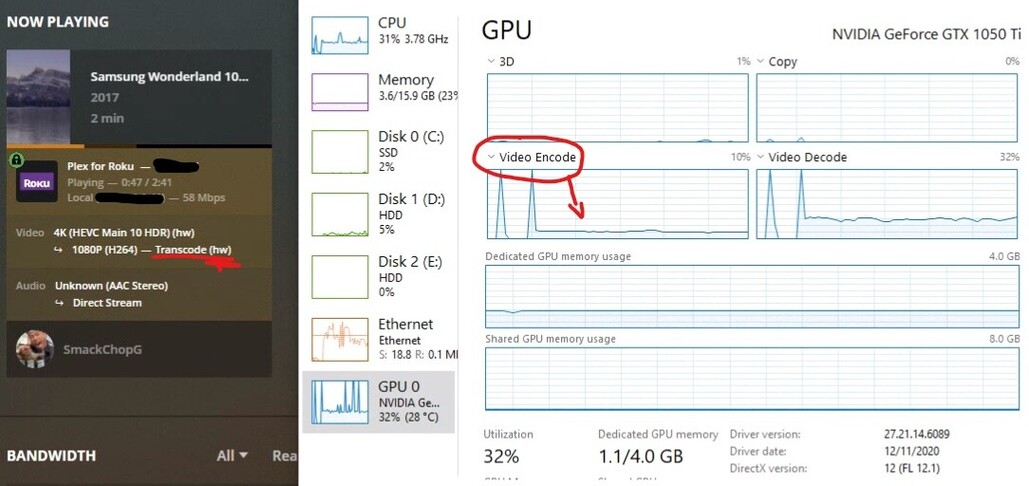
Im not sure the difference in Windows Server but on windows 10, you should be able to check task manager to see if the gpu is actually encoding anything.
Im sure you can also check your logs to see if any transcoding is happening.
Your 1650 should be more then capable compared to my 1050ti, but if i recall it comes down more to the cards vram, but 4 gb should be able to do the transcode fine, its worked for me. Your setup should be more than capable compared to my measly i3. The only thing I can think of, is that for some reason its not transcoding through your gpu. Could also be like me and it could be a network related issue on the devices you are streaming it to.
Most of my issues though came down to weird configurations. For example, my version of plex was really outdated even though ive been updating it to the latest, for some reason some things didn’t appear like tone mapping. This was a few weeks ago when I decided to toss a 1050ti into my plex box thinking it would just work. I ended up going down a rabbit hole. Some people saying they had to reinstall plex completely: Deleting the registry, cached data, etc. Except just leaving the actual video libraries, and having plex rebuild itself from a clean install. After I did this then, all these features started appearing, like tone mapping or even more hardware transcoding features… Really weird stuff. But than my transcode started actually working too. I would recommend you do this option as a last resort though, because depending on your video library it could take a bit to rebuild, or if you have something configured in your plex that might be a pain to redo from start, but if not than it was relatively painless rebuilding the data for me.
When you installed your video drivers, did you remove any of the previous ones through DDU in safe mode? Will try to help if I can because this was like a pain at first to figure out, literal hours of looking through google searches.
Now im down another hole of learning ffmpeg command lines to try and add tone mapping to my 4K rips haha!