Server Version#: Version 1.19.4.2865
Player Version#: tvOS 2.18.1 (15619)
I have found a huge issue for tvOS Clients who are playing back in 1080p from a 4K HDR HEVC source with the Enhanced Player.
When playing back the content with the following settings:
Media:
Format                                   : Matroska
Format version                           : Version 4 / Version 2
File size                                : 5.49 GiB
Duration                                 : 3 h 1 min
Overall bit rate mode                    : Variable
Overall bit rate                         : 4 339 kb/s
Encoded date                             : UTC 2019-08-27 03:52:10
Writing application                      : mkvmerge v35.0.0 ('All The Love In The World') 64-bit
Writing library                          : libebml v1.3.9 + libmatroska v1.5.2 / Lavf58.20.100

Video
ID                                       : 1
Format                                   : HEVC
Format/Info                              : High Efficiency Video Coding
Format profile                           : Main 10@L5.1@Main
Codec ID                                 : V_MPEGH/ISO/HEVC
Duration                                 : 3 h 1 min
Bit rate                                 : 3 492 kb/s
Width                                    : 3 840 pixels
Height                                   : 1 608 pixels
Display aspect ratio                     : 2.40:1
Frame rate mode                          : Constant
Frame rate                               : 60.000 FPS
Color space                              : YUV
Chroma subsampling                       : 4:2:0
Bit depth                                : 10 bits
Bits/(Pixel*Frame)                       : 0.009
Stream size                              : 4.42 GiB (80%)
Writing library                          : x265 2.9:[Windows][GCC 8.2.0][64 bit] 10bit
Encoding settings                        : cpuid=1111039 / frame-threads=5 / numa-pools=32 / wpp / no-pmode / no-pme / no-psnr / no-ssim / log-level=2 / input-csp=1 / input-res=3840x1608 / interlace=0 / total-frames=0 / level-idc=0 / high-tier=1 / uhd-bd=0 / ref=3 / no-allow-non-conformance / no-repeat-headers / annexb / no-aud / no-hrd / info / hash=0 / no-temporal-layers / open-gop / min-keyint=60 / keyint=600 / gop-lookahead=0 / bframes=4 / b-adapt=0 / b-pyramid / bframe-bias=0 / rc-lookahead=15 / lookahead-slices=8 / scenecut=40 / radl=0 / no-intra-refresh / ctu=64 / min-cu-size=8 / no-rect / no-amp / max-tu-size=32 / tu-inter-depth=1 / tu-intra-depth=1 / limit-tu=0 / rdoq-level=0 / dynamic-rd=0.00 / no-ssim-rd / signhide / no-tskip / nr-intra=0 / nr-inter=0 / no-constrained-intra / strong-intra-smoothing / max-merge=2 / limit-refs=3 / no-limit-modes / me=1 / subme=2 / merange=57 / temporal-mvp / weightp / no-weightb / no-analyze-src-pics / deblock=0:0 / sao / no-sao-non-deblock / rd=2 / no-early-skip / rskip / fast-intra / no-tskip-fast / no-cu-lossless / no-b-intra / no-splitrd-skip / rdpenalty=0 / psy-rd=2.00 / psy-rdoq=0.00 / no-rd-refine / no-lossless / cbqpoffs=0 / crqpoffs=0 / rc=abr / bitrate=3500 / qcomp=0.60 / qpstep=4 / stats-write=0 / stats-read=0 / ipratio=1.40 / pbratio=1.30 / aq-mode=1 / aq-strength=1.00 / cutree / zone-count=0 / no-strict-cbr / qg-size=32 / no-rc-grain / qpmax=69 / qpmin=0 / no-const-vbv / sar=1 / overscan=0 / videoformat=5 / range=0 / colorprim=9 / transfer=16 / colormatrix=9 / chromaloc=0 / display-window=0 / max-cll=0,0 / min-luma=0 / max-luma=1023 / log2-max-poc-lsb=8 / vui-timing-info / vui-hrd-info / slices=1 / no-opt-qp-pps / no-opt-ref-list-length-pps / no-multi-pass-opt-rps / scenecut-bias=0.05 / no-opt-cu-delta-qp / no-aq-motion / no-hdr / no-hdr-opt / no-dhdr10-opt / no-idr-recovery-sei / analysis-reuse-level=5 / scale-factor=0 / refine-intra=0 / refine-inter=0 / refine-mv=0 / no-limit-sao / ctu-info=0 / no-lowpass-dct / refine-mv-type=0 / copy-pic=1 / max-ausize-factor=1.0 / no-dynamic-refine / no-single-sei
Default                                  : Yes
Forced                                   : No
Color range                              : Limited
Color primaries                          : BT.2020
Transfer characteristics                 : PQ
Matrix coefficients                      : BT.2020 non-constant
If I convert to 1080p with the Enhanced Player (Use old video player OFF), it looks like this:
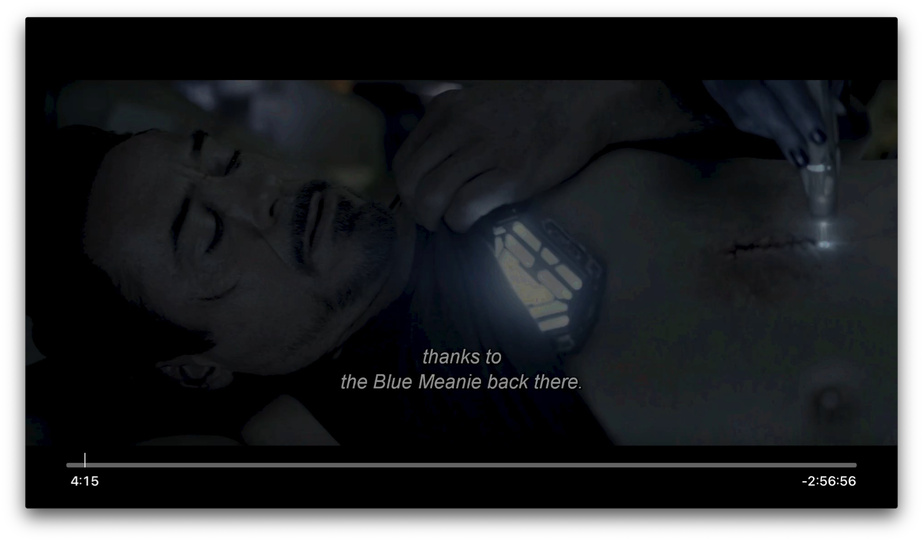
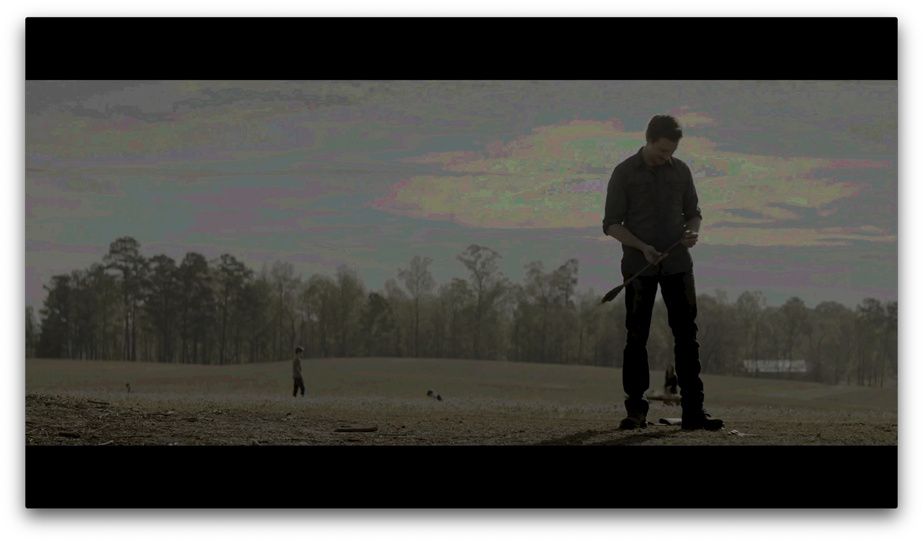
If I turn Use Old Video Player ON, it looks like this:
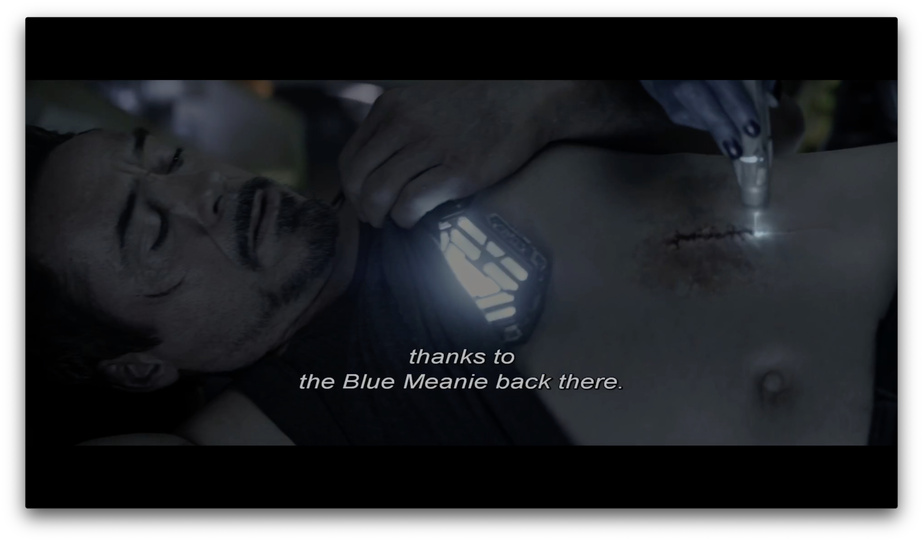
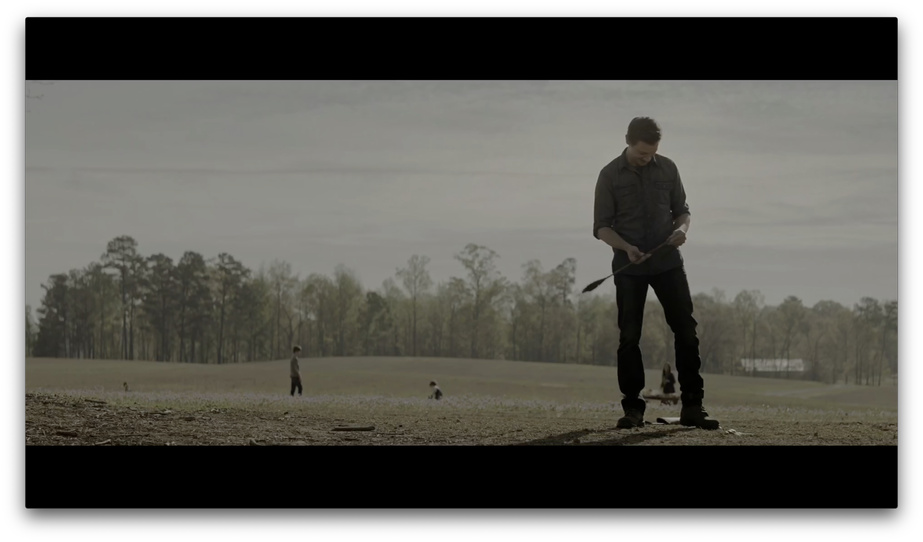
There is a huge and noticeable difference between the two, Enhance Player moves the movie unwatchable IMO. I have a number of people who can’t stream 4K or don’t have 4K ATV’s and I suspect this is affecting them too. The ONLY difference between those two images in the video player everything else is exactly the same. This doesn’t seem to happen with 4k h.264 but I also don’t think its HDR, I believe this is a mapping issue with the colors? But that’s just my guess. I tested this with other movies, 4K (HEVC Main 10) did not have this issue. But every movie that is HDR is totally botched and pretty much unwatchable with the Enhanced player, which is default on for everyone now if I recall correctly.
Server logs:
Plex Media Server Logs_2020-05-27_01-37-44.zip (4.5 MB)
Client Logs:
logging-4.zip (1.0 MB)
 Do you see that with HDR video (without transcoding it)?
 But I haven’t forgotten about this! I’ll let you know when I take a look, hopefully soon…
