Server Version#: 1.13.6.5339
Player Version#: 3.67.1
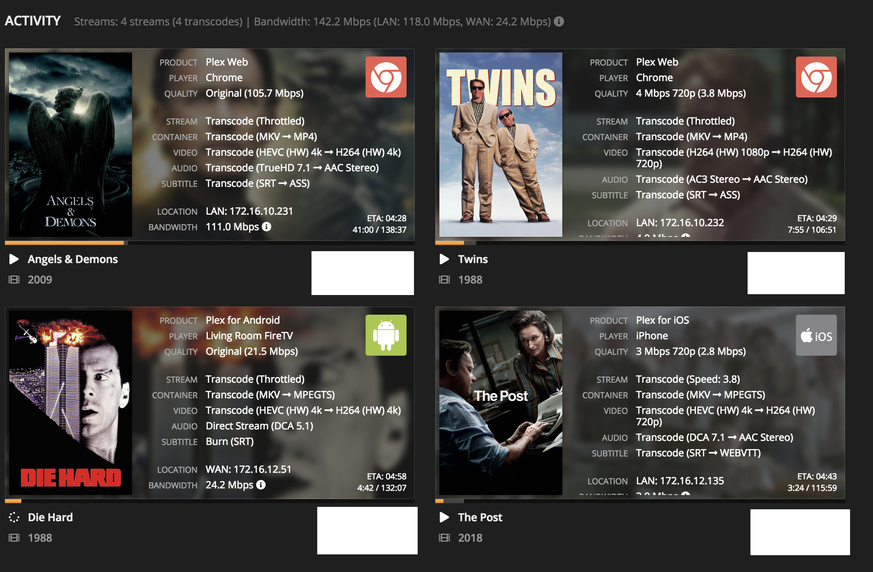
My plex server is a VM running on top of esxi with a Quadro P2000 passed through to it. The VMWare VGA Adapter is disabled. After installing PMS and enabling H/W transcoding, initially everything worked and I could see (hw) in both encoding and decoding. But after a restart it randomly changes transcoding mode. It always shows only hw encoding. See below for example.
How do I get the enc/dec to use the graphics card? The main reason is that I have a bunch of 4K rips that I want to watch on my phone when I’m out.
Local console has to be logged into the desktop for Windows. RDP does not work because there is no HW acceleration for RDP. The web console of ESXi is the same as an actual local console login.
There is a forum thread where others have discussed issues with Nvidia GPU transcoding with Windows. You could review that and see if any of the suggestions there help.
Like Achilles said, this is probably unsupported. I have colleagues I could possibly lean on to see if there are any ESXi tricks to passing the GPU to the guest but don’t think this is common.
Out of mere engineering curiosity, what is the reasoning behind people running Plex on VMs instead of the host. Is it mostly folks with ESXi hosts and not home users just running VMWare or Hyper-V on consumer OSes, and no other metal host is available?
The issue is not in getting the card to passthrough. Passthrough works fine. Even Plex recognizes the card and uses it for encoding. Just not decoding.
I can go with plex on Bare Metal. But My storage host has enough spare compute power. It’s a 14 Core Xeon Gold. I run all 24/7 services on it in docker containers or vms. Plex vm has 20 cores assigned to it and doesnt break a sweat with 1080p content. It’s just 2160p content that causes problems when I try to play when I’m outside the home.
If you want something low cost and low power to use as a dedicated PMS box, A NUC7PJYH does a fantastic job transcoding even 4K HEVC HDR for around $300. Thats if you can’t figure out how to get around the issue and leverage that P2000 in your ESXi Guest.
I just installed Windows on a Supermicro X10SSH-CTF/E3-1275 V6 system. It’s a Kaby Lake Xeon and should be able to transcode without issues using Intel QS. I’ll install Plex and test it out this week. Meanwhile, the current VM setup with P2000 works. System is under 75% load while transcoding 4K content. But that works for me as all my clients at home are direct play. I’ll update the thread with results once I get the kaby lake system running.
FWIW, from other post and my own experience, there are bugs with 4K transcoding. There appears to be a correlation between TrueHD audio tracks.
Regardless, according to ARK that supports QS and should be more enough for 4K. They do warn that HW 4K can cause compatibility issues. Presumably the transcoding output format options may be limited but if you are using fairly modern player devices there should not be much different. About 1/3 of my library content is 4K and streams flawlessly to a Roku Ultra stick and ATV 4K.
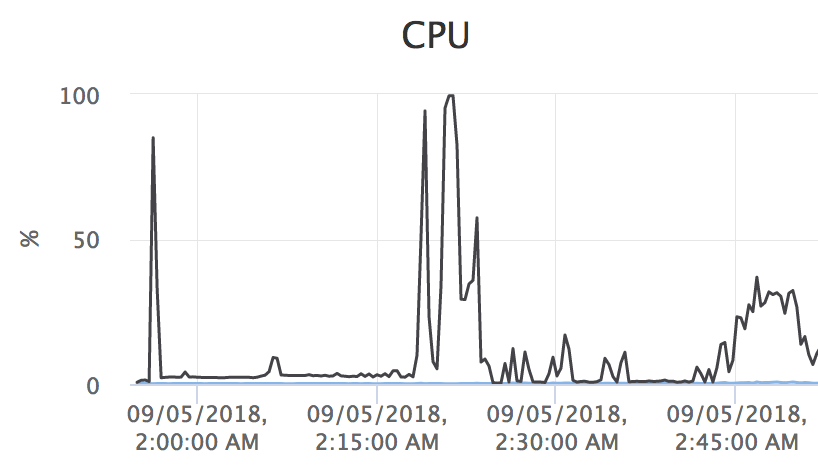
QS Works really well. I decided to check out QS transcoding with virtualized Linux and got really good results. Passed through the Intel Graphics adapter to a debian vm. Allocated only 4 cores to it and 4 gigs of RAM.
Able to transcode 4 streams in parallel, which is more than I’ll ever need. I’ll switch my main plex server to this box and continue working on getting the NVidia based transcoding to work.
You may have noticed this already but PMS does not tone map HDR to SDR yet. The colors may look washed out with a transcoded stream that is sourced from a 4K BD remux. The devs are aware of that deficiency.