The root question here, is how does Plex know / choose to play the 1080P file instead of the 4K file when both are available and it’s transcoding down to 1080P or lower? With that in mind here is the background.
I’ve been buying some 4K movies for a couple years now. After an early discussion on the forums about the processing requirements to transcode 4K I started keeping 1080p and 4K versions on Plex. All my initial testing showed this worked perfectly, Plex always using the 2K for transcoding, and 4K for direct play to 4K resources. All the first movies were fine so I’ve really quit testing / paying attention, just ripping both versions and putting them in plex.
Just recently added a few 4K movies and picked up on someone watching one where Plex was transcoding 4K down to 2K instead of starting with the 2K file. This sent me down a road of testing other movies trying to figure out how widespread this issue was and I was able to find one pattern.
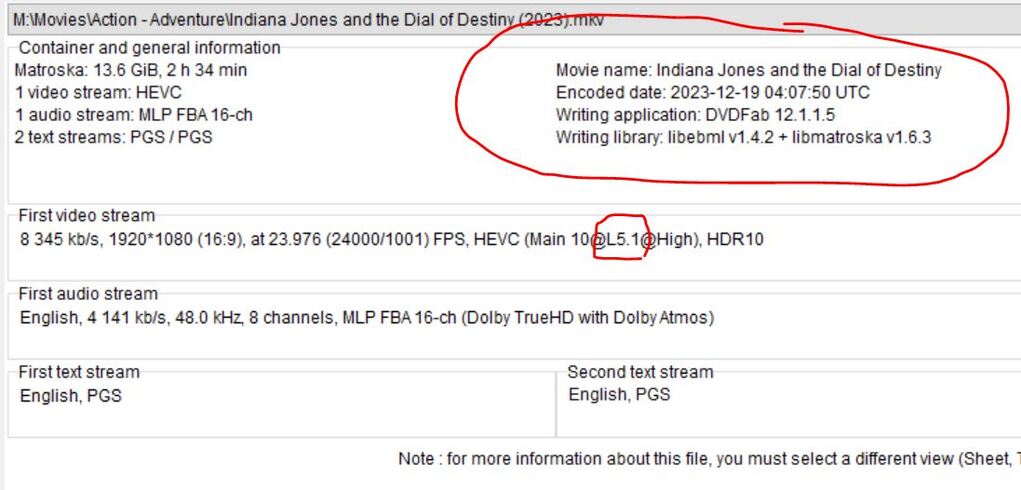
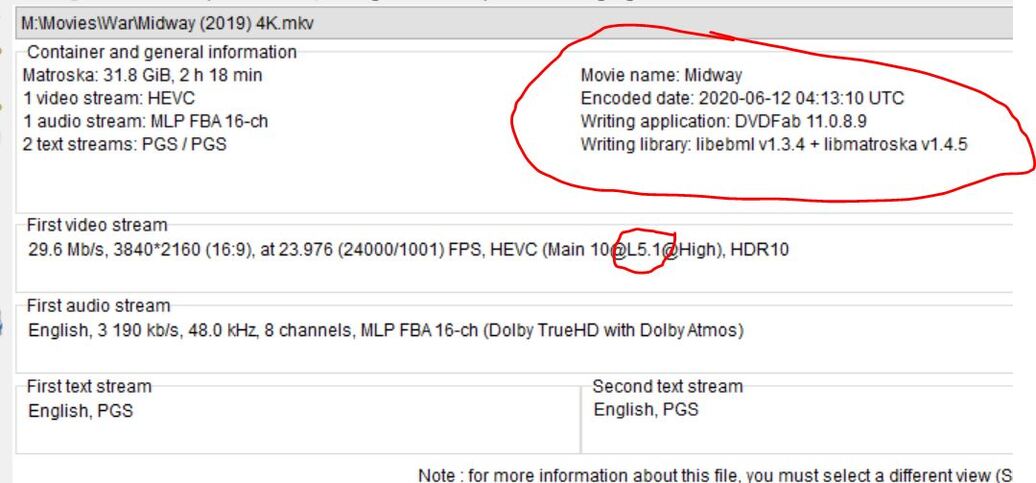
Attached are 4 files. they are images of Media Info for a 2K / 4K set of files that work correctly, and another set where the 2K is getting ignored. The difference in the technical information appears to be a pattern for other similar movies. Midway works correctly. IJ Dial of Destiny does not. It only uses the 4K and tries to transcode down to 2K. Noting the difference that the container info for both versions of IJ are the same while the container information is different for Midway. I do not know enough about the technical aspects of this to understand if it’s relevant. This pattern of differences has held true for multiple tests of movies that worked and didnt’ work. for some reason the 2K version that has the same library information type/version as the 4K is passed over.
What I don’t know is if this has something to do with the software I used to Rip, or whether I initially ripped down a 4K movie to 2K or just started with a 2K source. Sometimes I’ve only had a 4K disc others I had both. I know on this last round I had a 2K source disk and both versions were ripped with DVDFAB. I also own CloneBD but don’t recall now which was used when.
I really don’t want Plex to have to transcode 4K its on the limit for my CPU which runs at 90% for 2 hours when it happens.
Any thoughts on What I need to correct or change is VERY much appreciated!.
Are you keeping a 1080p copy for compatibility or only for bandwidth saving?
The use of HEVC HDR Level 5 also for the 1080p copy won’t help you regarding compatibility.
And TrueyhD audio won’t help you neither with compatibility nor with bandwidth saving.
I usually keep 1080p H264 SDR Level 4.1 and 4K HEVC HDR Level 5.1.
This usually works flawless, selecting the 1080p version on non HDR devices.
If a transcode to 1080p or 720p is needed, it would transcode down from the 1080p version.
However I noticed some quirks lately on Fire TV clients.
I also have try to put 4K and 1080p in the same folder. it doesn’t work for me as i have friends overseas and PMS keep playing the 4K instead of 1080p it buffer a lot. Now i Split the in different folder. I wish 4K works for remote.
the 1080P copy is more about saving my CPU from attempting to transcode 4K on the fly. It barely hangs in there on one file, most people report sketchy results anyway. 4K files are really only intended for those who can direct stream them, and that is pretty much for me locally.
Good point on not really needing TrueHD for a file that is intended to be transcoded anyway, that is a space saver.
The 1080p files that seemed to be recognized by plex and selected for trranscoding were HDR HVEC L5 vs the ones that didnt work were HDR HVEC L5.1. DVD FAB seems to only offer either HVEC 5,1 HDR… or H264 L5 SDR. I’m ripping one with DVDFAB in SDR now and then will try again with Clone BD and see what I can get.
I think HVEC HDR would still be a smaller file that H264 SDR. Assuming I can figure out how to get to the original file type I was using, I think that is preferred, but will at least know if the H264 works here shortly.
OK sorry for the delayed response but here is what I found.
Using AnyDVD/CloneBD - I could rip an HVEC L5.0 1080p AAC 5.1 resulting in a 8.65 GB file. (note there was an errant 2 channel audio track that doesn’t belong.) This file was properly selected by Plex for transcoding over the 4K file. Down side is CloneBD doesn’t yet crop the black bars (not usually a big deal), Also No way to rip to AAC (or any other) and maintain 7.1 with Clone BD. You have to keep the original HD Audio to maintain 7.1.
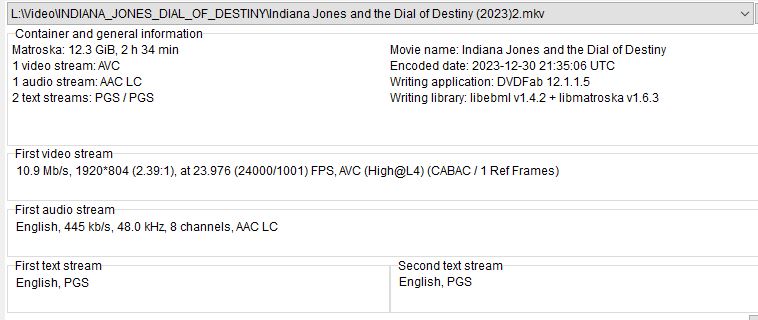
Using DVDFAB I can rip a H264 L4 1080p AAC 7.1 resulting in a predictably larger 12.3 GB file. This was also correctly selected by Plex for transcoding over the 4K. Down side is the file size, but it also allows you to maintain 7.1 channels in AAC.
Using DVDFab, any HVEC file at 1080p is still HVEC L5.1 AAC 7.1 resulting in a 6.62 GB file. For whatever reason, Plex defaults to the 4K file ILO the 1080P. I guess its seeing they are both L5.1 and then taking the best quality of those??
I have notice you use AAC LC sound. Can I ask if that is better?
I use Dual-Audio
DDP (E-AC-3) or DD (AC-3) 5.1
DTS-HD MA (DTS XLL) 5.1
Sometimes i will have 3 Audio
DDP (E-AC-3) or DD (AC-3) 5.1
DTS-HD MA (DTS XLL) 5.1
Dolby TrueHD with Dolby Atmos 7.1
The 4K video file is usually between 9 Gb to 18 Gb. HDR10 or SDR. I do use DVDFab. For the 1080p I try to keep the file at 3 Gb to 9 Gb with Dual-Audio. The only file i can compress is the Dolby Vision with HDR10. I am still not familiar with DVDFab.