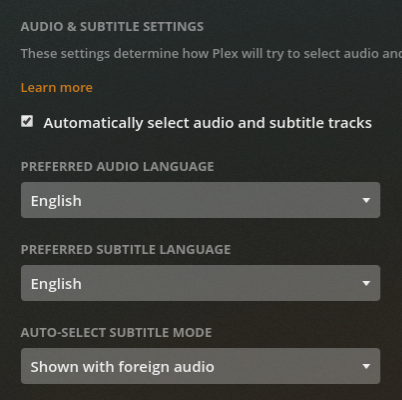
I can’t get the Account Audio/Subtitle Settings in Plex to work for me. I want to hear the original audio for a movie. Too often Plex chooses an undesired audio track for me. Here is what I want Plex to do:
Auto-select the first audio track with the original audio mix and language for a film. If unknown…
Auto-select the first audio track with the original language. If unknown…
Auto-select the first audio track.
With Plex, I get the following behaviour…
When a film is in a non-English language, and an English dub track is present, Plex will play the English dub. This is so frustrating for someone who watches a lot of foreign films. Like many movie lovers, I want to hear the original audio, not an English dub.
When a film’s first audio track has fewer channels than subsequent audio tracks, it will choose the subsequent audio track. This can often result in the Plex deciding to play a stereo commentary track if the original audio is in mono, which is frustrating to say the least. In other cases, it will choose an audio track with a 5.1 mix instead of a 1.0, 2.0, 4.0, 4.1, etc. mix, even if the non-5.1 mix is the first audio track, and flagged as default in the file. Is it just me, or does Plex prioritize more audio channels?
Adding insult to injury, if I use Infuse on my AppleTV, it more or less chooses audio tracks exactly the way I would expect. How do I get Plex to do the same thing? I would imagine that most cinema-philes would want to hear a movie in the original audio as well.
There is no flag or meta tag to indicate the ‘original language’ audio track.
There are only ‘language’ meta tags which can indicate the language as such of an audiuo track.
For your use case, you want to make sure that
the ‘original’ language is always the first audio track in the container (can be achieved with e.g. MKVtoolnixGUI)
Thanks for the quick response. I am a bit baffled by your answer, but hopefully you can help me out.
I didn’t make any claims that there was a flag or tag to indicate ‘original language’ audio, so I am not sure why you are telling me that this doesn’t exist. Perhaps you can clarify, why are you telling me this?
FYI, while there is no “original language” flag or tag, that I know about in encoding, there are other flags & tags that can be referenced to discern the original audio track most of the time. For example…
If only one audio track exists, use it. If more than one exists…
Ignore the audio track with the word “dub” in description. If result does not equal one single track…
Choose the audio track with the word “original” in description. If result does not equal one single track…
Choose the audio track that does not have the word “commentary” in description. If result does not equal one single track…
Choose the audio track with language flag that matches language flag of the video track. If result does not equal one single track…
Choose first audio track with language flag that matches language flag of the video track. If there are none…
Choose first audio track.
That’s a just off the top of my head, so please don’t critique it as purportedly flawless logic. Just a proof of concept.
I have disabled the auto-selection of tracks as you advised, and this does improve things overall, but still does not solve all my problems, and it creates a new problem…
Plex still does not play the original audio track if an English dub tracks is first in the file. Remains unsolved.
Plex will play the first audio track in a file even if it is non-English, and other tracks contain either an English commentary or dub. Big improvement.
Now subtitle tracks are never enabled, even if audio is non-English. New problem.
Remuxing all of my media library so that Plex can turn on subtitles when they are needed is unfortunately completely unfeasible, so that doesn’t work for me as a solution. Plex is so fantastic in so many ways, can it not be configured to play original audio, and if that original audio is not English, turn on English subtitles, like other services?
Simply to illustrate that it is difficult to determine which audio track is the ‘original’ one.
I didn’t “claim” this. I told you that it is desirable and how to make it so. In particular, it will alleviate “Plex still does not play the original audio track if an English dub tracks is first in the file.”
I wonder what happens if you re-enable the automatic selection, but un-select the Audio language preference (by picking ‘Select Language’ from the list).
Not at this time.
Please name some “other services”, which do it better.
Thanks for the clear and quick answers! Some clarification on my part…
MY BAD. If you look above, you’ll see I actually edited my message after I realized I mis-read what you said. Please accept my sincere apology for mischaracterizing what you said. You were clear. I was hasty.
That’s EXACTLY how I had it configured in the first place
No difference from having English selected.
Amazon Prime & Netflix, etc. which I know aren’t directly analogous since they do not play 3rd party files, do it better. If Infuse is used as a client on an AppleTV with an FTP, or SMB or any kind of server except for Plex, it gets it right. If Infuse reads from a Plex server, it gets it wrong. Any client that reads from PS3 / UMS / etc. tends to get it right. I honestly don’t know one single service that can’t simply toggle the (user preferred language) subtitles on when the audio track being played is not in the user preferred language. I’ve been running a media server for over a decade, and while I am happy with switching to Plex last year, I’ve not encountered any media server software in a decade that can’t do this, except for Plex.
That automatic setting does exactly this. However, plex does not use descriptions so if there are 2 tracks in the same language, plex will choose the first.
If that isn’t working you’ll need to recreate the issue and provide logs from the client and pms to see what’s going on.
OK, can you please clarify for me, what setting combination should give me track 1 audio, with English subs if track 1 audio is not English? I’m definitely not getting that behaviour, but perhaps I have it set incorrectly.
Keep in mind that for this to work, the languages do have to be set to something. You can’t leave them blank. i.e. your audio track must say something other than English. Then your subtitle track must also be labeled as English. i.e. If this is an external srt file, it must be named movie.eng.srt
I can confirm that these settings do not work for me. I get the same behaviour as before… it will choose the first audio track in English for non-English films.
FYI, I am only playing properly tagged files. I would be happy if I could just get Plex to play audio track one, and to turn on ENG subs if track one is not flagged as ENG.
If you don’t want dub tracks it’s honestly just easier to remux the files without the dub tracks imho. Bonus is that the files take less space with fewer audio tracks as well.
If you’ve enabled the settings above, then you’ve told PMS to pick the English track. PMS has no concept of a foreign film or original language, it only knows the language identified for the tracks. If you’ve set the preferred language to English, and there is an English track, it’s going to pick it, since that’s what you’ve told PMS you want. If you don’t want that, turn off the setting and PMS will pick the first audio track regardless of the language.
Thanks for the responses. Unfortuneately, there seems to be some miscommunication and I still need your help. To clarify…
If you don’t want dub tracks it’s honestly just easier to remux the files without the dub tracks imho.
I don’t want to get rid of any audio tracks. This isn’t my problem, nor is it a solution for my problem.
PMS has no concept of a foreign film or original language
Understood. We have already covered this and moved on from this point. I asked the following…
OK, can you please clarify for me, what setting combination should give me track 1 audio, with English subs if track 1 audio is not English?
…and I was given settings to do this, but they did not work. I reported back, and was told that those are the wrong settings for the behaviour I desire. OK, so my question still stands…
What are the settings to get Plex to behave like virtually every player out there, and (1) play the first audio track, and (2) turn on subtitles (in the users preferred language, if available) if that audio track is not in the user specified preferred language?
That is not possible. There is no way to tell PMS to always choose the first audio track and to also choose a subtitle. The audio and subtitle are linked and PMS can either automatically select both or neither.
You would need to make a feature request to have always choose the first audio track as an option when autoselecting audio and subtitles.
Theory here: remux the file so that you have labels on all tracks. Label the Video track with the language of the original material. Then label the Audio tracks with their respective languages. I’m wondering if Plex will match the Video track language with an Audio track of the same language by default. I’m going to try to test this.
I can provide instruction on the remux process with command-line if you need it.
Thanks for the info, Otto. I am in the midst of a little project filling in missing Video track language labels. Curious if you can tell us what purpose they ever serve (in non-Plex contexts). I wasn’t able to research that answer. If I’m on a fool’s errand with not a single benefit, I’ll abandon the effort.