no I’m speaking here to give the ability to plex to use another server
with the use of the option into “network”

where here DSM will use the DLNA package to share the iTunes indexed Folder by the DSM himself.
Here Plex become the client of the Dlna server.
and not create a dnla server option with/from Plex to another device like you understanded.
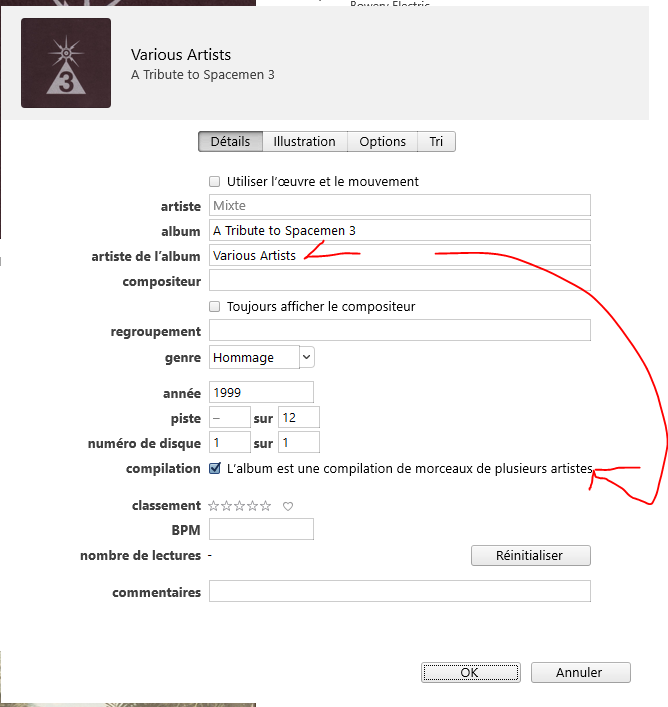
I use Itunes only to manage the MetaTags and jacket album pictures.
I found Plex much more complicate to manage this and in fact Plex will keep the jobs metadata done not into each music files but inside his own database. This give an only propriatary job done for Plex only.
With iTunes, the metatags will stick with each files and you will able to use them with Plex or any music indexation programs that handle correctly metatags.
take note here that for other server see by Plex, it must be the DLNA server package from DSM, and not the iTunes server that is definitely reserved to Bonjour and apple products.
Perso, I don’t use the DLNA way for my iTunes Library but I just point the entire Itunes folder where is my xml list too, and my old Plex version manage the list and file correctly without any intervention into the itunes other than the share xml pref. too.


As my Sonos like the iTunes way, I learned all these aspect and then after Sonos came the Plex experience.
But once you got thousand of musics, it become more easy to left the shutle mode  than to manage list for me.
Lists are worse to manage and to sync between environments…
I don’t need to import anything, as my Plex Music library is linked to the main folder iTunes
where there is 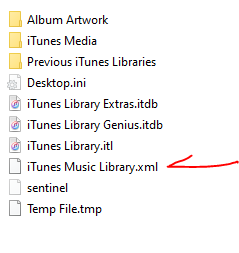
BUT you will need to setup iTunes to share this file too:

and like said @TeknoJunky you will do the trick said in his post Adding an iTunes Library in 2020
this is why I unconsider more and more the newest releases of Plex
Things that was working before are now considered as “obsolete” and new addons and changes give more trouble because of 4K and DVR demands…
then the basics stuffs like inside personnals services are disapairing slowly.
Sonos did the same but front of the wilyng poeples, gived back the old solution with possibilities to work with the new solution…
Here Plex decide simply to isolate the oldest (not so far from, as we talk about version older than few years here1.15.x release) from them relaying services
It’s like you make refreshing works at the second level of your house, but you remove the basement
Since about 15 years 
Plex does have a bug in that it needs the AA to be “Various Artists” (hardcoded in English) while normally in all other music library managers the AA should be empty for compilations.
Plex also does not correctly support albums with tracks from different years and/or different genres, the DB only stores Genre and Year on the album level. In addition, track artists on compilations aren’t searchable.
Compilations are an area where Plex hasn’t really been tested/developed for.
I agree that using TPE2 as Album Artist is incorrect usage of this tag, but since absolutely
everyone is using it this way (Microsoft, Apple, Google and pretty much every other music player out there) for a good 20 years now, it’s no use objecting, we’ll have to go with it.
Compilations are not just playlists of current hits, they are also archival tools for genres that are/were mainly singles, not to mention DJ mixes. There are millions of songs that were only ever released on compilations, so it’s a shame to see a library manager like Plex not being able to handle them very well.
The requirement of an Album Artist by Plex is somewhat annoying, since it’s the pretty much the only music manager/player out there that needs it. The id3v2 standard also doesn’t require it as a mandatory field, so in that sense Plex is moving away from the standard here.
There are some other things where Plex is much stricter than it really needs to be - for example the specific filename/folder naming (which shouldn’t be needed when you use tags), and the insistence that track numbers need to be present.
That said, it’s a shame there was never an id3v3 standard to sort out all the shortcomings: standardize the Part-Of-Compilation frame, clear guidelines if compilations should have an AA, a Release Type frame (Album/EP/Single/Archival), a Style frame, a ReplayGain frame, in other words, all the fields that online databases like RYM, Allmusic, Musicbrainz and Discogs have introduced since the id3v2.4 spec was published.
Hello,
I’m reading this thread and perhaps as of this writing the iTunes playlist import option has been removed. Even if not, I cannot find it and is completely unintuitive at best. I recently ported my music collection from a local PC to my QNAP NAS and am trying to get my rather extensive playlists set up. Is there a way to import a playlist, even a .CSV file format? I actually developed a pretty sophisticated way of creating playlists and need to have an import feature to make it all work. I can take my playlist creator (Excel file on steroids) and import the playlist to iTunes. I’m looking to do something similar for Plex. The “smart” playlists just don’t cut it for my diverse collection. Thanks!
Jim
How exactly do I get to this Playlists Tab? I really can’t find it.
@gregor_kremsmueller_at I’ve been fighting with this for a while, also. My Playlists tab (and therefore the “import from iTunes” option) in this updated version didn’t appear until I made a throwaway playlist - In your Music library, just select any file, then go up to playlist menu at the upper right of the screen and “Add to…” Name the new playlist, and your Playlists tab at the left should appear shortly. I hope this helps! ( I’m still trying to convince Plex to see my iTunes playlists, but I’ve at least gotten this far!)
I imported my playlists (Mac OS X) by following the steps above, creating the “throwaway” playlist, putting the correct file path to the iTunes xml file.
Then I kept getting an error message that Plex couldn’t import the playlists.
I went to Plex Settings - Plugins, and selected “Disable capability checking” and my iTunes playlist imported.
This is a cross post from here, if that’s a no-no please let me know and I’ll delete one of them. I was only ever able to get import iTunes working when my PMS was on a Windows box, after moving to a Synology I tried but couldn’t get it working. Tired of no cross-platform solutions I just went ahead and coded one on top of the Python plex API. It isn’t perfect, but it works well enough: I can import my playlists from Apple and play them in various Plex clients including on Alexa using the Plex skill.
Most of the following is in the README, so if you are technically inclined just read that. I would really appreciate someone from the Plex team looking at this to help diagnose the few remaining annoyances detailed at the bottom.
It should work on older iTunes XML files, but I haven’t tested it (only on Catalina). It should work on XML files created by the Windows version of iTunes, but again, haven’t tested it. It should work on just about any host OS for PMS, but I’ve only tested on a Synology NAS (i.e. Linux).
To work at all a few things are required:
- An Apple music library XML file (File -> Library -> Export library in the Music app or iTunes).
- Credentials for your Plex Account (your plex.tv account, NOT your account on the server).
- The name of your Plex Server.
Additionally, some steps while not strictly required will make it work much more reliably:
- In your Plex Server settings under Agents move “Local Media Assets” to the top of the list for both Artists and Albums. This will reduce the amount of renaming of your media files that Plex does, making it easier to match to the Apple playlist tracks. Be sure to refresh the metadata after doing this.
- Double-check the output in the terminal when running the importer. If it can’t match a track, then the problem is almost certainly that the plex name is different than the Apple name, and you should rename the track(s)/album(s)/artist(s). This is more true the more non-English non-ASCII your collection is. I have a lot of Japanese, Scandanavian, and Latin character-having artists/tracks in my collection but ended up only having to manually rename one artist after doing step 1.
You can clone this repository, install the plexapi package dependency, and run app.py in the importer package but I recommend installing through pip:
python3 -m pip install --user git+https://github.com/jasmith79/apple_playlist_plex_importer.git
Open up a terminal and (assuming you installed via pip) run the command:
pleximport path/to/library.xml --user myplexuser --password myplexpassword --server myplexserver
For those of you worried about having passwords in your shell history, you can omit anything except the file path and it will interactively prompt you for them. See --help as well.
Some known issues:
- It can take a significant amount of time for PMS to optimize all of those playlists. Don’t be too concerned if you try to access them right away and get some sort of “failed to load” error message.
- If you don’t have any existing music playlists you will have to reload the page/restart the client app to get the playlists menu option to show in the Plex client.
- As I said the name matching is not perfect and was shockingly difficult to implement with even decent reliability. Probably the reason the Plex team didn’t do it.
- Playlist items will always fail to load if you try to view the playlist in either the web or desktop clients (although they play just fine). I would really love some help fixing this.
Can anyone from the Plex team take a look at this and help iron out the remaining annoyances?
Hi All,
I am not sure if I was reading this correctly. Is their now solution at this time for importing iTunes playlist into plex on a windows machine? My iTunes is on the same PC as my plex server.
Thank you
You would not believe how many threads I have found with the same problem - searching, searching, searching… and EVERYONE seems to have problems with not having their playlists from iTunes import into Plex…
I have imported itn=unes as instructed, have set the path etc for the XML file, all is working innPlex and PlexAmp…BUT NO PLAYLISTS…
The default playlists in Plex are almost empty and pretty useless… I have MANY playlists in iTunes, but can find no way to get these imported…??? !!!
Come on Plex, I have a PlexPass… my music (from iTunes, on a Mac) is seen, imported and plays… but is a random jumble of individual songs and albums…
I want my playlists…
MANY PEOPLE are asking for the same thing…
PLEASE PLEX - Give us a reply and solution… this has been going on for YEARS!!!
HOW do we import a working PLAYLIST from iTunes???
I believe you. I’m not a Plex subscriber and from the looks of what’s working and breaking and is being removed over the past years, I’m not going to give Plex some of my money. From the looks of it, customer support can be improved. By a large margin if you ask me.
I have ripped/imported my entire cd collection years ago, carefully curated ratings, playlists and so on. All done in iTunes. I say either fix the iTunes stuff in Plex or simply delete it.
