Server Version#: 1.23.3 Windows
Player Version#: latest web player that comes with the Windows Server
Iam new to Plex. My plan is to create my private “Netflix” with only EDUCATIONAL courses/tutorials for me and my girlfriend. We pay for the REAL Netflix for fun and leisure, but we want to have a private “Netflix” hosting a collection of educational video-courses and tutorials. Lets make TV enriching
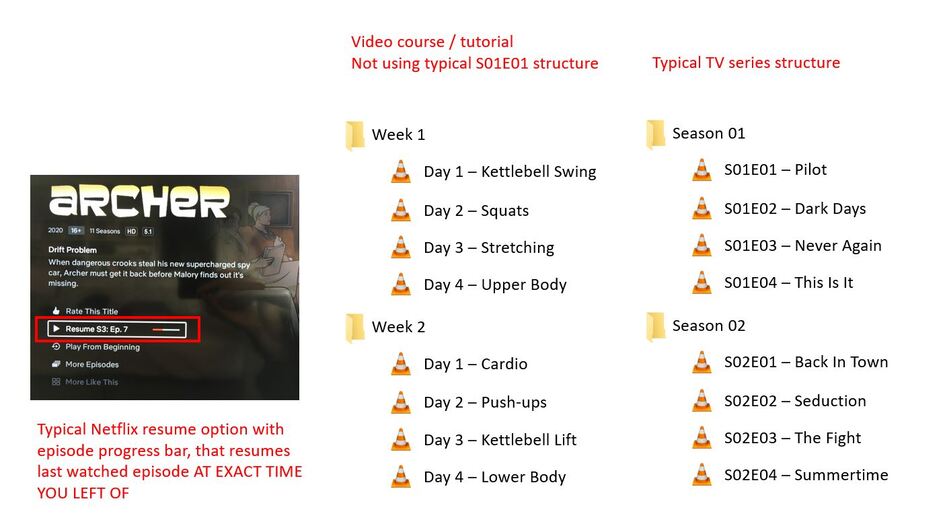
The greatest function about the REAL Netflix is the RESUME FUNCTION
You can binge watch a TV series and suddenly decide you had enough. So you switch off Netflix and when you come back, you get the screen [>> Resume S3: Ep. 7] with a episode progress bar and it resumes from the EXACT SECOND WITHIN THE LAST WATCHED EPISODE, where you left off. This 1 button convenience is priceless and the REAL KEY why Netflix completelly destroyed classic TV.
Combined with the separated USER PROFILES, where ME and MY GIRLFIREND can store MULTIPLE series ON PAUSE, or even watch same series, but each at his/her own pace with different PAUSE/RESUME points.
The fact that 2 people in a household can have MULTIPLE different series paused at the same time and possibility to resume any of them depending on your mood (drama, comedy, documentary) - this is what makes NETFLIX a candyshop TV unlike any other
Now how do I replicate that in PLEX with my private video collection of educational courses ???
Iam new to PLEX. So far I was able to create 2 MANAGED USERS so we can separate what we watch with my girlfriend and separate our PAUSE/RESUME points
I didnt exactly find the PAUSE/RESUME functionality in PLEX just yet, but it may be due to the fact, that my video collections do not really fit into the SEASON / EPISODE naming convention. I assume that PLEX is not recognizing the video courses as series with a sequential order of lessons and therefore does not display the RESUME option.
Iam attaching a picture showing example of a typical folder and file structure of a video course or tutorial (on the left side of attached picture) versus a typical TV Series
As you can see, video courses / tutorials usually dont follow the typical Season and Episode naming format (eg. S01E01), that is so common in TV series.
Iam not sure how to configure Plex to recognize the video course as a “series” and give me the option to PAUSE/RESUME. I dont want to be renaming all my video course folders and files to fake Seasons and Episodes
How to make PLEX treat the folders (Week 1, Week 2) as Seasons and the Days as Episodes
Can anyone help me how to setup PLEX to get the PAUSE/RESUME functionality of NETFLIX, using the folder structure of the example video course in the attached picture ?
I can see now, that my example picture didn’t exactly portrait, how many video courses are structured AND CONSUMED… much like TV Series the courses can be “binge-watched” in a sequence - Week 1 (Day 1, Day 2, Day 3), Week 2 (Day 1, Day 2, Day 3)… and so on…
You just WATCH the course, STOP and come back to watch from where you left - hopefully with 1 click of a button “RESUME”
If I set-up the library as “Videos” as you suggest, I will probably be able to RESUME individual videos ONE-BY-ONE… but Id like to RESUME the entire COURSE wherever I left off - just like you would want to RESUME entire “Game Of Thrones” TV series with just a single click of button [>> Resume S3: Ep. 7]…
You dont want to scroll through Seasons list and than through Episodes list to find the last watched episode somewhere down the list…
I am new to PLEX. I watched some tutorials where people organize TV series into hard-drive folders “Season ##” and than add suffix to file names like " - s##e##" to make PLEX organise things nicelly - AND RESUME…
I have yet to test if above renaming actually results in the kind of RESUME ala Netflix - where PLEX will RESUME from EXACT SECOND WHERE I PAUSED the last episode - it certainly seems like its already implemented in PLEX
If so, than my question is more about how to SKIP THE RENAMING and RE-ORGANIZING of Folders and Files into FAKE Seasons and Episodes…
All I really want is the RESUME function, and the re-organizing into FAKE Seasons and Episodes on hard-drive is little contra-productive for me - is there any way to hack the PLEX to apply the RESUME functionality to a custom folder/file structure that doesn’t naturally land itself to the S01E01 structure model ?
Plex will store the playback position of any video as long as you
have played it for more than 1 minute
have not played more than 90% of it
However, if you want Plex to monitor your progress across several “episodes” of a series of videos (which is pretty much the definition of a “TV show”), then you have to make these videos appear to Plex as a TV show.
Which involves changing their file names to the supported nomenclature and organizing them into the required folder structure. https://support.plex.tv/articles/naming-and-organizing-your-tv-show-files/
Then creating a library in Plex of the type of “TV Show” and point it to the folder which contains all your series of tutorials.
Can I put the “s01e01” at the beginning of filename instead of end of line:
"s01e01 - Day 1 - Kettlebell Swing.mp4"
Can I retain some kind of “optional” title for the “Season ##” folder
"Season 01 (Week 1)" or "Season 01 - Week 1"
or does it have to be “Season 01” and nothing else for PLEX to recognize the nomenclature
Finally,
I can understand the rule that you can resume video IF "have played it for more than 1 minute"
but is there some way to maybe reconfigure (via some INI setting) the rule "have not played more than 90% of it"
the reason this could be a problem, are video courses, where a single video has 3,5 hours (so 90% mark is 18 minutes before end) - what happens if I pause such a long video 15 minutes before end ? Do I lose the resume point ?
You can, but it will be ignored by Plex and therefore won’t appear in Plex.
You better put it at the end of the folder name and enclose it in square brackets Season 01 [Week 1]
Unfortunately not. 10% is to ignore the timespan which is usually occupied by the credits.
Unfortunately yes. Plex would consider this “episode” as completely played.
I found I can give names to imported Seasons and Episodes via the “Edit Pencil” icon inside PLEX for each season/episode and the names will show up in PLEX player
Season 01 → The Awakening
Season 02 → The Battle
Season 03 → The Finale
Episode 01 → Welcome to my World
Episode 02 → Childhood Memories
Episode 03 → Her name is Jane
But is there a way to name the mp4 files on HDD to be picked up by PLEX as Episode names ?
I hate to click “Edit Pencil” on 4 Seasons with 12 Episodes each - 48 manual edits
I guess normally Episode names are picked up from some IMDB / TMDB query but my “TV Series” are FAKE - they are actually EDUCATIONAL video lessons / tutorials from various source and therefore cant be found on IMDB / TMDB
How to name the files on HDD so PLEX will pickup an Episode name from the filename ?
Unfortunately not possible.
You will have to embed the title of the episode as meta tag into the mp4 file itself.
(mp4 / m4v files are the only file types where this is possible at all in Plex)
You can use the “File name → Tag” feature of e.g. mp3tag to do that on all files at once, provided they all follow the same file name structure (which they should, anyway).
If your file name is s01e01 - Day 1 - Kettlebell Swing.mp4
you’d actually use %dummy% - %title%
to get only “Day 1 - Kettlebell Swing” into the title tag.
Haha %dummy% was exactly what I was looking for to SKIP parts of filename I dont want to end up in the %Title% tag
NICE
The only downside of Mp3tag software is that it takes ages to apply the tags…
I have a video course in 1080p that has 20 GB and adding the Tags basically copies this whole folder over itself - takes forever to add 15 tags because it copies 20 GB
Yes, this is unfortunately unavoidable. It must make room for the tags at the beginning of the file, so it has to write some tags and then append the video file to them.
You can see that subsequent tag changes on that file are much faster from then on – because the area for the tags is already in place.
And if you want to do it perfectly right, you have to perform this after everything else is done:
This prepares the file optimally for streaming use, which is what Plex is.
But unfortunately it means in many cases writing the whole file yet again.