Server Version#: 1.19.4.2935
Player Version#: varies
Server OS: Windows 10 Pro
Players: Firestick app (primary), Android app (secondary), web (rare)
Plex User Accounts: 1 (admin)
I am having a weird issue with certain media in my library in which Plex can’t remember the location last watched in the media. The strange part is that it varies by both media being played as well as location the media is being played. Although it happens with files in both my Movies and TV Shows libraries, its best illustrated by what happens with The Office and Friends box sets, which my wife and I watch often (daily).
Both TV Shows are in the standard TV Show library and were uploaded with no specific settings configured for either show. I think I changed the background image and/or cover art in Plex, but that’s about it. With The Office, sometimes Plex remembers where we left off, other times it resumes on a random season/episode. I can’t seem to find any kind of pattern for when or why this occurs or what season its going to jump to. It does seem to occur more on the livingroom firestick, which is right next to the router. It also still occurs on the master BR firestick though.
On the other hand, every single time we resume friends, it resumes at Season 4…no matter where we left off…Season 4 every time. No matter the device, Season 4.
I should note that 99% of the time were watching these on one of the 2 firesticks noted above. Ive tried force-closing and clearing cache many times, to no avail. Pulling it up on my phone app, it looks like Friends is correctly showing the episode in Season 5 that we left off on, so maybe this is a firestick issue? Whatever the case, this has been an ongoing issue since I first setup my Plex server months ago. My wife and I only have 1 login for both of us, so it’s not a matter of a conflict between users. Furthermore, we very very rarely ever watch Plex at the same time on 2 separate devices (basically never). She does the majority of the Plex watching. Usually with Friends and The Office, we’re watching it together.
Any idea what could be going on here?
not sure how to troubleshoot it, but you could try fixing it the hard way;
- mark the whole show as ‘watched’
- make sure there are nothing still marked as unwatched (no orange corner or # in the corner)
- mark the whole show as ‘unwatched’
- manually go through and mark whatever season(s)/episodes as ‘watched’ until you are caught up to where you want to be.
^that^…
Also FireTV is notorious for caching issues - go to the main FireTV Home/Settings/Applications/Manage Applications/Plex/Force Stop/Clear Cache (NOT Data!). <— I clear cache often and restart the device often.
On Deck is easily confused by jumping around in seasons watching an episode here and there… don’t do that.
Also make sure there isn’t a client sitting around paused… somewhere - like Plex Media Player that hasn’t been opened in 6 months - closed inappropriately - still has the episode in the blocks waiting for the starting pistol. Yea… it happens to the best of us…lol
I have Plex set to not mark unread files. And at this point, I’m pretty sure we’ve watched every single one of the episodes. Definitely for the office… We’ve watched every single episode no less than 3 times.
That’s exactly how i force close and clear cache. I had no idea firestick had its own issues. Maybe that’s the problem?
We don’t ever jump around on episodes.
Interesting ideas about other clients. That’s possible… Can i force sign out clients from the server? Is there a list of signed in clients?
normally a paused client will show up in the server dashboard
Plex Web > settings > dashboard
you can see all logged in clients (but not necessarily if they are active/open) @ plex web > settings > authorized devices
you can remove individual devices from the above authorized devices section, or you can change your password and optionally sign out all devices at one time.
Ok well i just cleared out all but 4 clients. Most others just looked like old instances, so nothing should have actually been running. I did clear them anyway. If this problem persists, I’ll report back.
So Friends didn’t start on season 4 this time. It started on season 10. We’re currently on season 5 
Something’s broken…
@anon18523487 should figure out what it is.
@OttoKerner also has the magic touch with this sort of thing…
I am adding Star Trek TNG back to the fold after having been gone for a while - awful quality - something happened at some point and they were abandoned. Anywho…
As they slowly come back aboard they are all marked watched, but the latest one added always shows up in On Deck. Somewhere, in the invisible ether of the Plexiverse - for an episode that hasn’t been added yet… it’s unwatched or watched or partially watched and Plex is confused. I was cycling each re-newed episode as watched, which would take it out of On Deck, but then I decided to mark them all Unwatched. New ones aren’t showing up in On Deck - at least.
I’ll probably never know exactly what is going on, but when I get them all back on board and they’re under my control again - I’ll be able to make them do whatever I want - Until they actually get here - I’ll have to coax Plex along…lol
I was going through all the server settings, because I also can’t seem to get hardware accelerated transcoding to work with any consistency or predictability (I have another post about that, and I’m getting really irritated by this issue!) and I noticed what I believe is a new setting for plex’s ordering of items. I don’t recall exactly what it was called or which section of settings I found it in, but there was a settings that was something to the effect of “prioritize unwatched shows and shows that haven’t been watched in a while”. It was defaulted to being checked. I turned this off, because I don’t think Plex should be treated like a To-Do list. Obviously it didn’t help my issue at all, as we’re still not seeing the right Friends episode on-deck. I had wiped out all firesticks from the devices list, requiring us to re-sign-in, but that didn’t help either clearly.
Is there a way to just mark all episodes (or all libraries) as watched at once? Going through each episode to mark as watched would take forever. We’ve already watched the episodes, but maybe i can “cycle” them by marking all as unwatched then marking all as watched.
There is no way to mark an entire Library as watched - that I am aware of.
You can, and I do, mark entire Shows:
All 18 Seasons - in one go.
Watched, or Unwatched.
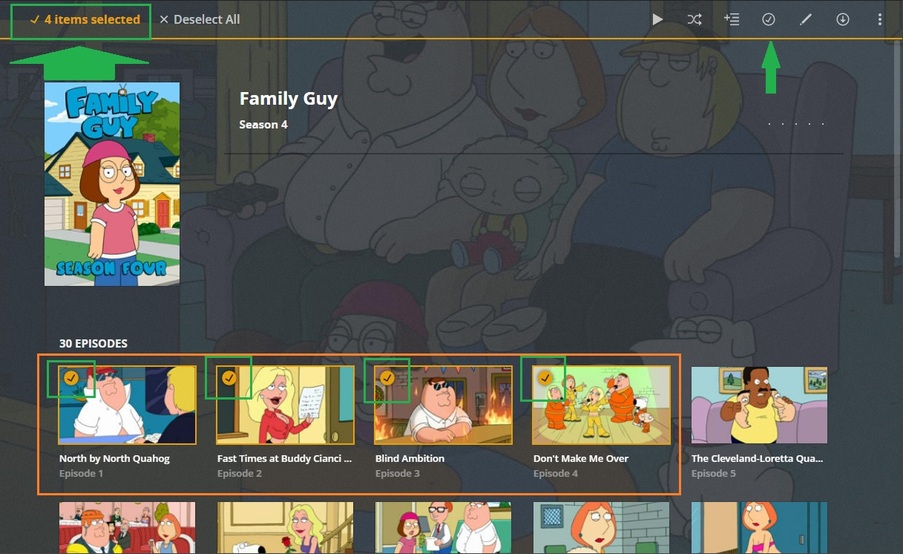
Then I can go to a Season, and check the little circle, or check the first one, hold Shift then select the last one in any row… then… well?..:
That’s about as quick and painless as it gets…
but it will take a moment for each show - if you’ve got a bunch out of whack, but right now you should be able to fix Friends rather easily, 'cause I recently ‘Re-Set’ mine for another ‘Re-Run’:
Unless there’s something gone horribly wrong.
So you need to check both the entire season and each individual episode? Or were you just showing that it can be done either way? Checking off entire shows is no problem since I only have like 6 or 7 so far. But if I had to check off every single episode of How Its Made or Chopped, I’d go insane lol
You can mark Shows, Seasons and/or Episodes when you get down to the nitty-gritty for the fine tune - and it’s easily done (easily enough anyway) with the individual episode select thingy - wherein you can apply the same action to selected episodes in a Season:
Select the circle thingy for Episode 1
Hold Shift and Select the circle thingy for Episode 19
Everything between 1 and 19 get checked and
can be marked/unmarked/edited/etc <— ‘DeSelect’ when you’re done - that may start a fire.
You can NOT have stray Episodes watched/unwatched.
You can NOT have Partially Watched Episodes - except the one you’re watching, of course.
You can NOT have blocks of Episodes in Seasons watched/unwatched.
If you’ve watched Episode 1 through 19 of Season 1 - the rest of the Season 1 Episodes AND every other Season after Season 1 MUST be marked Unwatched - or this bird won’t fly.
See The Pretty Maids - all in a row.
No Pretty Maids can run through the forest naked.
Get her back in line!
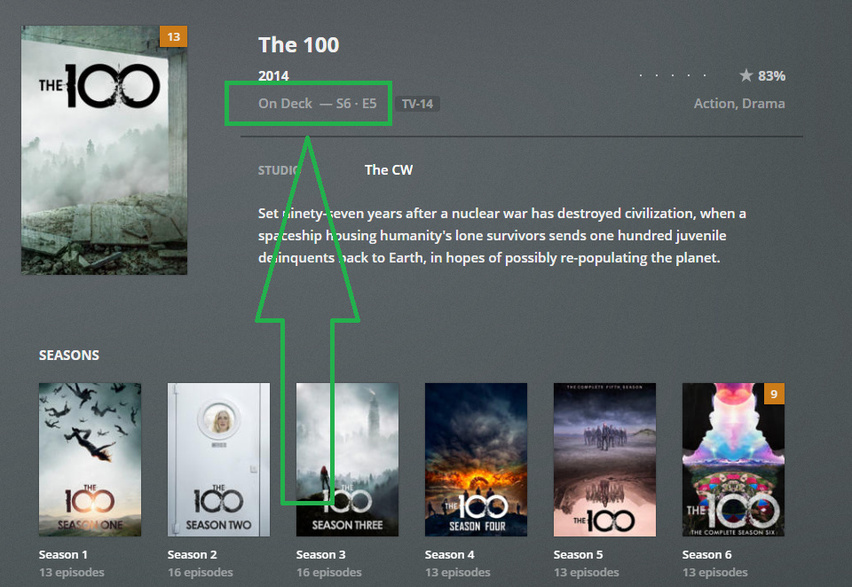
Look at On Deck in Plexweb.
What Episode is next?
Mark that episode Watched/Played. <— under the dots as you hover.
The next episode pops up in On Deck.
You have achieved normal. We hope.
Once all your maids are in a row and working correctly in Plexweb - Force Stop the FireTV App and clear the Cache - so it’ll take another fresh look at things. If the same episode you see in Plexweb - isn’t what you see on FireTV - you have a bigger problem than we thought.
Couple questions:
- Does this work on a per-client basis, or does marking watched/unwatched apply to the server library for every client?
- What is a “stray” episode?
- When you say you can’t have partially watched episodes or blocks of watched/unwatched episodes… Do you mean in general? Like, Plex doesn’t allow that? Doesn’t allow starting in the middle of a series or jumping from one episode to the next? We rarely ever intentionally skip over episodes, but we don’t always start at s01e01 and continue until the end. And since Plex sometimes doesn’t remember our spot, it’s impossible to not have partially watched episodes. If my understanding of what you’re saying here is correct, that makes Plex EXTREMELY restrictive and not at all in line with how I thought it worked.
- Who are these pretty maids and why can’t they run through the forest naked!?
I’ll try marking all episodes as watched when i get home. But if #3 above is true, this problem is not going away. Though there’s still the matter of why the behavior differs by show. We jump around with the office more than friends, but it doesn’t get as messed up. And I’ve jumped around in my incomplete collection of Overhaulin’ with zero issues.
How are you “resuming” these shows? Are you hitting play at the show level? If so, Plex will play the episode that is listed OnDeck. You can see the episode by looking at the OnDeck list on the home page or from Plex Web you can see the episode listed at the show level.
I don’t know what you mean by “show level”, but we simply go to on-demand and hit play. We don’t navigate through any seasons or anything like that (unless it doesn’t bring us to the correct resume location). The season/episode “on-deck”, as you have highlighted, matches the actual file being played. It’s just that the file is the wrong file. So it might say “On Deck - S10 E1”, and it’ll play S10E01 if we click play… But weren’t not on S10E01, and we haven’t been for some time.
Plex doesn’t have an “on-demand”. Can you provide me a screenshot/picture of the play button you are clicking on?
Edit - If OnDeck lists S10E01 that means that either that episode hasn’t been played yet. Plex will show the earliest episode that needs to be played. Go ahead and mark that specific episode as played and see what episode OnDeck changes to.
If Plex only plays the earliest unwatched episode, instead of the last-watched episode, then clearly the issue is a flaw in Plex source code. When you “resume” anything on any platform, the assumption is that you are “resuming” (where you left off). If this isn’t how Plex works, I’d be shocked and frankly very annoyed.
Not if you expect Plex to keep track of episodes and put them in On Deck correctly.
On Deck starts at the beginning, and continues on, one episode at a time, until the end. If you skip episodes, mark them watched, so Plex can keep track of where you are. Otherwise - don’t use On Deck and in fact remove it from your Home Screen.
Select Episodes directly from The Show/Season list.
It isn’t difficult to code the program to cache the last-watched file, then resume from that point by command. Numerous programs can do this for movies/music/TV. Name any streaming service you can think of and it does it this way (Netflix, Hulu, Amazon Prime Video, etc).
Its absurd for Plex to assume people will watch everything in chronological/alphabetical order at all times, with no deviation. If that’s how they want to code it, they shouldn’t call it “on-deck” because its not in fact on deck. Its simply “last-unwatched”.
Regardless of this apparent oversight on Plex’s part, I’m still not convinced that this is entirely my issue. Because if that were the only problem, then The Office wouldn’t jump all over the place. And Friends wouldn’t have suddenly jumped from being stuck at Season 4 to being stuck at Season 10. I still plan to mark everything unwatched to see if it changes anything, but the symptoms don’t seem to completely match the diagnosis here. I will report back after I mark all shows watched.