I would like the ability to sync the NEWEST / MOST RECENT items of a season, as opposed to only being able to do the oldest ones.
This suggestion would apply to the sync content screen, which is referenced in the following areas:
https://support.plex.tv/articles/201096606-sync-content/
https://support.plex.tv/articles/202045106-settings-for-sync-jobs/
https://support.plex.tv/articles/201059637-sync-multiple-items-dynamically/
I record some late night shows, and I’d rather watch the latest episodes rather than the oldest un-watched episodes.
Similar to having an “unwatched only” check box, there could be a check box or drop down option to sync the latest vs. oldest episodes first.
The easy version of this request would be, when there are less than the specified number of items synced, then plex would choose the latest episode to sync (if that option was selected), similar to what they do now.
The more complex version (possibly another checkbox/option) would be if a newer episodes becomes available, and only X episodes are configured to be downloaded, to delete the oldest of the synced episodes and then download the latest episode in it’s place. I realize this second feature/option might be asking for a bit too much, but figured I’d throw it in there since it is related.
Thanks!
You can do that already.
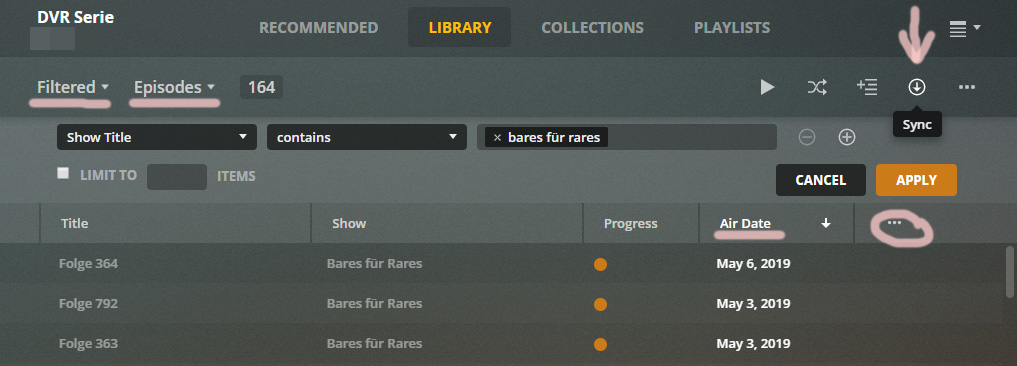
- Switch your library into the ‘Episodes’ view mode
- Create a ‘Custom Filter’ for ‘Showtitle’ -‘Contains’ = [title of the show you want to sync]
- Add either the ‘Airdate’ or the ‘Added at’ column to the List view
- click repeatedly on the ‘Airdate/Added at’ header to sort the list after the ‘descending’ date
- Click on the ‘Sync’ button, define your episode limit
This will work exactly like you describe your ‘second option’ above.
Thanks for the reply!
I unfortunately do not see a way to filter by typing in a show title on my mobile phone (andorid) app. The screenshot you posted seems to be a different interface than the one I have. Is this the “TV” application layout? If I have the above option, then please let me know. However, I’ve found a workaround which I’d like to share for anyone who has a similar issue/desire.
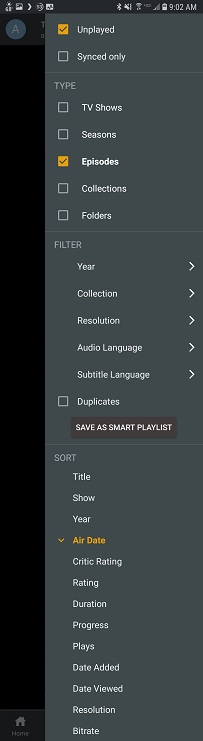
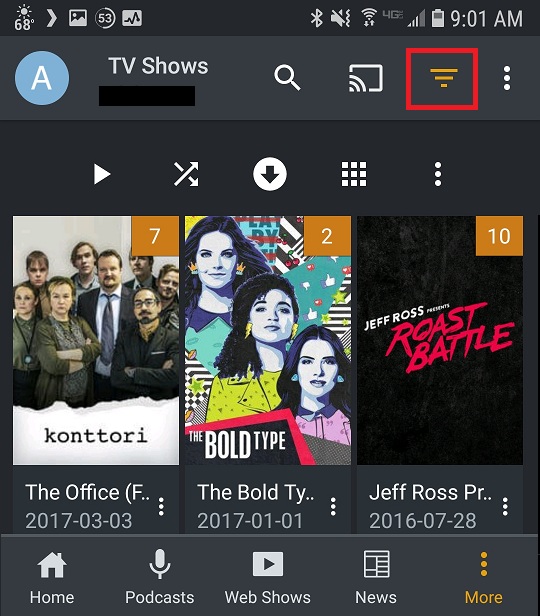
If I go to my TV Shows and then select the filter button, I am able to select the “Episodes” check box and then sort by “Air Date”. I can then press the “Sync” button as you described and have Plex sync the files associated with that filter.
However, since I can not filter based on show title, I had to create a “Collection” for the shows I want to sync. I then further refined my filter to include only that collection which I created.
If there were additional “filter” options when in the “Episode” type, this may make things easier and avoid someone from having to create a collection. However, I know you guys are busy working on lots of other great things, and having to create a collection is a fairly simple work around.
It may also have been possible to avoid creating a collection by selecting “TV Shows” and then filtering by actor (selecting an actor unique to the TV show(s) I wanted). However, given that this option gives you the entire TV show as a result, I don’t know if will sync the latest episodes the same way it does when you select “Episodes”. I’m just throwing this out there as an option if someone wants to try it and not create a collection.
So happy I’m able to do what I wanted! Thanks for the information!
This is the web app: app.plex.tv