Tekno,
Absolutely true! I have only what matters to me. I rip my media and then put the physical media in storage. I don’t have much but I do have full disc rips.
It may be a sign of my age. Maybe by the time I get to that 4 year repeat mark it sounds new to me again? lol
@mm98 Thanks for posting that other thread – I agree this sounds like exactly my problem.
Hoping we get a way to tune the new matcher. I would be great if it could re-attempt unmatched tracks every X weeks or something like that, and not have a manual scan trigger that.
It isn’t lame at all. I wonder that myself at times. But the library I have isn’t so much music that I want to listen to as music I think is important and should be available to be listened to if you want to. I collect music the way some people collect stamps or coins. The object isn’t just to have the ones you personally like. The object is to have what should be owned. The rule I have is if it is considered the best of a genre, era, or artist, I should probably track it down. My only rule, and this is as arbitrary as they come, is no Kenny G. I just can’t stand the guy. I also can’t stand a lot of other artists in my collection (KISS for example) but I really can’t stand Kenny G so he’s out.
Hey, I just bought a Synology NAS and Plex about a week ago, I’m running into the same problem you had previously. Originally I had thought this was just happening because I was syncing too much transferred music at once. But after a few overnight syncs I realized this was not the case!
Every time I add a new album onto my Music media and attempt a manual sync, it starts from the beginning and works it’s way up until it becomes unresponsive.
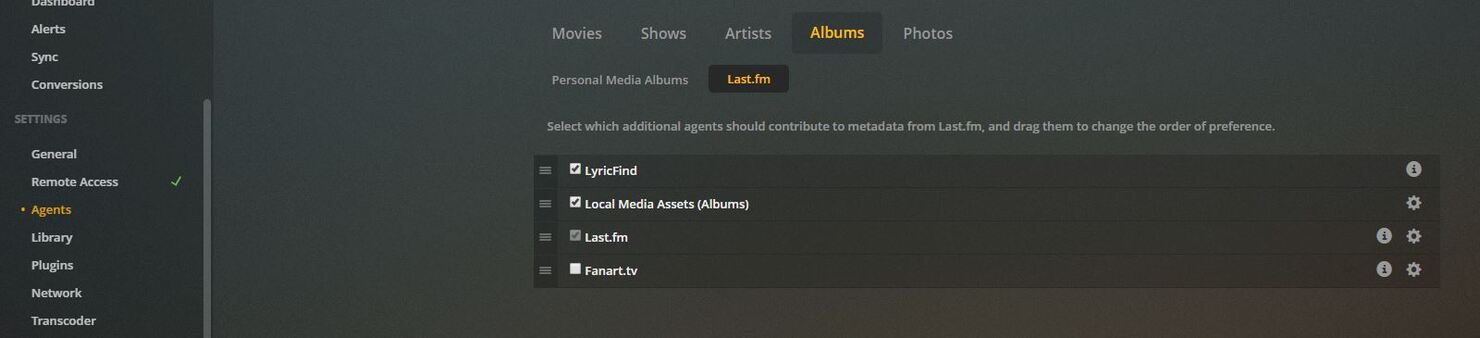
Where is this ‘lyricfind agent’ that I can disable in hopes to have this issue resolved? Or if you found any other way, please share, thank you!
The path @Stormdragon posted is indeed the same one I disabled.
I had to re-disable it once – not sure what ticked it back on, maybe a Plex server update? Also possible I did it myself during my debugging of this issue. I wasn’t watching too closely. Wanted to mention it.
I’d be interested to hear how much disabling that agent helps your issue. I think I’ve seen the unresponive-ness issue pop up again (even with lyricfind disabled) but I haven’t had a chance to debug it much yet.
And even without the server going unresponsive my scan time is still less than ideal as mentioned in that other thread – would be interested to hear if your results match!
Just a an update on what I’ve done and it looks like the problem is now fixed (still unsure how - I didn’t touch the lyricfind setting at all). Under ‘Settings -> Library’ I checked off ‘Scan my Library automatically’, ‘Run a partial scan when changes are detected’ and ‘Scan my library periodically every 6 hours’. I haven’t ran any manual scans since as it’s been doing it automatically now and I’ve had my NAS up and running for 4 days now without any high RAM or CPU usage. Also, media playback for both music and videos are perfectly fine, I wish I knew what or how this fixed but just thought I’d share.
I am curious how it can be scanning automatically when you have essentially turned off all the settings which govern automatic scanning (unless I misread “checked off” as in you added a check to them ).
Wow ok! That’s really strange, but maybe the manual scan and auto scan use somewhat separate codepaths?
This is definitely still happening to me, even with lyricfind off. That “fix” seems to be a red herring – it was probably part of the problem, and a manual scan with no new items runs ok, but when I actually add new music I still get the same problem with out of control RAM usage.
I have automatic scan fully disabled at the moment – I’ll try turning that on to see if it helps. Also totally possible we are running into different issues
Automatic scan didn’t help me – same problem once the periodic full scan kicked on the first time.
The automatic+partial scan sounds promising, though when I tried quickly this morning I couldn’t get it to work with my music library, which is not entirely unexpected, given the warning displayed on the settings screen.
I got automatic+partial scan working for my music library, but it did not help me – after the scan completed, regardless of how much/little had changed, RAM usage would still start to quickly grow out of control again.
I’ve done some more research here and the problem still appears to be the lyricfind agent, even though it should be disabled!
I started with a fresh server restart, everything in a good state. No lyricfind agent was running.
I added some new music to my library, and kicked off a manual scan. As soon as the scan was started, I could see the lyricfind agent running again:
$ ps aux | grep -i lyricfind
plex      2238  0.6  5.0 1188344 94472 ?       Sl   14:02   0:04 Plex Plug-in [com.plexapp.agents.lyricfind] /volume1/@appstore/Plex Media Server/Resources/Plug-ins-ac2afe5f8/Framework.bundle/Contents/Resources/Versions/2/Python/bootstrap.py --server-version 1.18.4.2171-ac2afe5f8 /volume1/@appstore/Plex Media Server/Resources/Plug-ins-ac2afe5f8/LyricFind.bundle
I let the scan run. The main scan took about 20 minutes (per that other ticket), but finished ok.
As soon as the scan finished, RAM usage on my Synology jumped way up and kept growing. I can see that it’s the lyricfind agent consuming by far the most RAM.
$ ps -o pid,user,%mem,command ax | sort -b -k3 -r | head
PID USER     %MEM COMMAND
 2238 plex     24.0 Plex Plug-in [com.plexapp.agents.lyricfind] /volume1/@appstore/Plex Media Server/Resources/Plug-ins-ac2afe5f8/Framework.bundle/Contents/Resources/Versions/2/Python/bootstrap.py --server-version 1.18.4.2171-ac2afe5f8 /volume1/@appstore/Plex Media Server/Resources/Plug-ins-ac2afe5f8/LyricFind.bundle
 2121 plex     14.7 Plex Plug-in [tv.plex.agents.music] /volume1/@appstore/Plex Media Server/Resources/Plug-ins-ac2afe5f8/Framework.bundle/Contents/Resources/Versions/2/Python/bootstrap.py --server-version 1.18.4.2171-ac2afe5f8 /volume1/@appstore/Plex Media Server/Resources/Plug-ins-ac2afe5f8/PlexMusic.bundle
32632 plex     11.6 /var/packages/Plex Media Server/target/Plex Media Server
 2044 plex      0.5 Plex Plug-in [com.plexapp.agents.localmedia] /volume1/@appstore/Plex Media Server/Resources/Plug-ins-ac2afe5f8/Framework.bundle/Contents/Resources/Versions/2/Python/bootstrap.py --server-version 1.18.4.2171-ac2afe5f8 /volume1/@appstore/Plex Media Server/Resources/Plug-ins-ac2afe5f8/LocalMedia.bundle
Killing that agents.lyricfind process doesn’t help, as Plex seems to replace it immediately.
Restarting PMS does clean up those processes, and after the restart things settle back down into a normal state.
So this seems like either a bug or some other piece of configuration I’m missing – lyricfind should be completely disabled, yet it’s not.
@ChuckPa Any suggestions? Can you communicate this back to the dev team please?
Yep understood. I will collect log files as well – I was just trying to determine whether the ps format I used was sufficient for the ps/top piece of your request.
It sounds like yes, that format works, but I should capture a before and after using the same format.
Also, a sense of time required is important. Excessive to one person is normal to another. As example, I have 787 albums (11378 tracks) indexed. As verification here, I created a fresh library section and downloaded everything in 34 minutes



 ).
).