Server Version#: 1.41.6.9685
Player Version#: 1.108.1.307-dd5b87aa (Windows)
LAN Networks:
“x.x.1.1/24, x.x.2.1/24, x.x.4.1/24, x.x.8.1/24”
[Copypasta of field with sanitized first two octets]
Error:
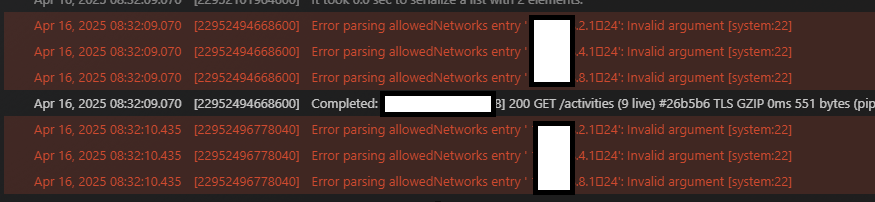
Invalid argument
Correct.
Initially, I used CIDRs (Example: 10.10.10.1/24)
Then subnet mask (Example: 10.10.10.0/255.255.255.0)
This is under the ‘LAN Networks’ section:
‘Comma separated list of IP addresses or IP/netmask entries for networks that will be considered to be on the local network when enforcing bandwidth restrictions. If set, all other IP addresses will be considered to be on the external network and will be subject to external network bandwidth restrictions. If left blank, only the server’s subnet is considered to be on the local network.’
If the ‘/’ is illegal, how do I specify multiple networks?
Found the solution.
Correct syntax:
10.10.10.0/255.255.255.0,10.20.30.0/255.255.255.0,10.20.40.0/255.255.255.0
This time with no commas or spaces.
Thanks the follow-up and help @drzoidberg33
Sorry, I didn’t mean / was invalid, I meant the character that should be representing it in your settings is invalid (like a different character completely or a different unicode character that looks like forward slash but isn’t the same).
That’s why I asked for the screenshot.
All good Doc
You pointed me in the right direction.
Thanks for the support homie
This has come up before. I think it’s the space after the comma that causes parsing issues. Try CIDR but removing the space.

