I have an issue with remote access. The issue resides in the fact that my ISP doesn’t open the ports on my main IP I use to access the internet, but instead, after buying public ports, I got a secondary IP address which too routes to my router, but I don’t use it to access the internet.
Plex doesn’t have a configuration option to reflect that, instead it tries to connect to the selected port on my main IP, which is a CGNAT IP and therefore does not have that port open.
Is there any way to “force” it to use the other IP address?
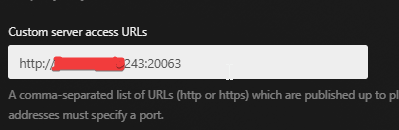
I have tried looking up whether someone else had similar issues, but didn’t find much. I tried setting up the “Custom server access URLs” setting, but predictably that did nothing.
I’m also fairly confident the issue is in plex and the settings on it, rather than in my firewall configuration or something other like that, since I tried setting up an http server on the same vm & port, and I was able to connect just fine.
That sounds primarily like a networking topic. Your router should be aware of the „secondary ip“ which is used to address it (though, wondering why they make you jump through the extra hoop). With that you should be able to do a port forward to your server.
Keep in mind that you may need a publicly trusted (i.e. not self-signed) security certificate for the address. Which in turn requires you to have an own domain name for that secondary address.
But do try first without a certificate. In which case you write the URL with the http:// protocol prefix. (And not https)
After putting in the address, it may take a while until the change arrives at your Plex client devices.
You can force them to contact plex.tv to fetch fresh information about your server by performing “Switch User” (if you do have at least another user in your Plex Home. If you don’t have a Plex Home, try rebooting the whole device, or force-stopping the Plex app and restarting it.)
In any case, don’t panic if it doesn’t work instantly.
Just let it sit for a few hours.
A restart of Plex server afterwards can’t hurt either.
I tried that before and to make sure, I did try it again, but it did not work. My process was like so: Set the Custom server URLs property to “http://xxx.xxx.xxx.243:20063”, Enable remote access - didn’t work, restart server, wait 3 hours, check again - didn’t work, restart server, check again - still didn’t work. Each time I tried to check by visiting the URL in my browser directly, by looking at the Remote Access page in the settings, and by trying to connect to the server from the Plex app on my phone on mobile data.
Through every point in that process, what was shown in the Remote Access page was “Not available outside your network” with the closed IP (xxx.xxx.xxx.200 : 20063) also being shown.
Is there anything else I could try, or something I could provide to help find out what the source of the problem is?
The router has 1 WAN IP which is a NAT IP of the ISP’s CGNAT. That IP is different from both of the aforementioned IPs. Whenever a request is sent to one of those IPs, it is routed to my router. I don’t believe there’s anything I could set in the router to “advertise” the secondary IP, and on top of that only for a specific set of ports.
Port forwarding is the same as if I had a single fully public IP. I set it to forward requests from my router’s WAN IP to a specific local IP, there’s nothing special about that except I that I need to use the secondary public IP to access it.
If I’m wrong, please do correct me. It’d be a nice to have a simple fix for all the stupid issues caused by this Thanks.
That’s quite interesting. We are talking about the property I have screenshotted here, right? I’ve had that set to this for a about 8 hours now, since I set it right after I read the first reply to this thread. Before then, I also had various combinations of this, with/without http/https, with/without port and with/without an additional ‘/’ at the end. I restarted the server multiple times and also disabled and enabled Remote access multiple times as well.
Of course I have set that. Pressing that “Disable remote access” button is what I meant by “disabled and enabled Remote access multiple times as well” in my previous comment.
Could you edit the the “Custom server access URLs” again and make sure that there are no whitespace characters in there, like space, or tab etc.?
Then scroll down on that page and press on the Save Changes button.
Let it sit for a while, then reboot the server machine and wait some more.
Then perform a connection test with canyouseeme.org
using your special IP and your port number.
What is the outcome?
Did you create a port forwarding in your router for that special port number?
There must be a mechanism to define, which machine in your local network shall receive the packets that arrive from the outside on that special port number.
I’m fairly confident there weren’t any whitespace characters, but to make sure I did try to very carefully retype the server URL. I saved, waited for multiple hours, restarted, waited for an about an hour after that, and still nothing.
I couldn’t use canyouseeme.org since opening it would force the .200 ip with the closed ports. I used https://portchecker.co/ instead and it showed me the port was closed, but that was not caused by my port forwarding, since as I said, I tried stopping plex and opening an http server on the same port and it opened the port and worked just fine.
Before this, I also routinely checked with running “curl http://xxx.xxx.xxx.243:20063” in my terminal and visiting the same URL in my browser, but to no avail.
 Thanks.