Apple Player Update Beta Testing - Archive

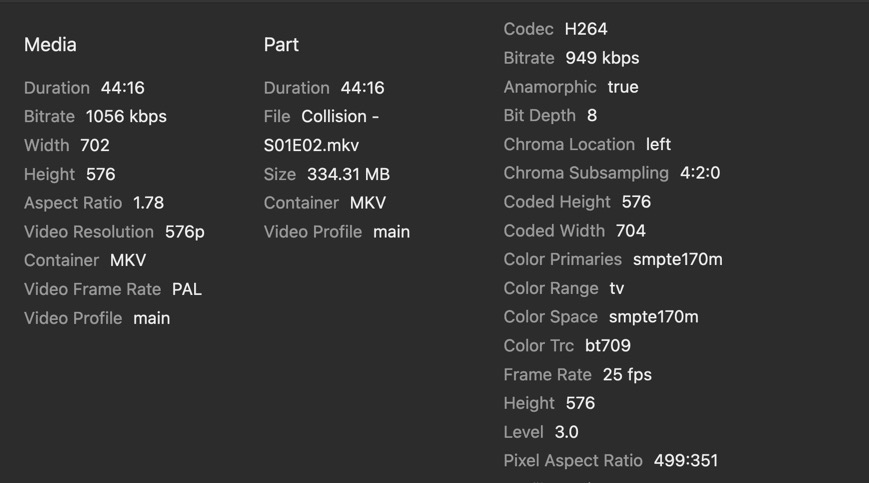
I don’t understand this. Yesterday, the Danish episodes stuttered like mad, but today there’s no stuttering whatsoever. Could it still be a heat related problem? If so, why would a simple 1080p video cause overheating? I don’t even keep my Apple TV in a closed cabinet or close to any device that radiates heat. It’s as “out in the open” as it can be.

Or could it be that the “flag” mentioned earlier hasn’t taken effect on my system until now?

Anyway, here’s a sample file. I had to make it 170 MB to include the opening credits where the stuttering was the most obvious. But it doesn’t stutter now. Go figure…

One thing this beta solves is the “announce as a player”-issue on ATV4k 2022. With the beta’s for ATV and iPhone installed, there’s flawless remote control now. Hurray!

Been testing out for the last week or so now; so far I’ve noticed a lot more sensitivity with container formats. MKVs both HEVC and AV1 seem to vary in stability. MP4s seem to have a lot more success (go figure), but for some reason are direct streaming after a simple remux from MKV to MP4 (stripping all the unsupported formats out of it) they’ll still direct stream. AV1 1080p transcodes seem to direct play fine across the board. Most MKVs are getting stuck and result in either the App Crashing, Server Crashing, or both. MKVs all being direct rips using MakeMKV with no alterations.

All files are playing as intended with Infuse.

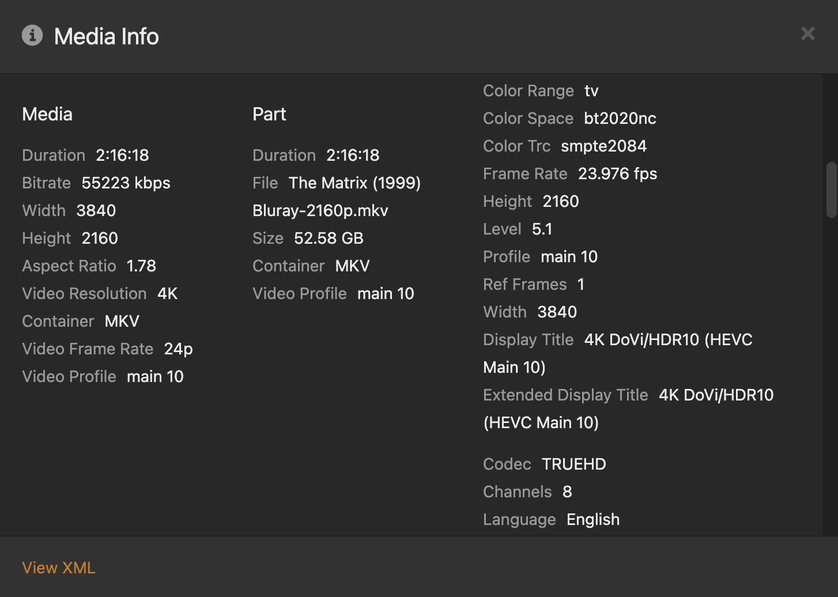
Below is my “golden” file that has been playing perfectly with the update. It previously stuttered slightly, but with this update the stuttering and framerate have been perfect.

Below are a couple of snips of my problem files that are mkv:


These files will stall indefinitely when attempting to play them locally at original quality, and will sometimes crash the app after several attempts and sometimes can even crash the server briefly.

May I ask whats your Hardware set up including audio.

Cheers

Sample files might be helpful here for the Plex team. Oftentimes, there are things that aren’t shown in Media Info, that can be identified by examining the actual file itself. :plexheart:

1 Like

2 Different Apple TV 4Ks w/ethernet (latest generation) (both direct wired on the same local network as PMS)

One with TV Directly Passed Through (LG OLED A1)

One Passed Through Pioneer VSX-932 to TV (LG OLED C8)

Both seem to have the same results.

1 Like

Apple TV 4K 2022 connected directly to 2020 Sony 900H TV & Denon Receiver over ARC:

  • HLG HDR content is not kicking AppleTV to output HDR mode (with Match Dynamic Range). It just outputs as SDR. DV or HDR10 works fine.
  • DolbyVision content color banding when Apple TV is outputting DV. Very visible on black/gray picture area. With Apple TV outputting SDR, no color banding. (Brawn: The Impossible F1 Story opening sequence is a good test content).

Update:

  • 720p60 mpeg2 OTA recording has tearing artifact. 1080i is unaffected.
  • 4K hvec HLG 25p plays like a slideshow. Maybe 2-3 fps. HDR10 4k25p is not affected

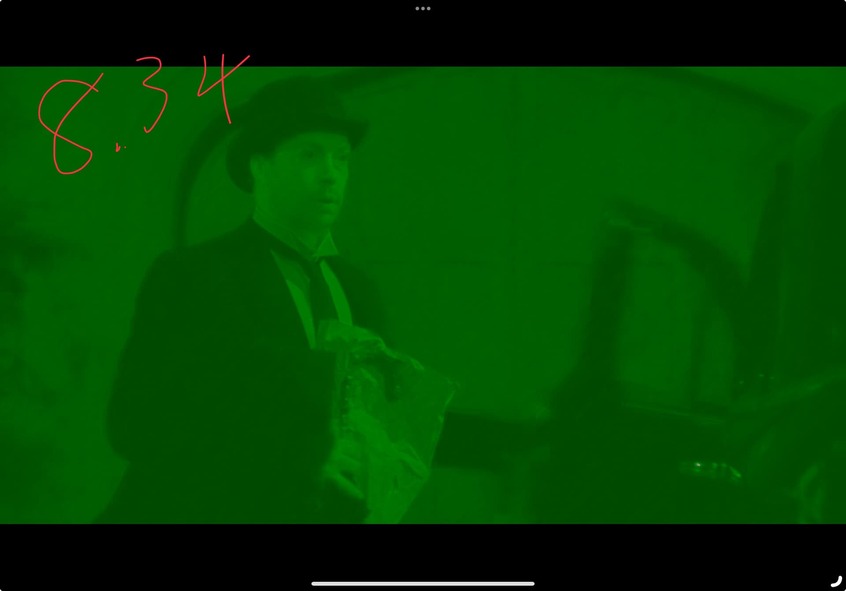
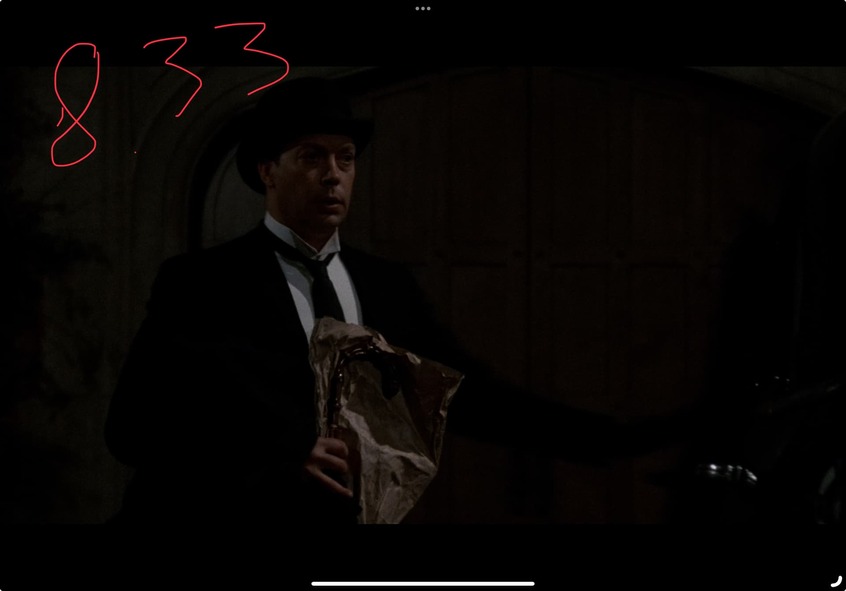
More on 8.34 being unusable. I’m away from home. This is on iPad 11inch M1 with iOS17.4.1. Plex 8.34 testflight.

Greentint file joins the color banding distortion and judder files: Proton Drive

General
Unique ID                                : 221489502856794507205608971651972680223 (0xA6A1539B876CDA85A74F1A2B3E114A1F)
Complete name                            : /home/plex/Videos/green tint colors-009.mkv
Format                                   : Matroska
Format version                           : Version 4
File size                                : 32.5 MiB
Duration                                 : 20 s 687 ms
Overall bit rate                         : 13.2 Mb/s
Movie name                               : green tint colors
Encoded date                             : UTC 2024-03-26 13:34:24
Writing application                      : mkvmerge v83.0 ('Circle Of Friends') 64-bit
Writing library                          : libebml v1.4.5 + libmatroska v1.7.1

Video
ID                                       : 1
Format                                   : HEVC
Format/Info                              : High Efficiency Video Coding
Format profile                           : Main 10@L5.1@High
HDR format                               : Dolby Vision, Version 1.0, dvhe.08.03, BL+RPU, HDR10 compatible / SMPTE ST 2086, HDR10 compatible
Codec ID                                 : V_MPEGH/ISO/HEVC
Duration                                 : 20 s 687 ms
Bit rate                                 : 13.2 Mb/s
Width                                    : 1 920 pixels
Height                                   : 1 038 pixels
Display aspect ratio                     : 1.85:1
Frame rate mode                          : Constant
Frame rate                               : 23.976 (24000/1001) FPS
Color space                              : YUV
Chroma subsampling                       : 4:2:0 (Type 2)
Bit depth                                : 10 bits
Bits/(Pixel*Frame)                       : 0.275
Stream size                              : 32.4 MiB (100%)
Writing library                          : x265 3.5+100-3dae0c3cc:[Windows][GCC 12.2.0][64 bit] 10bit
Encoding settings                        : cpuid=1111039 / frame-threads=4 / numa-pools=20 / wpp / no-pmode / no-pme / no-psnr / no-ssim / log-level=2 / input-csp=1 / input-res=1920x1038 / interlace=0 / total-frames=139347 / level-idc=51 / high-tier=1 / uhd-bd=0 / ref=6 / no-allow-non-conformance / repeat-headers / annexb / aud / no-eob / no-eos / hrd / info / hash=0 / temporal-layers=0 / no-open-gop / min-keyint=23 / keyint=250 / gop-lookahead=0 / bframes=16 / b-adapt=2 / b-pyramid / bframe-bias=0 / rc-lookahead=60 / lookahead-slices=0 / scenecut=40 / no-hist-scenecut / radl=0 / no-splice / no-intra-refresh / ctu=32 / min-cu-size=8 / no-rect / no-amp / max-tu-size=32 / tu-inter-depth=4 / tu-intra-depth=4 / limit-tu=0 / rdoq-level=2 / dynamic-rd=0.00 / no-ssim-rd / signhide / no-tskip / nr-intra=0 / nr-inter=0 / no-constrained-intra / strong-intra-smoothing / max-merge=5 / limit-refs=1 / limit-modes / me=3 / subme=5 / merange=32 / temporal-mvp / no-frame-dup / no-hme / weightp / weightb / no-analyze-src-pics / deblock=-2:-2 / no-sao / no-sao-non-deblock / rd=4 / selective-sao=0 / no-early-skip / no-rskip / no-fast-intra / no-tskip-fast / no-cu-lossless / b-intra / no-splitrd-skip / rdpenalty=0 / psy-rd=1.30 / psy-rdoq=1.00 / no-rd-refine / no-lossless / cbqpoffs=-2 / crqpoffs=-2 / rc=crf / crf=17.6 / qcomp=0.63 / qpstep=4 / stats-write=0 / stats-read=0 / vbv-maxrate=160000 / vbv-bufsize=160000 / vbv-init=0.9 / min-vbv-fullness=50.0 / max-vbv-fullness=80.0 / crf-max=0.0 / crf-min=0.0 / ipratio=1.30 / pbratio=1.20 / aq-mode=2 / aq-strength=1.00 / no-cutree / zone-count=0 / no-strict-cbr / qg-size=16 / no-rc-grain / qpmax=69 / qpmin=0 / no-const-vbv / sar=0 / overscan=0 / videoformat=5 / range=0 / colorprim=9 / transfer=16 / colormatrix=9 / chromaloc=1 / chromaloc-top=2 / chromaloc-bottom=2 / display-window=0 / master-display=G(8500,39850)B(6550,2300)R(35400,14600)WP(15635,16450)L(40000000,50) / cll=1363,47 / min-luma=0 / max-luma=1023 / log2-max-poc-lsb=8 / vui-timing-info / vui-hrd-info / slices=1 / no-opt-qp-pps / no-opt-ref-list-length-pps / no-multi-pass-opt-rps / scenecut-bias=0.05 / no-opt-cu-delta-qp / no-aq-motion / hdr10 / hdr10-opt / no-dhdr10-opt / no-idr-recovery-sei / analysis-reuse-level=0 / analysis-save-reuse-level=0 / analysis-load-reuse-level=0 / scale-factor=0 / refine-intra=0 / refine-inter=0 / refine-mv=1 / refine-ctu-distortion=0 / no-limit-sao / ctu-info=0 / no-lowpass-dct / refine-analysis-type=0 / copy-pic=1 / max-ausize-factor=1.0 / no-dynamic-refine / no-single-sei / no-hevc-aq / no-svt / no-field / qp-adaptation-range=1.00 / scenecut-aware-qp=0conformance-window-offsets / right=0 / bottom=0 / decoder-max-rate=0 / no-vbv-live-multi-pass / no-mcstf / no-sbrc
Language                                 : English
Default                                  : Yes
Forced                                   : No
Color range                              : Limited
Color primaries                          : BT.2020
Transfer characteristics                 : PQ
Matrix coefficients                      : BT.2020 non-constant
Mastering display color primaries        : BT.2020
Mastering display luminance              : min: 0.0050 cd/m2, max: 4000 cd/m2
Maximum Content Light Level              : 1363 cd/m2
Maximum Frame-Average Light Level        : 47 cd/m2

8.34:

Reverted to 8.33:

2 Likes

Sorry I haven’t followed the whole thread. Stuttering seems improved to me on 3rd Gen Apple TV 4k. But it seems like subtitle support is broken, my ASS subtitles on anime files just show as plain text (and duplicated) whereas on Infuse they show correctly with formatting etc.

FYI testflight updated a bit ago to a different build of 8.34. 8096 to 8140. MoltenVK is NOT in this one.
Patch notes are pretty clear, but I pulled logs and confirmed.

I wish the team would consider my suggestion instead of trying to reinvent the wheel (or at least alongside that).
.

1 Like

You can revert to ‘old player’ using Apple’s AVPlayer even now. It demuxs into directstreams and goes. But it doesn’t work like netflix/disney+ and others. Many HDR modes are broken, etc etc.
There is something else fundamentally different, I strongly suspect you are missing.

4 Likes

If I remember correctly, Emby uses AVPlayer, it hasn’t been smooth sailing for them either, the consesus is Plex is ahead of the curve on that one. They cant get HDR and Atmos playback to work consistently with the supported media designated under the engine.

@hsousa Any chance you could approve a few more TestFlight applications? I’m still waiting since the announcement was made and really want to get in on trying it out with many of my 4K stuff the Plex app struggles so bad with. Thanks.

There were major, showstopping, video quality regressions. If I was to guess they are ironing them out, not an easy task, and will return to testflight applicants when they have a new build.

You can change the setting in the tvOS Plex app to “Use Old Player.” However when using the old player I still get the stuttering issue.

“Old Player” has many limitations, for example it has very limited support for MKV files and many audio codecs. However, for passing DolbyVision to the display, it is the best (maybe only?) option right now.

Much appreciated.
Back in the bad old days forcing the TV into Dolby Vision mode whilst playing the HDR track was classed as a cool feature. It even got a shiny blog post about it.

Hopefully Plex on Apple devices is now heading in a different (better) direction.

Thanks again for keeping us all updated.

1 Like

Craig, I have a question about a setting “Auto Adjust Quality”. Is it intentional for it to not allow Original Quality that play without issue. Direct play These are very basic files.

I have now come across several files I need to Change the setting to off or use Playback settings and Change to Original quality.

The latest run of files are from a British TV series (2009), Plays on Web app, App for Mac, iPadOS, Android Mobile but not ATV 8.33 or 8.34

ATV 4K 128Gb (2022)
Server: Mac Mini M2 Pro 16Gb
PfMac: 1.90.1.118-a4bc1429
LG65OLEDB8
PMS: 1.40.2.8312-b1c79904d
iPad Pro 11" M2: 8.33
iPad 8th Gen: 8.31
Android Galaxy Mobile A51: 10.12.1.370(d6ec2fed)
Android Galaxy Mobile A52’s: 10.12.1.370(d6ec2fed)

Ethernet connected ATV, HDMI to LG TV, no other sound devices other than TV speakers.

Easy! Don’t use that. It always forces transcode.

Android and Roku now support a Quality Suggestions feature and can attempt direct playback, but the player will suggest a reduced bitrate/quality if necessary.

https://support.plex.tv/articles/quality-suggestions/

That feature hasn’t come to Apple devices yet. Fingers crossed. Maybe Craig will drop more tidbits. :slight_smile:

1 Like