amer.ali - I had that too - I disabled my firewall then tried it again - once I was past the point where I logged into plex and set up a few libraries, I re-enabled the firewall (adding allow rules for port 32400) and it seems alright now. It’s discovering files, allowing setup, etc.

How about leaving the firewall off for now?
still nothing change
Stop PMS
Control Panel - Shared Folders - Edit the Plex share - give your username Permission to R/W the share
FileStation: Plex/Library/Application support/Plex Media Server
Right click Logs and Compress to Logs.zip
Download that to your computer and attach here. I’ll see what’s happening
Logs.zip (169.6 KB)
Everything is running just as I expected.
- what’s the IP of your computer and what’s the IP of your Syno?
- If on the same subnet, Stop PMS; delete Preferences.xml (where you found the Logs directory); Start PMS
- Wait about 10-15 seconds for PMS to start up and then access it directly by NAS IP
http://ip.addr.of.nas:32400/web
1 Like
man you are a true legend
Yes @ChuckPa tried it from home everything is now working beautifully. I do have another question its telling me theres an update to manually install. I have Version 1.13.3.146 is there a newer alpha version that I should update to, or is my machine nuts.
Thank You
I’m sorry. I should have warned you and everyone.
Please ignore any and all update / upgrade warnings
I’ll notify everyone as I get the updates.
(I’m trying to get a new PMS version built now)
Hi,
problem with transcoding HEVC 4k and LG tv plex client.
Device is Synology DS418.
Transcoder utilize 100% cpu.
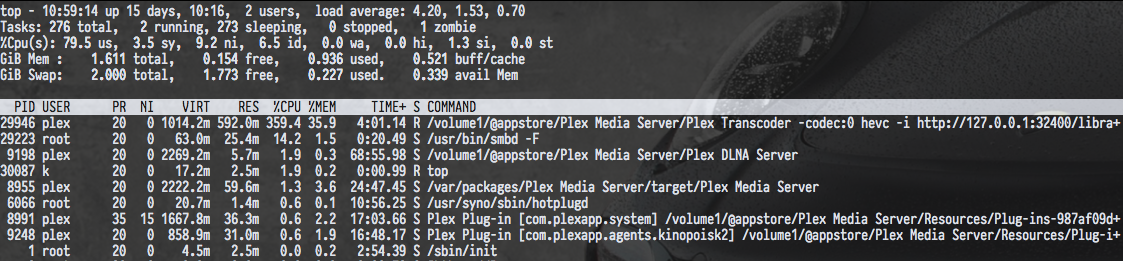
Logs attached.
Plex Media Server Logs_2018-07-20_11-43-25.zip (3.0 MB)
Logs.zip (4.4 MB)
Attached. For some reason, the movie posters are still a random scene capture from the movie. Despite my folders having all of that data in there. However, I remember seeing a menu somewhere about where to get the data from, but I can’t seem to find it. Also, I’ve connected the server to the Internet; however, I still can’t access the Server Settings in the PMS.
HEVC is the most difficult codec to utilize. Any normal Intel i7 can’t do it in software.
Please do not expect a hardware-only codec to be processed in software by a $60 CPU
This is a limitation of the CPU.
I am going to purchase either the QNAP TS-228A or the Synology DS218play and join the testing.
I know they have slightly different CPUs. Is there different capabilities between these 2 using PMS (e.g. transcoding) or are they basically on par?
Any advice is helpful. Thanks.
Nothing appreciable even worth mentioning because PMS is compiled to run on the entire family of them. If one has special features over the other, they won’t be used. This is unfortunately a ‘greatest common feature set’ problem.
More cores is the way to go with clock and memory.
I cannot access my server on Plex. The lock icon on the PMS shows locked and additionally, when I try to access the server it says, “Server Settings are Unavailable”
I have granted R/W access to Plex within the server control panel; however, at this point I just don’t know what to do.
Help.
Got it. Uninstalled and reinstalled. Posters fixed.
However…tried playing on the TV. No worky. It plays fine on the PMS, but not streaming.
Please detail that a little further?
However…tried playing on the TV. No worky. It plays fine on the PMS, but not streaming.
“No Worky” doesn’t tell me any details so there’s nothing I can do about it .
It won’t play to your TV but it plays to Plex/web ? What else does it play to?
It sounds like the server is running fine but either the snapshot of PMS I have is slightly flawed (possible) or the app in the TV is having issues in general with that video.
To all here:
How are we doing? It’s been very quiet. While this is good, it’s not what I had hoped for. I would like the feedback, good or bad.
If you’re wondering what ‘good’ feed back i’m looking for, it’s in the same post with the download links.
I want to verify everything is ok before I pull the trigger and start releasing the fully up-to-date PMS for ARMv8
