Artist Matching in Music Library Creating Duplicate Artists or Merging them into one

Server Version#: 1.41.3.9314
Player Version#: 1.41.3.9314 (web player)

I recently added my music collection that I used to manage in another media server (LMS/Lyrion), which I have tagged myself so I have uniform tags. In the advanced settings of the music library I ensured I had prefer local metadata selection and for genres I had embedded tags selected and album art - local files only.

My folder structure is such that

Music/ALAC/Artist/YYYY-Album

When I imported I got duplicate artists for artists with the same name, in the same folder and with the same Artist tag (I ensured there were no funny characters or extra spaces).

Some examples - I have 3 Charlier Parker Albums → In my case one album is tagged as

“Charlie Parker” only and resides in its own folder as below:

/music/ALAC/Charlie Parker/1953-Big Band

The Two others I have tagged as “Charlie Parker & Dizzy Gillespie” and they reside in a different folder:

/music/ALAC/Charlie Parker & Dizzy Gillespie/1997-Diz 'N Bird At Carnegie Hall
/music/ALAC/Charlie Parker & Dizzy Gillespie/1986-Bird And Diz

Yet I only have a single artist on the artist page “Charlie Parker & Dizzy Gillespie” but the bio is solely about Charlie Parker and list all three albums. The solo and the two collabs with Diz.

In the exact opposite example I have multiple Buddy Rich albums - All tagged as just “Buddy Rich” as the artist and all live in the folders like below:

/music/ALAC/Buddy Rich/1967-Big Swing Face
/music/ALAC/Buddy Rich/1968-Take It Away

However I get two separate “Buddy Rich” artists created with different bios, photo, etc. but still describing the same actual person (not a case of two artists with the same name) but one album (Take It Away) is listed under one “Buddy Rich” with Photo and Bio A and all others are under a different “Buddy Rich” with Photo and Bio B.

For Problem 1, is there any way to split the artist entry out as separate entries so I get a “Charlie Parker” artist and a “Charlie Parker and Dizzy Gillespie” artist as another ?

For Problem 2 is there an ability to “merge” artists into 1 as you can for duplicate media.

I think the first case is a known bug. Distinctly different tagged artists getting merged sounds a lot like this thread. I guess there is no fix as of yet?

However the opposite case of the same artist getting listed twice seems to be a different, but perhaps related issue.

As one final test, I tried turning off Artist Bios and Album Reviews - this fixed the issue… I only got Artists I defined as expected, but doing that also caused issues with compiliation albums.

Despite having the “Artist” tag as the actual performing artist on the song and Album Artist as “Various Artists” I get separate artists all titled “Various Artist” for each unique Artist on an album - rather than it grouping them into one album.

It is almost always better to address these kinds of problems by adjusting the file/folder structure and tags rather than clicking in the Plex GUI. If the files are set up how Plex wants, almost no manual fixes should be needed.

If your music library is pointed at /music then this may cause problems, as it wants to see

/libraryroot/artistname/album

not

/libraryroot/ALAC-or-whatever/artistname/album

I’m also not sure you can get away with putting the album year first.

Plex is just super fussy about music. Sometimes you can bend the rules, sometimes you can’t. Sometimes you get away with it for years, then it explodes. The best first troubleshooting step is always following the rules to the letter.

You could try making a new test library. Put just the Charlie Parker albums in there, following the rules exactly. See if you get what you want. Then you can decide if you are willing to change everything else.

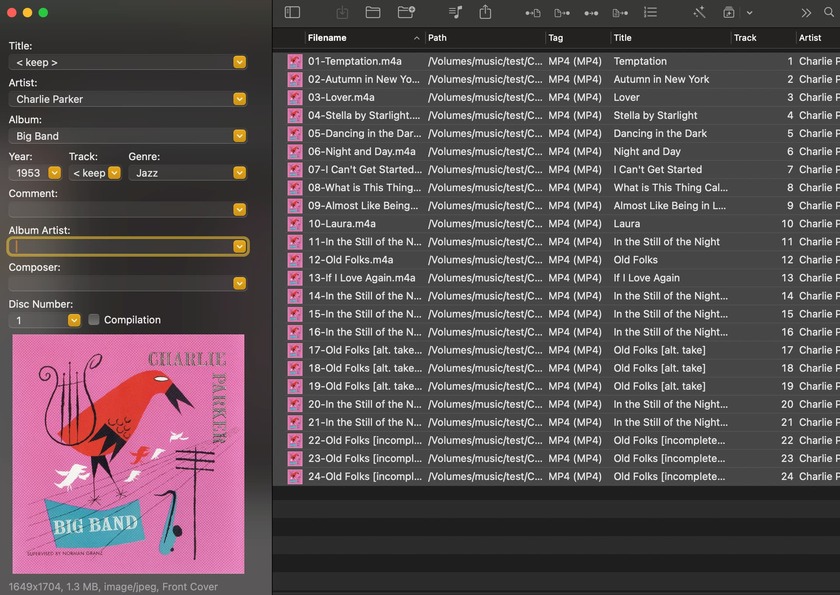
So I changed it around a bit based on your advice and it worked. FS Used
/artist/album title (removing the year):

Tags were Arist and Album.

In the case of a compilation Artist, Album, Album Artist:

And this scanned as expected. I got a 4 albums under “Buddy Rich” rather than 2 different “Buddy Rich” artists this time, a “Charlie Parker” and “Charlie Parke and Dizzy Gillespie” artist, and a “Various Artists” artist for the compliation.

Though FWIW without changing anything (just with root being my ALAC folder) I just did a rescan of my unaltered foldernames with the years appending to the album title and it only scanned one buddy rich artist this time around… though “Various Artists” still scanned in artists for each track rather than grouping on one “Various Artists”. It seems to act different based on the direction of the wind… :slight_smile:

  1. never leave the Album Artist tag empty
  2. Plex cannot handle collaborations. So the album by Charlie Parker & Dizzy Gillespie will probably be merged into the record lineup of one of these two artists. Don’t even try and work around that restriction. It’ll end up in chaos. The best you can do to handle this is by deciding under which of them you rather want this album to appear and then populate the AlbumArtist meta tag accordingly.
    (You can and should leave both names in the regular Artist tag.)
  3. Never put two albums with different AlbumArtist underneath the same Artist folder.

You can leave the release year in the folder name of the album. But I’d recommend putting it at the end, in regular parentheses.

2 Likes

Glad to see you are making progress.

Heed @OttoKerner 's words – there some important final tips there. The limitations are unfortunate, but it is what it is.

Good luck!

1 Like
  1. Noted.
  2. This seems to actually be working how i want it to. For an album collab i specifically want it to only show a different single “collab artist” based on the album artist tag and not show up under individual solo artists., In this case “parker and gillespie” as the artist and album artist and not show up under parker or gillespie indivdually.
  3. That is good to know. i dont do this. i generate my folder structure from my tags so it shouldnt happen.

Everything in the test library seems ok but how does plex handle compilations. in my above screenshots it seems ok but ive had it fragment albums amonst different artists for single tracks based on the artist tag rather than grouping it under a single album under the album artist being “Various Artists” on a different scan despite all albums in a folder called /Various Artists/Album X and album artist tagged as “Various Artists”. It doesnt use the compilation id3 tag does it look for Various Artists specifically in albumartist tag or the folder name?

The same as regular albums.
Store each compilation album in a separate folder,
inside the “artist” folder of the release, which in typical cases is called “Various Artists”,
fill the AlbumArtist tag with the name of the artist folder – i.e. “Various Artists”
don’t forget to fill the Track# tag of each track (and the Disc# tag as well for multi-disc releases)

Make sure to have “Prefer local meta tags” enabled in the properties of your library, or the metadata from Musicbrainz may interfere in ways that are sometimes hard to understand.

1 Like

This topic was automatically closed 90 days after the last reply. New replies are no longer allowed.
