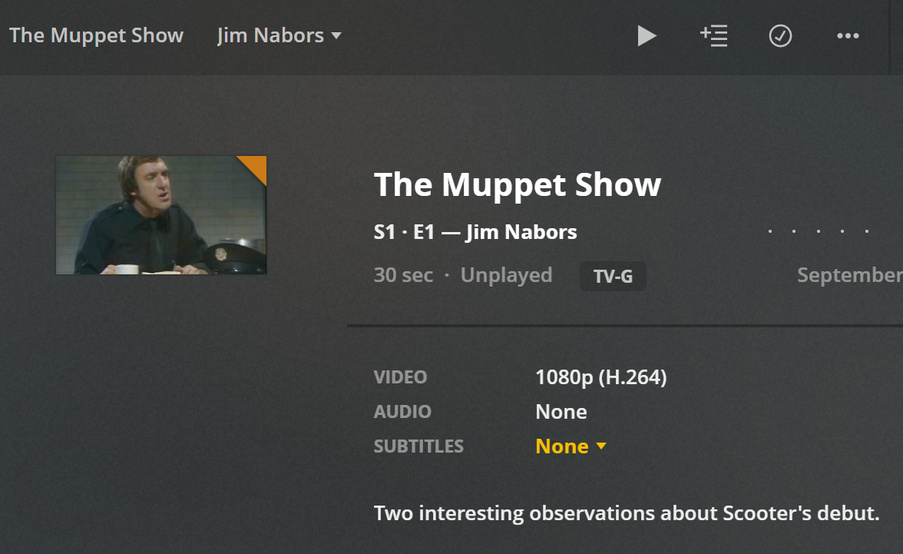
I need assistance. I keep running into this issue with practically any tv show. For instance:
In this show, episode 1 is labelled correctly as Juliet Prowse. Play in in a media player, it plays just fine. However, try to find this in Plex and it’s all out of whack. The episode labelled “Juliet Prowse” in Plex is labeled as episode 24. Select that and who’s hosting? “Mummenschanz”. I’m finding this incredibly frustrating.
I know the initial solution is either going to be:
-Messing around with either Filebot or Media Center Master (have tried, neither is user friendly in the slightest- I can’t even get Filebot to install.)
-Shifting everything around to reset some setting or other (I think it’s a plex media shuffle, or something?)
I’m at the point where I’m about to lose all patience. Is there a way to simply disable the feature of collecting data and just display and play the files exactly as they are labeled on my computer?
If you are using windows filebot is as simple as it gets, its right in the windows store. your file names are no where near correct, you need to change the filename to represent what you see in the file naming guide.
\media\tv shows\the muppets\season 01\The muppets - E01S01.mkv
something like that
copied right from the guide
/TV Shows
   /Grey's Anatomy
      /Season 01
         Grey's Anatomy - s01e01.avi
         Grey's Anatomy - s01e02 - The First Cut is the Deepest.avi
         Grey's Anatomy - s01e03.mp4
      /Season 02
         Grey's Anatomy - s02e01.avi
         Grey's Anatomy - s02e02.mkv
         Grey's Anatomy - s02e03.m4v
When I try to download Filebot, I just get a README.md- Renaming every file individually will take me literal months and really is not an option.
And also, not to be rude but yeah, it’s there in the Windows store, but it’s there for $40. I just need to rename files, not do anything elaborate.
Something that will take you months is not worth 40$?
Anyway I just did what you need to do and its works perfectly
I suggest changing your windows file explorer to show the file extensions always. so we can see what type of file they are. https://www.thewindowsclub.com/show-file-extensions-in-windows
can you show us the complete path?
what folder(s) do you have set in that TV libraries settings?
that is not the right show. you are displaying the 2015 show “the muppets”. He is trying to get the 1976 show “The Muppet Show”
@deadparrot1987
Part of the issue is your files seem to be named with very different episode numbers than what the TVDB has.
The Juliet Prowse episode was episode 24, not episode 1 according to the tvdb https://www.thetvdb.com/series/the-muppet-show/seasons/1
Yes I guessed on the name of the show incorrectly, it was most just an example of how that everything works properly when you follow the rules. I renamed my folder to The Muppet Show, and my file to The Muppet Show - S01E01, and then rescanned the library and it worked fine for the old series as well. and I agree his filenames do not line up with what TV DB has either. perhaps the DVD and airing order are different, or maybe one is just incorrect?
yeah that could be.
@deadparrot1987 you can try editing the show in plex to say it is in DVD order. Though not sure if thetvdb has that info. (since they redesigned their site i dunno if they kept that stuff on back end)
anyway to see if that is it go to edit the show and under advanced change it to DVD order and refresh metadata.
filebot has a portable exe version google is your friend… there is also an app called name my tv series which will do the same thing and is free i use both.
Thank you so much, this worked a treat!
Thanks, I could never find that. How does that work with file naming?
Does it automatically place what you named S01E03 based on the DVD order as S01E03 in the listings with the metadata for the proper episode or does it relocate the native TVDB Airdate order match to the DVD order. Reading that, I know it looks a bit confusing, but one might have to rename files to match the structure that TVDB says is the proper order so that the DVD order option will move it to the right place.
Let me try this another way:
I name the file:
S01E03 A Vintage Year for Scoundrels
as that is the DVD presented order
Plex just reads
S01E03
The TV Database sees S01E03 and determines it is another episode:
S01E03 The Terribly Happy Embalmers
an episode the DVD order has as
S01E06 The Terribly Happy Embalmers
Does this DVD ordering setting conform to a separate listing order at TVDB and attach it to the DVD order instead of the airdate order, recognizing that
S01E03 is in fact “A Vintage Year for Scoundrels”
and
S01E06 is in fact “The Terribly Happy Embalmers”
or does it stick the mismatched metadata about the episode title but rearrange the episode title.
Basically does the name of the file still need to be changed to conform to the TVDB’s belief of what that file is.
Yes. When you change that option in PMS you are just telling it to read the data on the TVDB that is in that DVD order list instead of the aired order list
many shows have the DVD order stored in The TVDB database. on their old site design when you went to a show or season page like this one , there would be a link to display what they had on file for the “dvd order” or “absolute order”. In their new site design that button is not there but the data still exist for many shows and still works with their api.
I remember seeing the DVD order info there after I had retagged a number of my files but I have not seen them lately. I know thetvbd mods don’t seem to like that Plex uses their site for this sort of data so maybe they are trying to make it harder to access.