You’re welcome Matt.
1 Like
The version released in this post works on my plex Desktop to my Onkyo Receiver. At first it was saying “MultiChannel PCM” but after a restart it is now properly decoding!
Thank you!
AJ
1 Like
Hi Matt,
I just uppgraded to this version and can confirm that on a 7.1.2 atmos set up with an Onkyo amp that it works perfectly. I ran a channel test signal and all channels work as intended including height. If this truly works as I expect, you have solved me the nightmare of microcraps terrible audio handling. If I turn off my amp, the next time I want 7.1 sound I need to unistall and reinstall the Dolby Access app. Every time. My other computer I need to run audio troubleshooter every time it comes out of sleep. I dont envy anyone who has to work with MS audio handling.
This is perfect and I have sorely missed such a feature since Plex For Home Theatres dissapeared.
Small note: After closing plex I saw my amp was still showing the red atmos logo but it released as soon as I played a youtube video.
I will be returning to plex for my HD viewing again thank you.
1 Like
v1.9.0 has been released with audio passthrough support.
1 Like
Kinda hidden in the advanced settings but it does indeed work. Getting a 5.1 signal. Thanks!

Hi there, Ive updated to the latest version for Windows…checked the Exclusive Audio box but still not hearing or seeing any changes for audio passthrough. Ive tested playing movies using Windows Media Player and VLC and can confirm that I can audio passthrough through this method…
Any suggestions? Thanks!
I encountered a bug whilst using Plex for Windows v1.9.0 on a laptop running Windows 10. In this configuration, Screen 1 is my laptop display, whilst Screen 2 is HDMI out to my AVR (then onwards to my TV).
When the application is running on Screen 1, I am able to manually select Audio Device. After which I can select the options for bitstream.
However, if the application is moved to Screen 2, Audio Device reverts to “Auto select device” and I am no longer able to manually select my HDMI output to bitstream.
Thus in effect, I am able to bitstream DD / DTS when I am playing video on my laptop screen but not when it is playing on my TV.
You’ll have to select an audio device, before you can activate pass-through.
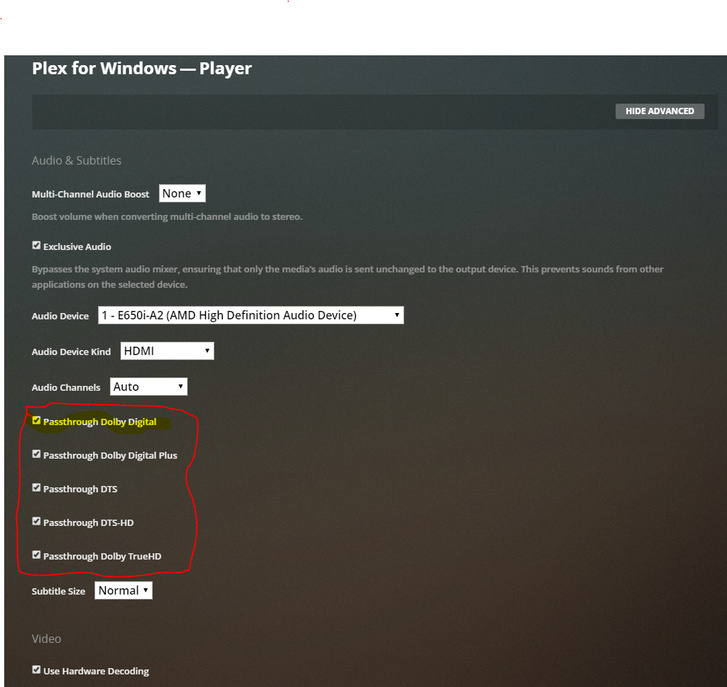
@OttoKerner, THANK YOU!
It was magical.seeing all of the audio options appears just by clicking the Audio Device drop down…
Not everythiing in my library is playing as the Original audio (e.g. TrueHD) but the majority of what I have is in DTS or DD5.1 and that is awesome.
I suspect at this point it must be on my PC side…maybe missing the correct codec.
Otherwise, Im good…
The chances are the files in your media collection will have multiple audio tracks. Don’t forget to make sure you are playing the correct audio track.
A handy utility to have on hand is MKVToolNix. It will allow you to see how your MKV is put togeher and what video, audio and subtitle tracks are embedded. You can change the defaults and disable unwanted.
Passthrough settings are inverted. (1.16.0.1364-da192ff7)
My Audio System is connected over S/PDIF but if i choose this, no Sound will come out an also i just can see Audio 2.0.
If i choose HDMI i can see Audio 2.0 - 7.1 and the Passthrough is working fine.
But i don’t have any Device connected to a HDMI Port, just Display Port and S/PDIF.
1 Like
This topic was automatically closed 90 days after the last reply. New replies are no longer allowed.
