Please Plex, add audiobook features. It is more related to your philosophy than Tidal or Movies & TV features.
6 Likes
I tried this for exact same series, and can’t get them to sort in order! don’t know why…any suggestions?
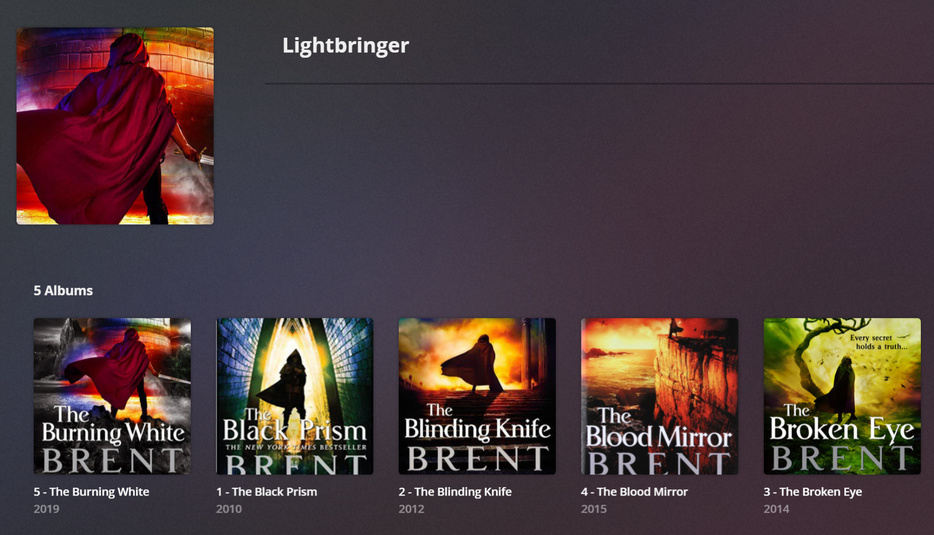
EDIT: I don’t know why, but I added a Description for the Series and it went in order. … Plex for audiobooks is painful.
Haha, agreed. The things that have helped me are needing to update their release date years to be correct (or at least sequential), and also changing their “sort title” (for example, I use “lightbringer 1, lightbringer 2”, etc).
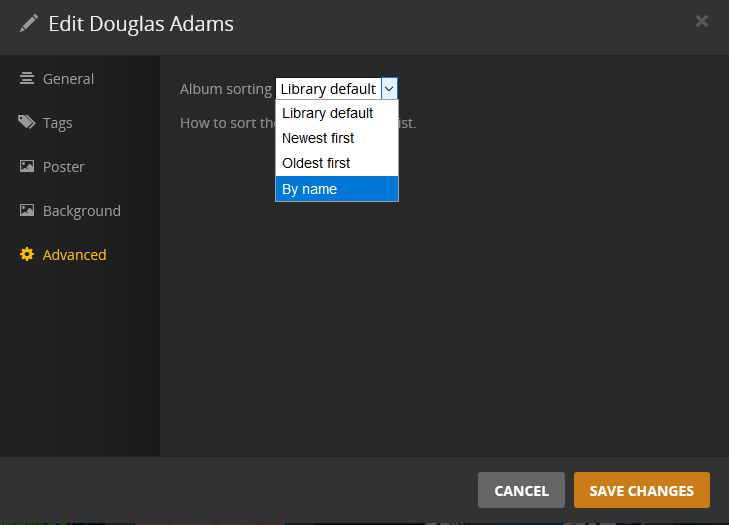
Change “Album Sorting” to “By Name” in the Advanced tab for either the whole library, or else for that Artist, then just make sure the Sort Album field has the desired series numerical order
Tried the things mentioned above and didn’t work. What did work for me eventually was to follow this guide on Github to the T!
The best part of this guide is the mp3tag *.ini file which makes all audiobook related metadata fields displayed on the left. If the data in these fields are consistent, AND the file structure is:
/audiobooks/author/series/booktitle/bookfile
It works perfectly (with the exception that I rename albumsort to “series Series# - Booktitle” so books in a series all display together.
2 Likes
Okay. Yes, that’s what the file structure should be. (or at least /audiobooks/author/booktitle/bookfile).
So what file structure were you using previously?
I had:
/audiobooks/author/series/bookfiles
Because all my books are one individual file so I thought I didn’t need to separate them with additional folders.
To some extent, being required to organize it in a specific manner primarily matters if you’re using agents to acquire metadata from an online database.
There are people here who list the narrator as the artist, the author as the composer, the series as the album, and/or have multiple book-length tracks in the same album. If you’re not doing any matching, then it’s really up to you how to organize it. But if you do intend to match the metadata that you have with what is stored online, you’ll have to organize it just so.
As an aside, I think organizing movies into separate movie-named folders is also recommended, as Plex says metadata is scanned one whole folder at a time—so having multiple movies in a single folder makes scanning for a single movie take longer.
In step 2D I’m a bit lost, nowhere do I see an option of what type of Music library I’m creating (Basic/Premium). What am I missing here?
Plex changed it. There are no longer premium or free music libraries. There’s only one kind now.
1 Like
Thank you. Got it working fine now.
Now the annoying bit is that the splits made by inAudible has nothing to do with the actual chapters in the books or the dividers you see in the Audible app. Maybe I’m doing something wrong.
The default chapter splits made by inAudible are where the original .aax file has the bookmarks located. In effect, if places where chapters are marked in the original file are the wrong places, then it is the publisher’s fault, not the inAudible software. A lot of Audible books I’ve purchased have their “chapters” marked evenly apart by their length of time. Other audiobooks have most chapters in a book marked correctly, but skip some chapters and have marks in the middle of other chapters. Still more have the first chapter-split at Chapter 2, meaning there is no mark for the Prologue and/or for Chapter 1 (nor the Foreword or the Author’s Note). It’s certainly annoying to have to fix. It means when the publisher submitted their source audio to Audible, they hadn’t marked the chapters correctly.
Fortunately, if you click the “Adjust Chapters” button on the bottom left of inAudible, it will let you manually adjust precisely (on a visible waveform of the file) where the chapter splits will be placed when you convert the original file. As a matter of fact, the ability to manually adjust exactly where to split chapters is one of the main reasons I prefer inAudible to any other audiobook conversion software.
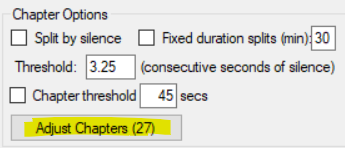

In that image above, you can drag the red line(s) around on the waveform, as well as delete them, and add more red lines. inAudible will split the file exactly where you put them.
This thread is exactly what I was looking for. Thanks for posting these instructions.
I was also able to get this working on my Shield Plex server. You first have to enable SMB network shares in the main Shield settings. Once you can access the Shield over the network, unzip “Audiobooks.bundle-master.zip”, rename the resulting folder to “Audiobooks.bundle” and copy that folder to “internalStorageLocation\Android\data\com.plexapp.mediaserver.smb\Plex Media Server\Plug-ins”
If you have an external drive attached to the Shield and if you set the Plex Server to use the external storage, the directory is:"\Shield_Ext\Android\data\com.plexapp.mediaserver.smb\Plex Media Server\Plug-ins"
Does Plex have better support for m4b files now?
By “better”, I assume you’re asking whether Plex supports single-file m4b audiobooks with chapter marks.
I can’t personally speak to whether they support chapter-marks, as I split my files instead. And from what I understand, people are still having issues with single-file audiobooks being labeled as finished when at or above 90%.
But Plex does support m4b files now—insofar as it also supports m4a files. Plex can remember where, in a track, you stopped listening (unless you reach 90%); and there is a Playback Speed setting (at least on mobile)—but those features are not specific to m4b files. They’ll work the same even with mp3s.
1 Like
I’ve been using Prologue for almost a year now and LOVE it. I haven’t come across a file format it wouldn’t handle but I’m not sure if that’s down to Plex or Prologue itself.
I few hints I’ve learned with the help of the developer of Prologue who has been extremely helpful (and patient):
- Using MP3Tag for Metadata is important. I can post a screenshot of how I do it if anyone is interested.
- For Audiobooks, Plex doesn’t seem to like Subfolders especially if you want to have multibook series under one “Album” (or “container”).
2a. If you have a multibook series where some books are one large file and others are broken up into smaller parts, you have to use MP3Tag’s track numbering wizard to tag all the files with tracks as though it were one single book (see #1 above as well). EG: If you have a 3-book series that is comprised of 2 large, single files and one book that is 48 smaller files, then you would start with track 1 and end with track 50. (MP3 Tag makes this really easy). - When using MP3tag, make sure you use the “year” field for some sorting features (like collections) and rather than using the actual release date; use chronological dates. EG: If a 5 book series had 2 of the book released in 2016… Start the series at 2016 and then tag them chronologically as they were released: 2016, 2017, 2018, 2019, 2020.
Hope this makes SOME sense. It takes a little bit of time but I’ve been a rabid consumer of Audiobooks recently and having everything organized makes it much nicer.
1 Like
I gave up on plex. the 100% better way is to use https://jellyfin.org/ Jellyfin free open source, i have books and audio books. And you can directly download them to mobile on android (not sure about ios) for use with Smart audio book reader or the like…
And for file management https://calibre-ebook.com/ is great.
I use Emby and Voice Audiobook Player to do this.
For a book series I just put the number of the book in the title for the series in MP3 tag.
For example, Stephen King’s Dark Tower series I did the following:
-Dark Tower 0.5 - The Little Sisters of Eluria
-Dark Tower 01 - The Gunslinger
-Dark Tower 02 - The Drawing of the Three
-Dark Tower 03 - The Waste Lands
-Dark Tower 04 - Wizard and Glass
-Dark Tower 4.05 - The Wind Through the Keyhole
-Dark Tower 05 - Wolves of the Calla
-Dark Tower 06 - Song of Susannah
-Dark Tower 07 - The Dark Tower
Just have to make sure your MP3 tag data is completely accurate. I’ve found some errors in mine here and there…then again I have almost 1,000 titles in my library, most of which I convert and put on Plex in batches at a time. The only annoying thing is there is no summary for the books so I have to put that under the “review” field to see it.
I also use the Prologue app for iPhone, recent change for me and I love it.
