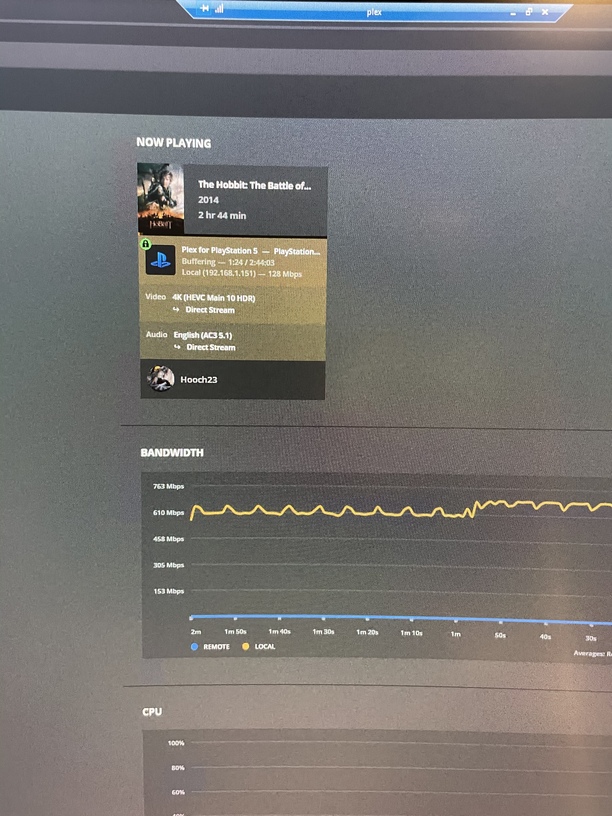
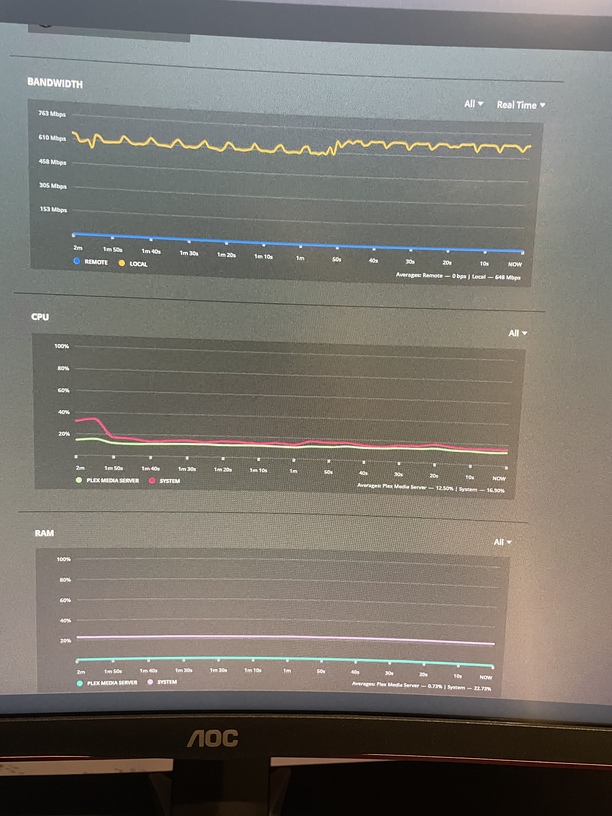
Bandwidth spikes to 500mbs when playing 4k movies

Hello All,

Hoping someone could help me. My Plex Server specs are GTX 1050, Ryzen 5 1500x, and 16 gigs of RAM. Windows 10 Pro. My server is fully up to date.

All my networking gear is gigabit. and cat6.

I have plex signed in on PS5 and that is connected to a 4k tv. I have attached some screens below of the files I’m playing. If you need any other info or know of settings that I should be changing that would be nice.

It just seems to be buffering a lot. Cheers

Do you have the plex app that you are running on the PS5 set to DirectPlay the content?

  • Streaming Quality: set to maximum

When you look at the activity dashboard does it show the media being transcoded?

Thanks for the reply I will check those settings and report. Thanks!

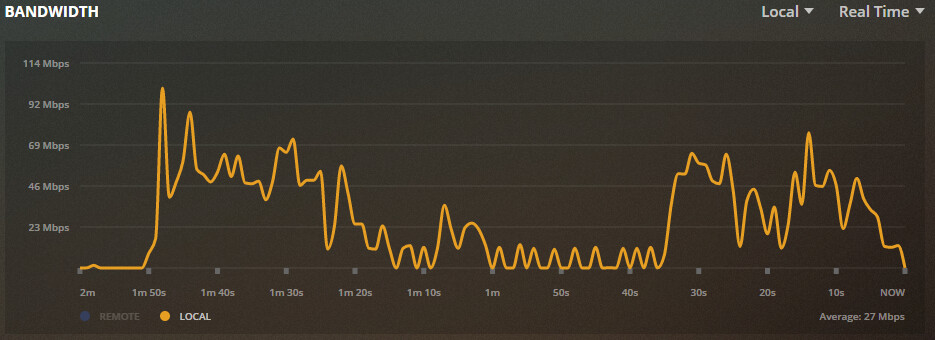
Video does not stream at a steady rate. It is normal to see traffic spikes as the client buffer empties and it asks the server for a refill. The refill happens as fast as possible, not at the rate the video is played. You will see large spikes at the beginning of a movie, when moving between chapters, etc. The peaks for LAN attached equipment will be higher since wired Ethernet typically has greater bandwidth than WiFi attached or remote clients.

Direct playing Blade Runner 2049, 4K HDR using Plex for Windows. PC using gigabit Ethernet. First spike to 300 Mbps is at movie launch. Second is jumping between chapters.

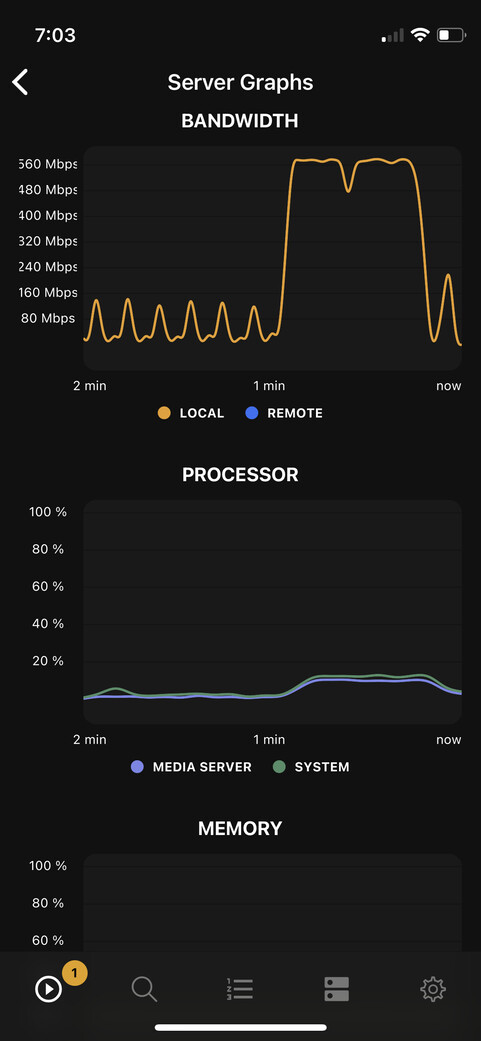
Direct playing same movie on my phone connected via 2.4GHz, 802.11n WiFi. The peaks are not as high but are sustained over longer periods. This is expected since the WiFi connection does not have the same bandwidth (~70 Mbps) as wired Ethernet (1 Gigabit), so it takes longer to transfer the same amount of data.

1 Like

“Poor me, I have a PS5, but it can only download at 500 Mbps, and it only has 16 GB of RAM to use as a buffer cache …”

:slight_smile:

100% what @FordGuy61 said. It’s even funnier with small files, where the player will download the entire file in the first gulp.

The settings on the ps5 show that direct play and direct stream are both checked.

How do I see if it’s transcoding in the app?

Thanks for the reply! I’m just trying to see what I can do to make it not studer every few seconds

go to Plex
and click on the activity dashboard in the upper right

Haha thanks for the reply. Trying to figure out how to make it stop buffering every few seconds

Ahh! I didn’t interpret your original message as “I’m having playback problems” … but I assume that’s what you meant by “buffering”?

I agree with @hthighway’s suggestion. While playing media, look at the Plex Server’s Activity Dashboard. What’s it show?

Past PS models have been very particular about media. I don’t see any clear information about what the PS5 officially supports.

That’s all I see but nothing indicating transcoding

Ahhh, that super-sustained 500+ Mbps bandwidth draw could also indicate a poorly-muxed file.

Try two things -

First, try DISABLING “Direct Play” in the PS app, if that’s an option.

Second, try REMUXING the file.

Method one:

https://support.plex.tv/articles/201097958-remuxing-files-to-mkv/

Method two:
ffmpeg -i InputFile.mkv -codec:a copy -codec:v copy -movflags faststart OutputFile.mp4

Some clients are a bit daft about downloading/caching/streaming any poorly-formatted files. If the audio and video in the file aren’t perfectly muxed together, the client can download a bit, throw it out, download another bit, throw it out.

Remuxing can often greatly improve this. Disabling Direct Play in Plex will allow Plex to remux it on the fly. Or manually remuxing will permanently rebuild the file contents in a “good” order.

1 Like

Edit: Or do what Volts says. Was typing my response at the same time. :slight_smile:


I’ve no experience w/ the PS5.

However, when I’ve seen that level of bandwidth with other clients, it was a problem with the container.

Try remuxing the movie with MKVToolNix.

2 Likes

Thanks for your help!

I’ll try that too. Thanks again mate!

Come on man…
Friends don’t let friends transcode 4K :slight_smile:

Hahaha

I didn’t say transcode. Keep Direct Stream enabled.

haha, I was just joking
but in the screen shot, the file is already DirectStreaming

1 Like