This used to work properly, but all of the sudden subtitles are on for EVERYTHING. I specifically have gone through every 4K movie and TV show to update everything to work properly in MKVToolNix. They are all set to use forced subtitles if necessary and full subtitles if a foreign movie that is all foreign language. Other than that, subtitles are included but defaulted to off.
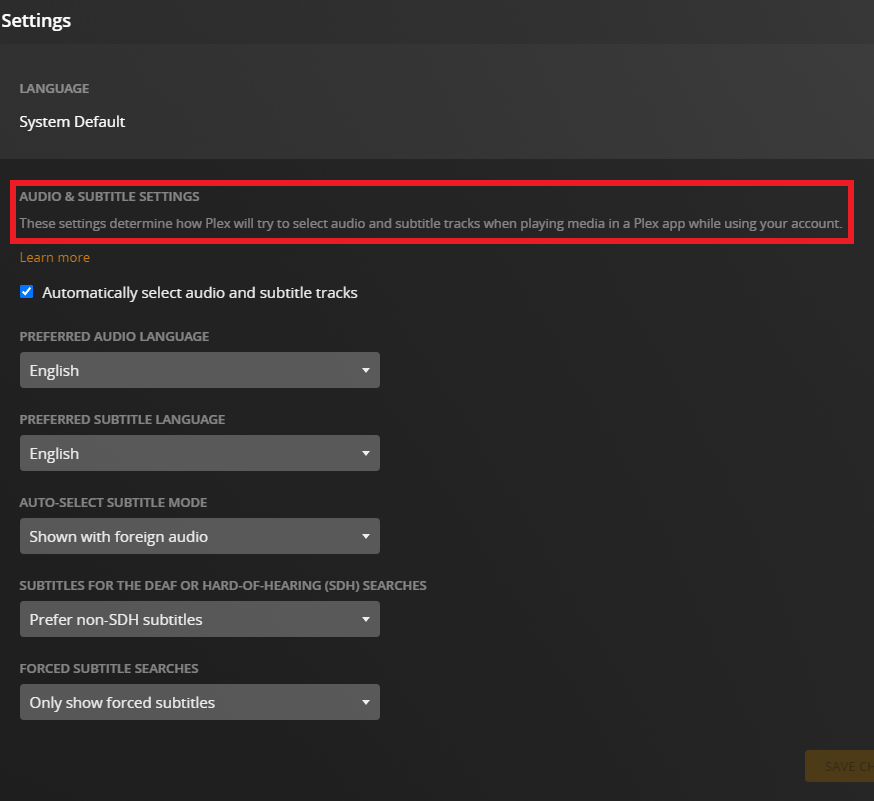
In the settings under language, I have None for Prefer Audio Track In, Show with Foreign Audio for Subtitle Mode, and None for Prefer Subtitles In. Checking the box or not, the same thing occurs. Every video has subtitles enabled by default!
I’ve done everything from Refreshing Metadata to Analyzing to even deleting the libraries completely, emptying trash, cleaning bundles, and optimizing database, then redoing the libraries to come to the same crap!
How do I get Plex to stop doing this incorrectly?! Subtitles should be exactly as I have set, not how Plex wants!
Yes, as stated in the original post, those are set to default to the proper settings. And whether or not the box is checked, there’s no change in subtitle operation. There should be no subtitle changes except with foreign audio.
That section is unchecked, so Plex should not be changing anything.
EDIT: It appears that selecting the checkbox for “Automatically select audio and subtitle tracks” with Subtitle Mode set to “Shown with Foreign Audio” apparently engages subtitles for ALL movies in the library despite their languages properly set to what they should be by me in MKVToolNix. Changing that to “Manually Selected” turns them all off. Even the ones that have Forced Subtitles, WTF.
ANOTHER EDIT: It’s attached to the Subtitle Mode set to “Shown with Foreign Audio”. Regardless of the checkbox for enabling this, this setting is either enabling all subtitles or disabling all subtitles. “Manually Selected” seems to disable all subtitles, except the checkbox isn’t enabled, so that shouldn’t do anything.