Server Version#: 1.18.2.2029
Player Version#: Plex Web 4.12.2
There is a bug in the studio filter where not results are returned for TV show when the studio name contains the + caracacter, such as Apple TV+ or Disney+.
Steps to reproduce:
- Go to any TV Show with a studio using a
+character, such as shows fromApple TV+orDisney+. - Click on the link for the studio name .
- No results are shown for the filter.
Looking at the filter in the URL query parameters, studio=Disney+ is encoded to studio%3DDisney%252B and the + sign is dropped.

Using the filter drop down menu does work:
- Go to a TV Show library.
-
Click on the “All” drop down and select
Network, then selectDisney+. - Correct results are shown for the filter.
Looking at the filter in the URL query parameters, studio=Disney+ is encoded to studio%3DDisney%2525252B and the + sign is encoded correctly.
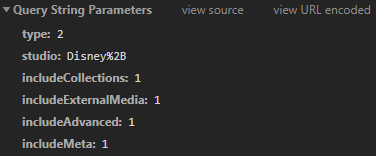
Additionally, a custom filter using Studio contains or Content Rating contains does not work with partial matches or case sensitive strings.
Steps to reproduce:
- Go to a TV Show library.
- Click on the “All” drop down and select “Custom Filter”.
- Create any new filter with
StudiocontainsorContent Ratingcontainsand any partial string or case sensitive match. Examples:-
StudiocontainsDisneydoes not show results forDisney ChannelorDisney XDorDisney+. -
StudiocontainsDisney+does not show results forDisney+(the+sign is removed from the filter string). -
StudiocontainsBBCdoes not show results forBBC OneorBBC Two. -
StudiocontainsFoxdoes not show results forFOXorFOX (US). -
Content RatingcontainsTVdoes not show results forTV-GorTV-PGorTV-14. -
Content Ratingcontainstv-gdoes not show results forTV-G.
-
- Click “Apply”.
- No results are shown for the filter.


