Server Version#: 1.40.0.7775
Player Version#: Any Player / Any Device
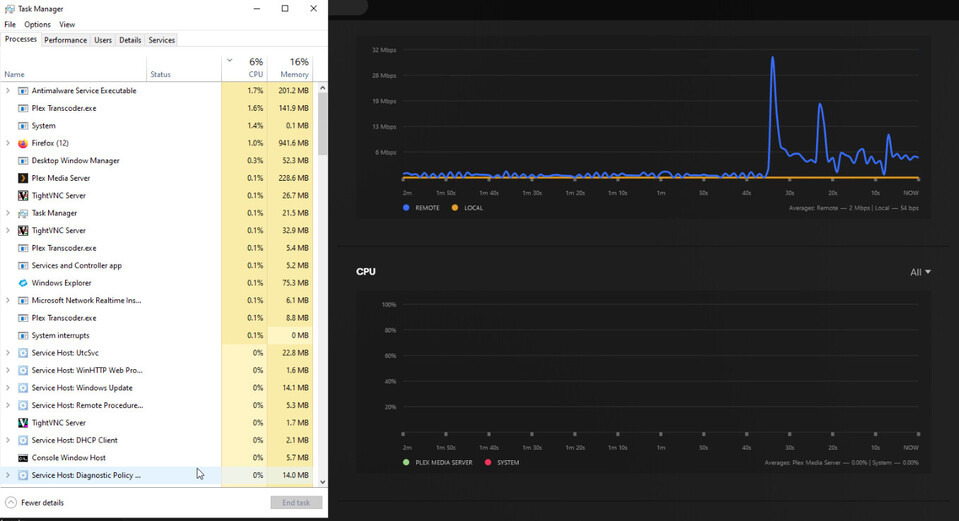
I recently upgraded my server hardware, and all seems well, except for my cpu graph on the dashboard web UI page. It’s either completely absent, or just a random green line and then nothing. Even under some stress, evident in Windows task manager, the graph still shows no System graph or Plex graph. Upgraded Windows to Windows, copying local app data folder, and registry key as designated in the Plex server migration article.
I’ve noticed this happens to me occasionally too. Not sure if it is a bug, or if there is an issue between Plex communicating with the system’s monitoring tools. Do you have a dedicated graphics card by chance and have HW Acceleration enabled? Just trying to see if there is a link with what I’m experiencing.
Unfortunately, this isn’t an occassional issue. This is all the time, every time, and not just on the Plex Web UI. Utilizing Plex Dash, the cpu still isn’t reported. Restarting Plex doesn’t fix it, restarting my entire system doesn’t fix it.
I’m running server hardware, with an obsure graphics card meant for basic display. Matrox G200e. Hardware Accelerated encoding is set to enabled, and would only work if the card is able to do so. (That’s my understanding.)
That is very odd and interesting. Sorry I missed the images before, but TM is displaying CPU usage, but Plex isn’t utilizing it, or can’t for whatever reason. It’s also odd that your bandwidth graph is coming through on Plex, because at first I thought maybe it was a permissions issue and shutting Plex down and then opening it as administrator might do something, but that doesn’t appear to be the root cause of it.
I mean there is no line there whatsoever, even if the CPU was at 0% utilization, you would still see the green line at the bottom. I might do some digging and report back later if I find anything, because, whilst my issue doesn’t appear to be caused by the same thing, possibly there’s an answer for both of us out there.
Yep, no line at all. It would be one thing if TM didn’t report it, as I’ve seen that issue when using HP servers. There is a setting in their Integrated Lights Out management system that needs to be toggled in order for the OS to see CPU usage. But that’s not the case here.