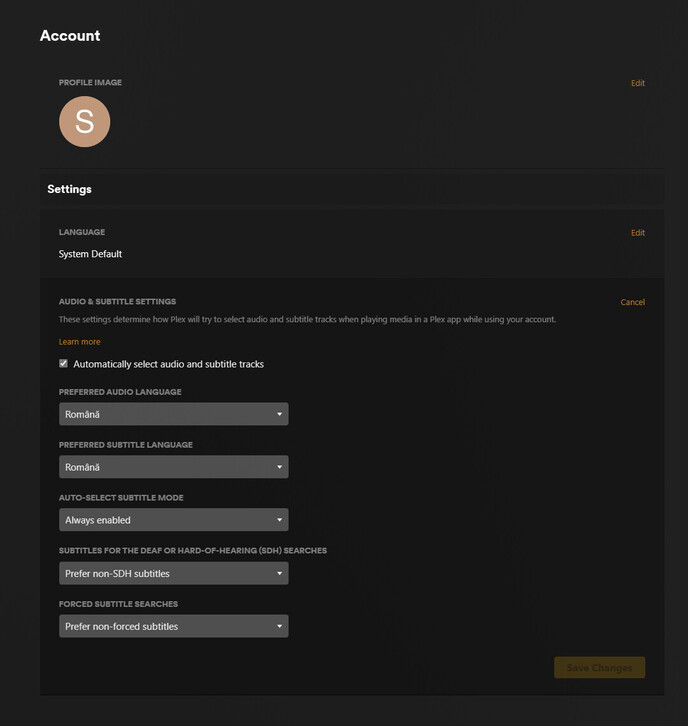
I found a bug with Plex. So if you select a Preferred Subtitle Language, then Plex client (any platform) will not auto-select that specific Subtitle even if it is present. This doesn’t happen with the main account that you are using, but it only happens with Managed Accounts that are attached to your main account.
Please check out these pictures demonstrating the steps to reproduce:
Please be aware that the bug is only reproducible with a Managed Account and not a Main Account. For Main Accounts, everything is working as it should!
Bug is reproducible irrespective of Plex Client. It happens with Desktop Plex app, Plex on Chrome, Plex on Edge, Plex on TV (both Samsung and LG)
Would you guys please fix this? It’s a bummer when you’ve got more people in your household and they’re facing this issue with their accounts.
Did you enable those settings after that movie was already scanned in?
This feature does not retroactively turn on subtitles but will do so going forward as new media is scanned in.
Edit: Striked incorrect statement from me after post by @OttoKerner
I can confirm that this feature is working correctly as I have my mom’s managed user account setup exactly like your screenshot (with the only difference being her language is set to English) and I just checked the new files I added a couple of days ago and the subtitles are set under her profile.
I’ve had her account set like that for a couple of years now and the subtitles have always been auto selected on new media.
That’s not 100% accurate.
It will automatically select audio and subtitle tracks on existing videos.
However, it will only do so if the user hasn’t already manually selected audio and subtitle tracks on a particular video.
The auto selection logic has a flaw, if you set subtitles to “Always enabled”. While it should select the regular “full” subtitles track in this case, it will actually only select the “forced” subtitles track (if present).
If that’s the case, my apologies for the false information.
I only said that because I recall seeing that posted in the past from someone affiliated with Plex. Not trying to throw anyone under the bus but I think it was @tom80H I remember seeing having posted it.
That said, it’s 100% possible he also added the caveat that you mentioned and I’m just forgetting about that.
Again, did not mean to put incorrect information.
I’ll edit the post to strike that out (still keeping it there though and make a comment).
That said, the rest of my post still stands as I confirmed this is working with my mom’s managed user account.
Right. Apparently after I rescanned the whole library, emptied the cache of the libraries and cleared the Metadata, it is now working as it should. This can be closed. Thank you.