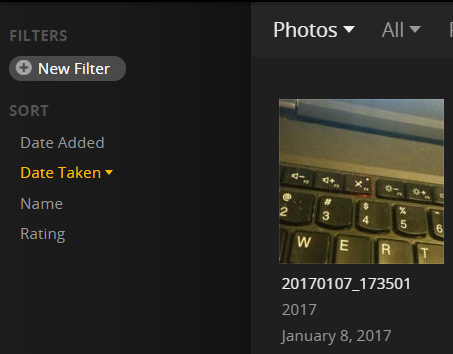
I recently started up my own Plex Server and love it so far. I just set up a big photo library with a few thousand pictures. I have my pictures named YYYYMMDD_HHMMSS.jpg, and all of my pictures were taken in the Mountain (UTC-7) or Pacific (UTC-8) time zones. For all pictures taken in the evening, when I sort by “Date Taken” and look at the information under each picture, Plex says these pictures were taken a day later than they actually were.
For example, this picture was taken at 17:35:01 on 1/7/2017, but Plex says the picture was taken on January 8th, 2017.
I have the latest Plex Pass release of Plex Media Server (1.3.3) installed on my Windows computer and on my QNAP server, and this date issue occurs in both. I’ve checked every field in the file properties I thought might be relevant (date created/modified/taken, etc.) and they all display the correct times (none are a day later). Is there something I need to fix on my end, or is this a problem with Plex? Thanks for your insights.
Several devices, including an iPhone 6, a Samsung Galaxy S5 (using the respective default camera apps) and a Canon T2i DSLR were used to take these pictures. I haven’t seen any pictures that don’t display this behavior.
I can only speak to iOS as that’s all I have but can confirm, photos taken after 20-Dec-2016 (apparent production build date of the 4.6.1 binary) will use the new name format.
Android devices appear to always have had this renaming capability unless renaming was turned off (keep original name).
To clarify, these weren’t photos that were automatically uploaded using the Plex app on any device. I transferred them manually from my phone to my computer, and then to my Plex server.
Have you found anything so far? The “pictures taken on this date” feature on my Plex app for Roku would be nice to use, but because of this date issue, it doesn’t work. It shows pictures from the evening of the previous day and the morning of the current day.